What Is Everboarding? Benefits, Tips, and How AI Helps
Marvin broke down how everboarding extends onboarding into continuous learning, comparing it with traditional training and examining microlearning, retention, and AI-driven personalization.


Traditional onboarding often ends once HR wraps up the initial training. After testing onboarding methods and reviewing how top organizations structure continuous learning, here’s what everboarding is, how to implement it with AI, and why it’s replacing one-and-done training.
What is everboarding?
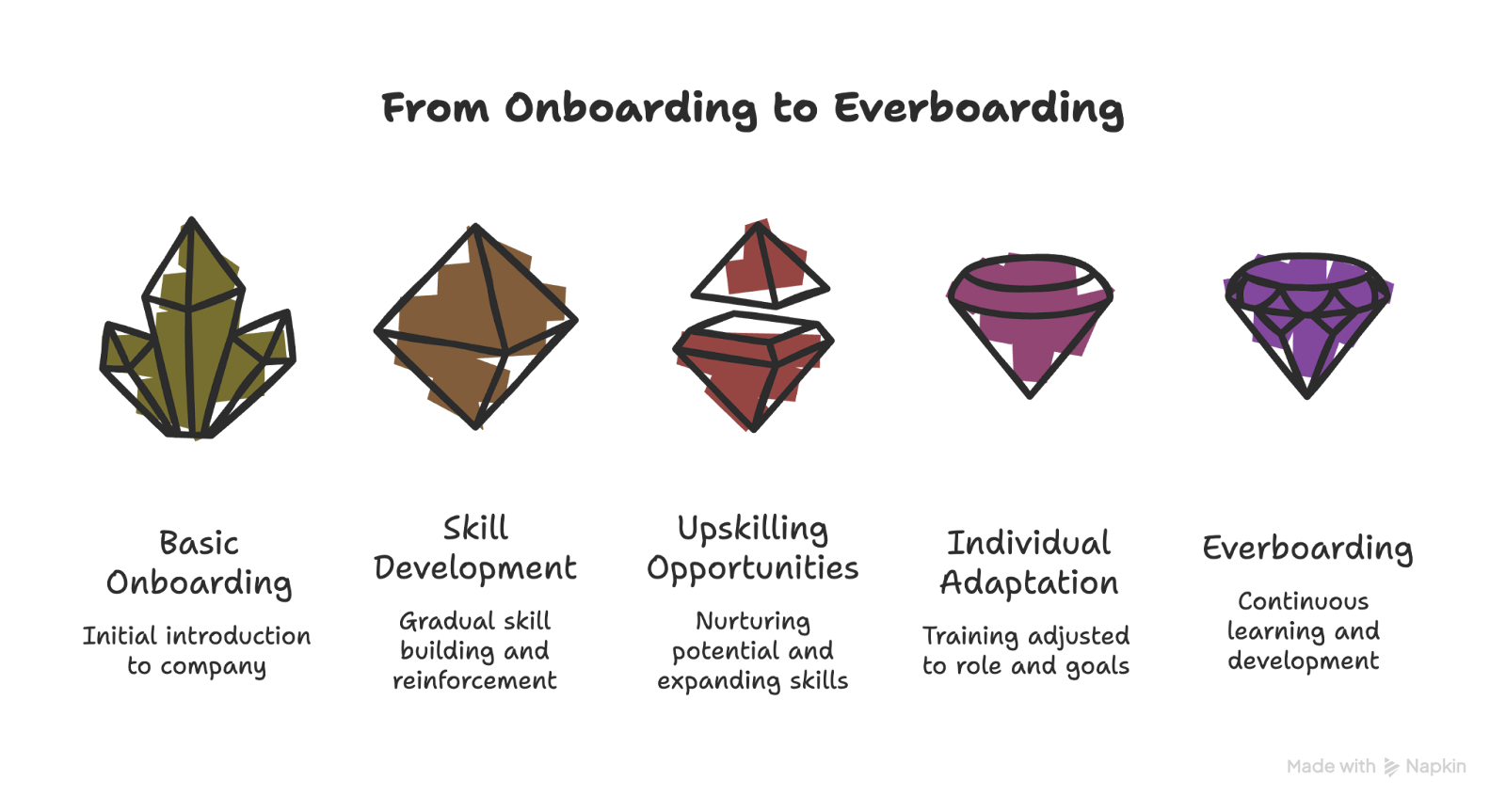
Everboarding is the practice of continuously training, supporting, and developing employees throughout their time at a company. Instead of stopping after onboarding, everboarding helps employees learn continuously, helping them with performance, growth, and retention.
In traditional onboarding, new hires receive information upfront, like policies, tools, processes, and role expectations, often within their first few weeks. Once that phase ends, structured learning typically slows down or stops.
Everboarding changes that model. It builds learning into the employee lifecycle, reinforcing knowledge over time and adapting as roles, tools, and business priorities evolve.
It helps teams adapt to new tools, roles, and expectations as work evolves.
Why does everboarding exist?
Everboarding exists to support continuous employee learning and adaptation in modern, rapidly changing workplaces, where traditional onboarding is not enough.
With everboarding, employees get continuous support, training, and career development from day one through their entire journey at your company. It turns learning into an ongoing process that boosts performance, growth, and retention.
The limits of traditional onboarding
Most onboarding programs share three structural weaknesses. These are:
- Information overload: Large amounts of training are compressed into a short time frame.
- No reinforcement: Once an employee “completes” the training, structured learning often stops.
- Static design: Programs assume roles, tools, and priorities won’t change significantly.
The result? Employees remember what they need immediately, but much of that knowledge fades without reinforcement. Roles evolve, but the training doesn’t. Here’s what happens:
- Teams update the tools they use.
- Processes change.
- Teams restructure.
- Expectations shift.
A one-time onboarding experience can’t keep pace with that level of change. When learning is treated as a one-off event, employees are left to adapt on their own.
How everboarding fills the gap
Everboarding addresses these issues by shifting from event-based training to continuous development. Instead of front-loading information, it:
- Reinforces knowledge over time
- Aligns learning with real, day-to-day work
- Supports employees during role changes or skill expansion
- Focuses on knowledge retention, not just completion
It recognizes that onboarding prepares employees to begin, while everboarding prepares them to grow.
Everboarding vs onboarding: What’s the difference?
Onboarding helps new hires get oriented during their first days or weeks, while everboarding continues after onboarding, supporting employees as their roles, tools, and responsibilities change over time.
Traditional onboarding is:
- Time-bound: Focused on the first days or weeks
- Front-loaded: Information is delivered all at once
- Completion-focused: Success is measured by finishing modules
- Standardized: Most employees follow the same checklist
Its primary goal is short-term readiness. Once employees understand basic tools and policies, human resources (HR) teams consider onboarding to be complete.
Everboarding, on the other hand, is:
- Continuous: Learning spans the entire employee lifecycle
- Reinforcement-based: Individuals revisit knowledge and strengthen it over time
- Performance-focused: Training aligns with evolving responsibilities
- Adaptive: Learning adjusts to role changes, skill gaps, and career goals
Instead of asking, “Did the employee finish onboarding?” everboarding asks, “Is the employee growing, adapting, and retaining what they learn?”
Let’s see how they differ side-by-side:
| Aspect | Onboarding | Everboarding |
|---|---|---|
| Timeframe | First days or weeks | Entire employee lifecycle |
| Primary goal | Help new hires get started | Support continuous growth and performance |
| Learning approach | One-time training sessions | Ongoing, role-based learning |
| Personalization | Mostly standardized | Tailored to roles and skill needs |
| Focus | Policies, tools, and basics | Skills, development, and adaptability |
| Long-term impact | Short-term readiness | Retention, engagement, and growth |
{{templates}}
What everboarding looks like in practice
Everboarding means structuring learning so it continues naturally over time. That means shifting from long, one-time sessions to smaller, regular learning opportunities integrated into daily work. Here’s how that happens:
Ongoing microlearning
Instead of full-day workshops, employees learn in short, focused sessions. These can be:
- Five-minute refreshers
- Quick scenario-based challenges
- Short video walkthroughs
- Weekly knowledge checks
These smaller learning moments improve knowledge retention because they reinforce information gradually instead of overwhelming employees upfront.
Just-in-time support
Employees don’t always need training months in advance. They need it when a task changes or a new tool launches. Everboarding supports:
- In-app guidance when systems update
- Refresher content before high-stakes tasks
- Role-specific training when responsibilities expand
It reduces friction and shortens the time it takes to adapt.
Role-based learning paths
Not every employee follows the same career path. Everboarding adjusts learning based on:
- Role changes
- Skill gaps
- Career progression goals
- Performance feedback
Instead of one standardized checklist, employees follow development paths aligned with where they are and where they’re going.
Constant upskilling
Employees don’t depend on HR or other certification courses for continuous learning. Managers can help with their development through:
- Regular one-on-one check-ins
- Goal reviews tied to skill growth
- Coaching conversations
- Performance feedback loops
With everboarding, you and your managers integrate learning into everyday check-ins, so development never feels separate from real work.
Embedded learning into workflow
The most effective everboarding models integrate learning into existing systems. That can include:
- Knowledge hubs accessible anytime
- Learning prompts inside collaboration tools
- Shared documentation for evolving processes
- Cross-functional projects to expand exposure
Why everboarding is good for your business
Everboarding supports employee growth and turns learning into an ongoing process that benefits both teams and the company. Let’s see how:
- Improves employee retention: Everboarding keeps employees engaged beyond their first few weeks. Ongoing learning and development help people feel invested in their roles, which increases job satisfaction and reduces turnover, as backed by LinkedIn Learning’s 2024 Workplace Learning Report.
- Increases productivity over time: Continuous training helps employees refine skills and stay updated with tools and processes. Teams work more efficiently when learning keeps pace with day-to-day work.
- Builds adaptable teams: Everboarding helps employees respond faster to change. Regular learning makes it easier to adjust to new systems, responsibilities, and business priorities.
- Reveals strengths and growth paths: Everboarding creates space for employees to identify strengths, develop new skills, and explore internal roles. It supports career progression while uncovering talent for long-term growth.
Challenges with everboarding
Everboarding boosts long-term growth, but only works with proper structure and coordination. Here are the biggest hurdles you might face:
Content overload
When teams hear continuous learning, the instinct is often to add more content. Over time, that can mean too many modules, updates, and reminders competing for attention. Instead of improving engagement, learning starts to feel like noise.
Prioritize high-impact topics and space out the sessions. Keep learning moments short, relevant, and intentional rather than constant.
Tool fatigue
Everboarding often relies on digital systems like learning platforms, collaboration tools, feedback apps, and dashboards. Participation can drop, and momentum can fade if employees must switch between multiple systems to access training.
Integrate learning into tools employees already use. Centralize the experience so development feels embedded, not separate.
Lack of involvement from team leads
Continuous development cannot sit solely with HR or learning & development (L&D) teams. If team leads don’t push learning through coaching, feedback, and goal alignment, they disconnect everboarding from day-to-day performance.
Make development part of regular one-on-ones and performance reviews. Equip managers with clear expectations and ownership.
Measuring the wrong metrics
Many organizations still focus on completion rates, attendance, or quiz scores. Those metrics capture short-term activity, not long-term skill growth. Track knowledge retention, skill progression, internal mobility, and performance improvements over time.
How to use AI to make everboarding even better
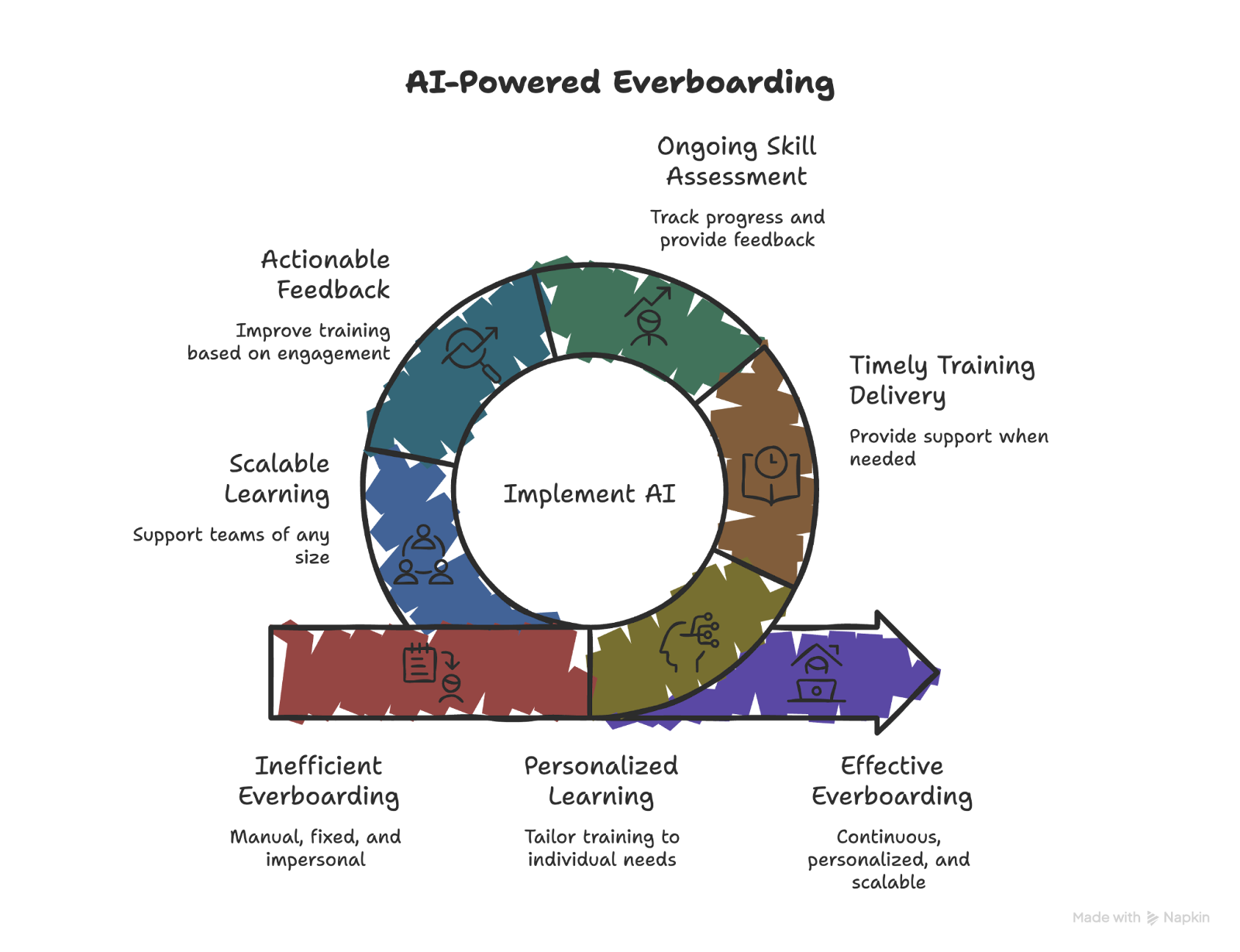
AI improves everboarding as it supports continuous learning without adding manual overhead. It can deliver relevant training, track progress, and adjust learning according to the employee’s abilities. Here's how:
- Personalized learning based on behavior: AI tracks employee learning activities, assesses performance data, and identifies skill gaps. It then tailors training materials to match individual roles, experience levels, and learning patterns, making training more relevant and easier to apply.
- Training delivered at the right time: AI automates when and how training appears. Employees receive refreshers before key tasks, guidance when performance drops, or support when learning a new tool, instead of relying on fixed schedules.
- Ongoing skill assessment and feedback: AI tracks skills and knowledge over time rather than through one-off evaluations. It highlights areas for improvement and provides clear feedback that helps employees progress steadily.
- Actionable feedback on training quality: AI collects engagement data and learner feedback across sessions. Teams can see which content works, which gets ignored, and where training needs improvement.
- Learning that scales with team size: AI supports multiple learning paths at once, whether a team has ten employees or thousands. Each employee receives relevant training without increasing administrative effort.
- A consistent learning assistant: AI provides ongoing guidance that reinforces training and helps employees apply new skills in daily work. Support stays available without burnout or delays.
{{cta}}
Top tips for AI-powered everboarding
AI can support everboarding at scale, but results depend on how teams implement and manage it. These tips can help you avoid hiccups, along with effective and sustainable learning:
Prioritize smooth integration with existing systems
AI works best when it connects cleanly with your HR tools. Strong integration keeps employee data consistent across systems and prevents gaps in learning records. A shared source of data also makes it easier to track progress, spot skill gaps, and tailor training without manual updates.
Use AI to adapt learning as needs change
Employee skills and responsibilities shift over time. AI can adapt to these changes and adjust training content. Adaptive modules keep training relevant, introduce new challenges at the right pace, and help employees stay engaged instead of repeating outdated material.
Monitor and refine AI learning regularly
AI requires oversight to stay aligned with learning goals. Teams should review performance data, analyze engagement patterns, and gather employee feedback regularly. Ongoing adjustments keep training useful and prevent systems from drifting away from real needs.
My final verdict
I see everboarding as a practical shift, not a trend. Traditional onboarding solves the first few weeks, but it stops short once work changes, tools evolve, or roles expand. Everboarding fills that gap by treating learning as part of the job, not a one-time event.
Adding AI makes this approach easier to sustain. It reduces manual effort, keeps training relevant, and helps teams stay aligned as they grow.
For me, the everboarding works because it adds consistency. When learning keeps pace with work, employees perform better, and companies stay resilient. Choosing the right tool can turn this idea into something that works every day.
Try Lindy to automate your everboarding processes
If you want to put everboarding into practice, Lindy acts as an AI assistant that supports ongoing employee development without adding operational overhead.
Here’s how Lindy can help you with everboarding:
- Just tell it what you need: You don’t need technical skills or a complicated setup. Just text Lindy in plain English, and it handles the task, like automating onboarding documentation, tracking employee onboarding progress, and creating completion quizzes.
- Set up tasks for Lindy: Describe the task you want to automate in everyday language. For instance, ask Lindy to find market trends and changing skill requirements, create a strategy to upskill your employees, and automatically sort the eligible ones.
- Run more actionable meetings: You can use Lindy to create interview summaries, key takeaways, and action items automatically. Teams leave meetings knowing exactly what needs to happen next.
- A smarter assistant: Lindy continuously improves by learning from your feedback and the company knowledge base, making help more relevant every time you text for support.
- Connect with existing tools: Lindy integrates with 4,000+ tools, including Slack, Gmail, and major CRMs. Teams can keep their current stack while extending it with AI-driven support.
- Cost-effective: You can try Lindy’s 7-day free trial to see how it fits your workflows. The paid version starts from $49.99/month and offers a ton of functionality.
Try Lindy’s free trial and automate your everboarding process today.










