Software Adoption Strategy: How to Drive Usage and ROI
Everett walked through a seven-step software adoption strategy, covering goal-setting, user segmentation, onboarding, and ongoing training, plus tracking usage metrics and acting on feedback.


I’ve seen great software fail, not because it lacked features, but because users never fully adopted it.
That’s where a strong software adoption strategy comes in. It’s about getting users to actually use the product, consistently and at scale.
In this guide, I’ll show you how to drive adoption, boost usage, and maximize ROI, whether you’re rolling out a new tool internally or selling to external users.
What Is Software Adoption?
Software adoption is the process of getting users to start using a new tool and continue using it as part of their workflow.
True adoption means your team:
- Gets why it's valuable: They genuinely see how this software helps them personally and helps the company overall.
- Actively uses it: This isn't a "log in once and forget it" kind of thing. They're consistently in there, using it to tackle tasks and hit goals.
- Prefers it over old ways: They've actually made the switch. No more clinging to clunky spreadsheets or outdated systems.
- Feels confident and self-sufficient: They can navigate the tool on their own, troubleshoot minor issues, and don't need you holding their hand constantly.
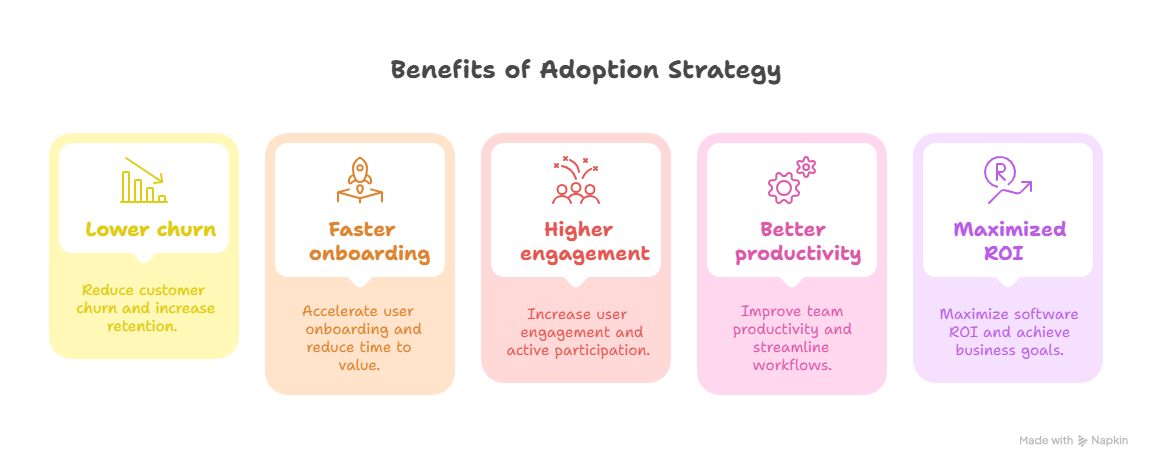
7-Step Software Adoption Strategy That Drives Real Usage
This framework breaks down the whole adoption process into seven super important steps. It's designed to guide you from initial planning straight through to long-term success.
1. Define What "Winning" Looks Like
Before you even think about introducing the software, get crystal clear on what end result you want. These should be solid, measurable goals that will guide your entire strategy.
Ask yourself:
- What big business goals should this software help us hit? (e.g., "cut customer churn by 10%", "speed up sales cycles by 15%", "get projects done faster").
- What specific things should users actually do in the tool to help with those goals? (e.g., "create 3 new projects per week", "send 10 automated reports", "resolve customer tickets within X hours").
- What percentage of your target users should be actively rocking the software within specific timeframes (e.g., 7 days, 30 days, 90 days)?
Set clear metrics to track, like:
- Active User Rates: This is the percentage of users logging in and doing key stuff daily, weekly, or monthly (e.g., "80% active users within 30 days").
- Feature Adoption & Usage Rates: How often are people using those super important features? (e.g., "dashboards created", "reports generated", "integrations used").
- Workflow Completion Metrics: Are people actually finishing critical tasks or whole processes inside the software? (e.g., "90% of sales opportunities moved through the pipeline in the new CRM").
- Efficiency Gains / Less Old Tool Use: Track how much time you save on manual tasks, or how much less you rely on older, clunkier tools (e.g., "20% less time spent on email for project updates").
2. Know Your Users (and Group Them Wisely!)
Not everyone jumps on new tech at the same speed. Understanding these differences lets you tweak your messages, training, and support for maximum impact.
Here's how to think about your user groups (and how to handle them):
- Champions / Early Adopters: These are your tech-savvy enthusiasts, always first in line for new stuff. Get them involved early in pilot programs. They're your internal advocates and can even help train their peers. Their excitement is contagious!
- Pragmatists / Mainstream Users: This group waits for proof that something works before jumping in. They're usually your biggest group. Show them clearly how the software solves their specific problems. Give them structured, role-based training and make sure they know where to get help.
- Skeptics / Laggards: These folks resist change and need strong reasons and a lot of hand-holding. Address their concerns directly. Emphasize the real benefits (e.g., "it saves you time," "it cuts down on errors"). Offer personalized, hands-on support and share success stories from their colleagues.
- Occasional Users: They don't use the tool all the time, but when they do, it's for crucial tasks. Make sure they have super clear, easy-to-find guides for their specific use cases. Offer quick refreshers and gentle reminders.
Before rolling out, run some surveys or interviews to gauge how ready people are and to spot your potential champions and skeptics.
Create a communication plan specifically for each group, addressing their unique worries and needs.
{{templates}}
3. Customize and Integrate the Software
If the tool feels foreign or clunky, people just won't bother with it. The software should feel like a natural extension of how your team already works, not some extra chore.
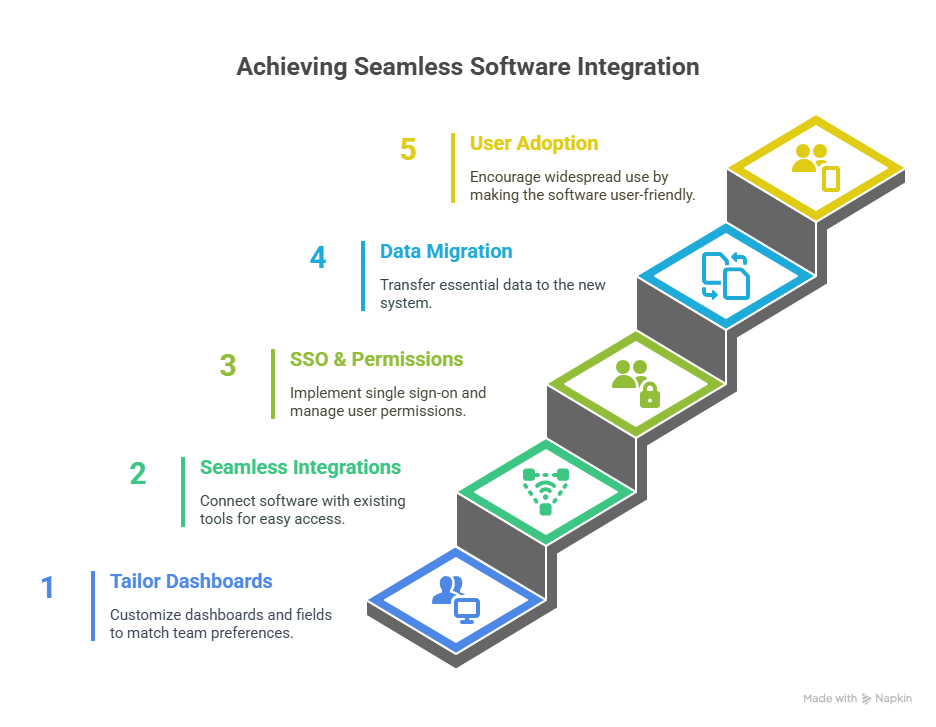
Here’s how you can do it:
- Tailor Dashboards & Fields: Work with user groups to customize dashboards, forms, and fields. Make them match your team's existing terms, processes, and how they like to see reports. This makes the tool instantly familiar.
- Make Integrations Seamless: Connect the new software with the tools your team already lives in daily (e.g., Slack for notifications, Outlook/Gmail for calendar/email, your current CRM, HR platforms). This means users don't have to bounce between a million different systems. Less friction, no more data silos.
- Single Sign-On (SSO) & Smart Permissions: Set up SSO to get rid of login headaches. Configure permissions carefully so users only see what's relevant to their job. This keeps things simple and secure.
- Data Migration Strategy: Plan out and execute a clean, accurate transfer of any old data people need. Users are way more likely to adopt if their important info is already waiting for them in the new system.
Remove every single reason for users not to use it. Make the new software the absolute easiest way to get work done.
4. Create a Clear, Guided Onboarding Journey
Simply sending a login link and expecting magic? That's a big no-no.
You need a structured, step-by-step onboarding journey to build confidence and skills. Here’s what a good onboarding plan can look like:
Pre-Launch Buzz & Communication: Get people excited! Clearly explain why you're bringing in the new software and highlight the benefits for them.
Day 1: The Welcome Wagon:
- Send a personalized welcome email with clear instructions and a link to a "Getting Started" checklist.
- Include short, engaging welcome videos that show off the interface and main idea.
- Guide them through that first critical "quick win" action (e.g., "Create your first project," "Log your first customer contact").
Week 1: Foundational Skills & First Wins:
- Schedule live training sessions (or provide recorded video modules) focusing on core features relevant to their roles.
- Encourage them to complete a first meaningful task within the tool.
- Make sure they have super-easy access to quick-start guides and FAQs.
Week 2: Deeper Dive & Core Features:
- Introduce more advanced features through targeted tutorials or mini-webinars.
- Encourage them to explore and play around in a safe, supportive environment.
- Offer "office hours" for live Q&A.
Week 3+ & Beyond: Reinforcement & Expansion:
- Send automated reminders, tips, and "did you know?" nudges via email or in-app messages.
- Shout out success stories from your internal champions.
- Introduce advanced ways to use the tool and new integrations.
Here are a few things that can help:
- In-Product Tours: Use tools like Appcues or Userpilot to provide interactive, step-by-step guides right inside the software.
- Checklists & Progress Trackers: Make onboarding a bit like a game with clear checklists showing users their progress.
- Automated Email Nudges: Trigger personalized emails based on what users are doing (e.g., "Haven't logged in in 3 days? Here's how to complete your first task!").
5. Train and Enable Continuously
Initial training is just the beginning. User needs change, software gets updates, and people forget stuff. You need ongoing learning and support.
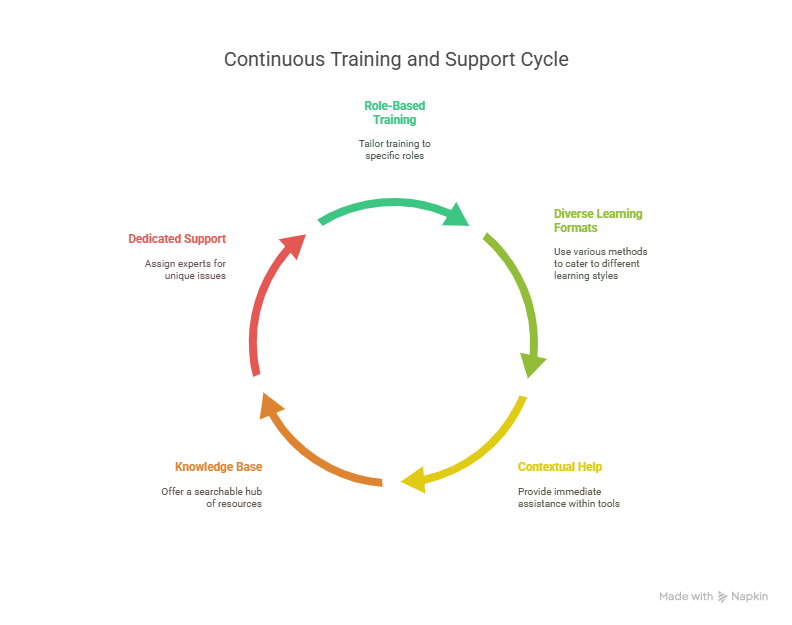
Here are a few strategies you can try:
1. Role-Based Training: Deliver training that's super specific to each team or role's daily work. A sales rep needs different training than a marketing person.
2. Diverse Learning Formats: Cater to how different people learn best:
- Short, Bite-Sized "How-To" Videos: Perfect for quick refreshers or learning specific features (Loom, Scribe).
- Live Demos & Webinars: Interactive sessions for broader understanding and Q&A.
- Interactive Simulations: Let users practice without any risk.
3. Contextual Help Inside the Tool:
- Tooltips & Pop-ups: Briefly explain features when a user hovers over them.
- In-App Chatbots / AI Help: Provide instant answers to common questions (Lindy, Intercom).
- Guided Workflows: Offer step-by-step prompts within complex processes.
4. Robust Knowledge Base & FAQs: Create a central, searchable hub of articles, guides, and troubleshooting tips (Notion, Confluence).
5. Dedicated 1:1 Support: For really tough, unique issues. Assign internal experts or power users to be go-to resources.
Tools like Lindy can automate answers to common onboarding and support questions. This dramatically reduces the load on your internal teams and provides instant help 24/7.
6. Monitor Adoption with Real-Time Data (Don't Guess, Measure!)
Don't just cross your fingers and hope; measure everything. Data is your most powerful tool for seeing what's working, what's not, and where users are getting stuck.
Keep an eye on these metrics:
- Login Frequency: How often are people actually accessing the tool?
- Feature Usage Heatmaps: Which features are super popular, and which are being totally ignored?
- Workflow Completion Rates: Are users successfully finishing those critical workflows from start to finish?
- Time Spent in Key Areas: How long are users spending on specific tasks or modules?
- User-Specific Friction Points: Pinpoint exactly where individual users or groups are struggling or dropping off.
- Support Ticket Volume & Themes: Are support requests going up? What are the common questions or issues?
Then, based on this data:
- Spot Drop-Offs Early: Proactively reach out to inactive users with personalized re-engagement tips, resources, or direct support.
- Optimize Workflows: If data shows people are bailing on a specific workflow, investigate why and simplify it.
- Prioritize Training & Content: Focus your training efforts on features or areas where usage is low or people are confused.
For this, you can use your software’s native analytics. Many platforms have built-in dashboards (e.g., Salesforce reports, Jira dashboards). There are also dedicated product analysis tools like Pendo, Mixpanel, Heap, etc., that give you deeper insights into user behavior and feature adoption.
7. Collect Feedback and Make Changes Continuously
Software adoption is all about constant improvement. Actively ask for feedback, dig into it, and use it to continuously make the user experience better and fine-tune your adoption strategy.
Here’s how to get helpful feedback:
- In-App Surveys & NPS Scores: Quick, contextual surveys to check satisfaction and find pain points (Hotjar, Typeform).
- User Interviews & Focus Groups: Deeper dives into user experiences, uncovering what's really bothering people and why.
- Feedback Boards / Suggestion Boxes: Let users submit ideas for improvements or report issues (Canny, Aha!).
- "Voice of the Customer" Analysis: Look through support tickets, social media mentions, and internal forum discussions for common themes.
Based on the feedback, here are a few things you can do:
- Adjust existing workflows within the software based on user suggestions to make them more intuitive.
- Work with the software vendor or your internal dev teams to fix usability issues (e.g., confusing navigation, unclear buttons).
- Feedback can highlight unmet needs, helping you decide which features to develop next or look for.
- Create new FAQs, articles, or videos to answer frequently asked questions or tackle challenging areas.
- Revise training content to clarify confusing points or add new best practices.
Think of adoption as a living, breathing process, not a one-time thing. A strong feedback loop ensures your strategy stays relevant, effective, and always responsive to user needs.
Tips for Successful Software Adoption
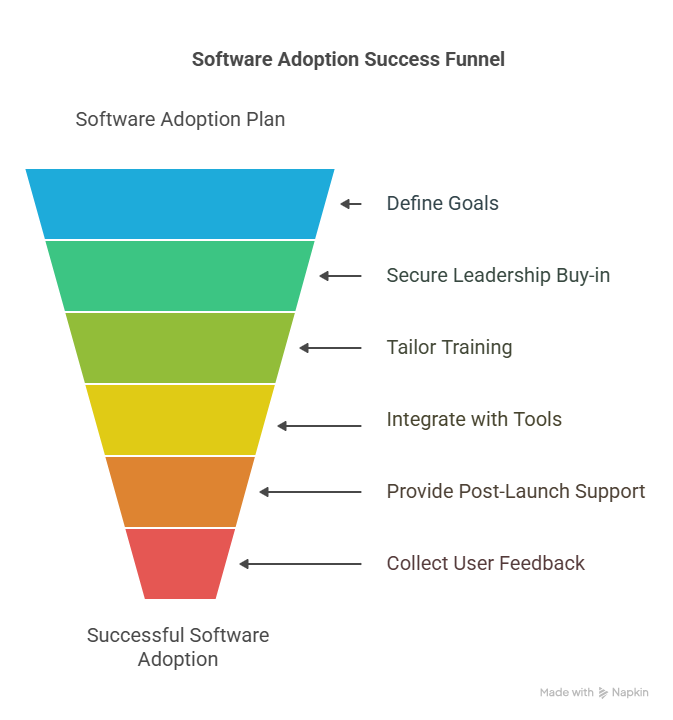
- Start with a clear plan. Don’t launch blindly. Define goals, onboarding steps, and key success metrics before rollout.
- Get leadership buy-in early. Make sure executives support the adoption. If they don’t promote it, users won’t prioritize it.
- Avoid generic training. Tailor training to each role and workflow. One-size-fits-all sessions won’t stick.
- Integrate the software into existing tools. If it doesn’t work well with your current stack, users will ignore it.
- Offer strong post-launch support. Keep up momentum with check-ins, office hours, and help docs after launch day.
- Act on user feedback. Regularly collect feedback and make updates. Ignoring users kills trust and adoption.
- Communicate clearly and often. Let users know what’s changing, why it matters, and how it helps them.
Want to Make Software Adoption 10x Smoother? Try Lindy!
Lindy helps you roll out new tools faster, with fewer headaches and higher usage.
Use Lindy to:
- Automate onboarding with AI-powered walkthroughs and checklists
- Answer user questions instantly with AI agents trained on your help docs
- Deliver personalized training flows based on user roles and actions
- Monitor adoption trends and trigger timely nudges to keep engagement high
- Reduce support workload by handling common queries 24/7
Adoption doesn’t have to be manual.
Let Lindy guide, train, and support your users, so they actually use the software you invested in.
{{cta}}
Frequently Asked Questions
1. How long does it usually take to fully adopt new software across a team?
It depends on the software’s complexity and how prepared your rollout is. For most business tools, full adoption typically takes 4 to 8 weeks. With structured onboarding, clear metrics, and continuous support, you can accelerate this timeline and see meaningful usage within the first 30 days.
2. What’s the difference between onboarding and adoption?
Onboarding is the initial setup and training phase, getting users familiar with the tool. Adoption goes further. It means users are actively using the software, prefer it over older systems, and can work independently without ongoing help. Onboarding is a step toward full adoption, not the end goal.
3. What if my team is resisting the new software entirely?
Resistance is common and often comes from fear of change or unclear benefits. Start by showing how the software solves their daily problems. Offer tailored training, share success stories, and get leadership involved. Use feedback to improve the experience. Tools like Lindy can support hesitant users with hands-on AI help.
4. Do I need a dedicated adoption manager or team?
Not always, but it helps. If the rollout affects many users or workflows, assigning someone to lead adoption ensures focus. They coordinate training, track metrics, collect feedback, and troubleshoot. For smaller teams, you can still succeed by using tools that automate onboarding and support, like Lindy.
5. How can I track if adoption is actually working?
Use metrics like login frequency, feature usage, task completion, and support ticket volume. Compare these over time and across user segments. If users are logging in regularly and completing tasks without constant help, that’s a strong sign. Adoption tools like Pendo or Lindy can surface this data automatically.
6. What tools do I need to support adoption besides the software itself?
You’ll need onboarding tools (e.g., checklists, product tours), communication tools (email, chat), learning resources (videos, FAQs), feedback tools (surveys, interviews), and analytics to monitor usage. Platforms like Lindy combine multiple of these, offering AI-powered onboarding, live support, and adoption tracking in one place.
7. How can Lindy help me drive software adoption faster?
Lindy can onboard users automatically with in-product checklists, train them using AI-powered tutorials, and support them with 24/7 AI agents. It reduces support load, personalizes help, and sends smart nudges based on user behavior. It’s like having a full adoption team, but on autopilot.
8. How do I convince leasing teams to adopt new tools?
Start by showing how the tool saves them time, automating reports, speeding up tenant communication, or reducing manual data entry. Use real estate-specific examples. Involve a few team members early as champions. Provide quick wins during onboarding, and keep support accessible. Adoption increases when benefits are immediate and clear.









