Relevance AI Pricing: Plans, Costs, and Best Alternatives in 2026
Marvin broke down Relevance AI's pricing plans and usage limits, comparing it against other AI agent-building platforms for production workflows.


Relevance AI pricing is usage-based, so costs can rise fast as you run more Actions and use more Vendor Credits. In this guide, I break down the current Relevance AI pricing plans and compare them with alternatives like Lindy to help you decide if it’s worth it.
Relevance AI pricing plans: at a glance (2026)
Relevance AI pricing plans are simple on paper, but the real limiter is how many Actions and Vendor Credits you get each month. If you are evaluating other AI agent platforms, comparing these limits against botpress pricing can help you determine the best fit for your budget. Similarly, if your team relies heavily on meeting transcription tools, reviewing otter ai pricing can ensure you balance your overall software spend.
Here’s the quick view:
| Plan | Price (monthly) | Best for | Key limits/what you get |
|---|---|---|---|
| Free | $0 | Testing the platform | 200 Actions/month + $2 bonus vendor credits, 1 build user, 1 project |
| Team | $349/month | Teams running agents across multiple users | 7,000 Actions/month + $70 vendor credits/month, 5 build users, 45 end users, shared projects |
| Enterprise | Custom | Large orgs with governance needs | Custom action limits, enterprise controls, security features, and dedicated support |
Relevance AI pricing plans breakdown
Relevance AI pricing plans breakdown comes down to three things: how many Actions you get, how many Vendor Credits you get, and how many people can build and share projects.
Free plan: $0/month
What’s included: You get 200 Actions per month and $2 in bonus vendor credits when you sign up. You also get unlimited agents and tools, but only 1 user and 1 project.
Best for: Testing the builder and running small experiments.
Pros:
- SOC 2 - Type II, GDPR compliance
- Basic user permissions and API key management
- You can still build and test many agents, even on Free
Cons:
- Lack of ticket or priority support
- You will hit the monthly Actions cap fast if agents run daily
- The single-user, single-project setup makes teamwork hard
Team plan: $349/month
What’s included: 7,000 Actions per month plus $70 worth of Vendor Credits per month. You also get 5 build users, 45 end users, and 5 shared projects, plus calling and meeting agents and analytics. If you are specifically looking for meeting transcription tools, comparing this with fireflies ai pricing can help evaluate your budget.
Best for: Teams building agents for larger internal teams and shared workflows.
Pros:
- Built for collaboration (shared projects and more seats)
- Better fit for production use, where agents run every day
- Access to analytics and Agent modes for calling and meeting
Cons:
- You still need to manage Actions and credits, or costs can creep up
- The price jump from Free to Team is significant, so the ROI needs to be clear
Enterprise plan: Custom pricing
What’s included: Custom Actions and Vendor Credits, plus enterprise controls like SSO/RBAC, multi-region support, and priority support options.
Best for: Larger orgs that need governance, security controls, and dedicated support.
Pros:
- Priority support and early access to enterprise features
- SSO, agent evaluation, and custom enterprise triggers
- Flexible limits and stronger controls for large deployments
Cons:
- Pricing is not listed, so you have to talk to sales
- Overkill if you only need a few stable workflows
Which Relevance AI plan should you choose?
Choosing a Relevance AI pricing plan is mostly about expected usage (Actions + Vendor Credits) and how many people need to build and share projects.
Choose the Free plan if you:
- Are doing a small proof of concept
- Can stay within low monthly usage limits
- Want to test the builder and basic agent flows
Choose the Team plan if you:
- Need shared projects and multiple builders
- Are rolling agents out to many internal users
- Want more headroom for steady, higher-volume runs
Consider Enterprise only if you:
- Need custom limits, support terms, or rollout help
- Need stricter security and access controls (like SSO/RBAC)
A practical rule you can apply is that if you cannot guess your monthly usage yet, start on Free and watch what you hit first: Actions or Vendor Credits. That will tell you whether the next tier will actually pay off. If you prefer traditional tiered subscription models, reviewing the best zapier pricing options can help you budget for standard automation tools.
Is Relevance AI worth the cost?
Relevance AI is worth it if you want to build and test agents often, and you are comfortable tracking usage. Since September 2025, Relevance AI has split pricing into Actions (what your agent does) and Vendor Credits (model costs).
Vendor Credits have no markup, and paid plans let you bring your own API keys to bypass Vendor Credits entirely. This setup gives you more control over model spend, especially if you already manage usage through OpenAI, Anthropic, or similar providers. For teams exploring credit-based data enrichment tools, analyzing clay pricing software provides useful context on managing outbound automation spend.
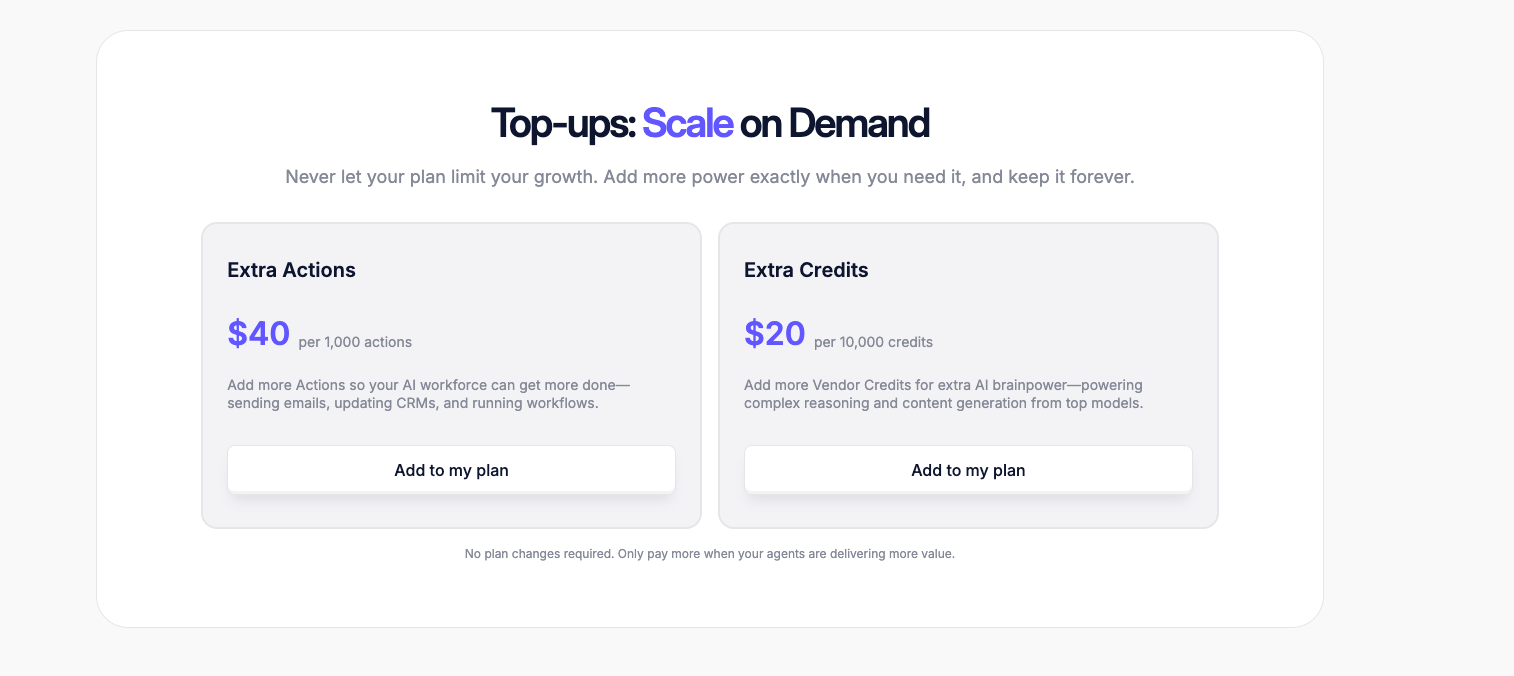
Costs still scale with activity. If agents run continuously, Actions and Credits can burn faster than expected. In practice, many teams end up topping up usage rather than upgrading plans, which makes Relevance AI flexible but less predictable for always-on workflows. If you are specifically building sales workflows and sourcing lead data, evaluating seamless ai pricing provides another helpful comparison point for lead intelligence costs.
Relevance AI makes sense for teams that:
- Build and test multiple agents, not just one workflow
- Need a clear split between “work done” and “AI model cost.”
- Want cost control options like the BYO(Build-your-own) model key on paid plans
Relevance AI is a poor fit for teams that:
- Want a fixed monthly price that rarely changes
- Need production workflows fast, with less usage tracking
- Do not want to manage Actions, Vendor Credits, and top-ups
Relevance AI alternatives and pricing comparison
If Relevance AI pricing feels hard to predict, Lindy, Zapier, and n8n are common alternatives: For teams comparing human-in-the-loop workflow builders, reviewing relay app pricing software provides useful context on alternative cost structures.
| Tool | Starting price | Best for | Key advantage |
|---|---|---|---|
| Lindy | $49.99/month | Business workflows across sales, ops, and support | Built to run real workflows end-to-end, not just experiments |
| Zapier | $29.99/month | Simple, no-code automations | Huge app library and fast setup for common workflows |
| n8n | $24/month | Technical teams that want control | Flexible workflows with strong self-hosting options |
If you want a simple setup and lots of integrations, Zapier is usually the easiest option. If you want more control (and don’t mind complexity), n8n is a strong pick. If you want an AI assistant to manage your business workflows, Lindy is a better choice. For teams exploring autonomous software agents alongside workflow builders, reviewing devin pricing offers another perspective on AI agent costs. To compare feature sets and pricing models in depth, read our complete guide to relevance ai alternatives.
Lindy vs Relevance AI: Which should you choose?
Lindy vs Relevance AI comes down to whether you want an AI assistant to run business workflows or a platform to build and test agents.
If you want an AI assistant that can run real business work end-to-end (like sales ops, support follow-ups, and internal workflows), Lindy is usually the simpler pick.
If your team is doing heavier agent experiments and you do not mind managing usage, Relevance AI can be a better fit. Its costs are tied to Actions and Vendor Credits, so you get control, but you also need to watch limits as usage grows.
- Choose Lindy when you want faster setup and production workflows.
- Choose Relevance AI when you want deeper agent building and tighter usage tracking.
You can also use both: Prototype and stress-test in Relevance AI, then move the repeatable workflows into Lindy once they are stable.
{{cta}}
My bottom line on Relevance AI pricing
Relevance AI pricing is fair if you want to build and test agents often, and you are willing to track usage. It is powerful, but your monthly cost can climb as your agents run more Actions and use more Vendor Credits.
For many teams, that tracking becomes the main downside. If you want faster time to production workflows and simpler plan choices, I think Lindy feels like a better value. Its pricing is straightforward with clear paid plans, so it is easier to budget for.
Try Lindy: The AI Assistant You Can Text to Get Work Done
Lindy is one of the best conversational AI assistants out there. Instead of configuring triggers or building complex systems, you simply tell Lindy what you need in plain English.
Whether it’s managing your inbox, scheduling meetings, updating your CRM, or following up with leads, Lindy handles it.
Here’s what that looks like in practice:
- Get answers instantly: Text Lindy to pull information from your email, calendar, or CRM without digging through tabs.
- Send emails and follow-ups automatically: Ask Lindy to draft, personalize, and send outreach and handle replies.
- Take meeting notes and share summaries: Lindy joins meetings, writes structured notes, and sends action items afterward.
- Update your CRM without manual entry: After a call, Lindy logs notes and fills in missing fields automatically.
- Find and qualify leads in minutes: Tell Lindy your ideal customer profile and get curated lead lists ready for outreach.
- Works with 4,000+ integrations: Lindy connects with the tools you already use, so everything stays in sync.
FAQs
1. Does Relevance AI charge per agent?
No, Relevance AI does not charge per agent. Its pricing page says all plans include unlimited agents. Your costs are mainly driven by usage, like Actions (tool runs) and Vendor Credits (model costs). So you can build many agents, but heavy usage can still raise your bill.
2. Is Relevance AI expensive?
Relevance AI can be expensive once your usage grows. If you run out of included usage, you may need top-ups instead of just staying on the same plan. Relevance AI sells extra Actions and Credits as add-ons, which is useful, but it can make the monthly spend less predictable.
3. What are the disadvantages of Relevance AI?
The main disadvantages of Relevance AI show up in reviews as you scale. Users most often mention cost, a complex interface, a learning curve, and customization or integration friction in some cases. If your team wants a fast setup, these points can slow you down.
4. What is the best Relevance AI alternative?
The best Relevance AI alternative is Lindy for teams that want production-ready workflows in sales, ops, and support. Lindy is built to run end-to-end tasks across common tools, and it is easier to budget for with clear pricing tiers and predictable costs. For deep agent labs, Relevance AI may still fit.
5. Is Lindy cheaper than Relevance AI?
Lindy can be cheaper than Relevance AI for many teams, especially if you want simple budgeting and fast rollout. Relevance AI costs can rise with usage and top-ups for Actions and Credits. Lindy uses clear plan-based pricing, which can make costs easier to predict compared with usage-based pricing.










