n8n AI Agents vs Lindy AI Agents: What’s Better in 2026?
Everett compared n8n and Lindy AI agents for building automations, weighing manual node-wiring setup, memory handling, and integrations using an invoice-chaser workflow example.


n8n AI agents are powerful and flexible, but require more complex setups. They’re great for developers, but can be overwhelming for teams looking to automate everyday tasks.
However, Lindy AI agents can be built with a no-code interface, making them easier to set up for non-technical users.
Plus, the AI-native platform offers flexibility to customize prebuilt templates and automate tasks like meeting scheduling, email management, and sales processes.
In this article, we’ll cover:
- What are n8n AI agents?
- How they compare with Lindy AI agents
- How Lindy agents are different (and more autonomous)
- Which platform makes more sense for real-world business tasks
Let’s begin with an overview of n8n AI agents.
What are n8n AI agents?
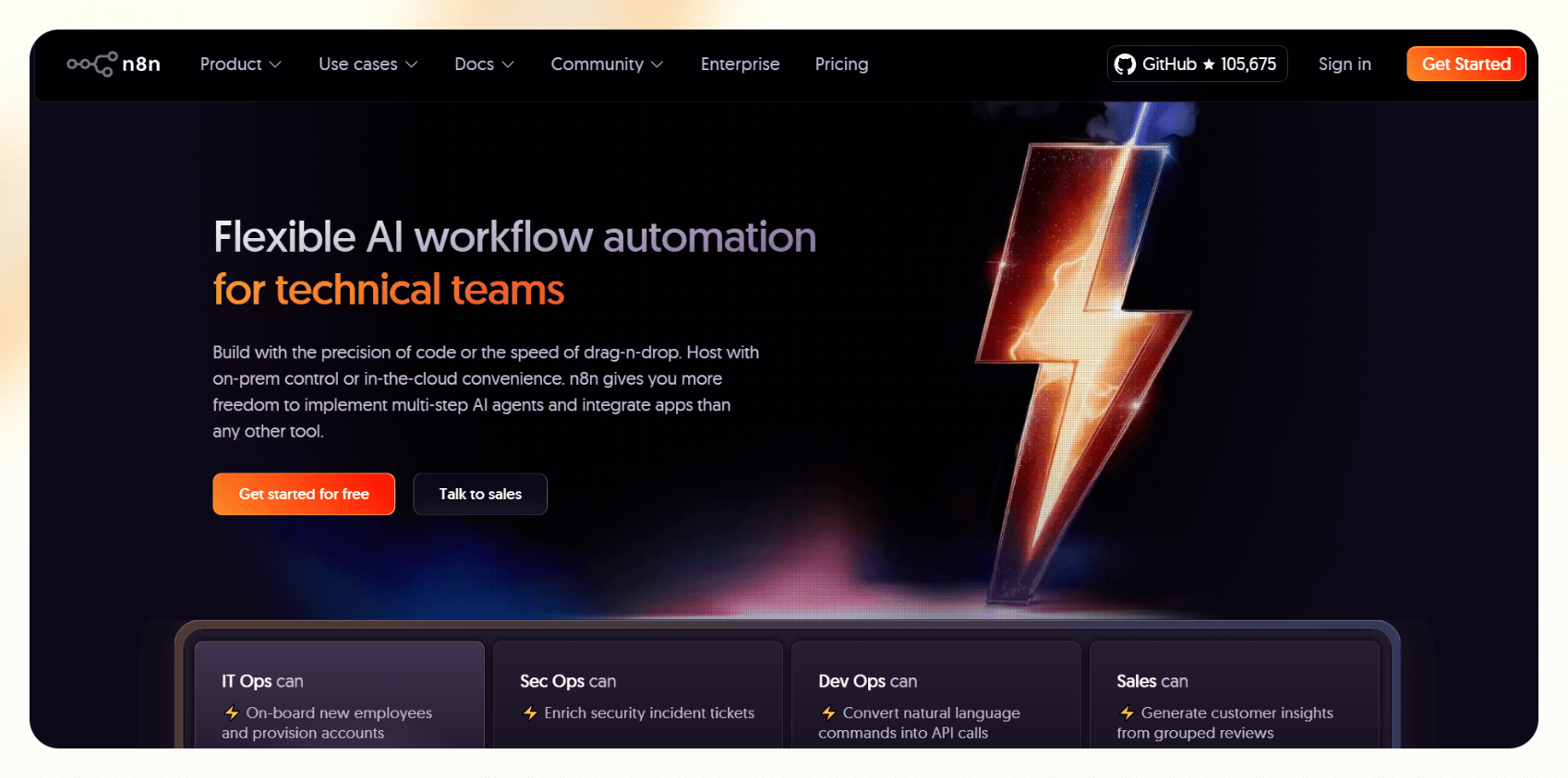
n8n AI agents are customizable AI agents designed to run complex workflows. They are built using a modular, visual workflow system. The core idea is to connect OpenAI’s language models with memory and logic layers — so the agent can respond to input, access tools, and take actions.
However, n8n’s version behaves more like a scripted flow with some AI features.
Here’s an n8n AI agent example:
- You start with an n8n AI Agent Node, which is responsible for interacting with a language model.
- Then, you link it to optional Memory Nodes to preserve short-term or long-term context.
- Finally, Tool Nodes let the agent search, update records, or send messages, depending on the use case.
This setup gives you a high degree of control. But there’s a tradeoff. Every “agent” must be hand-wired –– the memory logic, prompt construction, error handling, and fallback flows all require manual setup.
This makes n8n flexible, but not fast, especially for business teams who need scalable agents, not just clever workflows.
n8n AI agent key features:
- Customizable workflows with deep control over node logic and sequencing
- AI model flexibility, including support for OpenAI, Hugging Face, and LangChain
- 400+ integrations, covering tools like Slack, Gmail, Airtable, and Notion
Lindy, on the other hand, takes a different approach to AI agents. Let’s see how they compare.
How do Lindy AI agents compare to n8n agents?

Lindy is a no-code automation platform designed for teams that want flexible, AI-powered assistants — without the complexity of code-heavy tools like n8n. It includes built-in planning, memory, and native integrations to streamline setup and reduce time-to-value.
Unlike n8n, Lindy doesn’t require you to wire every logic step from scratch. You can configure agents using a visual builder and prebuilt templates — defining task context, memory, and reasoning in just a few clicks.
The result is agents that can plan, adapt, and act across entire workflows — from scheduling meetings to enriching CRMs — without constant oversight.
Lindy also supports Societies –– the ability to coordinate multiple agents for a shared goal. You can delegate tasks like lead qualification, scheduling, and follow-up to different agents, and they’ll pass context between each other without breaking the flow.
For teams who want automation that behaves more like a human assistant than a logic board, Lindy removes the setup friction and scales better across business ops.
Lindy key features:
- No-code visual agent builder
- Large knowledge base, context, and task history
- Multi-agent orchestration with Societies
- 7000+ integrations across 1600+ apps via Pipedream partnership, native APIs, and no-code connectors
- Native integrations like Slack, GCal, Salesforce, HubSpot, Gmail, Twilio
- Adaptable, based on user behavior or external inputs
- Prebuilt templates for sales, recruiting, customer support, and more
- Automation across different workflows like call, email, and tasks
Next, we compare these agents side-by-side.
{{templates}}
Lindy vs. n8n agents: How they stack up
Let’s break down how n8n AI agents differ from Lindy agents across factors like core functionality, setup, and ideal use cases.
Here’s a side-by-side comparison:
| Feature | n8n AI Agents | Lindy Agents |
|---|---|---|
| Setup style | Manual (requires chaining memory, prompts, tools) | Drag-and-drop customizable workflows, prebuilt AI agents |
| Memory | External memory setup (DB or buffer node) | Knowledge base with long and short-term context |
| Tool use | LangChain wrapper + APIs | Native integrations + no-code app connectors |
| Task planning | Manual step-based workflows | Agentic planning with task context + fallback flows |
| Multi-agent support | DIY chaining only | Orchestrated via Societies |
| Ideal for | Devs who want full control | Sales, ops, CX, and RevOps teams looking to save time |
You can also explore how Lindy compares to other automation tools like Zapier in this n8n vs. Zapier vs. Lindy breakdown.
Next, we understand the features or capabilities that make a good AI agent.
What makes a good AI agent?
A good AI agent is a system that can reason, adapt, and act across multiple steps without human oversight. That’s what defines true agentic behavior.
To do that well, three things matter:
- Memory: So it can recall context, preferences, and history over time
- Planning: So it can break down tasks and adjust as things change
- Tool access: So it can take action — update a CRM, send emails, reschedule meetings
This level of autonomy is especially important in workflows like sales or support, where continuity between steps can make or break the outcome. Lindy agents are built around this design from day one. n8n agents can do parts of this — but only if you wire them manually.
Next, we explore a use case to uncover how these two agents approach the same goal differently.
Real-world use case: Invoice chaser
Let’s look at the popular use case of reminding clients about overdue invoices. The difference in approach between n8n and Lindy becomes clear in this scenario.
AI invoice chaser agent
An AI invoice chaser agent will message customers about overdue invoices and loop the sales team in whenever necessary, based on the rules you set.
n8n and Lindy achieve this differently. You’ll have to connect the nodes and apps manually, creating a long chain of nodes with loops. Lindy simplifies this with its AI workflow builder. The final workflows are drastically different. Let’s see how.
Lindy: 3 steps to build an invoice chaser AI agent
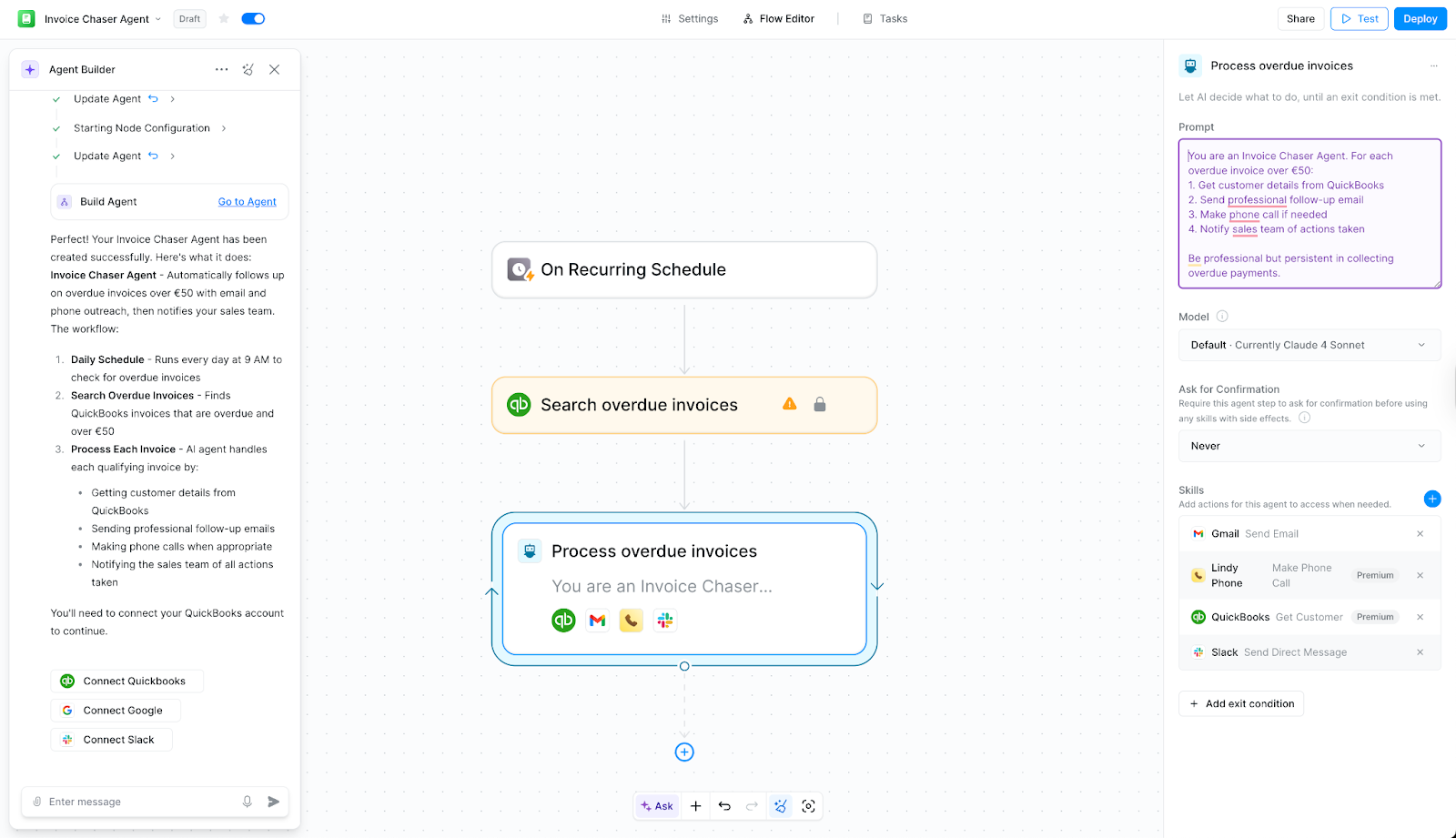
With Lindy, you could replicate the same process in just a few steps. We described the flow and the tools required for the Lindy Agent Builder.
Here’s how the workflow in Lindy looks:
- Start with a recurring schedule node
- Search overdue invoices in QuickBooks (integrated)
- Process overdue invoices
Without designing or connecting any tools, our workflow was ready in just a few minutes.
The final workflow was a single loop with an AI agent that checks each invoice, decides what to do based on the criteria you set, and sends the email or makes the call itself.
The agent handles the decision-making and actions natively, so you’re not manually stitching every tool and branch together every time.
n8n: 6 steps to build an invoice chaser AI agent
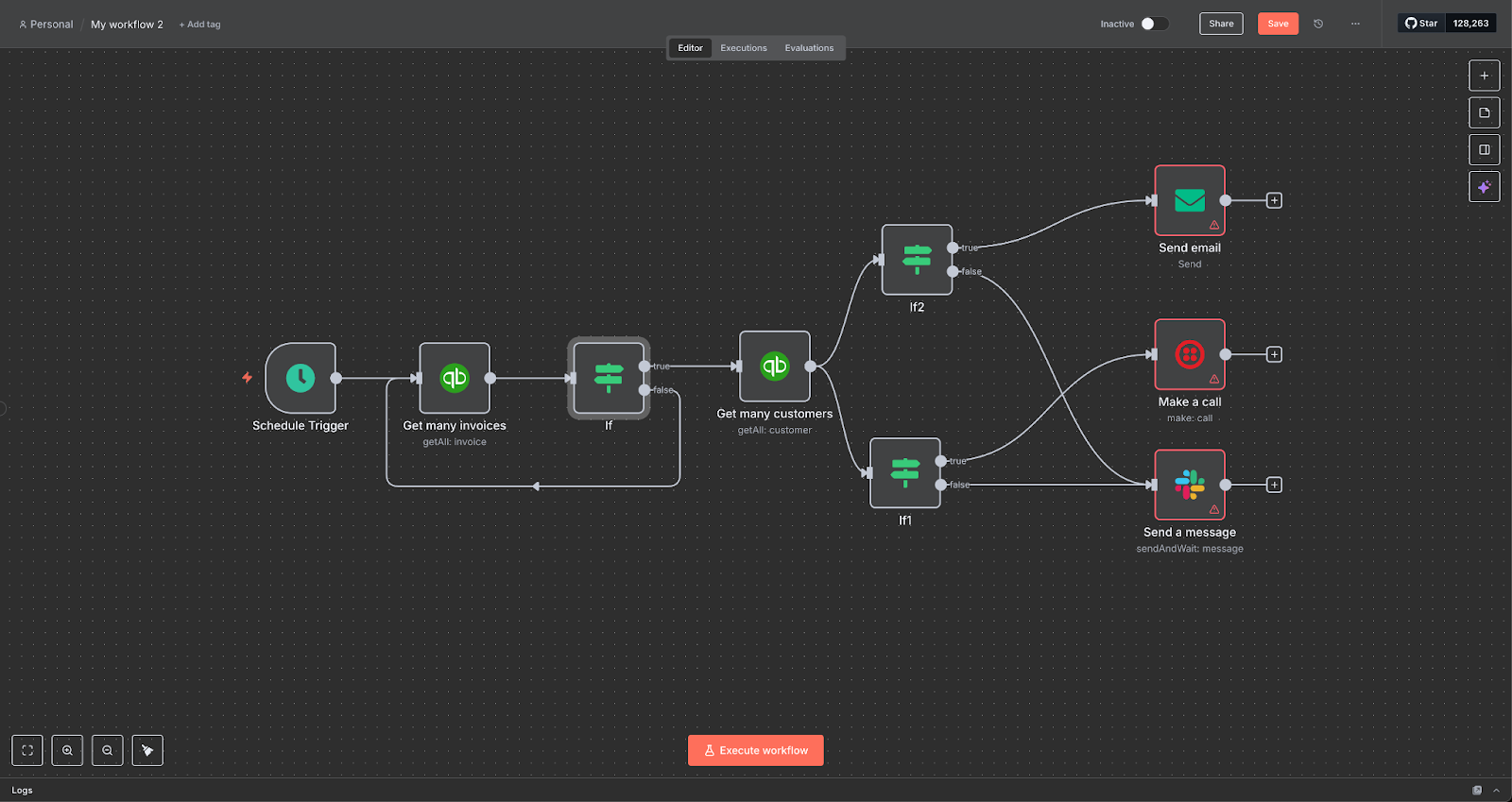
You’d need to build a longer chain of nodes with n8n to create an invoice chaser AI agent. Below are the steps involved:
- Schedule a trigger
- Fetch invoices with QuickBooks (integrated)
- Add an IF condition to check if they’re late and over $50
- Add another IF condition to check for email and phone details
- If yes, connect to email APIs and configure Twillio to make phone calls
- If there’re no contact details, loop the sales team and send them a Slack message to manage retries
It works, but you need to set up 9 nodes, a loop, and connect all the tools manually.
Here’s where Lindy’s ease of use makes a world of difference:
| Task | n8n | Lindy |
|---|---|---|
| Setup time | ~ 30 minutes | 5 minutes |
| Steps | 9 nodes, one loop | 3 steps |
| Tool wiring | Manual | Automatic |
| Logic | IF/AND | AI agents |
But how does Lindy offer value to businesses? We’ll explore that next.
Build AI Agents in Minutes - Start Free
Get things done 10x cheaper, 10x faster with your custom AI agent — no coding required.
Built for business: why Lindy agents outperform others
When you’re evaluating automation tools for business use, the question is “How fast can I use this to get something done?”
With Lindy, most teams can launch their first automation or AI agent in under an hour — no engineering help required. Here’s how it stands out:
- Every agent is memory-aware: You don’t need to set up Postgres or configure token windows. The agent knows what it’s done before — what meetings it’s booked, which contacts were updated, what emails were sent — and uses that context to make better decisions in real-time.
- You’re not building agents from scratch: You pick from use-case templates like Sales Assistant or Support Responder and customize from there. Each one is already wired with the right structure, fallback logic, and integrations.
Having 7,000+ integrations, including native ones like Slack, Salesforce, Notion, Twilio, and Gmail, makes setup faster and reduces maintenance overhead. Most flows take under 15 minutes to deploy.
You can see how it compares with other tools in this n8n alternatives breakdown. Where n8n is flexible, Lindy is focused — and it shows in how teams get value from day one.
So, which one suits your needs best? We answer that next.
Which should you choose?
Choosing between n8n and Lindy comes down to how much time, technical effort, and flexibility you’re willing to trade off. These scenarios should help:
- If you want complete control over every step, are comfortable with prompt engineering, and don’t mind wiring memory and fallback logic manually, go with n8n.
- If you're building custom internal tools or working on highly specific use cases that no off-the-shelf agent can handle, n8n might be a better fit.
- If you want agents that work out of the box, with built-in memory and business-ready logic, Lindy saves you that setup time.
- If your team wants to quickly automate tasks like follow-ups, CRM updates, scheduling, or lead routing, Lindy will get you there faster.
- If your operations team doesn’t code and your engineers don’t want to maintain brittle flows, Lindy removes that burden.
{{cta}}
Frequently asked questions
Do I need to code to use Lindy agents?
No. Lindy is designed for non-technical users. You can build and deploy AI agents using a drag-and-drop interface without writing a single line of code.
What’s the best AI agent system for small businesses?
For most small teams, it’s Lindy. It offers prebuilt templates, real-time adaptability, and native integrations with popular tools — all without requiring technical setup or maintenance.
What’s the difference between an automation and an agent?
Automations follow rules, while agents make decisions. Automations are static step-by-step instructions. AI agents, on the other hand, can adapt mid-task, access a knowledge base, and handle follow-ups based on context.
Is Lindy better than Zapier or n8n for AI workflows?
Yes. Lindy is built to handle dynamic, memory-aware workflows. It can help you build autonomous AI agents that can run complex workflows without writing code. Zapier is best for linear automations and offers entry-level AI actions via OpenAI and AI Assist. n8n provides deep customization and flexibility, but requires technical setup.
Next, check out how Lindy compares to Zapier vs. Pabbly in another head-to-head comparison guide.
Let Lindy be your AI-powered automation app
Still stuck between n8n vs. Lindy? If you want affordable AI automations, go with Lindy. It’s an intuitive AI automation platform that lets you build your own AI agents for loads of tasks.
You’ll find plenty of pre-built templates and loads of integrations to choose from.
Here’s why Lindy may be an ideal option:
- Lead enrichment: Lindy can be configured to use a prospecting API (People Data Labs) to research prospects and to provide sales teams with richer insights before outreach.
- Automated sales outreach: Lindy can run multi-touch email campaigns, follow up on leads, and even draft responses based on engagement signals.
- Sales coach: Lindy can provide custom coaching feedback, breaking down conversations using the MEDDPICC framework to identify key deal factors like decision criteria, objections, and pain points.
- Cost-effective: Automate up to 400 monthly tasks with Lindy’s free version. The paid version lets you automate up to 5,000 tasks per month, offering plenty of value per automation compared to many competitors.









