EHR Automation: How Clinics Can Cut Data Entry Time With AI
Jack walked through automating EHR data entry using tools like Suki, DeepScribe, and UiPath, covering workflow mapping, HIPAA compliance safeguards, and staff training steps.


Clinicians spend too much time on data entry and updating records, hindering their ability to attend to the patients. In this guide, I break down how you can use AI for EHR automation to capture, structure, and enter data reliably in 2026.
How to automate EHR data entry in 5 steps
You can automate EHR data entry easily when you treat it as a rollout, not an instant switch. Start by finding the processes that waste the most time, then add automation to them slowly. Here are five steps that help you do it without disrupting care or documentation quality:
Step 1: Map manual workflows and find bottlenecks
Before adding tools, understand how all the processes work in your clinic. Sit in on patient visits. Watch how clinicians, nurses, and admin staff handle intake, documentation, and follow-ups.
Here’s what you should focus on:
- Which tasks involve the most typing or copying?
- Where does the same data get entered more than once?
- Which steps follow the same pattern every time?
Most teams uncover the same issues:
- Transcribing visit notes after each appointment
- Copying vitals, labs, or imaging summaries into the EHR
- Writing discharge instructions from scratch
- Constantly switching between tools for labs, billing, and scheduling
Once you do this, create a short list of repetitive tasks that follow rules and do not require clinical judgment. That list becomes your EHR automation roadmap.
Step 2: Choose tools that fit your workflow
Once you know where you lose time, match each problem to a tool that does that job well. Most clinics do not need a complex stack.
Here’s a quick-glance guide on how to select the right tool:
| Need | Tool type | What it automates | Top options |
|---|---|---|---|
| Clinical note entry | AI medical scribes | Transcribes visits andcreates SOAP or H&P notes | Suki, DeepScribe, Augmedix |
| Backend taskautomation | Healthcare RPA | Automates repetitive admin workflows like claims, billing, and intake | UiPath |
| Cross-systemdata sync | Integration platforms | Connects labs, devices, imaging, or scheduling data to the EHR | Redox |
| Custom workflows | AI assistant | Ask the AI assistant in plain English to help with tasks across EHR or internal tools | Lindy |
Shortlist tools that:
- Connect to your EHR through FHIR, HL7, or native APIs
- Output structured, editable data rather than raw transcripts
- Support HIPAA compliance and BAAs
- Allow human review before data writes to the record
Before buying anything, ask vendors to demo the exact workflow you plan to automate. If they cannot show it end-to-end, move on.
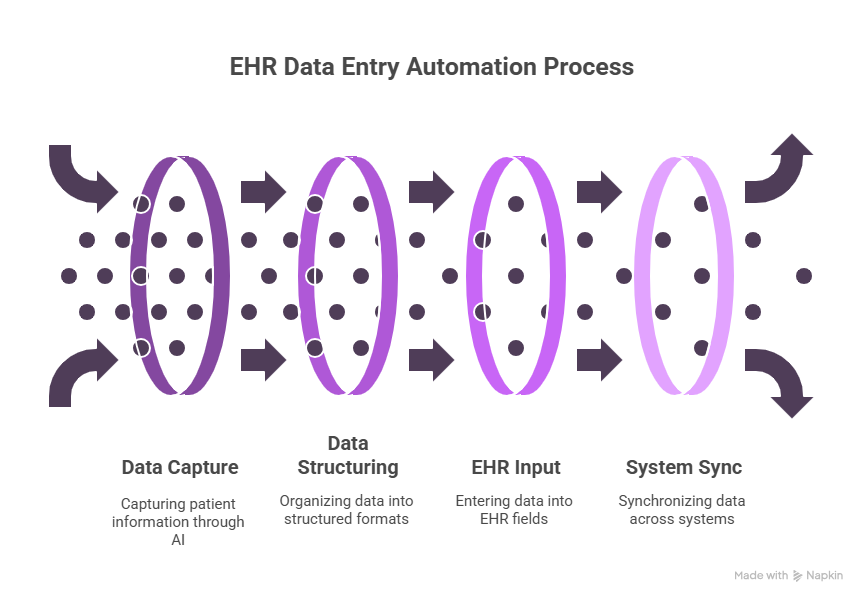
Step 3: Roll out automation one workflow at a time
Automating everything at once can complicate things and add more errors. Start with one workflow that consumes time every day and test there first.
You can roll it out efficiently like this:
- Clinical documentation: Use an AI scribe during visits. Generate SOAP notes or summaries, then let clinicians review and submit them to the EHR.
- Structured data entry: Automate fields like vitals, medications, allergies, and labs. Pull data from devices, lab systems, or intake forms instead of retyping it.
- Follow-up workflows: Trigger post-visit actions automatically. Schedule the next appointment, send care instructions to the portal, and generate billing codes without manual entry.
Build EHR automation in layers. Each workflow should run cleanly before you expand to the next.
Step 4: Safeguard accuracy, compliance, and clinical quality
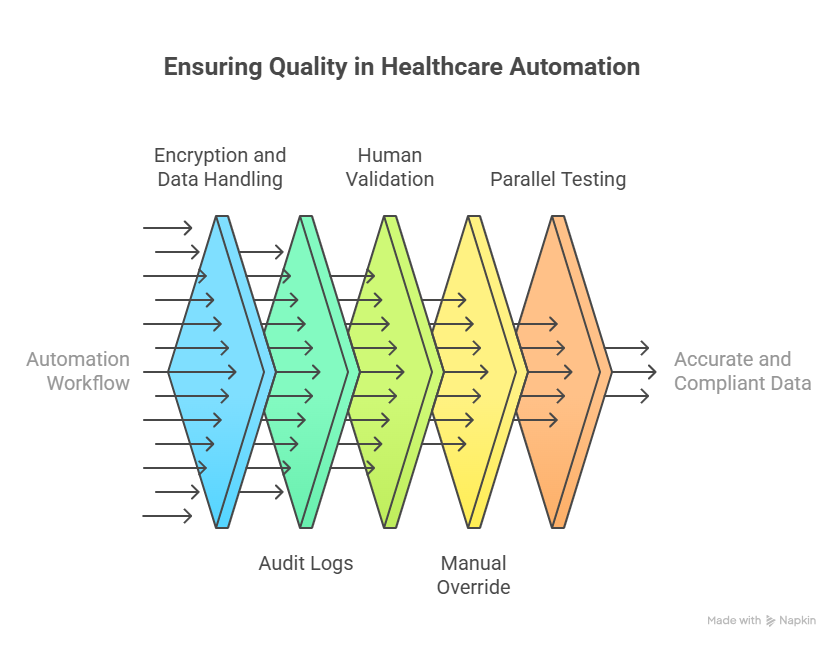
EHR automation must be reliable and auditable. Speed does not matter if you cannot trust the data. Every automation workflow should include:
- HIPAA-grade encryption for data in transit and at rest
- Audit logs that record what ran, when it ran, and who approved it
- Human review before any data is written to the EHR
- Manual override controls when outputs look wrong
Before a complete rollout, run parallel testing. Compare 10 to 20 automated records against manually completed ones. Check for missing fields, incorrect interpretations, and coding errors.
If the system generates ICD-10 codes or structured fields, confirm it uses current code sets and correct patient context.
Automation should remove clerical effort, not clinical judgment. Keep decisions in human hands.
Step 5: Train your team and build confidence
Tools can fail when teams do not trust them. Adoption depends on how confident your staff is about the change. Start with a small pilot. Choose one or two clinicians who feel comfortable testing new tools and collect their feedback in real workflows.
Show the system working. Walk through a live visit and demonstrate how it captures speech, creates structured notes, and routes drafts for review.
Provide simple training materials. Share short SOPs, quick reference guides, and walkthrough videos that answer practical questions, including how to correct errors and where drafts appear.
Create an easy feedback loop. Let users flag issues or suggest improvements through a form, Slack channel, or short survey.
Share early wins. Call out time saved, fewer after-hours notes, and cleaner records. When teams see consistent results, they become more open to expanding EHR automation across the workflow.
{{templates}}
What parts of EHR data entry can you automate?
You do not need to automate every task to see meaningful time savings. EHR automation works best in areas where information follows clear patterns and repeats across visits.
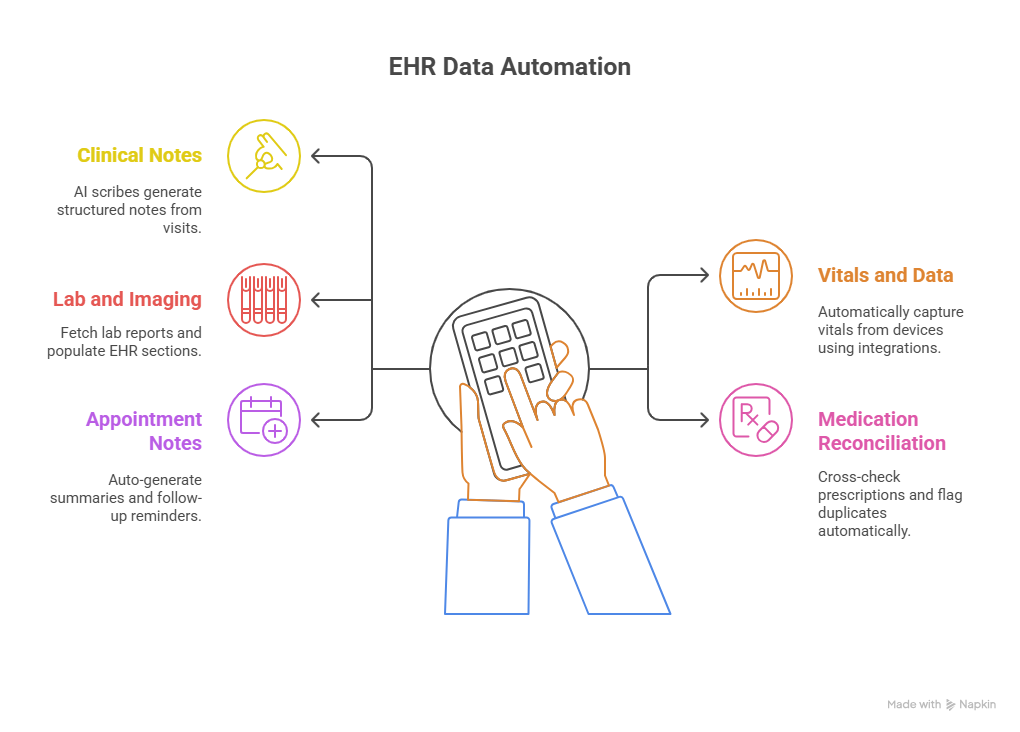
The most common candidates include:
- Clinical notes and SOAP documentation: AI scribes can capture patient conversations during visits and turn them into structured notes such as SOAP or H&P. Many systems route drafts directly into the EHR for review and approval.
- Vitals and device data: Data from monitors, wearables, and point-of-care devices can flow into the EHR automatically through integrations, removing the need for manual entry.
- Lab and imaging results: Automation can pull lab reports and imaging summaries, extract key values or findings, and place them in the correct EHR fields instead of relying on copy and paste.
- Medication reconciliation: Tools can compare prescriptions across sources, map them to structured fields, and flag duplicates or conflicts before they reach the chart.
- Appointment notes and follow-ups: AI can generate post-visit summaries, care instructions, and follow-up reminders based on visit type and patient data, and then send them to the patient portal without manual effort.
Why clinicians should automate EHR data entry
Clinicians should automate data entry because manual processes keep them away from patient care and add avoidable strain to daily work. EHR automation can handle repetitive tasks that do not require clinical judgment.
Here’s how they benefit clinicians:
Saves time for clinicians
Doctors and nurses often spend a couple of hours a day documenting visits, updating fields, or re-entering the same information across systems. Automation handles those tasks in the background, returning hours each week to patient care rather than screens.
Reduces burnout and administrative load
Clerical work can lead to burnout. When automation takes over note drafts, follow-ups, and data syncing, clinicians spend less time charting after hours and multitasking during visits. That shift leads to better focus and lower fatigue.
Improves accuracy and reduces errors
Manual entry introduces typos, missed fields, and copy-paste mistakes. Automated workflows apply the same rules every time, placing data in the correct format and location. It reduces errors and prevents rework later.
Scales without adding headcount
Automation keeps pace as patient volume grows. Whether a clinic sees ten patients a day or fifty, the workload stays manageable without adding staff. Documentation quality stays consistent during busy periods, growth phases, and seasonal spikes.
What you should know before automating EHR data entry
EHR automation can save time, but it requires planning. Most setups need testing, oversight, and adjustment before they work reliably. Keep these factors in mind:
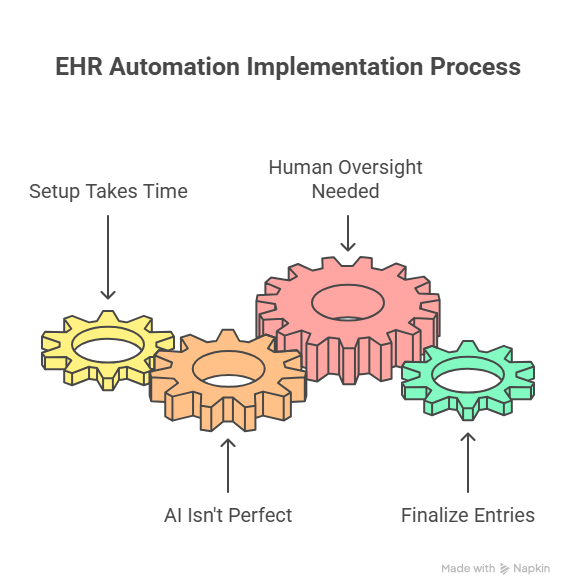
Setup takes time, especially with complex EHRs
Connecting automation tools to systems like Epic, Cerner, or Athena often involves custom configuration. APIs and integrations rarely work out of the box. Plan for some IT support and test workflows in a sandbox environment before going live.
AI struggles with inconsistent input
Voice-based tools can misinterpret accents, rapid speech, or background noise. Busy clinical settings increase this risk. Regular quality checks help catch transcription errors before they reach the record.
Human oversight is necessary
Automation handles repetition, not judgment. Every workflow should include a review step where a clinician approves entries before finalizing them in the EHR. This keeps records accurate and compliant.
Try Lindy for EHR automation and other related tasks
Lindy offers a ready-to-use medical scribe that notes all the necessary patient details and consultation notes. It also connects with EHR tools to automate entries.
Lindy integrates with 4,000+ apps and offers customizable templates to get started quickly.
What Lindy can do for you:
- Transcribes patient visits as you talk and creates accurate, ready-to-review SOAP notes
- Sends notes directly to your EHR for your review and approval
- Connects with labs and devices, bringing all the info you need together without manual entry
- Text Lindy to remind you of follow-up tasks, like referrals or discharge instructions
- Keeps your data safe with HIPAA-compliant standards and clear audit trails
Try Lindy’s free trial for your medical workflows.
{{cta}}
Frequently asked questions
What is EHR data entry automation?
EHR data entry automation is the use of software to capture patient information and enter it into an Electronic Health Record system without manual typing. These tools rely on AI or rules-based logic to structure data correctly before it reaches the chart.
Instead of documenting visits by hand, automation tools:
- Transcribe patient and clinician conversations
- Extract clinical details such as vitals, diagnoses, and medications
- Fill structured EHR fields directly
- Sync data across labs, billing, and scheduling systems
Can AI do data entry?
Yes, AI can handle data entry by capturing information from voice, text, or forms and entering it into structured systems like EHRs. It transcribes conversations, extracts relevant clinical details, and fills fields without manual typing.
How to automate data entry?
You can automate data entry by using AI tools or robotic process automation to extract information from documents, forms, or voice input. Teams connect integrations, map data fields, and review outputs before submission.
What is EMR data entry?
EMR data entry refers to the manual or automated entry of patient information, such as vitals, medical history, medications, and clinical notes, into an Electronic Medical Record system. Clinics rely on it for care delivery, billing, and compliance.
What is medical data entry?
Medical data entry is recording patient demographics, diagnoses, treatments, lab results, and visit notes in digital health systems. Staff can complete this work manually or use automation to improve speed and consistency.
How can a computer system make documenting orders more efficient?
Computer systems can make documenting orders more efficient by using templates, rule-based logic, and field mapping. They reduce duplicate entries, auto-fill details, and flag errors during the process.
How do you automate data extraction in healthcare?
You can automate data extraction in healthcare by using AI and integration platforms to pull structured data from documents, voice recordings, and medical devices. These systems send fields like vitals, labs, and codes to EHRs through HL7, FHIR, or APIs.
How accurate is AI when it comes to clinical documentation?
AI scribes are highly accurate when it comes to structured clinical documentation, when audio quality and speech clarity remain consistent. Errors can still occur, so clinicians should review all entries before finalizing records.
Can automation really handle structured EHR fields, or just notes?
Automation can handle structured EHR fields such as vitals, ICD codes, medications, allergies, and lab values. It places data directly into the same fields staff would otherwise complete manually.
Is it safe and legal to use AI for EHR automation?
AI for EHR automation is safe and legal when vendors meet HIPAA requirements, encrypt data, maintain audit logs, and sign a Business Associate Agreement. Clinics must also require human review.
Will this work with my current EHR system?
Many EHR automation tools offer integration with platforms like Epic, Cerner, Athena, and eClinicalWorks through APIs, FHIR, HL7, or middleware. Be sure to confirm integration capabilities with your specific vendor before committing.
How much time can I expect to save with automation?
Clinics that use EHR automation often save significant time every day, sometimes over an hour per clinician. They can then use this freed time for patient care and help reduce after-hours documentation.
Do I need to hire developers to set this up?
Most teams do not need developers to set up EHR automation. Many tools offer no-code workflows that admins configure with clear goals and system access.
What does a typical rollout look like?
A typical rollout starts with a small pilot focused on one workflow. Teams test performance for two to four weeks before expanding to additional use cases.
How do I make sure the AI isn’t making critical errors?
You can ensure that AI isn’t making critical errors by adding human-in-the-loop control where clinicians review data before the AI writes to the EHR. Regular audits help catch edge cases and performance issues.
Can I customize what the AI captures or automates?
Yes, you can customize what the AI captures, how it structures outputs, and where data lands in the system. This way, you can create workflows to match specialty and provider preferences.
How do I get started with Lindy?
You can get started with Lindy by setting up a free trial and asking Lindy to help with documentation or follow-ups. The platform supports no-code setup with human review before submission.









