Meeting Request Email: 12 Examples to Ask for Availability
Lindy walked through crafting meeting availability requests, covering a reusable template, subject lines, and scheduling links, weighing context, time zones, and meeting length.


Knowing how to ask for availability for a meeting can save you a lot of back-and-forth and help you get replies faster. After analyzing hundreds of meeting requests, I break down the exact format to use, common mistakes to avoid, and examples you can copy.
I answer a meeting request email faster when I can see the reason and the times without scrolling. The 6 steps below are how I write mine, and the 12 examples that follow apply them in 53 words or fewer each, sorted by who you're writing to.
What is a meeting request email?
A meeting request email is a short message that asks someone to meet, says why, and proposes specific times they can accept or counter.
A good one answers four questions before the reader has to ask them. It says what the meeting is about, how long it takes, when you're free, and who sends the invite once they say yes.
If the email skips the third question, the likely reply is a question about when you're free, which adds another round of email before anything gets booked.
What you need before you write one
Settle these five things up front:
- The reason, in one line. Make it concrete, like "review the Q3 campaign numbers and decide the December spend." "Catch up" doesn't say what the meeting is for or what you need from them.
- A length. Pick 15, 20, or 30 minutes, and state it in the email.
- Two or three open slots. Check your own calendar beforehand, so you're not offering a time you'll have to withdraw.
- Where they're based. Check their time zone before you pick slots, and if it's different from yours, write out both times. Microsoft's June 2025 Work Trend Index special report found that "nearly a third of meetings now span multiple time zones," based on aggregated Microsoft 365 productivity signals.
- The next step. Decide who sends the invite, and to which address.
Once those five are settled, the writing takes very little time. Every example in this article starts from the 35-word template below:
Hi [Name],
I'd like to discuss [topic].
Would you be available for a [15/20/30]-minute meeting on [option 1] or [option 2]? If neither works, send a time that suits you, and I'll send the invite.
Replace the brackets with your details to get a usable draft.
How to write a meeting request email in 6 steps
Each step below covers one part of the template above, in the order it appears in the email. The first two deal with why you're asking, and the last four deal with timing and the invite.
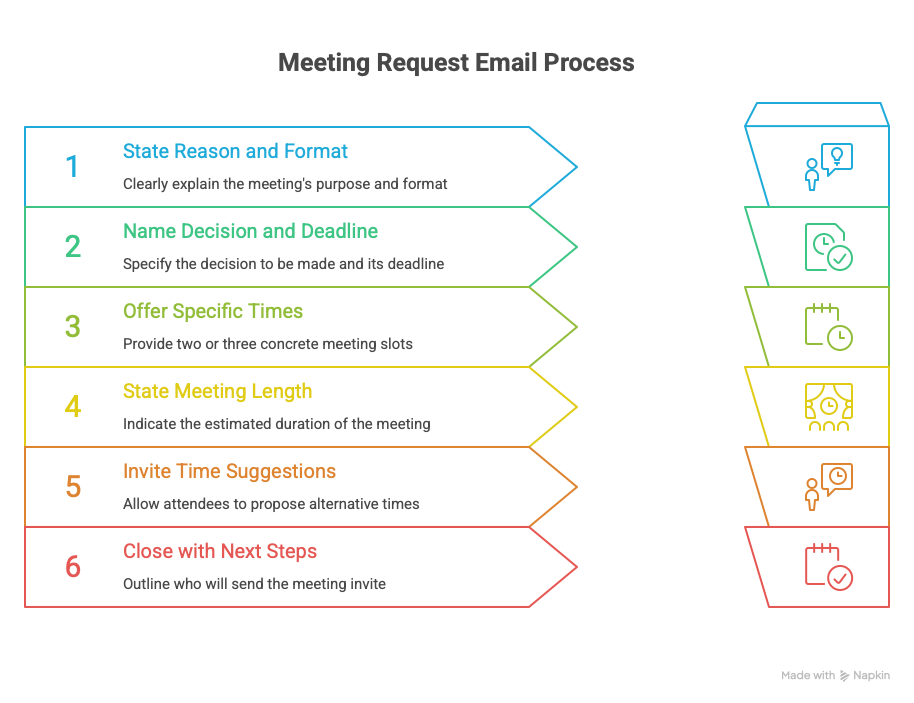
Step 1: Lead with the reason and the format
Open with why you want to meet and whether it's in person, on a video call, or by phone. If the reason sits below a greeting paragraph, the reader has to get through small talk to find out what you want.
Compare "Can we meet sometime next week?" with "I'd like to walk through the Q3 campaign results on Zoom and agree on next steps." The second covers the topic and the format, and makes clear a decision is needed.
Pro tip: If it's in person, name the room or the address in the same sentence, and they won't have to look it up.
Step 2: Name the decision waiting on them
Step 1 covers what the meeting is about. The decision explains why it can't wait until next week, so include the deadline. "Decide between the two final candidates before Friday" states the choice and the date.
Keep the decision to a single sentence and paste it into the invite as the agenda, so it's in front of them when the meeting starts.
If the decision builds on an earlier call, link the recap so nobody spends the opening re-explaining it. Lindy's meeting minutes comparison covers 12 apps that can write that recap for you.
Step 3: Offer two or three specific times
Asking "When are you free?" instead means the person doing you a favor has to open their calendar and type out a few times before they can answer.
Give two or three slots with the day, the time, and the time zone. "Tuesday at 2 PM ET or Thursday at 10 AM ET" can be answered with a single word.
Stop at three, because with four or more, they have to check each one against their calendar before replying.
Pro tip: Spread the slots across different days. One blocked afternoon shouldn't rule out both.
Step 4: State the length up front
Give the meeting a length in minutes. "15 minutes" is easy to check against a calendar, while "a quick sync" doesn't tell them whether to block 10 minutes or 45.
Say it even if the meeting might run over. The number sets the expectation, and if you need more time, you can ask once you're talking.
For anything above 45 minutes, add the reason in the same sentence, so they can see what fills the hour before they commit to it.
My own default is 20 minutes, and I only go to 30 when the agenda calls for it. An open 20-minute window is easier to find in a full calendar than a 30-minute one.
Step 5: Invite them to suggest another time
Sometimes neither slot will suit them, so add a fallback line like "If neither works, send a time that suits you, and I'll send the invite."
If your Tuesday at 2 PM clashes with something on their end, the fallback lets them propose another time instead of saying no and ending the thread.
A scheduling link can serve as the fallback too, as long as it sits under your times. Putting your times first shows you've already checked your own calendar.
Step 6: Close with who does what next
End by saying what happens after they reply. "If either works, I'll send the invite" means that once they reply, they're done.
If you leave out who sends the invite, each side waits for the other to handle the calendar hold, and the meeting may not get booked at all.
Mention the tool too if the meeting involves another company. "I'll send a Google Calendar invite to this address" answers the question people would otherwise write back to ask.
Pro tip: Send the invite as soon as they confirm. Until it's on their calendar, someone else can book that hour.
12 meeting request email examples by situation
Each of these 12 examples starts from the template below and adapts it to who's reading it and how well they know you. Start from this one:
Subject: [15/20/30]-minute call about [topic]?
Hi [Name],
I'd like to discuss [topic].
Would you be available for a [15/20/30]-minute meeting on [option 1] or [option 2]? If neither works, send a time that suits you, and I'll send the invite.
1. A coworker
With a colleague you see every day, you can skip the formal tone.
Hi James,
I want to go over the launch timeline and confirm the final task owners before Friday.
Are you free for 20 minutes Tuesday at 1 PM or Wednesday at 10 AM? If neither works, send me a time.
Skipping the formal tone keeps the whole ask to three short sentences.
2. Your manager
Include the decision you need from your manager in the email, next to the time you want.
Hi Priya,
Could I have 30 minutes to walk through my priorities for next month and get your decision on the Hendricks account?
Would Thursday at 2 PM or Friday at 11 AM work? Happy to move it if your week is busy.
"Get your decision on" tells Priya the Hendricks account is waiting on her, which gives the 30 minutes a clear purpose.
3. A client
Lead with what the client gets out of the meeting, then give the times.
Hi Anna,
I'd like to review last quarter's campaign performance with you and agree on the scope for phase two.
Would a 30-minute call on Monday at 3 PM or Tuesday at 11 AM suit you? If another time is easier, name it, and I'll work around it.
Agreeing on scope means Anna leaves the call with a decision made.
4. Cold outreach
Mark has no idea who you are, so the first line needs to show you've read his work.
Hi Mark,
I read your post on rebuilding revenue ops after the Series B, and the sequencing problem you described is one we faced last year.
Would you be open to 15 minutes on Wednesday at 2 PM or Thursday at 9 AM to compare approaches? If neither works, name one that does.
Mentioning his post and the problem he described signals the email was written for him.
5. A warm lead
A lead who downloaded a guide or attended a webinar has given you something to open with.
Hi Dana,
You joined our session on inbound routing last Thursday and asked about multi-region handoffs. I'd like to show you how two of our customers solved that.
Would 20 minutes on Tuesday at 11 AM or Wednesday at 4 PM work? If neither works, name another, and I'll send the invite.
Quoting Dana's question from the session connects the call to something she asked for.
6. An existing customer
With a paying customer, I'd build the email around a feature they already pay for but don't use.
Hi Tomás,
Your team is on the plan that includes approval workflows, and it looks like nobody's switched them on.
Can I take 20 minutes on Monday at 10 AM or Tuesday at 3 PM to set them up with you? If you'd rather I just sent a walkthrough, say so.
Offering a walkthrough instead makes the call optional for Tomás.
7. A formal or executive request
Write an executive request so it still makes sense if a busy VP skims it and forwards it to an assistant.
Dear Ms. Okonjo,
I'm writing to request 30 minutes to present the results of the supplier consolidation review, ahead of the board's December session.
Would December 8 at 10 AM or December 10 at 2 PM be convenient? I'll send materials 48 hours in advance.
Promising materials 48 hours ahead tells her office what to expect and when.
8. A virtual meeting
For a video call, name the platform in the opening sentence.
Hi Lena,
Can we take 20 minutes on Google Meet to go through the API migration plan? Tuesday at 2 PM and Wednesday at 9 AM both work on my end.
I'll send the link with the invite, and I'll record it if you'd rather watch it later.
Naming Google Meet in the first sentence tells Lena it's a video call before she gets to the times.
9. An internal team meeting
Group requests need one person in charge of booking, or each person may assume someone else is sending the invite.
Hi team,
Let's take 30 minutes to review project status and confirm what ships before Friday.
I'm holding Tuesday at 2 PM and Wednesday at 11 AM. Reply with your preference by end of day tomorrow, and I'll send the invite for whichever gets more votes.
The deadline gives the group a cutoff, and the slot with more votes at that point gets booked.
10. A follow-up after no reply
Assume the original got lost in their inbox, and write as though it did.
Hi Emily,
Following up on my note from last week in case you missed it. I'd still like to find 20 minutes on the Q2 hiring plan.
Would Tuesday at 4 PM or Thursday at 10 AM work? If this isn't a priority right now, tell me, and I won't follow up again.
The final sentence gives Emily a one-line way to say no. If you send a lot of these nudges, the AI email assistants roundup covers tools that draft them when a thread gets no reply.
11. Rescheduling
When you're the one moving the meeting, go to the top of the range and offer three slots.
Hi Sam,
I have to move our Thursday call. Apologies for the change.
I'm free Friday at 11 AM, Monday at 9 AM, or Monday at 3 PM, and I'll take whichever is easiest for you. I'll resend the invite as soon as you pick.
Sam gets a third slot to make up for the cancellation, and the apology is kept to four words.
12. Someone in another time zone
Do the conversion yourself, or the reply you get is "what time is that for me?"
Hi Daniel,
I'd like 20 minutes on the onboarding plan.
Would Thursday at 9 AM PT or Friday at 1 PM PT work for you? That's 6 PM and 10 PM in Berlin. If those run late, send a morning slot, and I'll take the early call.
Offering to take the early slot yourself saves Daniel from an evening call.
The 6 PM in that email won't be right on every date, so check it against the meeting day before you send. Pacific and Berlin are usually 9 hours apart, but the two regions change their clocks on different weekends.
US daylight saving runs from the second Sunday in March to the first Sunday in November, while EU summer time runs from the last Sunday in March to the last Sunday in October.
Because the two schedules don't line up, the difference drops to 8 hours in the two or three weeks between those dates in March, and again in the week between the EU's change in late October and the US change in early November.
{{templates}}
Meeting request email subject lines to copy
The subject line is what the recipient reads before deciding to open your email. Include the topic, and the length if you can. "Touching base" on its own gives them little to decide with. Pick one by situation:
Cold or first contact
- 15 minutes on [specific problem they wrote about]?
- [Mutual contact] suggested I reach out
- Question about [their project or announcement]
Warm or existing relationship
- Time to go over [topic] next week?
- Check-in on [project] this week?
- 20-minute call about [topic]?
Internal
- 20 minutes to decide [topic]?
- Need your call on [item] before [day]
- Tuesday or Wednesday for [project] review?
Moving an existing meeting
- Moving our [day] call
- New time for our [topic] review?
Most of the subject lines above have a bracket for a detail specific to the reader, like their project name or the problem they posted about.
When to use a scheduling link instead
Use a scheduling link, like one from Calendly, when you already know the person, when more than two calendars are involved, or when you've traded three messages and still don't have a time.
With someone who doesn't know you, a link on its own makes them look through your availability to find a time.
In that case, lead with times and add the link underneath as a backup, something like "I'm free Wednesday at 11 AM or Friday at 3 PM, and here's my calendar if something else is easier."
Outlook and Gmail can both share your availability without a separate tool. The difference is who picks the final time.
Outlook's Scheduling Poll lets you propose several times and puts tentative holds on attendees' calendars while they vote. Once you pick the final time, the other options are removed from everyone's calendar.
Microsoft lists it for organizers on Microsoft 365 business or enterprise plans with Exchange Online, and personal Outlook.com accounts aren't on that list. Attendees can vote from any email address.
Gmail's "Set up a time to meet" option, at the bottom of the compose window, puts your availability in the message. When they pick a slot, Gmail creates the meeting and sends the confirmation for you.
The feature only works on personal Gmail accounts and Workspace Business Starter. Other Workspace editions get "Help me schedule" instead. With several recipients, only the first person to book joins the event, and you add the rest manually.
Once you're coordinating more than a few meeting requests a week, one of the AI scheduling assistants in Lindy's roundup can propose times and book meetings for you. If you'd rather keep the work inside your calendar, the AI calendar assistants roundup covers the tools that do it there.
Common mistakes to avoid
The six steps cover what goes in the email. These three mistakes happen around it, and each one can stall the booking:
- A first slot that's too close. If you send at 5 PM and offer 9 AM tomorrow, the slot may pass before they read your email. Leave at least one full business day before your first option.
- Booking over the times you offered. If another meeting lands in one of your slots and they pick that one, you have to write back with new times. Put a tentative hold on each slot until they reply.
- Asking at the bottom of an old thread. A request added to a long reply chain is easy to miss, and the subject line still describes the old topic. Start a new email with a subject line from the list above.
{{cta}}
How Lindy handles meeting requests and calendar follow-ups
Lindy is an AI employee that lives in your Slack. You @mention it in a channel or DM it directly. It connects to your email and calendar, and Routines let it run standing work on a schedule.
Of the work this article covers, it can take on the drafting and the scheduling, and it can sit in on the meeting itself. Each part below comes with a limit worth knowing before you hand it over:
- Writing the request. DM it who you're writing to and what you need decided. It can search your email for context and write the meeting request email. Ask it for a draft, since Slack DMs with Lindy aren't guarded and a "send it" there skips the approval step.
- Incoming mail. Email drafting writes replies only for the messages Email Triage flags as needing one, and leaves each in your drafts folder for you to send.
- Unanswered threads. Follow-up bumps trigger after a wait you choose, up to 7 days. When that time passes with no reply, the bump is saved to your drafts until you send it.
- Your calendar. Smart Scheduling proposes three slots inside the availability you set. Once a time is picked, it books the meeting and sends the invites, so define your working hours and buffers before you let it reply for you.
- The meeting itself. Lindy joins your video calls as a visible participant and records them. Afterward, it sends a follow-up email with the action items. Because everyone in the meeting can see it, you'll want to look up local rules on recording consent.
- Searching past meetings. In Meetings, each folder has its own sharing setting, from just you to the entire team, and anyone with access can ask questions across it. Your personal meetings stay private unless you share them or add them to a folder.
- Guardrails. In shared Slack threads, each integration is set to "Always allow," "Require approval," or "Don't offer." One guardrail covers every account under that integration, and reads are never guarded.
- Security. Lindy's security page lists SOC 2 Type II, GDPR, HIPAA, and PIPEDA compliance. A signed BAA requires the Enterprise plan.
The Team plan costs $29.99 per user per month and includes 3,000 credits per user each month, according to Lindy's pricing.
There's also a free plan with $50 in credits that last 7 days, and it doesn't require sharing your credit card.
Try Lindy if you want to test it on your next meeting request email.
Frequently asked questions
How do you politely ask for a meeting request?
Name the reason in one line, propose two or three specific times, and invite them to suggest a different slot. Say how long the meeting will take, and keep it to 53 words or fewer, like the examples in this article.
How do you write a meeting request email to a client?
Lead with what the client gets from the meeting, then give the length and two concrete times. Close by inviting them to suggest another time. The client example in this article does it in three sentences and 48 words.
Is it better to offer time slots or ask when someone is free?
Offering time slots is better. Specific slots turn your request into a question they can answer in one line, while "when are you free?" makes them open their calendar and do the matching for you.
How long should a meeting request email be?
Keep it to three or four sentences and 53 words or fewer, which is enough for everything the template asks for. The 12 examples here run 40 to 53 words, and the cold outreach example is one of the two longest, at 53, because its first line is context about the reader.
Should you include a scheduling link?
Yes, when the other person already knows you, when more than two calendars are involved, or when you've traded three messages without finding a time.
For cold outreach, offer two times and add the link below them as a backup, since sending it alone asks a stranger to find a time on their own.









