How To Ask For A Raise Via Email: Templates And Examples
Everett put together five raise-request email templates and a five-step framework, covering timing, proof of impact, market research, and handling a "no."


I've helped hundreds of professionals write raise request emails, and the ones that work all follow the same pattern. Here are five templates that show you exactly what that looks like.
When to ask for a raise by email?
The best time to ask for a raise via email is when you can demonstrate strong performance and your company has the budget to act. That means after a positive review, after taking on more responsibility, following a major project win, before a budget cycle closes, or when market rates have shifted in your favor.
These are the situations when a raise request email is most likely to get a positive response:
- After a strong performance review: Your manager has just put their positive assessment in writing. Reference it directly in your email. It's the strongest possible context for your ask.
- After taking on more responsibility: If your scope has grown but your pay hasn't, that gap is easy to name and hard to argue with. List what you've absorbed since your last salary review.
- After a measurable win or major project: A specific outcome like revenue closed, cost reduced, or a project delivered ahead of schedule is your strongest evidence. Ask while the result is recent and your manager can still feel it.
- Before a budget cycle closes: Most companies lock headcount and salary budgets quarterly or annually. If you wait until after those decisions are made, you're asking your manager to fight for something that's already been allocated elsewhere.
- When market rates have moved: If compensation benchmarks for your role have shifted since your last raise, that's a data-backed reason to revisit. It is not a personal ask, but a market correction.
What to do before writing the email
Before you write an email to ask for a raise, collect proof of your impact, research current market rates for your role, set a clear goal for the conversation, and choose the right tone.
Here’s what to keep in mind:
- Gather proof of impact: Pull together specific results like KPIs you've hit, revenue you've driven, costs you've reduced, projects you've led, team members you've mentored, or responsibilities you've absorbed. Concrete numbers carry far more weight than vague self-descriptions.
- Research compensation: Check sources such as Glassdoor, LinkedIn Salary, Levels.fyi (for tech), or the Bureau of Labor Statistics benchmarks. If you can access your company's pay bands internally, do so. Know the realistic market range for your role, level, and location before you write a single word.
- Decide your goal: Are you requesting a conversation, asking for a formal salary review, or naming a target number outright? Each approach calls for slightly different framing. You don't have to commit to a number in the email; more on that later.
- Decide your tone: You're not asking for a favor, but presenting a case. Write the way you'd speak in a client meeting. Be clear, direct, and grounded in facts. If you catch yourself apologizing or over-explaining, cut it. Your manager doesn't need to feel comfortable with your ask. They need to act on it.
How to ask for a raise via email in 5 steps
Asking for a raise via email comes down to five things. Start with a clear subject line, be direct in your opening, back it up with solid evidence, make a specific ask, and keep it to the right length. Here's how to do each one.
Step 1: Start with a clear subject line
Your subject line is the first thing your manager sees. Make it specific enough to signal what the email is about, but simple enough to act on. Vague subjects get skipped or deprioritized.
Strong options:
- Request to discuss compensation
- Salary review request: [Your Name]
- Meeting request: compensation review
- Compensation discussion: [Your Name]
Aim for clear and direct, and mirror your company's usual style. Formal if that's the norm, friendly but specific if it isn't.
Step 2: Open politely and state the purpose fast
Your first sentence should tell your manager exactly why you're writing. No long warm-up, no excessive context. State your purpose, then briefly acknowledge your time in the role before moving on. If you are reaching out to a new contact, learning how to introduce yourself in an email can set the right initial tone.
Weak: "I've been meaning to write this for a while, and I know you're really busy, but I just wanted to check in about something that's been on my mind..."
Strong: "I'm writing to request a conversation about my compensation. After [X period] in this role, I believe my contributions and expanded responsibilities warrant a review."
Step 3: Show why the request is justified
This is the core of your email. Keep it to two to four sentences and lead with your strongest evidence. Cover your expanded scope, your measurable outcomes, and your most recent achievements. You are not writing a performance review, but more of a pitch. Pick your two or three best points and save the rest for the meeting.
Step 4: Make a specific ask
Don't leave the email open-ended. Close with a clear, easy-to-respond-to request like scheduling a meeting, a formal review, or a time to talk. The easier you make it for your manager to say yes, the faster you get a response. For effective phrasing when proposing times, refer to the best how to ask for availability for a meeting example.
Example: "I'd welcome the chance to discuss this at your convenience. Would you be open to finding 20 to 30 minutes in the next couple of weeks?"
Step 5: Keep it short and professional
The ideal raise request email is 120 to 250 words. If yours is running longer, cut it. Focus on value delivered. Leave out personal expenses, financial stress, and how long you have been waiting. End with a thank you and your name. For proper sign-offs, learning how to close an email software solutions facilitate can ensure your message ends on a strong note.
5 email templates for different raise scenarios
Whether you're following up on a strong review, pushing back after a no, or navigating a fully remote setup, the right template makes the difference between an email that gets a response and one that gets buried.
Template 1: Standard raise request email
For employees whose strongest card is loyalty, consistency, and sustained contribution over time. Not a single recent win or a sudden scope change, but a track record that the company has quietly relied on.
Subject: Salary review request: [Your Name]
Hi [Manager's name],
I'd like to request a meeting to discuss my compensation. I've been in my current role for [X time], and over that period I've [list one or two key contributions or achievements briefly].
I've also reviewed current market rates for [your role] and believe there may be a gap worth addressing. I'd appreciate the chance to have that conversation with you when timing works.
Could we find 20-30 minutes in the coming weeks? I'll keep it focused and come prepared.
Thank you, [Your name]
Template 2: Asking after taking on more responsibility
For when your job description stopped matching your actual job a while ago. You've absorbed new responsibilities, stepped into gaps, maybe started managing people or owning entire processes that weren't originally yours. Nobody formally handed you a new title or a new salary. It just happened.
Use this one when scope creep is the argument, and you can name what you've taken on specifically.
Subject: Compensation discussion: Expanded role
Hi [Manager's name],
Over the past [X months], my responsibilities have grown significantly. In addition to my original scope, I've taken on [list new responsibilities: e.g., managing two direct reports, leading the client onboarding process, owning X initiative]. I've been glad to step up, and I want to make sure my compensation reflects where my role currently stands.
I'd love to schedule some time to discuss this when you're available. Would [suggest a specific day or timeframe] work for a short call or meeting?
Thanks so much, [Your name]
Template 3: Asking after a big win or review
Momentum is an asset. A strong performance review or a measurable project win is one of the few moments where your manager has recently articulated your value in their own words. This template uses that as a launchpad rather than starting the ask from scratch.
Use this one within a few weeks of a formal review or a significant, quantifiable outcome. The window closes faster than people think.
Subject: Following up on my performance review
Hi [Manager's name],
Thank you for the thoughtful feedback during my recent review. It was genuinely motivating. I wanted to follow up on my compensation.
Given the feedback I received and the results I contributed this [year/quarter], including [specific win: e.g., closing $X in new revenue, reducing churn by X%, delivering the rebrand project ahead of schedule], I'd like to explore whether now is the right time to revisit my salary.
Would you be open to a short conversation about this? Happy to work around your calendar.
Best, [Your name]
Template 4: Asking for a raise in a remote job
Remote work adds a layer of friction that in-office employees don't deal with. You can't catch your manager between meetings, you can't read the room, and a calendar invite for a "quick chat" can feel heavier than it needs to. Email does more of the heavy lifting here.
Use this one when you're fully remote or on a distributed team where an unsolicited video call request would feel abrupt. The goal is to give your manager context before they ever have to respond.
Subject: Request to discuss compensation: [Your Name]
Hi [Manager's name],
I hope this finds you well. I wanted to reach out in writing first, since I know calendars can be tight across time zones, to flag that I'd love to have a conversation about my compensation.
Over the past [X period], I've [accomplishment or responsibility growth], and I've taken time to research current market rates for my role. I believe a discussion is warranted, and I'd rather initiate it clearly rather than leave it for a future review cycle.
Would you be open to scheduling a video call in the next few weeks to talk through it?
Thanks very much, [Your name]
Template 5: Asking to revisit compensation after a prior "not now"
A soft no is not a permanent no. But returning to the conversation requires more care than the first ask. You need to acknowledge what was said, signal that something has genuinely changed, and make it easy for your manager to say yes without feeling like they're reversing themselves.
Use this one when time has passed, circumstances have shifted, and you have new evidence that wasn't on the table last time. Don't use it if nothing has actually changed.
Subject: Revisiting our compensation conversation
Hi [Manager's name],
When we last spoke about my salary [X months ago], the timing wasn't right. I understood, and I appreciated your honesty. I wanted to circle back now, since [reason the timing has changed: e.g., the new budget cycle has started / I've since taken on X / we've completed the project we discussed].
I've continued to [evidence of contributions since last conversation], and I'd like to revisit the conversation about adjusting my compensation accordingly.
Could we find 20 minutes to reconnect on this topic? I'd appreciate the chance to discuss it.
Thank you, [Your name]
Example of a strong raise request email (annotated)
Here's what a well-written raise request email looks like in practice, followed by a quick breakdown of why it works.
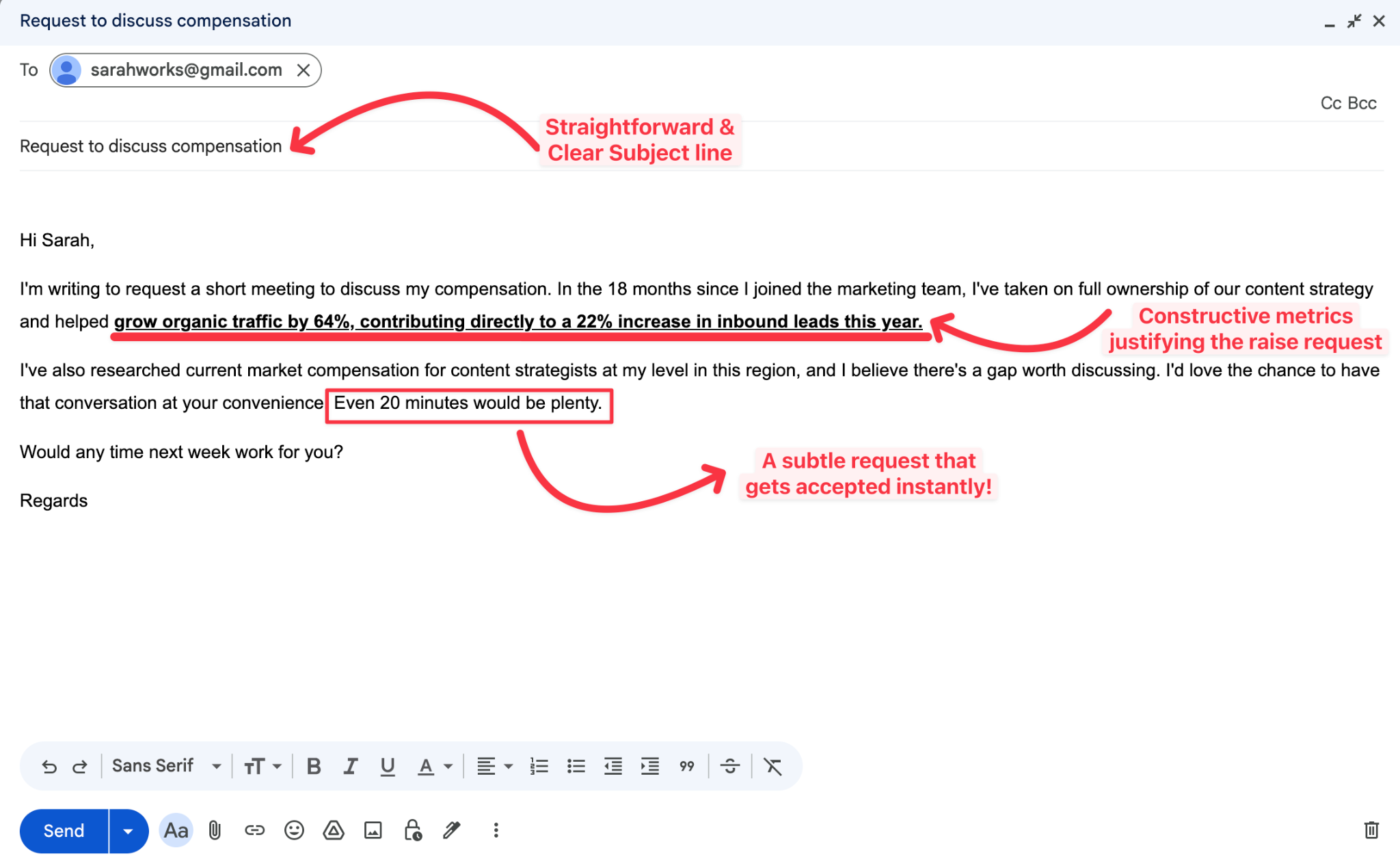
Why it works: The subject line names the topic and the sender, making it easy to find and act on. The opening statement states the purpose immediately with no warm-up. Two specific metrics do more work than a full paragraph of self-praise, and the closing asks for something small and easy to say YES to.
{{templates}}
How to follow up after sending the raise request email
Before sending a follow-up, wait 5 to 7 business days to ensure your manager has had enough time to read and consider your email. Keep it short, warm, and pressure-free. One follow-up is professional; anything more is not.
Here's a sample you can use:
Once your manager responds and a meeting is set, come prepared with your market research, a clear target number or range, two to three specific quantified achievements, and a sense of what alternatives you'd consider if a salary increase isn't immediately possible.
What not to say in a raise request email? Common mistakes to avoid
Avoid bringing up personal finances, comparing yourself to coworkers, or leading with emotion in a raise request email. These shift the focus away from your professional value and give your manager a reason to pause rather than act. The strongest emails stick to evidence, stay factual, and make it easy to say yes.
Some of the most common mistakes include:
- Personal finances: Mentioning rent, bills, or living costs shifts the conversation away from your value. Your employer is not responsible for your expenses. Keep the focus on what you have delivered.
- Coworker comparisons: Saying "I heard Sarah makes more than I" creates awkwardness and rarely helps your case. Your ask should stand on your own merits, not someone else's salary.
- Quitting threats: Unless you have an offer in hand and are fully prepared to walk, ultimatums almost always backfire. They put your manager on the defensive instead of in your corner.
- Emotional language: Phrases like "I feel undervalued" can read as unprofessional. Your manager needs facts they can act on, not feelings they have to manage.
- A long backstory: Your manager knows your history. You do not need to recap every project since you joined. Pick your two or three strongest points and leave the rest out.
- Apologetic filler: Opening with "I'm sorry to bother you" or "I hope this isn't too much to ask" signals that you are not confident in your own request. Own your ask from the first sentence.
What to do if your boss says no
When your boss says no to a raise, it does not have to be the end of the conversation. How you respond matters just as much as how you asked.
Stay professional, thank them for their time, and then do three things:
- Stay professional: Thank them for the conversation and express that you understand, even if you're disappointed. How you handle a no quietly shapes how seriously you're taken the next time you ask.
- Ask what a yes would require: Try asking "What would I need to achieve in the next six months to make a raise possible?" A good manager will give you a real answer. That answer becomes your roadmap.
- Pin down a timeline: Don't let it end with a vague "let's revisit this." Ask directly, "When would be a good time to come back to this conversation?" A date on the calendar is a commitment. A maybe is just a maybe.
If the salary number is genuinely frozen, ask about alternatives. A performance bonus, a title adjustment, equity, flexible hours, or a professional development budget are all worth exploring. The conversation does not have to end because one door closed.
Pay attention to what the no tells you as well. A company that cannot offer a clear path to fair compensation may be telling you something important about your future there.
{{cta}}
Try Lindy: Write your raise request email in seconds
Got other emails to write? Lindy can handle most of them for you. Text Lindy what you need in plain English and it drafts, personalizes, and sends, whether that's a raise request, a follow-up, or everyday outreach.
Here's what that looks like in practice:
- Get answers instantly: Text Lindy to pull information from your email, calendar, or CRM without digging through tabs.
- Send emails and follow-ups automatically: Ask Lindy to draft, personalize, and send outreach and handle replies.
- Take meeting notes and share summaries: Lindy joins virtual meetings, writes structured notes, and helps with follow-ups.
- Update your CRM without manual entry: After a call, Lindy logs notes and fills in missing fields automatically.
- Find and qualify leads in minutes: Tell Lindy your ideal customer profile and get curated lead lists ready for outreach.
- Hundreds of integrations: Lindy connects with the tools you already use, so everything stays in sync.
FAQs
1. Is it okay to ask for a raise through email?
Yes, asking for a raise through email is completely professional and often the smarter first move. It gives your manager time to prepare, creates a written record, and removes the pressure of a real-time reaction. It works especially well in remote or hybrid environments, or when you want to open the conversation before requesting a formal meeting.
2. Should I ask for a specific percentage or dollar amount?
Asking for a specific percentage or dollar amount works best when you have strong market data and a clear number in mind. If you do, naming it in the email can anchor the conversation helpfully. If you're less certain, request a meeting first and save the number for that conversation.
3.Is email better than asking in person?
Email is not universally better than asking for a raise in person. It depends on your workplace culture and your relationship with your manager. Email works well as a first move because it creates a record, removes time pressure, and gives your manager space to respond thoughtfully. In-person or video follow-up is usually where the actual negotiation happens.
4. Should I mention a specific number in the raise request email?
Mentioning a specific number in your raise request email works best when you have solid market data to back it up. If you're less certain, save it for the meeting and write "I have a figure in mind that I'd love to walk through with you directly."
5. Can Lindy help me write a raise request email?
Yes, text Lindy your role, your key achievements, and the outcome you're looking for, and it will draft a polished, personalized raise request email in seconds. You can also ask Lindy to adjust the tone, generate multiple versions, or write a follow-up when you're ready to send one.









