What is Generative AI in Customer Service & How to Use it
Marvin broke down generative AI in customer service, explaining how it beats rule-based chatbots, real use cases across e-commerce and SaaS, and a five-step rollout.
.avif)

Customer expectations have changed. They want fast, accurate, and personalized answers, without waiting on hold or digging through FAQs.
Generative AI makes that possible.
This guide breaks down what generative AI in customer service really means, what benefits it brings, how businesses are using it today, and how you can start implementing it.
What Is Generative AI for Customer Service?
Generative AI in customer service uses advanced AI models like GPT to understand and reply to customer queries in real time through chat, email, or voice. It doesn’t follow fixed scripts. Instead, it understands natural language, responds like a human, adjusts its tone, and learns from every conversation.
This makes support faster, more natural, and more helpful for customers.
What’s the Difference Between Generative AI and Traditional Chatbots?
| Feature | Traditional Chatbot | Generative AI |
|---|---|---|
| Input Handling | Rule-based, keyword matching | Natural language understanding |
| Flexibility | Pre-scripted flows | Dynamic, real-time generation |
| Learning | No memory | Learns and adapts |
| Tone | Robotic, static | Conversational, adaptive |
| Use Cases | FAQs, simple tasks | Full conversations, complex queries |
Why Use Generative AI in Customer Service?
1. Give Instant Support 24/7 Without Delays: Generative AI answers customer questions at any time of day, even when your team is offline. You don’t need to limit support to business hours.
2. Make Every Conversation Feel Human: The AI understands natural language and replies in a way that feels real. It adjusts tone and context just like a human agent would.
3. Solve Issues Faster and Save Time: The AI can quickly understand the problem, suggest a fix, or send the request to the right person. This cuts down how long it takes to help each customer.
4. Keep Your Customers Happier: When answers are accurate and fast, people feel heard. This improves satisfaction scores and keeps them coming back.
5. Reduce Workload and Boost Efficiency: The AI handles common, repetitive questions. Your team gets more time to focus on tough or high-priority requests.
6. Grow Your Support Without Hiring More Staff: You can help more people without increasing team size. This is great for startups or businesses looking to scale smartly.
How You Can Use Generative AI in Customer Service
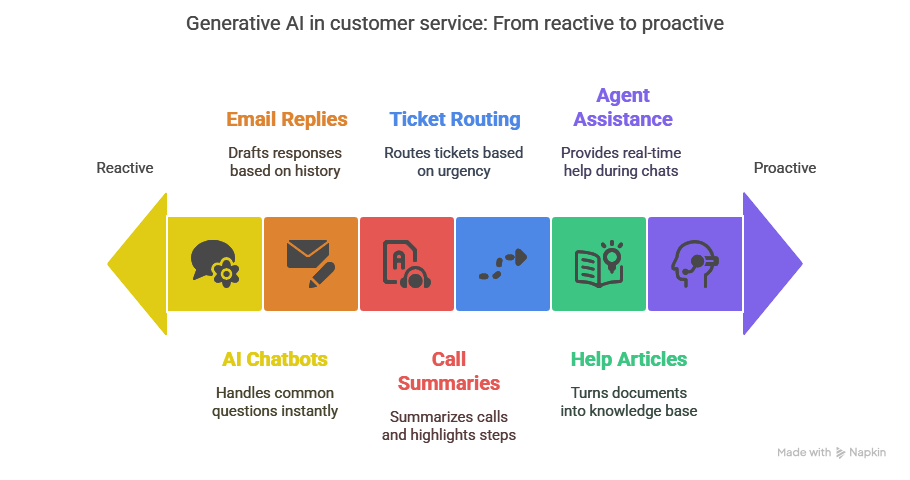
1. Use AI Chatbots to Handle Common Customer Questions
You can train and create AI chatbots to answer product questions, track orders, manage returns, and guide users, all in a friendly, natural language format. This reduces pressure on your live agents and gives customers instant help.
2. Let AI Draft Accurate Email Replies for You
Instead of writing every customer email from scratch, generative AI can create full responses based on past conversations, customer history, and intent. You save time and still deliver clear, helpful replies.
3. Automatically Summarize Support Calls and Follow-Ups
After a customer call, AI can write a detailed summary, highlight next steps, and sync everything into your CRM. This keeps your records clean and helps agents follow up without missing anything.
4. Sort and Route Tickets Without Manual Work
AI can scan incoming support requests, understand the problem, and route each ticket to the right agent or team. It prioritizes based on urgency and sentiment, so nothing falls through the cracks.
5. Turn Internal Documents Into Useful Help Articles
You can use AI to scan manuals, support transcripts, and internal notes, then turn that data into easy-to-search knowledge base content. Customers and agents both find answers faster.
6. Give Agents Real-Time Help During Live Chats
While your support agents talk to customers, AI can suggest replies, pull product info, or provide relevant articles instantly. This leads to faster answers, better conversations, and fewer mistakes.
Real Examples of How Businesses Use Generative AI in Customer Service
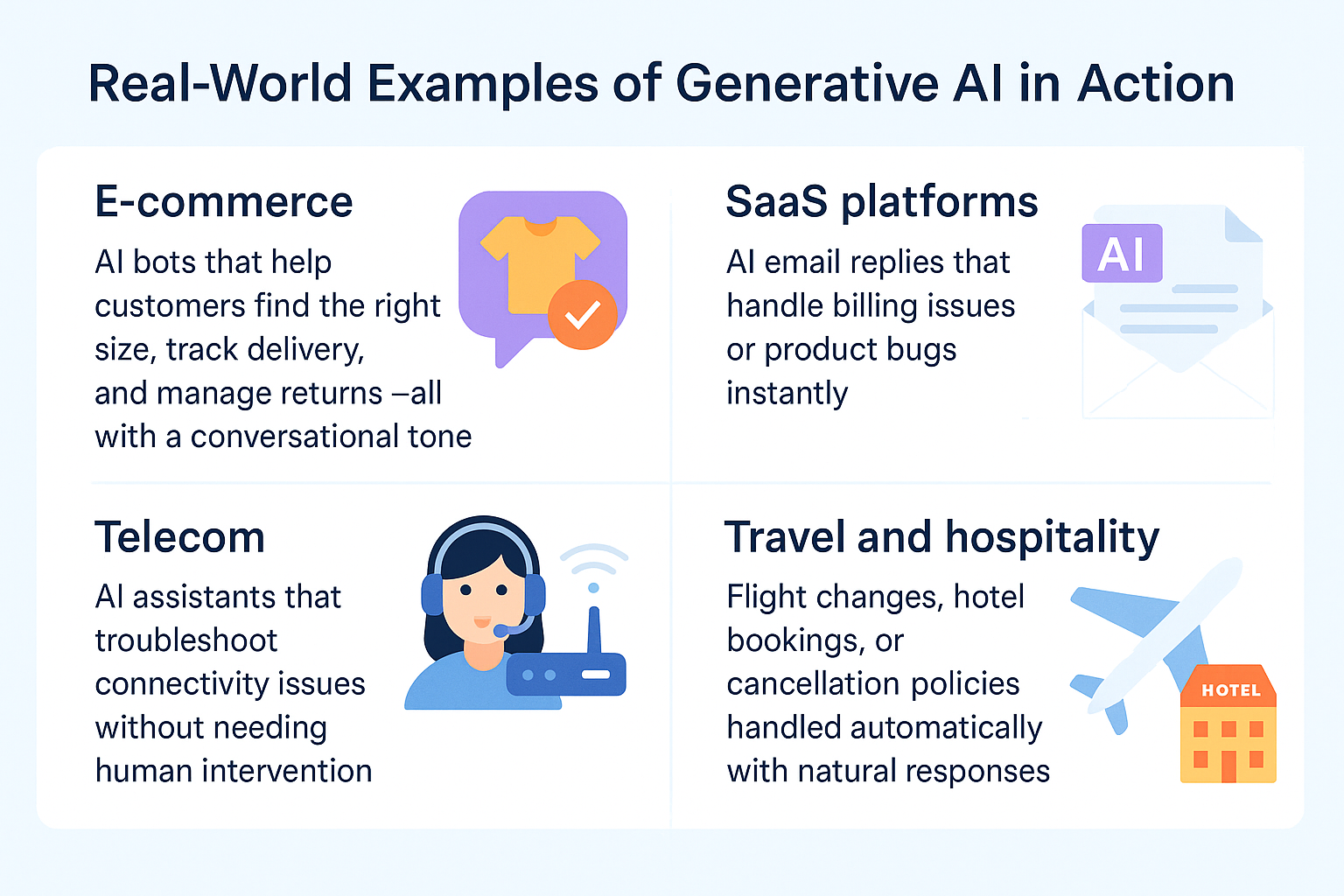
1. E-commerce: Help Customers Without Delays
Online stores use generative AI to assist with order tracking, return requests, size guides, and product questions. The AI chats with customers in a friendly, natural way, helping them make buying decisions or solve issues without needing a live agent.
It reduces wait times, improves the shopping experience, and cuts down support costs.
2. SaaS Platforms: Respond to Support Tickets Automatically
Software companies use AI to draft email replies for billing problems, subscription changes, and product bugs. The AI understands the request, pulls the right data, and sends a full response that feels personal and accurate.
It keeps response times low and helps the support team focus on complex issues.
3. Telecom: Solve Technical Issues With AI Guidance
Telecom companies use AI to guide customers through troubleshooting steps for things like internet outages, SIM issues, or device setup. The AI asks follow-up questions, checks context, and offers real solutions without involving a support rep.
It saves time for both the company and the customer while resolving common problems quickly.
4. Travel and Hospitality: Handle Bookings and Changes in Seconds
Hotels, airlines, and booking sites use AI to manage flight changes, cancellations, refund requests, and hotel bookings. The AI answers in real time, using clear and polite language that feels human.
It keeps travelers informed, reduces frustration, and improves the overall experience, especially during high-demand periods.
{{templates}}
How to Add Generative AI to Your Customer Support Process
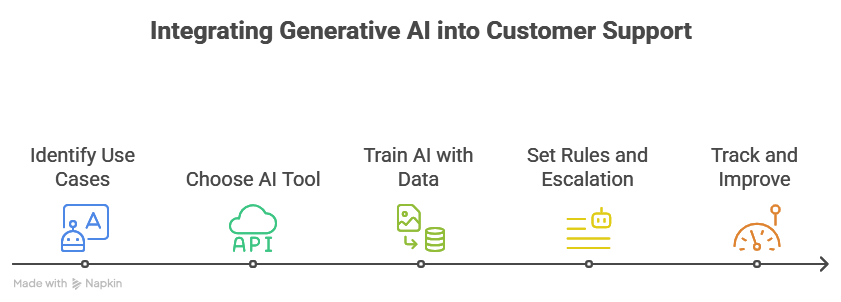
Step 1: Start With Clear Use Cases
Begin by identifying tasks that come up often and don’t require complex thinking. These are usually things like:
- Tracking orders
- Updating account details
- Answering FAQs
- Resetting passwords
Pick 2–3 of these to start. Focus on what your team spends the most time on and what frustrates customers when delayed.
Lindy lets you build task-specific AI agents that can handle each use case separately. You can create one agent for returns, another for account help, and more, each trained to handle the job without confusion.
Step 2: Choose a Tool That Fits Into Your Workflow
You don’t need another disconnected system. Pick a generative AI platform that connects easily with your current tools:
- CRM (like HubSpot or Salesforce)
- Ticketing systems (like Zendesk or Freshdesk)
- Knowledge bases and internal docs
Make sure the AI can pull real-time data and update records.
Lindy connects with your existing software stack so your AI agents can fetch order details, check customer history, or log support notes, without switching tabs or building custom integrations.
Step 3: Train the AI With the Right Data
AI is only as helpful as the data you feed it. Start by uploading:
- Support transcripts
- Help docs and FAQs
- Product descriptions
- Internal SOPs or troubleshooting guides
Keep the information clean, up to date, and relevant. Avoid vague or outdated content.
Lindy uses your real documents to train AI agents. Just upload your files or link your help center, and Lindy will automatically pull answers from the latest content so the AI always gives accurate replies.
Step 4: Set Rules and Escalation Paths
You need to control what the AI can and can’t do. For example:
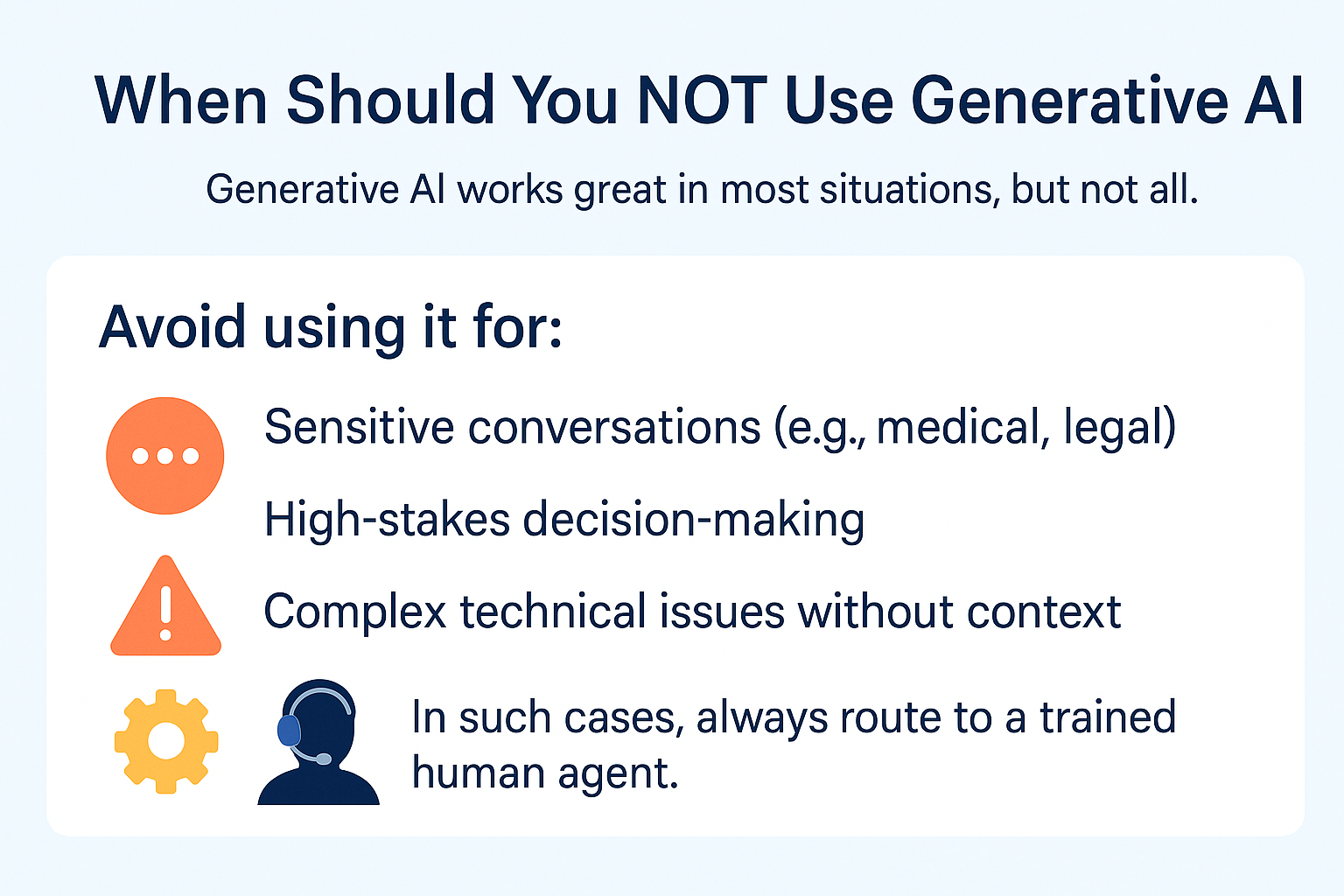
- Block it from answering billing or legal questions
- Add rules to escalate tickets to humans if confidence is low
- Set tone preferences (formal, casual, brand-specific)
Build clear fallback systems so the AI doesn’t go off track.
Lindy lets you set up guardrails for every agent. You can define the tone, blacklist topics, and configure when to escalate to a live agent. This keeps conversations on-brand and safe.
Step 5: Track Results and Improve Over Time
Once live, track key metrics like:
- Resolution time
- Deflection rate (how many tickets AI resolves)
- Handoff rate to humans
- CSAT and feedback ratings
Use this data to fine-tune prompts, add better training data, or adjust workflows.
Lindy gives you detailed reports on each AI agent’s performance. You’ll see which queries were answered, which needed help, and where improvements are needed, so you can keep optimizing support without guessing.
How to Make the Best of Generative AI in Customer Service
1. Track common questions to spot new trends
Use AI transcripts to identify what customers keep asking about. If a certain issue or product keeps coming up, your team can act fast, whether that means fixing a bug, improving onboarding, or updating your policies.
2. Personalize replies using customer history
When your AI knows past orders, preferences, or open tickets, it gives better answers. It avoids repeat questions, shows that you understand the customer, and makes the whole experience feel more tailored.
3. Use AI chats to train new support agents
AI conversations often model ideal tone, speed, and structure. Sharing top-rated responses with your team helps them learn what good support looks like and speeds up onboarding.
4. Improve your help docs based on AI failures
Every time AI can’t answer a question and passes it to a human, that's a learning opportunity. Look at those moments to find what’s missing in your knowledge base, then update it to close the gap.
5. Keep testing different prompts and response flows
Small changes in how you set up the AI can lead to big improvements. Try new prompt structures, test different tones, and monitor what gets the best customer satisfaction or deflection rates.
{{cta}}
Try Lindy to Build Your Own AI Support Agent
Want to implement generative AI in your customer support?
Lindy lets you build custom AI agents that:
- Answer customer queries
- Learn from your documentation and past support tickets
- Summarize calls and tickets
- Pull data from your CRM or helpdesk
No coding needed. Just connect your docs, set your workflows, and go live.
Frequently Asked Questions
1. Can Lindy handle multiple languages effectively?
Yes, Lindy supports multiple languages and understands context in different regions. It works well for global support teams and responds naturally in the customer’s language. You can train agents on multilingual data to improve accuracy and serve diverse audiences without building separate workflows.
2. How can generative AI enhance customer support?
Generative AI understands customer intent, replies in natural language, and learns from every interaction. It resolves repetitive queries instantly, reduces wait times, and improves customer satisfaction. It also helps agents by summarizing tickets, suggesting replies, and handling routine tasks so they can focus on complex issues.
3. How do I get into generative AI?
Start by learning how large language models work. Explore no-code tools like Lindy or ChatGPT to build simple agents. Read about prompt design, fine-tuning, and RAG. Join communities, follow product updates, and test use cases like support, content creation, or research automation in your business or role.
4. Is it the most reliable generative AI for customer interactions?
Lindy ranks among the most reliable AI agents for customer support. It connects to your systems, understands your content, and delivers fast, consistent answers. With guardrails, memory, and real-time data access, it offers more control and accuracy than general-purpose chat tools.
5. What are the main benefits of using Lindy.ai for customer support?
Lindy gives you fast setup, deep integrations, and full customization. You can build task-specific AI agents, train them on your docs, and connect them to tools like CRM or helpdesk. It saves time, handles repetitive tickets, and improves quality without adding headcount.
6. Does Zendesk use AI for customer service?
Yes, Zendesk includes AI features like automated ticket triage, intent detection, and generative replies. It also offers bots that handle FAQs and use machine learning to route conversations. You can extend Zendesk’s AI with third-party tools like Lindy for more advanced use cases.
7. How do I create an AI agent?
Pick a no-code tool like Lindy. Upload your support content, define what the agent should handle, and connect it to your ticketing or CRM system. Set tone and rules, test common queries, and go live. You can iterate later by adding more data or refining prompts.
8. How do I choose a generative AI provider for multilingual support?
Check if the AI supports your target languages natively, not just through translation. Look for tools that let you train agents using multilingual content. Evaluate output quality in different languages and make sure the platform lets you customize tone and intent recognition based on region.
9. How do I use Lindy AI?
Sign up, upload your internal docs, and choose a use case like support, ticket triage, or CRM automation. Create an agent, define its purpose, connect it to your tools, and test responses. You can go live quickly and monitor performance with built-in analytics.
10. What platforms include generative AI performance tuning in customer support packages?
Platforms like Lindy, Intercom Fin, Forethought, and Ada offer performance dashboards where you can review fallback rates, accuracy, and satisfaction. These tools help you tune prompts, update training data, and improve response quality over time based on real usage.
11. What tools offer 24/7 support for global teams working on generative search strategy?
Lindy, Intercom, and Forethought provide AI agents that run 24/7 and handle customer queries worldwide. These platforms support multiple languages, understand time zones, and integrate with internal systems to deliver real-time information no matter where your team or customers are.
12. What's the best AI support agent for companies with legacy systems?
Lindy works well with legacy tools because it connects through APIs, file uploads, or simple webhooks. You don’t need to rebuild your tech stack. You can train agents using existing SOPs, PDFs, or email logs, and still automate support at scale.
13. What's the best AI support agent that works well with minimal training data?
Lindy performs well even with limited data. You can upload just a few help docs or SOPs, and the AI starts responding accurately. It doesn’t need thousands of examples like older models. You can improve performance later by adding more documents as needed.










