What is Automated Customer Onboarding & How to Do it Right?
Michelle walked through automating customer onboarding, from defining the activation event and mapping the journey to choosing tools, personalizing flows, and measuring time-to-activation.


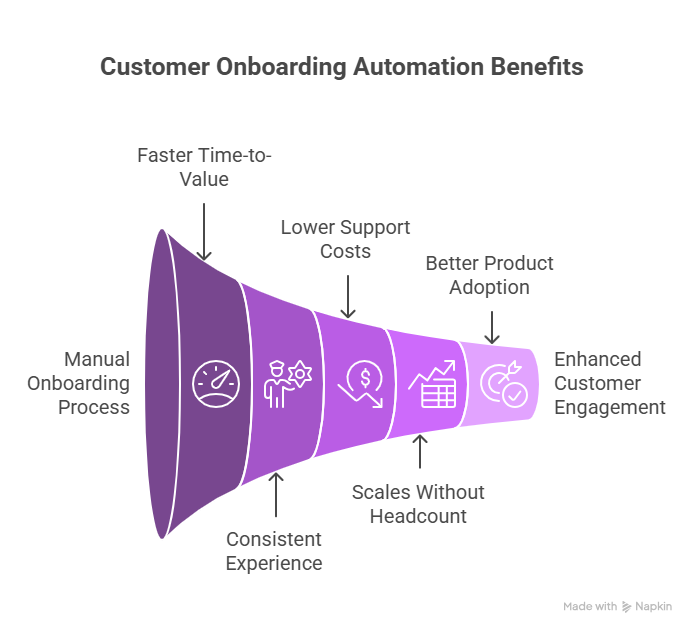
Automated customer onboarding is the process of welcoming, educating, and activating new users through pre-set workflows instead of manual hand-holding.
It uses tools like email sequences, product tours, chatbots, and in-app checklists to:
- Guide users through initial setup
- Teach them key features
- Drive first value or “aha” moments
- Reduce support tickets and churn
Think of it as a self-driving onboarding experience that runs 24/7, tailored to each customer’s needs.
6 Key Elements of an Automated Onboarding Flow
1. Welcome Email + Setup Instructions
Triggered immediately after signup. Should include:
- A warm welcome
- Login/setup link
- Clear next step (e.g., “Connect your CRM”)
2. In-App Walkthroughs
Use product tours, tooltips, or checklists to:
- Walk users through must-do actions
- Highlight features in context
- Trigger based on actions (or inaction)
3. Automated Email Sequences
Send time-based or behavior-based emails to:
- Educate (e.g., "How to use integrations")
- Motivate (e.g., "You're 1 step away from setup")
- Re-engage (e.g., "Still need help finishing setup?")
4. Progress Tracking + Nudges
Use onboarding checklists or dashboards to show:
- What’s done vs. pending
- What’s next and why it matters
- Nudges like: “Just one more step to finish onboarding!”
5. Chatbot or AI Assistant
Let users ask questions anytime during onboarding.
- Instant replies
- Links to docs or help articles
- Option to escalate to human support
6. Success Milestones
Trigger rewards or messages when users hit key goals:
- “First project created”
- “3 team members added”
- “First integration live”
P.S. Cut to the chase and let Lindy take care of your client onboarding.
How to Build an Automated Customer Onboarding System (Step by Step)
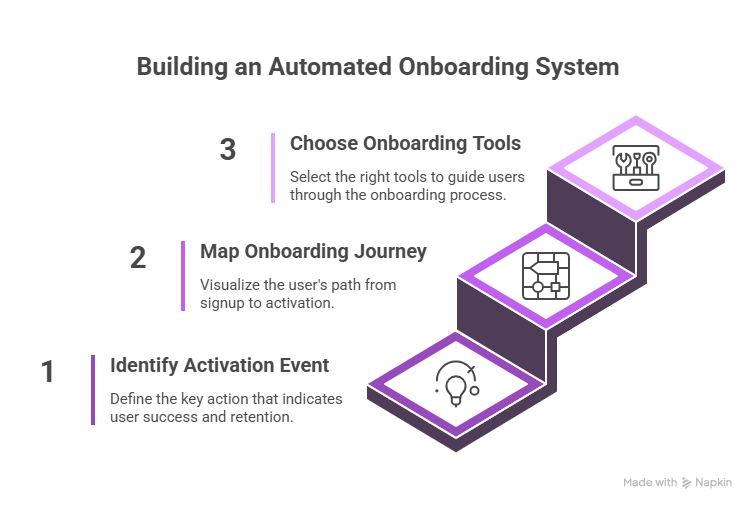
Step 1: Identify the Activation Event That Signals Success
Before you build anything, define the one action that proves your user has seen value. This is your activation goal.
Examples:
- A project management app → User creates first task or board
- A CRM → User imports contacts or connects email
- A fintech tool → User connects their bank or sends first payment
What to do:
- Ask: “What action correlates most with long-term retention?”
- Analyze historical user data (if available) or talk to customer support/success teams.
- Pick one primary goal and secondary milestones, if needed.
Everything you design should move the user toward this action within the first 10–30 minutes or within 1–2 sessions max.
Step 2: Map Out the Onboarding Journey Visually
Draw a simple customer journey map from signup to activation. Keep it lean.
This is what a typical structure looks like:
- Signup
- First login
- Profile/account setup
- First meaningful action
- Activation achieved
For each step, answer:
- What action does the user need to take?
- What’s blocking them from doing it?
- What message, tool, or automation helps them get through?
Use tools like Miro, Whimsical, or even a Google Doc to sketch your onboarding map.
Step 3: Choose Tools to Power the Experience
You don’t need to build your own onboarding platform. Use purpose-built tools for each part of the journey.
| Function | Tool Examples | Use It For |
|---|---|---|
| Product tours | Appcues, Userpilot, Chameleon | In-app walkthroughs, guided setup |
| Email automation | Customer.io, ActiveCampaign | Welcome emails, timed reminders, behavioral nudges |
| CRM + triggers | Intercom, HubSpot, Lindy | Contact segmentation, workflows, smart alerts |
| Onboarding checklists | Pendo, UserGuiding, Stonly | In-app setup trackers, visual progress bars |
Start with no-code tools, then layer on API integrations later as needed.
Step 4: Personalize the Onboarding Flow Based on Who the User Is
Generic onboarding is forgettable. Personalization improves activation and engagement.
What to personalize:
- By user role: Admin vs. Member
- By plan: Free users get a shorter flow, paid users get full onboarding
- By use case or industry: Different flows for e-commerce, SaaS, finance, etc.
How to do it:
- Ask the right questions at signup (e.g., “What do you want to achieve with this tool?”)
- Use branching logic in your tours and emails
- Trigger conditional onboarding paths using tools like HubSpot or Intercom workflows
Quick example:
If a user selects “I want to integrate with Slack,” immediately send them to a flow that covers that exact integration with:
- A product tour
- Help doc link
- Email follow-up if incomplete
Step 5: Measure What’s Working and Keep Optimizing
Your onboarding is never "done." Keep improving based on data.
Track these KPIs:
- Time-to-activation: How long does it take users to hit the success metric?
- Setup completion rate: Where do users drop off?
- Email and product tour engagement: What steps are ignored or skipped?
What to test:
- A/B test different welcome emails
- Try short vs. long checklists
- Move key actions earlier in the flow
Run a review every month. Look at your funnel. Find the highest drop-off point. Fix that first.
Don’t know what questions to include? Check out some client onboarding questionnaire examples here.
{{templates}}
How Different Businesses Use Automated Customer Onboarding
Here’s how automated onboarding plays out in different industries and products, with real goals, users, and workflows.
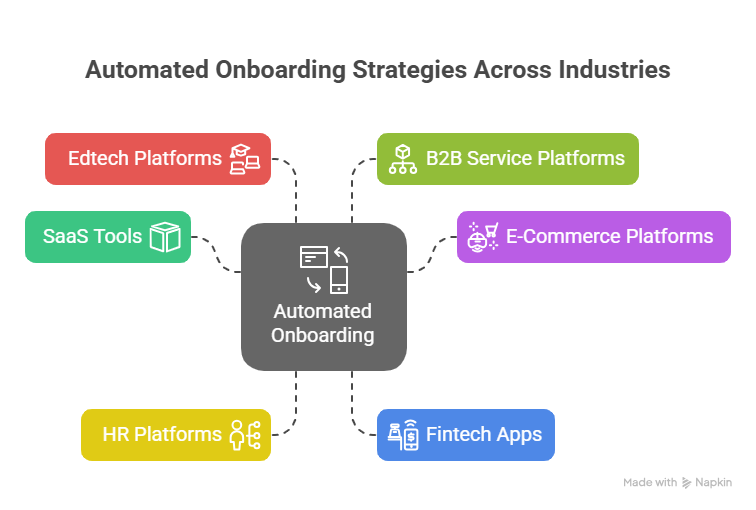
1. Saas Tools (CRMs, Project Engagement, Analytics Platforms)
Users: Marketing teams, sales reps, founders, operations managers
Activation goal: Get users to complete setup and reach first value action (e.g., connect data sources, create a campaign, or invite teammates)
Automated onboarding includes:
- In-app product tours, guiding the user to create their first project or pipeline
- Triggered emails nudging them to invite their team
- Onboarding checklist to track setup steps (e.g., connect HubSpot, import contacts, launch first dashboard)
2. E-Commerce Platforms (Shopify-Like Tools, Marketplaces)
Users: Store owners, product managers, sellers
Activation goal: Set up store, list products, and activate payments
Automated onboarding includes:
- A guided wizard for uploading the first 5 products
- Triggered help docs and videos for setting up payment gateways
- Automated nudges for missing steps, like tax settings or shipping policies
3. Hr Platforms (Employee Management, Payroll, Or Onboarding Tools)
Users: HR managers, admin staff
Activation goal: Import employee data, configure workflows, and complete first HR task (e.g., run payroll or launch onboarding checklist)
Automated onboarding includes:
- Step-by-step email guidance for importing bulk employee data
- Interactive product tours for creating workflows (e.g., leave approval or offer letters)
- In-app reminders to finish setting up benefits, documents, and compliance tasks
4. Fintech Apps (B2B Payments, Neobanks, Expense Platforms)
Users: Founders, finance heads, accountants
Activation goal: Complete KYC, connect bank account, and make first transaction
Automated onboarding includes:
- Identity verification reminders (KYC) sent via email/SMS
- Product tours, guiding the user to connect accounts or cards
- Smart AI chatbot to assist with compliance questions or transaction issues
5. Edtech and Online Learning Platforms
Users: Students, professionals, training managers
Activation goal: Enroll in a course, complete first module, pass initial quiz
Automated onboarding includes:
- Personalized welcome emails based on selected learning path
- In-app onboarding wizard to guide learners through course dashboards
- Nudges to complete first video or quiz, sent via push or email
6. B2B Service Platforms (Legal, Insurance, Logistics Portals)
Users: Business owners, procurement heads, legal teams
Activation goal: Submit first request, upload documentation, or complete profile
Automated onboarding includes:
- Dynamic forms with pre-filled info based on signup
- Email workflows triggered by incomplete steps
- Escalation triggers to live support if key onboarding actions are delayed
Each of these use cases shares the same principle: guide users to value quickly, contextually, and without needing a human in the loop, unless absolutely necessary. That’s the power of automated onboarding.
{{cta}}
Ready to Automate Your Onboarding? Let Lindy Handle It End-to-End
Building a seamless onboarding flow is tough, especially when you’re juggling setup emails, in-app guidance, and user questions across touchpoints.
Lindy makes it effortless. It’s not just another chatbot or email tool. Lindy builds full AI agents that handle onboarding across email, chat, product, and CRM (like Salesforce, HubSpot) automatically.
Here’s what Lindy can do for your onboarding:
- Auto-respond to user questions in real time with onboarding help via chat or email
- Send personalized, behavior-based emails based on each user’s progress and plan
- Trigger step-by-step setup workflows the moment a user signs up or hits a milestone
- Push onboarding data into your CRM so your sales or success team always has context
- Run role-specific onboarding flows (e.g., Admins vs. Users, Free vs. Paid) without manual logic
- Escalate intelligently to humans only when needed, keeping the rest fully automated
If you're serious about scaling onboarding without scaling your headcount…
Frequently Asked Questions
1. What’s the difference between onboarding and activation?
Onboarding is the structured process that guides new users from signup to setup using tools like emails and tours. Activation is the moment they reach their first value milestone, like sending an invoice or completing setup. Activation is the result; onboarding is how you get them there efficiently and consistently.
2. How long should automated onboarding take?
Ideally, users should reach their first success milestone within 5–15 minutes of signing up. If your tool is more complex, aim to deliver value within the first session or two. The faster you guide users to a meaningful result, the better your retention and conversion rates will be.
3. Can I automate onboarding for high-touch customers?
Yes. Blend automation with manual support. Use product tours, setup emails, and help docs for the basics. Add human touchpoints, like kickoff calls or tailored check-ins, for strategic setup or complex use cases. This hybrid approach keeps your onboarding scalable without sacrificing the white-glove experience for VIP accounts.
4. How do I measure onboarding success?
Track key metrics like time-to-activation, setup completion rate, activation rate, and early-stage churn. Monitor drop-off points, engagement with onboarding elements (like checklists or emails), and support ticket volume during onboarding. These indicators show how well your flow drives users toward product value and retention.
5. Is it worth hiring someone just for onboarding automation?
Yes, especially if you're scaling or have a complex product. A dedicated onboarding expert can design flows that reduce churn, increase activation, and cut support costs. They continuously test, optimize, and personalize onboarding, turning it into a measurable growth lever instead of a support bottleneck.
6. How long does it take to set up automated onboarding?
If you're using no-code tools like Lindy, or HubSpot, a basic onboarding flow can be set up in 1–2 days. More complex, multi-path flows may take 1–2 weeks, depending on integrations and customization. Start small, launch fast, then iterate based on user behavior.
7. What are the most common onboarding mistakes to avoid?
Common pitfalls include: overwhelming users with too many steps at once, using generic flows for all users, skipping progress tracking, and not prompting a clear first action. Avoid automating everything without context, automation should guide, not confuse.
8. Can automated onboarding work with my existing tech stack?
Yes. Most tools integrate easily with CRMs (like HubSpot or Salesforce), analytics platforms (like Mixpanel), and support tools (like Intercom or Zendesk). With Lindy, you can plug into your existing workflows and trigger onboarding actions based on events or user behavior in real-time.
9. Is automated onboarding suitable for free trial users or freemium products?
Absolutely. In fact, automation is critical for converting free users. You can design goal-based flows that show value quickly, like prompting a feature setup or integration, while tracking who completes onboarding and who drops off before converting.
10. How do I educate users without overwhelming them?
Break onboarding into digestible stages. Use checklists, tooltips, and triggered emails based on what the user has (or hasn’t) done yet. Focus only on one or two key actions per screen. The goal isn’t to show every feature, it’s to get them to first value fast.









