What Is Customer Engagement Score Formula & How to Improve
Marvin broke down the customer engagement score formula, weighting user actions like logins and feature use, segmenting users by score, and improving engagement with AI.
.avif)

A Customer Engagement Score is a number that shows how actively and meaningfully a customer interacts with your product or service. Aka CES, it reflects product usage, feature interaction, and behavioral signals that point to real value.
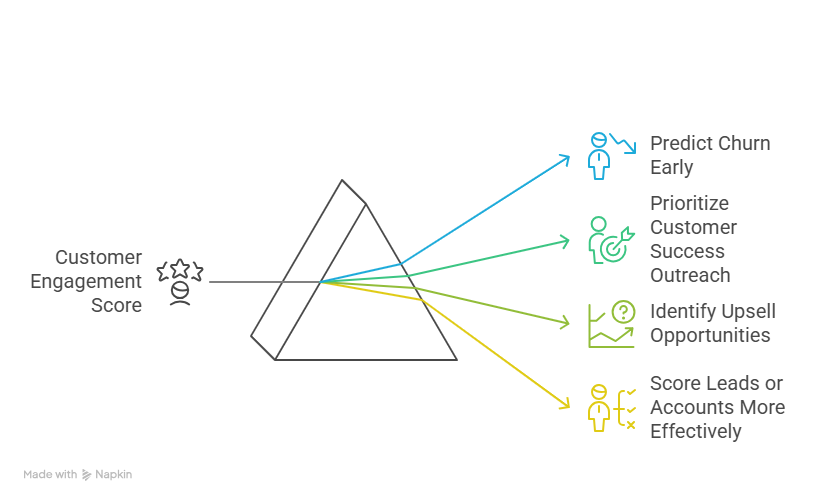
This score helps businesses:
- Predict churn early
- Prioritize customer success outreach
- Identify upsell opportunities
- Score leads or accounts more effectively
It’s based on behavior, not sentiment, making it more reliable than subjective metrics like NPS.
What Is the Customer Engagement Score Formula?
There’s no fixed global formula. Each company needs to define what engagement means based on its product.
The general formula looks like:
Customer Engagement Score = (a × Event1) + (b × Event2) + (c × Event3) + ...
Where:
- Event1, Event2, etc. are user actions (logins, feature usage, etc.)
- a, b, c are the weights or importance you assign to each
Example:
CES = (2 × #Logins) + (4 × #Key Feature Uses) + (1 × #Support Tickets) – (3 × #Days Inactive)
You can tweak the weights depending on what drives retention.
What Events Should You Track?
The most useful scores are built on value-driving actions, not vanity signals.
| Event to Track | Should You Use It? |
|---|---|
| Weekly or daily logins | Yes |
| Use of core product features | Yes |
| Time spent in-app | Yes |
| Support ticket submitted | Maybe (context matters) |
| Clicking marketing emails | No (too passive) |
| NPS or CSAT score | No (not behavioral data) |
Start with 3–5 events that make the most sense for your business.
For example:
- If you run a project management tool, track the number of tasks created, comments posted, time spent in projects, and logins per week.
- If you offer a B2B analytics platform, focus on dashboard views, reports exported, the number of team invites sent, and custom metric creation.
- For a SaaS communication tool, important events could be messages sent, channels created, active days per week, and integrations connected.
Each event you pick should reflect value delivered or progress toward a customer’s success. Skip superficial actions that don’t lead to retention or usage expansion.
How to Use Customer Engagement Score
Once you’ve calculated the Customer Engagement Score, the next step is to segment your users based on their score.
This makes it easier to personalize your messaging, prioritize your customer success efforts, and automate responses based on engagement level.
Here’s how you can segment:
| Score Range | Engagement Level | What It Means |
|---|---|---|
| 80 and above | Highly engaged | Users consistently use key features and get clear value. |
| 50–79 | Moderately engaged | Users are active but haven’t fully adopted core features. |
| Below 50 | At-risk or inactive | Users have dropped off or barely use the product. |
What to Do with Each Segment
1. Highly Engaged (80+)
These are your power users. They’re the most likely to upgrade, refer others, or expand usage internally.
Here are a few things you can do:
- Send NPS surveys or review requests.
- Introduce premium features or upsell plans.
- Encourage referrals or testimonials.
- Invite them to customer advisory boards or beta programs.
- Use them as case study candidates.
2. Moderately Engaged (50–79)
These users are on the fence. They’ve seen some value, but may not be fully onboarded or using sticky features.
For this segment:
- Trigger automated email sequences with feature tips or how-tos.
- Offer webinars or product tours focused on deeper use cases.
- Assign a success manager or send a personal check-in email.
- Use in-app nudges to drive feature discovery.
- Share stories of similar users who saw better results after full adoption.
3. At-Risk or Inactive (Below 50)
These users are disengaged and likely to churn unless reactivated soon.
Here’s what I suggest doing:
- Send win-back campaigns highlighting new features or benefits.
- Offer incentives (discounts, extra support, etc.) to re-engage.
- Identify blockers like trigger surveys or exit interviews to learn why they’ve disengaged.
- Use retargeting ads or in-app messages if they return briefly.
- Reduce friction by simplifying setup or revisiting onboarding.
Automate It Inside Your CRM or Product Stack
Once these segments are in place, automate workflows based on score changes:
- Trigger alerts for CS reps when scores drop below a threshold.
- Sync CES to your CRM (like HubSpot or Salesforce) to update contact or account health. Lindy works best for it.
- Automate playbooks for each segment using tools like Intercom, Customer.io, or Gainsight.
- Use score trends (not just raw score) to spot slipping engagement before it becomes churn.
Tracking is good. Acting on it is better. Automating it is best.
{{templates}}
How to Improve Customer Engagement Score with AI in 6 Steps
If your Customer Engagement Score is low, it means users aren’t getting enough value from your product, or not consistently.
AI can help you fix that by automating personalized guidance, predicting churn, and reacting to user behavior in real time.
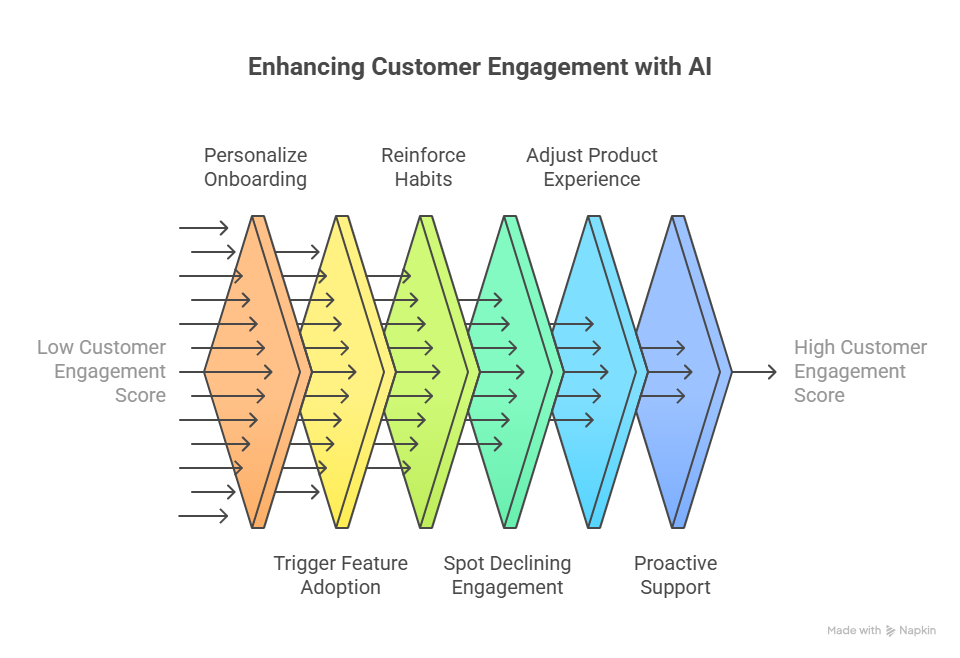
Here’s how to use AI to systematically improve CES across the user journey.
Step 1: Kick Off Smarter Onboarding with AI-Driven Personalization
Generic onboarding doesn’t work for modern users. People have different roles, goals, and expectations. If they don’t experience value in the first few days, they disengage.
How AI helps:
- Let Lindy instantly tailor onboarding experiences based on user traits like role, company size, or product plan. For example, a Head of Ops might get guided tours focused on analytics, while a marketing user gets workflows tied to campaign tracking.
- Lindy can auto-generate welcome messages, video walkthroughs, or quick setup tips tailored to where the user is stuck.
- Pair that with Appcues or Intercom, and you can deliver these flows through email, live chat, or in-product modals, automatically triggered by user behavior.
Like if a user signs up but doesn’t complete integration setup within 24 hours, Lindy can step in with a smart email: “Looks like you skipped the setup, most teams connect this by Day 2. Want a one-click walkthrough?”
This gets users to value faster, and boosts early CES before it drops.
Step 2: Turn Behavioral Data Into Feature Adoption Triggers
You don’t need every user to try every feature, you need them to adopt the right features that correlate with retention.
How AI helps:
- With Lindy, track what features your high-retention users rely on, and compare that with what a current user hasn’t used yet.
- If the gap is clear, Lindy can send an in-app prompt, email, or video tip nudging the user toward that feature automatically.
- Tools like Pendo and Amplitude Predict can also help score features based on how likely they are to improve retention, and time your nudges accordingly.
For example, if top users regularly use “Team Collaboration Boards” and a current user hasn’t even visited it, Lindy can say: “Teams like yours boost output by 40% using shared boards. Want to set up your first one in 60 seconds?”
This kind of timely, behavior-aware prompt dramatically increases meaningful engagement.
Step 3: Reinforce Habits with AI-Timed Engagement Loops
Habit formation drives retention. But sending the same weekly email to everyone doesn’t build habits, it creates noise.
How AI helps:
- Lindy can learn individual usage patterns (e.g., user prefers weekends, logs in every Tuesday) and schedule reminders, summaries, or nudges only when that user is likely to respond.
- Lindy can also personalize the content, sending usage tips based on what features they’ve explored or missed.
- Customer.io and HubSpot AI help adjust timing and message types based on past engagement data.
For instance, if someone typically checks reports on Mondays but hasn’t logged in, Lindy could send: “Need help preparing this week’s report? Here’s a quick summary of last week’s numbers, jump back in.”
The message hits at the right time and with personalized relevance, both critical to forming habits.
Step 4: Spot Declining Engagement Before It’s Too Late
Churn often comes after weeks of slow drop-off. The problem? Most teams notice only when it’s already too late.
How AI helps:
- Let Lindy analyze usage patterns like decreasing logins, fewer actions, or ignored core features, and instantly flag when a user’s engagement is slipping.
- Based on the risk level, Lindy can launch a win-back campaign, offer proactive support, or even notify the sales or CS team for follow-up.
- Gainsight and Totango offer AI-powered health scores that work well for account-level insights across enterprise users.
Let’s say a user drops from 3 logins/week to 1, and hasn’t used a key feature in 10 days. Lindy might trigger: “Noticed a dip in usage, can we help you get back on track? Here's a quick way to restart where you left off.”
This keeps users in the loop before they disengage completely.
Step 5: Adjust the Product Experience Dynamically
Users should never feel like your product isn’t made for them. AI can make your UX flexible and context-aware, just like a real assistant would.
How AI helps:
- Lindy can automatically adapt what content, dashboards, or tooltips a user sees based on their behavior or goals. If they’re focused on reporting, don’t distract them with onboarding tours for task management.
- AI can hide irrelevant modules, highlight advanced features for power users, and adjust messaging across touchpoints.
- Tools like Mutiny and Drift use AI to change messaging and layout dynamically, especially on the web or landing pages.
For a user in a finance role who’s consistently engaging with forecasting tools, Lindy might adjust their dashboard to feature advanced analytics while hiding beginner guides they no longer need.
That level of in-app personalization boosts satisfaction and keeps CES high for experienced users.
Step 6: Get Ahead of Support Issues, Before the User Complains
Waiting for a user to open a support ticket means the frustration has already set in. AI lets you flip support from reactive to proactive.
How AI helps:
- Let Lindy track repeated failed attempts, error messages, or patterns that suggest confusion, and trigger contextual tooltips, videos, or live chat.
- Lindy can offer help before the user gives up or reaches out, increasing the odds of recovery and reducing ticket volume.
- Intercom Fin and Zendesk AI can supplement this by handling common questions instantly and escalating only when necessary.
Like if a user tries to set up a feature three times unsuccessfully, Lindy might say: “Looks like something isn’t working the way it should. Want a step-by-step guide or 2-minute screen share?”
This keeps frustration low and engagement intact, before it reflects in the score.
{{cta}}
What You Should Do Next
If you’re ready to make your Customer Engagement Score a core part of your growth strategy, here’s exactly how to start:
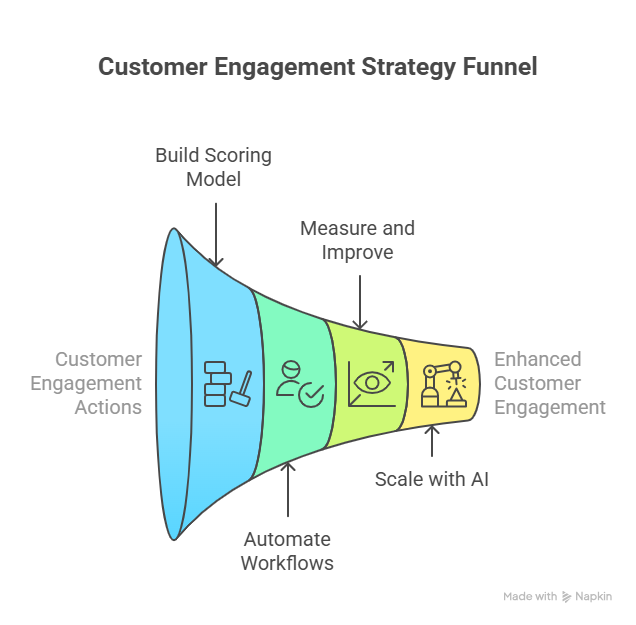
- Identify Your 3–5 Most Critical Engagement Actions: Look at your product analytics and determine which actions are most tied to retention and success, e.g., completing onboarding, using a core feature, inviting a teammate, or generating a report.
- Build a Weighted Scoring Model: Assign weights to each action based on its importance. For example:
- Logins = 2 points
- Key feature use = 5 points
- Team invite = 4 points
- Inactivity = –3 points
- You can build this model in a spreadsheet, CRM (like HubSpot or Salesforce), or analytics tool (like Mixpanel or Amplitude).
- Turn Scores into Automated Workflows: Set thresholds (e.g., below 50 = at-risk, 50–80 = active, 80+ = highly engaged) and connect each to specific actions:
- Low score? Trigger a re-engagement campaign or CS follow-up.
- Moderate score? Nudge toward underused features.
- High score? Offer an upsell, request a review, or push a referral.
- Measure What’s Working, Then Improve: Track how changes in CES relate to product usage, retention, and expansion. Adjust your weights, thresholds, and automation logic based on what actually drives results.
- Scale It with AI: Want to automate the full process?
- Lindy can calculate scores, monitor changes in real time, and trigger personalized outreach across email, chat, and in-app.
- Gainsight and Totango can sync CES with health scores and automate CS playbooks. These platforms eliminate the need for manual tracking, so your engagement system runs 24/7.
Start simple. Automate fast. Scale as you go.
Don’t take CES as just a metric. It’s your engine for retention, growth, and customer success.
Automate Your Customer Engagement Strategy with Lindy
With Lindy, you can connect your Customer Engagement Score directly to real-time workflows, so engagement doesn’t just get measured, it gets managed.
Here’s what that looks like in practice:
- When CES drops below 50 → Launch a personalized re-engagement campaign, notify your CS team via Slack, and update the CRM instantly.
- When CES improves after inactivity → Pause win-back emails automatically and return the user to the normal lifecycle.
- When CES crosses 80 → Trigger a timely upsell email, in-app referral prompt, or exclusive offer based on user behavior.
No dashboards to monitor. No manual triggers. Just smart, real-time decisions driven by your data.
Try Lindy for FREE today and watch your customer engagement system become fully autonomous!
Frequently Asked Questions
1. How to calculate customer engagement score?
Start by identifying 3–5 key user actions (e.g., logins, feature use, support tickets). Assign a weight to each based on importance.
Use this formula: Engagement Score = (Weight1 × Action1) + (Weight2 × Action2) + …
Higher scores indicate deeper engagement. Customize it based on what drives retention in your product.
2. How to use engagement value?
Engagement value helps you segment users and trigger specific actions. High-value users can be targeted for upsells or referrals, while low-value users get re-engagement campaigns. You can also track score changes to measure onboarding success, feature adoption, or campaign effectiveness across different user segments.
3. Do engaged customers spend more?
Yes. Engaged customers are more likely to renew, upgrade, or make repeat purchases. They use your product more often, find more value, and tend to have higher lifetime value. Engagement directly correlates with retention, expansion revenue, and long-term profitability—especially in SaaS or subscription businesses.
4. Why does customer engagement matter so much now?
With product-led growth and rising customer acquisition costs, retention is more valuable than ever. Engaged customers stay longer, churn less, refer others, and grow organically. In competitive markets, companies that drive engagement consistently outperform those that rely only on acquisition or one-time transactions.
5. What is a calculation that measures the likelihood of a customer recommending a business?
That’s the Net Promoter Score (NPS).
It’s calculated by asking: “On a scale from 0–10, how likely are you to recommend us?”
Then subtract the percentage of Detractors (0–6) from Promoters (9–10):
NPS = %Promoters – %Detractors
6. How to analyze customer engagement data?
Start by tracking behavioral data like feature usage, login frequency, session duration, and support activity. Group users by engagement level or lifecycle stage. Look for trends, drop-off points, and correlations with retention or revenue. Use tools like Mixpanel, Amplitude, or dashboards in your CRM for deeper insights.
7. How to calculate a weighted score?
To calculate a weighted score:
List the actions you want to track and assign each a weight based on importance (e.g., logins = 2, feature use = 5).
Multiply the number of times each action occurred by its weight, then add the results:
Score = (Action1 × Weight1) + (Action2 × Weight2) + …
This gives you a personalized engagement score.
8. How often should I recalculate Customer Engagement Scores?
It depends on your product's usage patterns. For active SaaS products, recalculating CES daily or weekly works best. For low-frequency tools (e.g., monthly analytics), a bi-weekly or monthly refresh is fine. Automating recalculations ensures your engagement data always reflects the most recent behavior.
9. What’s the difference between Customer Engagement Score and Customer Health Score?
CS focuses strictly on product usage and behavior. Customer Health Score is broader, it can include CES plus support interactions, NPS, billing status, and more. Think of CES as a component of health scoring, especially in product-led or usage-driven businesses.
10. Can CES be used for sales and upsell targeting?
Absolutely. CES helps identify power users or accounts that are most ready for upgrades, add-ons, or enterprise deals. If a customer consistently scores high, your sales or CS team can prioritize them for expansion conversations, referrals, or long-term contract offers.
11. How can CES help reduce churn?
CES surfaces disengaged users early, before they leave. You can use score drops to trigger reactivation emails, support check-ins, or personalized nudges. Over time, you’ll see churn drop as you proactively recover users who would have otherwise disappeared silently.
12. Can I use CES across different user roles in the same account?
Yes. In fact, you should. Engagement varies by role, admins may set things up, while end-users use the product daily. Track CES at both the user and account level. Then average or weight them based on usage to get a full view of account health.
13. What’s a good CES benchmark?
There’s no universal number—it depends on your formula and product. But once you define your scoring model, you can benchmark CES ranges across user segments (e.g., free vs. paid, new vs. long-term). Over time, look at what CES ranges correlate with renewal, upgrade, or churn.
14. Should CES include negative signals like inactivity?
Yes. Subtracting points for inactivity, failed actions, or skipped milestones gives a more realistic score. For example, subtract –3 points for 7+ days of inactivity or –5 for an incomplete onboarding step. This helps you catch at-risk users, not just track the active ones.
15. How do I connect CES to my CRM and messaging tools?
Use automation platforms like Lindy to sync CES with your CRM (e.g., HubSpot, Salesforce) and engagement tools (e.g., Intercom, Customer.io). When scores change, Lindy can automatically update contact properties, trigger workflows, or notify reps, no manual data sync required.










