What is Chatbot Onboarding? Benefits & How to Do It without Coding
Marvin broke down chatbot onboarding, explaining the benefits, how to build a no-code flow that welcomes users and automates tasks, and common pitfalls to avoid.
.avif)

Most onboarding experiences are forgettable. Popups, email drips, maybe a product tour, then silence.
Now, imagine a chatbot that actually talks to your users. Welcomes them. Guides them. Answers questions on the spot. No code. No developer.
That’s chatbot onboarding. It’s fast, personal, and incredibly effective when done right.
In this guide, I’ll show you how to build it from scratch with no fluff, no coding, and real results.
What Is Chatbot Onboarding?
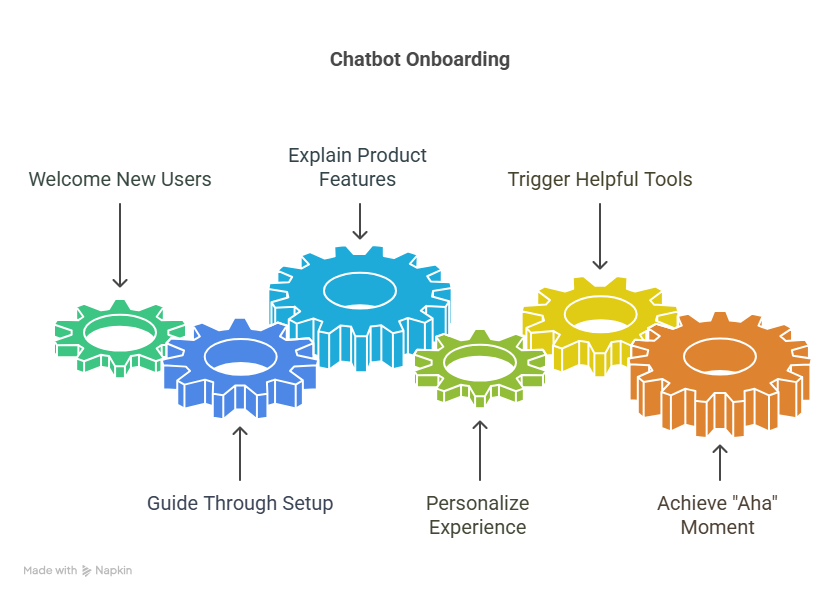
Chatbot onboarding is the use of an automated chat assistant to welcome new users, guide them through setup, and help them reach their first “aha” moment.
Instead of static tutorials or help docs, users get an interactive, conversational experience that walks them through key steps, like creating an account, setting preferences, or completing their first task.
A good user onboarding chatbot can:
- Answer basic questions in real time
- Explain product features step by step
- Personalize the experience based on user needs or goals
- Trigger tooltips, videos, or checklists at the right moment
Why Use a Chatbot for Onboarding?
Here’s why more teams are switching from traditional onboarding flows to chatbot-driven experiences:
1. 24/7 Instant Help: Users don’t need to wait for a rep or dig through help centers. Chatbots give answers and guidance on the spot, even at 2 a.m.
2. Higher Activation Rates: New users often bounce if they hit friction. Chatbots can guide them past the tricky first steps and help them get value faster.
3. Personalized Onboarding: Smart chatbots can tailor onboarding flows based on user role, use case, or behavior. That makes the experience more relevant and more effective.
4. Lower Support Volume: By handling FAQs and common setup issues automatically, chatbots reduce pressure on your customer support team.
5. Data-Driven Improvements: Most chatbot tools log user interactions. You can see where users drop off, what they ask most, and how to improve your onboarding experience.
How to Do Chatbot Onboarding Right
Chatbot onboarding isn't just showing users around. It's to help them see the value of your product and become active users.
A good onboarding chatbot makes users stick around and feel happy. I’ll show you how to set up an onboarding experience that really works.
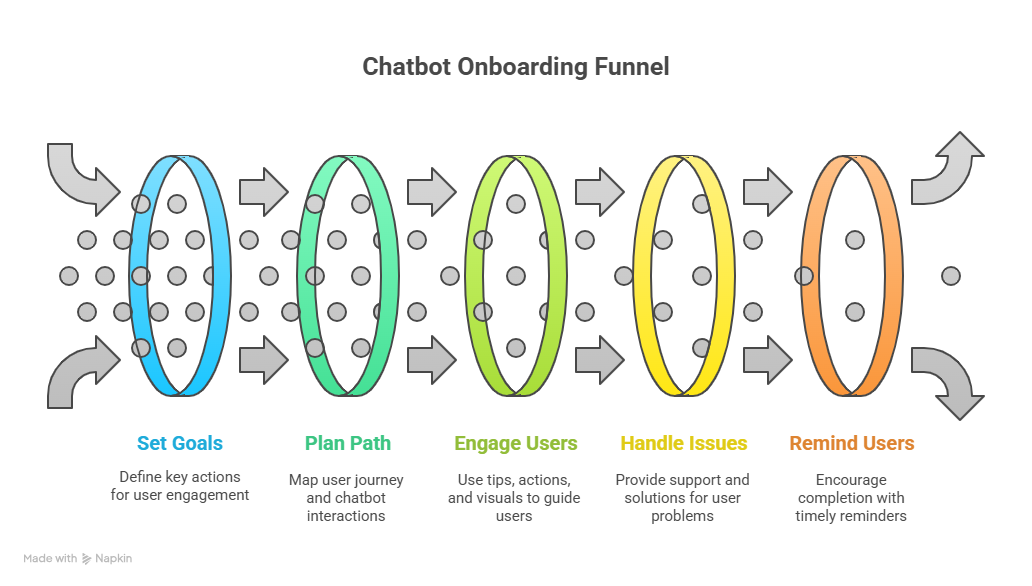
1. Know What You Want to Achieve
Before you even build your chatbot, decide what you want for your new user. If you don't have clear goals, your chatbot won't know what to do.
Think about key actions users must take. What are the most important things a new user needs to do to get value from your product? For example:
- Finish their profile: Fill in their name, company, or what they like.
- Do a main action: Send their first message, create their first project, upload a file, or schedule an event. This is often when they "get it."
- Set up connections: Link other tools like their calendar or social media.
- Pick a plan: If they need to choose a paid plan.
- Bring in data: Import existing information from another service.
Then pick 1 to 3 main goals. Don't overload users or your chatbot. Focus on the most important actions that give them immediate value. It could sound like:
Increase profile completion by 20% in the first 24 hours after signing up.
Or
80% of users will send their first message within 30 minutes of starting onboarding.
Lastly, work with your product team. Make sure your onboarding goals match the bigger product goals.
2. Plan the Onboarding Path
Once you know your goals, understand the steps a user needs to take to reach them. This planning helps you design your chatbot's conversations and how it interacts with your product.
Here's how you can do it:
1. See the user's path:
- Start from when a user signs up or enters your product.
- Find every step, every choice they make, and any problems they might face.
- Draw out this path using flowcharts or mapping tools.
2. Find chatbot moments: Where can your chatbot best step in to guide, help, or prompt users?
- First welcome: A friendly greeting and a quick explanation of what they can do.
- Step-by-step guidance: Break down big tasks into smaller, easy steps.
- Help before they ask: Offer help before a user gets stuck.
- Reminders based on context: Gently push users to the next action based on where they are.
3. Design conversations: For each chatbot moment:
- Write the words: Create clear, short, and friendly messages. Use your brand's voice.
- Give clear choices: Use buttons, quick replies, or numbered lists to guide what users say and keep the conversation focused.
- Guess user questions: Think about common questions users might have at each stage and program answers.
4. Break down big tasks: If a goal is "finish profile," the chatbot should guide them to fill in one piece of information at a time (e.g., "First, what's your name?").
3. Use Tips, Direct Actions, and Visuals
Good onboarding isn't just telling, it's showing and letting users act. Your chatbot should work smoothly with your product's design to give instant context and direct actions.
This is how you can help your users:
- Trigger helpful tips: When the chatbot guides a user to a feature, have it show a small pop-up tip or highlight that part of your product. For example, the chatbot could say something like “To connect your CRM, click on 'Integrations' in the left sidebar." At the same time, a tip appears next to Integrations.
- Offer "click-to-action" buttons: When possible, put buttons inside the chatbot conversation that directly do something in your product or take the user to the right screen. Like the chatbot could say "Ready to create your first project?" followed by a button Create Project Now that opens the project creation screen.
- Use product tours: If your product has built-in tours, use your chatbot to start specific parts of the tour based on what the user needs.
- Provide visuals: When explaining something, the chatbot can send GIFs, short videos, or screenshots to show how it works.
- Make it personal: Use information you gather during onboarding (like their job or industry) to give tailored advice and suggested actions.
4. Plan for Mistakes and Ways to Get Help
No chatbot is perfect. Users will ask unexpected questions, or your bot might misunderstand something. Having a strong plan for these situations prevents frustration and ensures users can always get help.

A few things you can do:
1. Design for "I don't understand": When the chatbot doesn't know what a user means:
- Say you don't understand and ask them to rephrase: "I'm sorry, I don't understand that. Can you say your question in a different way?"
- Offer common choices: Give a few common questions or next steps as buttons.
2. Give self-help options:
- Link to helpful articles: "While I can't directly help with that, you might find this article useful: [Link to article]."
- Direct to a help search: "You can also search our full help section here: [Link to search]."
3. Hand off to a live person smoothly: This is vital for tough problems or very frustrated users.
- Option for live chat: "Would you like to talk to someone right now?"
- Create a support ticket: "I can create a support ticket for you. What's your email and a short description of the problem?"
- Set expectations: Tell the user how long it usually takes to hear back from a live agent.
4. Watch for unknown questions: Regularly check your chatbot's "unhandled" questions to find common themes and make your chatbot smarter.
5. Add Reminders and Ways to Get Users Back
Onboarding isn't a one-time thing. Users might get distracted or leave in the middle. Your chatbot can act as a friendly reminder and bring them back on track.
Try these:
1. Find incomplete onboarding steps: Track which users started but didn't finish key onboarding steps.
2. Set up timed reminders:
- Short-term (e.g., 2–4 hours later): "Hey [User Name], still setting things up? You're almost there! Just a few more steps to go to [reiterate goal, e.g., send your first message]."
- Mid-term (e.g., 24–48 hours later): "Just checking in. How's [product name] going? Remember, once you [reiterate goal], you'll unlock [benefit]."
- Long-term (e.g., 3–7 days later): "We saw you haven't [completed key action]. Can I help you get started or answer any questions?"
3. Offer direct links: In these reminders, give a direct link or chatbot button to take the user back to where they left off in onboarding.
4. Tailor reminders: Make reminders specific to which onboarding step they didn't finish.
5. Give valuable nudges: Instead of just saying "finish setup," explain the benefit of completing the next step. "Finish your profile to get recommendations just for you!"
6. Test, Look at Data, and Improve
Onboarding always changes. What works for one group of users might not work for another. You must keep testing and looking at data to make things better.
This is what I do to test and improve chatbot onboarding:
1. Track key numbers:
- Completion rates: What percentage of users finish each onboarding step and the whole process?
- Time to activation: How long does it take for users to have their "aha!" moment?
- Drop-off rates: At what points do users leave the onboarding process?
- Feature use: Are users using the features the chatbot guided them to?
- Support tickets: Are fewer users asking for help with onboarding?
- User happiness scores: How do users feel about the onboarding experience?
2. Set up A/B tests:
- Try different words: Test different greetings, explanations, or calls to action.
- Change step order: Does changing the order of onboarding steps affect how many people finish?
- Test different ways to interact: Buttons versus typing freely versus direct links.
- Experiment with reminder frequency and content.
3. Get user feedback:
- Surveys: Ask users directly about their onboarding experience.
- User interviews: Talk to users one-on-one to understand their problems.
- Session recordings: Tools can show you exactly how users interact.
Finally, set aside time to look at your data, find problem areas, and make improvements. Onboarding is never truly "done," it changes as your product and users change.
{{templates}}
Real-World Chatbot Onboarding Examples
Chatbots can make a big difference in how new users get started with different types of products. Here’s how different industries use chatbots to onboard users well.
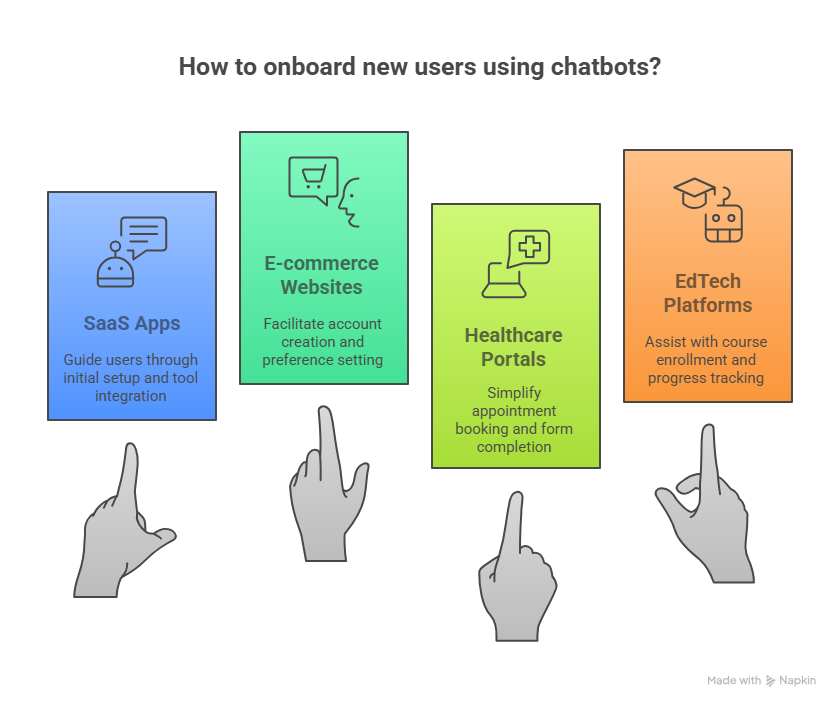
1. SaaS Apps (Software as a Service)
SaaS apps are tools people use online, like project management software or marketing platforms. New users often need to set up many things to start using them.
How a chatbot can help in this scenario:
- Guides initial product setup: The chatbot walks users through the first steps to get the app ready.
For example, imagine a new user signs up for a project management tool. The chatbot immediately pops up and says, "Welcome! To start, let's connect your team's Slack account. Click 'Integrations' in the left menu." It then shows a quick GIF of where to click.
- Helps connect other tools: Many SaaS apps work with other services. The chatbot shows users how to link them.
Like the chatbot might ask, "Do you want to import your existing customer data from Salesforce?" If the user says yes, the chatbot gives step-by-step instructions: "First, go to 'Settings,' then 'Data Import,' and select 'Salesforce.'"
- Shows how to bring in data: If users have old data, the chatbot helps them move it into the new app.
For an email marketing tool, the chatbot could say, "Great! Now let's import your contact list. Do you have a CSV file ready?" If they confirm, it guides them: "Click 'Contacts,' then 'Import,' and upload your file. I'll show you how to map the fields."
2. E-commerce Websites (Online Shopping)
Online stores want first-time shoppers to feel comfortable and buy something. Chatbots can help them get familiar with the site.
Here’s how chatbot onboarding can help:
- Walks new shoppers through account setup: The chatbot makes it easy for users to create their shopping account.
Like when a new visitor lands on the site, a chatbot asks, "Welcome! Would you like to create an account for easier checkout and order tracking?" If they agree, it guides them: "First, type your email address here..."
- Helps set preferences: The chatbot can learn what the shopper likes.
For example, after account creation, the chatbot asks, "What types of products are you most interested in? (e.g., 'clothing,' 'electronics,' 'home goods')" Based on their answer, it might then suggest, "Great! I've set your preferences. You can now browse our 'clothing' section directly."
- Shows how to track orders: After a purchase, the chatbot can explain how to check the delivery status.
When a user completes their first purchase, the chatbot could say, "Congratulations on your order! You can track its status anytime. Just click 'My Orders' in your account, or ask me 'track my order' later."
3. Healthcare Portals
Healthcare websites help patients manage their health online. Chatbots can make these often-complex tasks simpler.
In this case, an onboarding chatbot:
- Helps patients book appointments: The chatbot guides patients through the steps to schedule a doctor's visit.
When a patient logs in. The chatbot greets them: "Welcome, [Patient Name]! Do you need to book an appointment today?" If they say yes, it walks them through: "First, choose your doctor, then pick a date and time from the calendar."
- Guides patients to fill in forms: Many medical tasks involve filling out paperwork. The chatbot can help.
For a new patient, the chatbot might say, "To prepare for your first visit, please complete your intake forms. Click 'My Forms' and I'll guide you through each section." It can then highlight each required field.
- Shows how to access lab results: Patients often want to see their test results quickly. The chatbot can show them where.
For example, the chatbot could proactively message a patient: "Your recent lab results are ready. To view them, go to 'Lab Results' in your dashboard, or click this link directly."
4. EdTech Platforms (Education Technology)
Online learning platforms need to help students easily find courses, understand their dashboard, and track their progress.
- Assists students with course enrollment: The chatbot makes it easy for students to sign up for classes.
Imagine, a new student logs in. The chatbot asks, "Welcome! Are you ready to enroll in your first course?" If they agree, it presents options: "Browse 'All Courses' or tell me what subject you're interested in, like 'Math' or 'History'."
- Guides dashboard navigation: The chatbot helps students understand where everything is on their personal learning page.
For example, after a student enrolls, the chatbot says, "This is your dashboard! Here, you can see your courses, assignments, and grades. Let me show you where your assignments are located." It then highlights the assignments section.
- Helps track progress: The chatbot can show students how well they are doing in their courses.
Like the chatbot might prompt, "Want to see your current progress in 'Algebra 101'?" If the student says yes, it directs them: "Go to your course page, then click on 'Progress' in the menu." It can even show a small chart or percentage.
Ready to Build Your Onboarding Chatbot without Coding?
Lindy lets you create smart, fully customizable onboarding chatbots in minutes without any coding at all. Whether you want to guide users, trigger product actions, personalize flows, or handle questions automatically, Lindy does it all.
Start with a template, train it on your product, and launch directly inside your app or site.
Try Lindy free and see how fast you can activate new users.
{{cta}}
Frequently Asked Questions
1. What’s the difference between chatbot onboarding and regular onboarding emails?
Email onboarding is passive and time-delayed, users might not even open the messages. Chatbot onboarding happens inside your product, in real time. It reacts to user behavior, provides instant help, and feels like a natural part of the experience rather than a separate communication channel.
2. Can I use a chatbot for onboarding and ongoing support at the same time?
Yes. Many platforms, including Lindy, let you use the same chatbot for onboarding, FAQs, and live handoff. Once a user completes onboarding, the chatbot can switch roles to offer help, suggest features, or answer common product questions based on user actions.
3. How do I know if my chatbot onboarding is working?
Track metrics like onboarding completion rate, time to first key action (e.g., sending a message), chatbot engagement rate, and drop-off points. You can also measure impact on support tickets, retention, and user satisfaction scores to see how effective your chatbot onboarding really is.
4. Does chatbot onboarding work for mobile apps too?
Yes. Most modern chatbot platforms support in-app chat experiences for mobile (iOS/Android) as well. You can use SDKs or no-code widgets to embed your chatbot directly into mobile onboarding flows for real-time guidance, just like on web apps.
5. What tools do I need to build a chatbot without coding?
You don’t need a dev team. Tools like Lindy offer no-code builders with drag-and-drop flows, live previews, and natural language training. Just describe what you want your bot to do, like “guide users to connect their calendar,” and the bot builds itself.
6. How long does it take to set up a chatbot onboarding flow?
If you use a no-code builder like Lindy, you can build a basic onboarding chatbot in 1–2 hours. For more advanced flows with conditionals, integrations, or reminders, it may take a day or two, but still much faster than hard-coded onboarding systems.
7. Can the chatbot personalize onboarding for different user types?
Yes. You can design different flows for different roles (e.g., marketer vs. developer), industries, or even plan tiers. The chatbot can ask a few questions up front and then tailor the rest of the onboarding experience based on those responses automatically.
8. How do I test and optimize my chatbot onboarding?
Use built-in analytics from your chatbot tool to identify drop-offs and bottlenecks. Run A/B tests on copy, step order, and timing. Collect user feedback post-onboarding. Tools like Lindy let you update flows instantly and push changes live without any redeployments.










