


AI for Customer Service: How It Works, Benefits & Real Use Cases


Is your support team overwhelmed? AI can reduce wait times, handle repetitive queries, and improve customer satisfaction without extra headcount.
In this article, I’ll break down exactly how AI is used in customer service, the types of AI tools available, and real examples of where it works best.
What is AI Customer Service?
AI customer service uses artificial intelligence to automate and enhance customer support.
It handles tasks like answering questions, routing tickets, analyzing sentiment, and assisting agents in real time.
Businesses use it to reduce response times, cut support costs, and provide 24/7 help without adding more staff.
How AI and Customer Service Work Together
AI in customer service uses technologies like natural language processing (NLP), machine learning, and automation to interact with customers, resolve queries, and support human agents. These systems can:
- Understand and respond to messages or voice calls
- Suggest answers to agents in real-time
- Automatically route tickets to the right team
- Analyze sentiment to detect unhappy customers
- Provide 24/7 self-service without human support
The goal isn’t just automation; it’s faster resolution, better consistency, and happier customers.
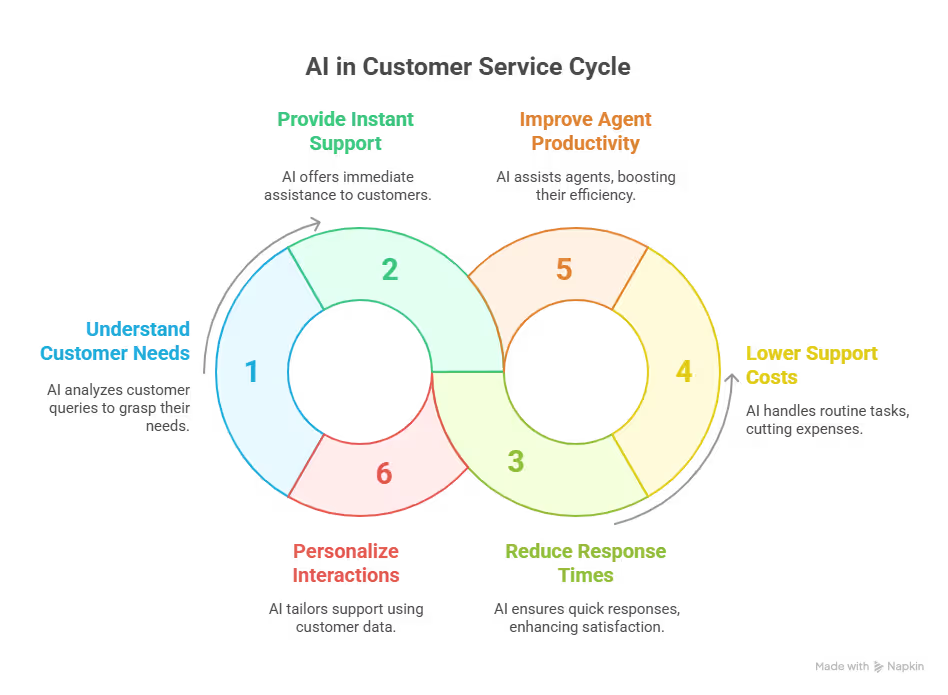
How Using AI in Customer Service Can Benefit Your Business
1. 24/7 Availability: AI-powered chatbots and voice bots don’t sleep. They answer questions around the clock, giving your team breathing room and your customers instant help.
2. Faster First Response Times: Customers don’t like to wait. AI responds instantly, even during peak hours, reducing average response times and improving CSAT.
3. Lower Support Costs: AI handles a high volume of repetitive questions (password resets, shipping status, refund policies) without needing more staff.
4. Improved Agent Productivity: Agent-assist AI reduces the time agents spend searching for answers, allowing them to focus on solving complex issues.
5. Personalized Support at Scale: AI uses customer data and interaction history to deliver personalized messages, product suggestions, and help articles.
Common Types of AI Customer Service Tools
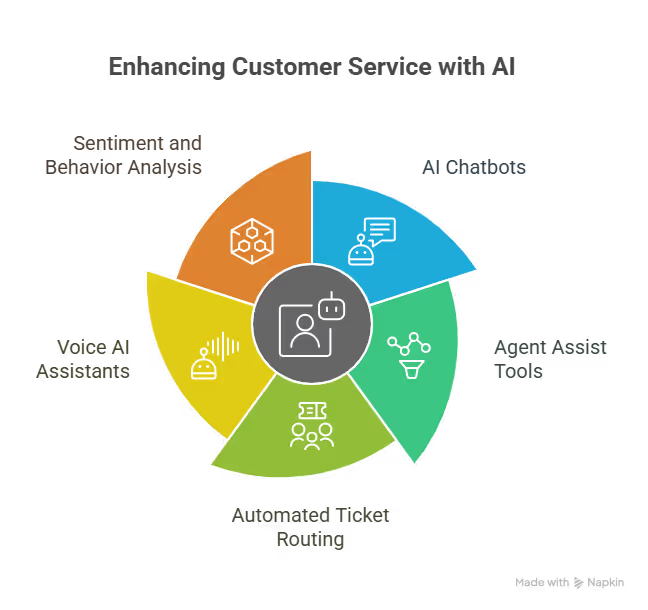
1. AI Chatbots
AI chatbots handle repetitive support tasks so your team doesn’t have to. These automated assistants use natural language processing to understand questions, pull the right answers, and guide users through things like refunds or tracking orders. You can train them using your help docs, chat history, or FAQs.
Think of how your bank’s chatbot can help you reset passwords, check balances, or block your card, without waiting on hold.
Just like that, chatbots respond faster, lower support load, and keep your customers happy even after hours.
2. Agent Assist Tools
Instead of forcing agents to search for answers, these tools suggest the right response in real time. They listen during live chats or calls and surface help articles, product links, or next-best actions while your team talks to the customer. You save time and reduce friction.
Like when a customer asks about a return, the system shows your agent the return policy, so they can send it instantly.
This makes your agents work faster, make fewer mistakes, and keep conversations smooth.
3. Automated Ticket Routing
You don’t need to manually sort tickets. AI reads every message, figures out what it’s about, and sends it to the right person. It looks at keywords, urgency, and topic to assign tickets without delays. That way, your most skilled agents handle the issues they’re best at.
For example, a billing issue would go straight to your finance team, while a product question would land with your support crew.
Such automated ticket routing helps you fix problems faster, reduce back-and-forth, and improve first-touch resolution.
4. Voice AI Assistants
Voice bots talk to customers just like human reps do. They understand spoken questions, reply clearly, and handle common tasks like checking account info, updating plans, or scheduling appointments. You free up your phone lines and still offer real help 24/7.
Imagine a customer calling to check data usage, and the voice bot handles it without a single human touch.
That way, AI voice agents cut wait times, support more users at once, and make voice support scalable.
5. Sentiment and Behavior Analysis
AI can tell when a customer’s getting frustrated. It picks up on tone, repeated complaints, or slow replies. It flags these interactions so you can act fast. You won’t lose valuable users because you missed the signs.
For example, a repeat buyer sounds upset. The AI tags them for VIP handling, and you step in with a better resolution.
Just like that, automating sentiment and behavior analysis helps you prevent churn, spot red flags early, and show customers you’re paying attention.
{{templates}}
How is AI Used in Customer Service? 4 Real-World Use Cases
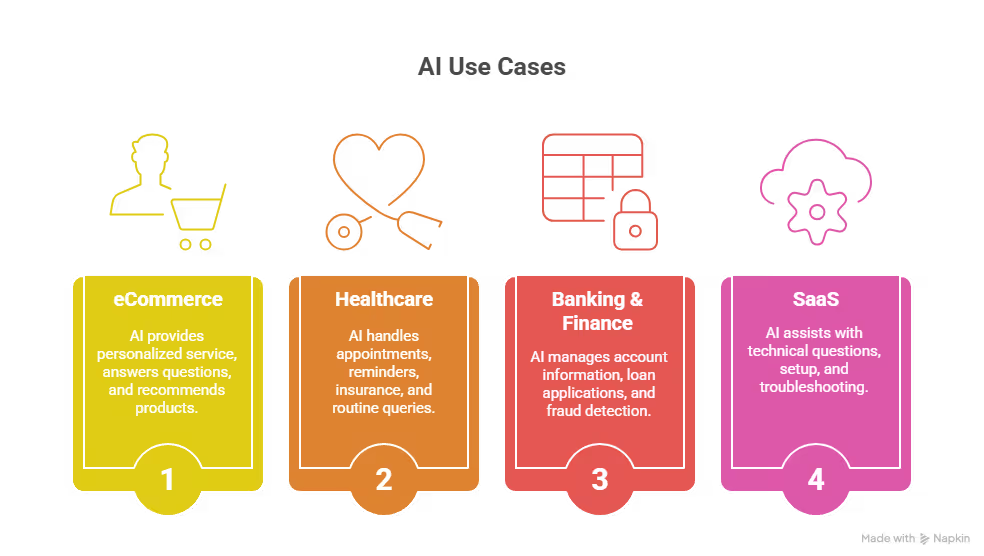
1. eCommerce
AI helps eCommerce brands deliver fast, personalized service without overloading human teams. AI chatbots instantly answer common questions about order status, delivery timelines, and return eligibility, no agent needed.
When buyers ask about product fit or features, the bot can recommend sizes, colors, or similar products using past behavior, purchase history, or what's trending.
For example, a customer messages late at night to return a product. The AI guides them through the return policy, generates a shipping label, and updates their order status in the system, all without human help.
This helps you reduce support volume, improve conversion, and boost retention with instant help that feels personal.
2. Healthcare
AI assistants in healthcare don’t just save time; they improve patient access and reduce admin load. Virtual agents handle appointment scheduling, send reminders, manage insurance verification, and answer routine queries about symptoms, treatments, or medication dosages.
For chronic care or follow-ups, AI can also check in with patients automatically.
Like when a patient wants to refill a prescription, AI can confirm eligibility, check insurance coverage, and schedule the refill for pickup, without needing staff involvement.
This improves patient satisfaction, reduces call center congestion, and supports patients consistently, even during staff shortages.
3. Banking & Finance
In banking, accuracy, speed, and security are critical. AI chatbots handle routine but sensitive queries like account balance, transaction history, and credit card due dates. They also help with more complex workflows, such as initiating a loan application or reporting potential fraudulent activity.
For instance, a customer sees an unknown charge and messages the support bot. It quickly checks past activity, flags the transaction, locks the card, and offers next steps, all while escalating to the fraud team.
You offer round-the-clock service, protect users faster, and reduce risk, all while keeping compliance in check.
4. SaaS (Software as a Service)
AI in SaaS helps users get value from your product without waiting for a CSM. AI agents handle technical questions, walk users through setup steps, and even auto-troubleshoot issues like login errors or integration failures.
They can detect confusion, surface relevant documentation, or offer onboarding tips based on user behavior.
Like if a new user struggles with connecting your product to Slack, the AI could recognize the action, guide them through the process with screenshots, and offer to book a training session if the issue continues.
This helps you reduce churn, drive feature adoption, and scale customer success without hiring more reps.
How to Use AI in Customer Service (Step-by-Step)
You don’t need a huge team or technical background to get started with AI in support.
You just need a clear plan, the right use case, and a tool that fits into your workflow.
Here’s how to go from idea to implementation:
1. Start by Auditing Your Support Tickets
Look at your past support tickets to spot patterns. What do customers ask about again and again?
Password resets? Order status? Refunds? Bug reports?
These repetitive questions are perfect for automation. Break them into categories and tag how often they occur. This helps you build a strong use case for AI.
You can upload your ticket data or connect your helpdesk directly to Lindy. It automatically analyzes past interactions and suggests the best starting points for automation, like which issues to handle first and what workflows to create around them.
2. Pick One Use Case to Start Small
Don’t try to automate everything at once. Choose a single, high-volume use case where AI can make an immediate impact, like:
- Tracking orders
- Booking appointments
- Escalating complaints.
Once that’s working well, add more.
Lindy comes with ready-made AI agents for common use cases like order updates, scheduling, and lead routing. You can customize these with no code and launch them in minutes. That lets you test quickly, prove value, and scale what works.
3. Choose a Tool That Integrates With What You Use
Your AI needs to work where your team works, whether that’s your CRM, email inbox, live chat, or helpdesk.
Pick a tool that integrates smoothly so you don’t create extra steps or new silos.
Lindy connects with tools like Zendesk, Intercom, Gmail, Google Calendar, Salesforce, and Notion. You can build agents that update tickets, reply to emails, schedule follow-ups, or sync notes across all your systems, without switching tabs.
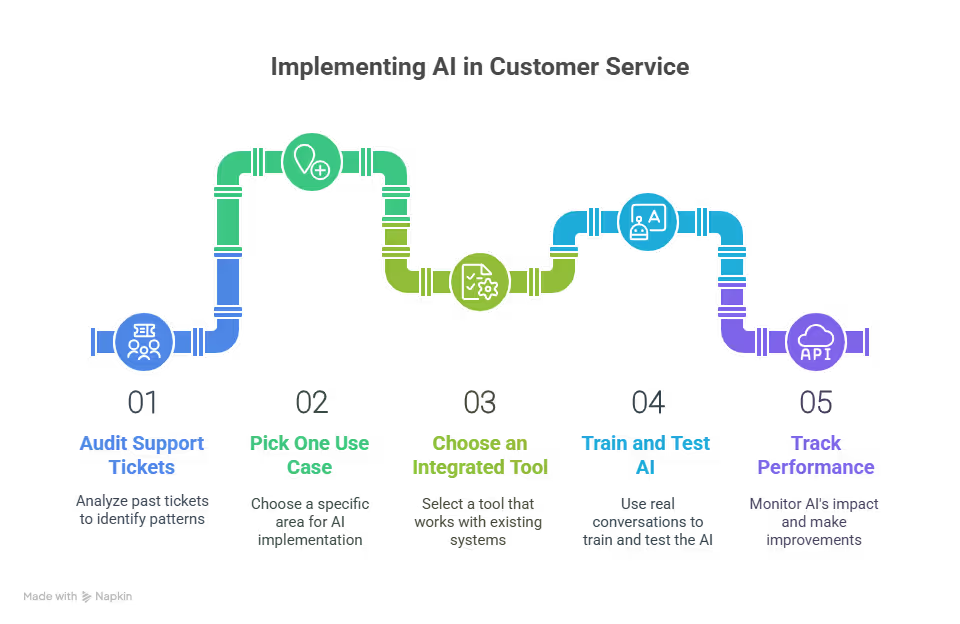
4. Train and Test With Real Conversations
Generic bots give generic answers. Use your own chat logs, email threads, and help articles to train the AI.
Start small, test it internally, and refine responses until they match your tone and standards.
With Lindy, you can feed in your own content (FAQs, chat history, documentation) and tweak how your agent speaks. You can preview every response, test real cases, and get feedback from your team before going live.
5. Track Performance and Improve Over Time
Once your AI agent is live, monitor its impact.
How many tickets does it resolve on its own? Are customers getting faster answers? What issues still need human help?
Use data to guide improvements.
Lindy gives you clear dashboards showing how many tasks your agents completed, how much time they saved, what percentage of issues were handled without human input, and which conversations need attention. You get insights to tune and expand your automation.
{{cta}}
Want to Start With Something Real?
If you want to go beyond chatbots and build full AI agents that actually solve problems across tools, Lindy AI makes that possible.
You can create no-code agents that:
- Answer customer questions
- Book meetings automatically
- Update CRMs with customer data
- Escalate complex issues to the right team
FAQs
1. Can AI agents handle sensitive customer conversations?
Yes, AI agents can manage sensitive conversations when trained with secure data handling practices, clear escalation paths, and empathetic language models. They can detect tone, respond calmly, and escalate immediately when they sense emotional distress or sensitive topics that require human intervention.
2. Can the best AI support agent handle multiple languages?
Yes, advanced AI support agents understand and respond in multiple languages using built-in translation and multilingual NLP models. They support global users by switching languages automatically based on user input or regional settings, ensuring consistent experiences across diverse customer bases without losing context or accuracy.
3. Can the best AI support agent understand customer sentiment?
Yes, top-tier AI support agents use sentiment analysis to read tone, urgency, and emotion in customer messages. They adjust responses accordingly, offer proactive support, and escalate negative interactions when necessary. This improves response relevance and helps brands prevent churn and resolve issues with more empathy.
4. Can the best AI support agents create and update support tickets?
Yes, the best AI agents connect with ticketing systems and create, update, or close support tickets based on user input. They capture details, assign categories, set priority levels, and sync data to helpdesk platforms automatically, reducing manual effort and speeding up issue resolution.
5. Can the best AI support agents detect urgent customer issues?
Yes, advanced AI agents identify urgency by analyzing keywords, message frequency, tone, and user history. They flag urgent issues, escalate them instantly, and notify human agents when needed. This keeps critical situations from slipping through the cracks and improves customer trust and retention.
6. Can the best AI support agents handle complex customer inquiries?
Yes, AI agents handle complex inquiries by using contextual memory, accessing backend data, and guiding users step by step. They reference previous messages, surface relevant documentation, and clarify details without breaking the flow of conversation, giving customers consistent and intelligent support.
7. Can the best AI support agents handle technical product support?
Yes, high-quality AI agents assist with technical support by referencing product documentation, past cases, and internal tools. They troubleshoot known issues, guide users through setup or fixes, and collect logs or screenshots. They also escalate cases that require engineering support without losing context.
8. Can the best AI support agents integrate with customer knowledge bases?
Yes, the best AI agents integrate with knowledge bases to pull accurate answers, suggest help articles, and keep conversations factual. They use search and semantic matching to deliver the right content in real time, which reduces repetition and improves customer resolution rates.
9. Can the best AI support agents learn from customer interactions?
Yes, top AI agents improve over time by learning from real interactions. They identify better response patterns, update workflows, and flag gaps in knowledge. Teams can review this learning to improve training data, fine-tune responses, and continuously upgrade service quality.
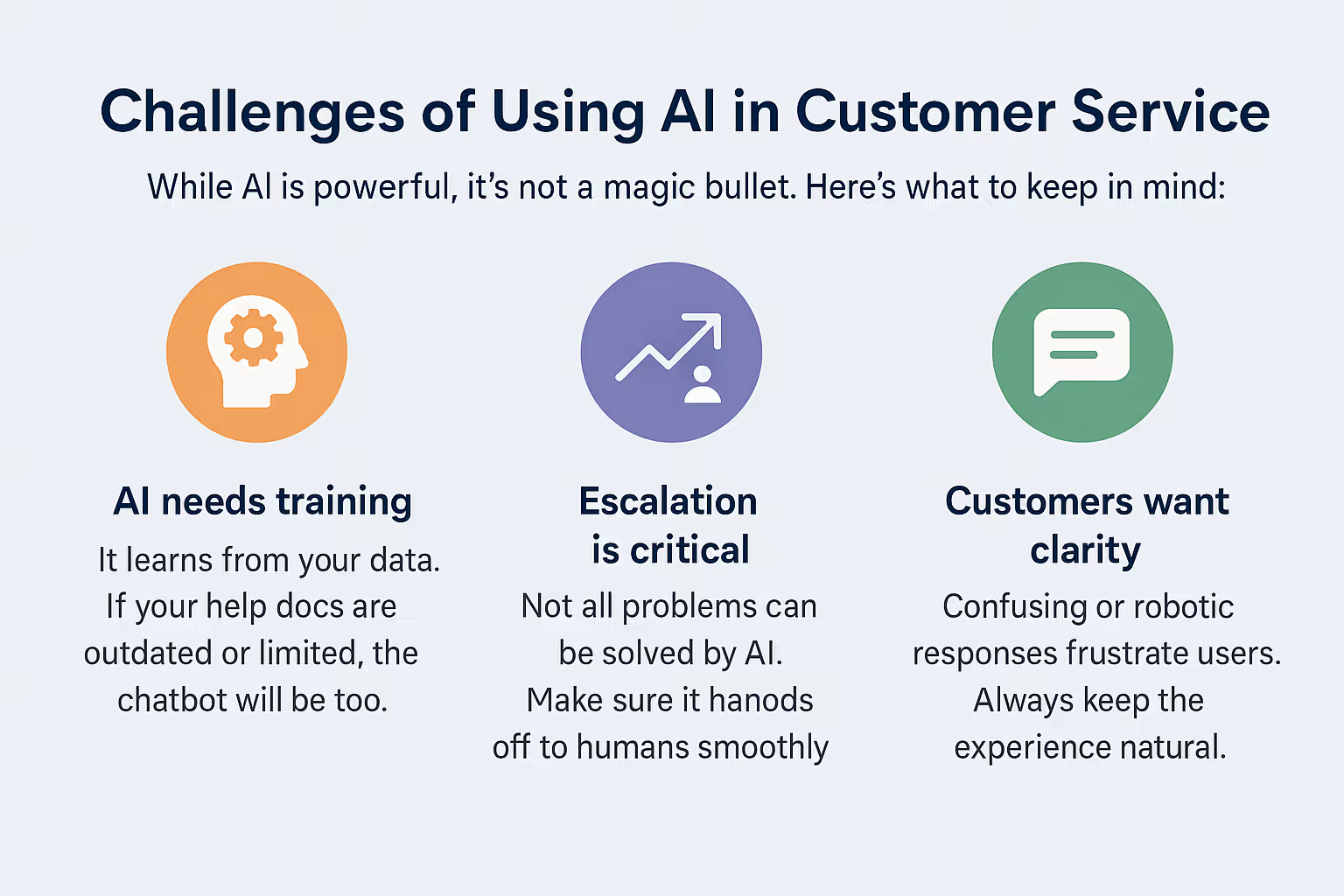
10. Can the best AI support agents recognize when to escalate to human agents?
Yes, smart AI agents know when to escalate by detecting emotional signals, unclear issues, or repeated failed attempts to resolve a problem. They hand off smoothly, summarize the context, and let human agents take over without restarting the conversation or asking repeated questions.
11. Does Zendesk use AI for customer service?
Yes, Zendesk includes AI features like chatbots, intent detection, auto-routing, and agent assist. It helps teams reduce ticket load, respond faster, and improve efficiency by automating repetitive tasks. Zendesk also supports AI integrations with tools like Lindy to expand automation capabilities.
12. How do the best AI support agents handle multiple related customer questions?
The best AI agents maintain context across multiple questions in a conversation. They track topics, understand follow-ups, and refer back to earlier messages without confusion. This helps them deliver coherent responses, even when customers switch topics or ask several things in one interaction.
13. How quickly can the best AI support agents be deployed in an emergency?
AI agents can be deployed in hours during emergencies if you're using a no-code platform like Lindy. You can clone templates, connect to live data, and launch quickly. This helps businesses respond during spikes, outages, or urgent service updates without delaying support.
14. What AI solutions help with multilingual customer support in automotive settings?
Tools like Lindy, Intercom, and Ada support multilingual interactions in automotive settings. They handle queries in local languages, guide users through vehicle features, and help schedule service or report issues. AI ensures consistent support across regions, dealerships, and customer touchpoints.
15. What are the main benefits of using Lindy.ai for customer support?
Lindy lets you build AI agents that not only talk to customers but also take action. You can automate replies, create tickets, update CRMs, schedule callbacks, and escalate issues. It connects with your tools, works in any channel, and runs with zero code.
16. Can AI fully replace customer service reps?
No. AI can handle routine tasks, quick replies, and standard workflows, but it can’t replace human empathy, judgment, or complex problem-solving. The best results come when AI handles the repetitive work while human agents focus on high-stakes conversations, creative problem-solving, and building stronger customer relationships.
17. How much training does AI need to work well?
AI needs high-quality training to perform well. Pre-built models give you a head start, but your results improve when you feed in actual support conversations, knowledge base content, and FAQs. Regular reviews and updates help your AI stay aligned with changing products and customer expectations.
18. Is AI customer service expensive to set up?
No. Many AI tools are affordable and easy to implement. Platforms like Lindy offer low-cost plans with no-code setup, which makes them accessible for small teams. You only pay more as you expand to more channels, advanced workflows, or deeper integrations with internal systems.
19. What are the biggest mistakes to avoid when using AI in support?
Avoid launching AI without proper training, testing, or human backup. Don’t rely on it to handle emotional or complex issues alone. Always give customers an easy path to a human agent, monitor performance regularly, and keep refining your workflows based on real user feedback.











Blog
Related Articles
.avif)
.avif)

%20(1).png)

%20(1).png)

The AI assistant that runs your work life
Lindy saves you two hours a day by proactively managing your inbox, meetings, and calendar, so you can focus on what actually matters.
