AI Cold Calling for 2026: How It Works, Benefits & Top 5 Tools
Everett broke down how AI cold calling works, from lead data and intent detection to compliance, and compared top tools like Dialpad, Retell, and Vapi.


After testing AI cold calling tools across different outreach campaigns, I figured out how they work and how to set them up for maximum benefits. I also discovered the legalities involved with these tools and what you should look for while picking one for your team. Here’s everything you need to know about AI cold calling for 2026.
What is AI cold calling?
AI cold calling uses AI to support or handle parts of outbound sales calls. Depending on the setup, AI can help reps research prospects, write call scripts, score leads, transcribe conversations, suggest follow-ups, or place calls and qualify leads before a human rep steps in. Deploying a dedicated ai call center agent can automate these outbound conversations while keeping human reps focused on high-value interactions.
AI cold calling and AI-assisted cold calling sound similar, but they don’t work the same way. Let’s see how they differ.
AI cold calling vs AI-assisted cold calling
With AI cold calling, software can place outbound calls, speak with prospects, ask qualifying questions, and take the next step based on the conversation. That next step might be booking a meeting, sending a follow-up, updating the CRM, or routing a strong lead to a rep.
For example, an AI voice tool might call a list of inbound leads, ask whether they’re still interested, confirm their company size, and schedule a call with the right rep.
On the other hand, AI-assisted cold calling supports the rep before, during, and after the conversation. It can research the prospect, write a sharper opener, suggest objections to prepare for, transcribe the call, summarize what happened, and recommend the next follow-up.
For example, AI can pull CRM context before a call, suggest a short intro based on the prospect’s industry, and summarize the call afterward. The rep still handles the conversation, but AI removes the preparation and admin work around it.
Here’s a comparison table to understand them better:
| Approach | Who makes the call? | Best for | What AI handles | Where humans still matter |
|---|---|---|---|---|
| AI cold calling | AI runs the call | Simple, early-stage outreach | Dialing, talking, qualification, booking, CRM updates | Objections, pricing, strategy, high-intent leads |
| AI-assisted cold calling | Human rep calls | Higher-value, longer-cycle deals | Research, prep, transcripts, summaries, follow-ups | Trust, nuance, pushback, relationship-building |
| Hybrid cold calling | AI and reps split work | Scale with human judgment | List cleanup, qualification, notes, reminders | Intent signals, detailed questions, consultation |
Benefits of AI cold calling
AI cold calling helps sales teams spend less time on repetitive outreach and more time on conversations that need judgment. It helps the most with tasks like list prioritization, qualification, note-taking, follow-ups, CRM updates, and coaching.
Here are the biggest gains teams see with AI cold calling:
Higher outbound coverage
AI can help teams reach more prospects without adding more manual dialing work.
For AI voice calling, the system can call leads, ask basic questions, and route interested prospects to a rep. For AI-assisted calling, the rep still makes the call, but AI helps with prep, summaries, follow-ups, and logging. Using a dedicated ai caller helps scale these outbound dialing efforts while keeping conversations consistent.
The approach gives teams more coverage across long lead lists, older inbound leads, event lists, and lower-intent segments that reps may not have time to work manually.
Better lead qualification
AI cold calling can qualify leads with more consistency than a busy rep rushing through a list.
You can give the system clear criteria, such as company size, industry, budget range, current tools, timeline, or pain points. It can ask the same core questions on every call and log the answers in a structured way.
That consistency helps reps avoid dead-end conversations. It also gives managers cleaner data on which lead sources create the pipeline.
Faster follow-ups
A rep has a good conversation, plans to send a recap, gets pulled into another call, and forgets until the next day. AI can close that gap by sending a follow-up email, SMS, meeting link, or internal reminder right after the call.
How quickly you respond signals your interest. When a prospect asks for more information, they should get it while the conversation still feels fresh.
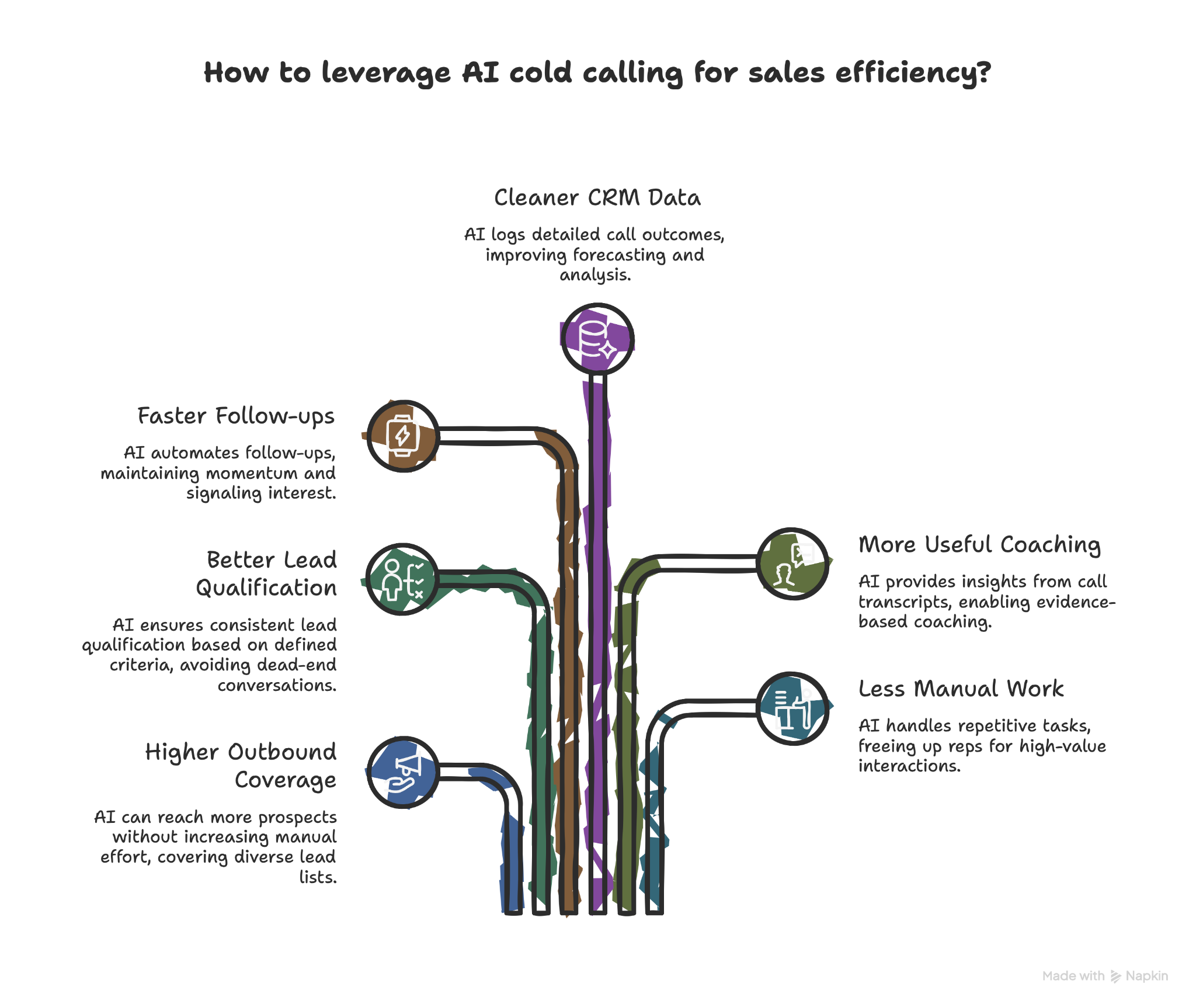
Cleaner CRM data
AI can log call outcomes, notes, objections, next steps, and qualification details in your CRM.
That saves reps from manual entry and gives the team a cleaner record of every interaction. Instead of vague notes like “left VM” or “follow up later,” you can capture details like “uses HubSpot, hiring 5 SDRs next quarter, interested in automating call summaries.”
Cleaner CRM data also helps with forecasting, routing, and campaign analysis.
More useful sales coaching
AI cold calling tools can turn call transcripts into coaching insights.
Managers can review common objections, see where prospects drop off, compare talk tracks, and find patterns across calls. Reps can also use AI summaries to understand what went well and what needs work.
It helps teams coach from evidence instead of memory. It also reduces the need to sit through hours of recordings to spot the same issue repeated across the team.
Less manual work for reps
AI can take on the repetitive parts of outbound cold calling, like finding context, drafting openers, logging notes, sending follow-ups, updating CRM fields, and nudging reps when a lead needs attention.
It gives them more time for the parts of selling where humans still win, like building trust, reading nuance, handling pushback, and moving deals forward.
How does AI cold calling work?
AI cold calling works by connecting your lead data, call instructions, voice technology, and sales tools into one calling process. Implementing modern ai phone calling software helps businesses streamline these automated voice interactions.
The setup changes from tool to tool, but most AI cold calling systems follow the same basic flow. They pull context about the prospect, start the call, listen for intent, respond based on your instructions, and record the outcome after the conversation. Evaluating the best automated phone call software can help you find a platform that integrates seamlessly into this flow.
Here’s what usually happens during a cold calling workflow:
Lead data gives the AI context
AI cold calling starts with your contact list or CRM. The tool may pull details like the prospect’s name, company, job title, industry, location, lead source, past activity, or previous conversations. This context helps the AI avoid generic openers and keep the call relevant.
For example, a call to a real estate broker should sound different from a call to a SaaS founder. Good lead data helps the AI understand the difference before the call starts.
The knowledge base keeps answers accurate
The knowledge base tells the AI what it can say. It can include your product details, pricing rules, qualification criteria, competitor notes, common objections, call scripts, and handoff rules. The AI uses this information to answer questions and stay aligned with your sales motion.
A focused knowledge base matters more than a giant one. If you add every internal doc, old pricing sheet, and half-finished sales script, the AI may pull the wrong information. Keep it tight and current.
Speech recognition helps the AI listen
During the call, speech recognition converts the prospect’s words into text. It helps the AI phone agents understand what the prospect said, whether they asked a question, raised an objection, showed interest, or asked to end the call.
The tool must be accurate at speech recognition. If the tool mishears names, numbers, timing, or objections, the rest of the conversation can go off track.
Intent detection guides the next step
After the AI understands the prospect’s words, it looks for intent. That intent could be:
- Interest: “Yeah, send me more information.”
- Timing: “Call me next quarter.”
- Objection: “We already use another vendor.”
- Disqualification: “We don’t have a sales team.”
- Opt-out: “Don’t call me again.”
The AI then uses that intent to choose what happens next. It might ask a follow-up question, send a resource, book a meeting, update the CRM, or stop the outreach.
Response generation creates the reply
Once the AI identifies the intent, it creates a reply based on your instructions and knowledge base. If you give the AI a vague goal like “sell our product,” it will struggle. You must give it a clear goal, like “confirm whether the prospect manages a sales team of 10 or more reps, then offer a meeting if they show interest,” to keep the call clean.
Strong AI cold calling scripts sound short, direct, and natural. They don’t try to push through every objection. They guide the conversation toward one clear next step.
Text-to-speech turns the response into voice
Text-to-speech converts the AI’s reply into spoken audio. Good voice quality makes a big difference. The AI needs to sound clear, respond quickly, and avoid awkward pauses. Even a smart response can feel uncomfortable if the voice lags or sounds stiff.
Before you launch any campaign, listen to test calls. Check pacing, pronunciation, tone, and how the AI handles interruptions.
CRM updates and follow-ups close the loop
After the call, the AI can log the outcome in your CRM, add notes, update lead fields, trigger a follow-up email, send a meeting link, or notify a rep.
Letting AI handle this post-call work saves the most time. Reps don’t need to chase notes, copy call summaries, or remember who needs a follow-up tomorrow. The system keeps the next step moving.
Is AI cold calling legal?
AI cold calling can be legal, but it depends on how you collect contacts, consent, where you call, the voice technology you use, and how your system handles opt-outs.
Compliance matters because AI cold calling is regulated under the same laws as robocalling.
The FCC's 2024 ruling confirmed that AI-generated voices count as “artificial or prerecorded voice” under the TCPA, which means many AI voice calls require prior express consent.
That doesn’t mean every AI-assisted cold calling workflow creates the same risk. AI that helps a human rep prepare for calls, summarize notes, or write follow-ups falls into a different bucket than an AI voice system that calls prospects on its own.
Still, teams should treat compliance as part of the setup, not something they check after launch. Check these factors before you launch AI cold calling workflows:
Get clear consent before AI voice calls
If your system places calls using an AI-generated voice, you need to know whether you have the right consent for that contact.
Consent rules can change based on the type of call, phone number, region, and relationship with the prospect. The TCPA covers automatic dialing systems and artificial or prerecorded voice messages, and the FCC enforces rules around telemarketing calls and robocalls.
Don’t rely on scraped lists or vague “lead partner” consent for AI voice outreach. Use contact sources you can audit.
Respect do-not-call rules and opt-outs
AI cold calling tools should check do-not-call lists and honor opt-out requests. The FTC’s Telemarketing Sales Rule covers do-not-call requirements, calling restrictions, required disclosures, and rules around prerecorded telemarketing messages.
It also explains that sellers and telemarketers need to maintain entity-specific do-not-call lists when consumers ask not to receive calls.
Your AI calling setup should stop outreach as soon as someone says something like “don’t call me again,” “remove me,” or “take me off your list.”
Disclose what matters
AI voice calls should identify the company behind the call and the purpose of the outreach early in the conversation.
Some states and countries may also require AI voice disclosure, call recording consent, or specific wording during the call. You should always review call scripts before launch, especially if you call across multiple regions.
Review privacy rules before storing call data
AI cold calling tools often store transcripts, recordings, lead notes, call outcomes, and CRM fields. That creates privacy obligations.
If you call prospects in the EU or process EU personal data, GDPR may apply. If you call in healthcare or handle patient-related information, you may need HIPAA-aligned controls. If you record calls, you also need to account for call recording consent rules in the regions you call.
A safe setup includes clear retention rules, access controls, audit trails, and a process for deleting data when someone requests it.
Bring legal into the setup early
AI cold calling should not start with a giant uploaded lead list and a “start campaign” button. Before launch, confirm:
- Which contacts you can call
- What consent you have
- Which numbers sit on do-not-call lists
- What the AI must say at the start of the call
- How opt-outs get handled
- Whether you can record the call
- When the system should stop calling a contact
AI cold calling works best when compliance rules sit inside the workflow from day one, not in a spreadsheet someone checks later.
How to implement AI cold calling: 9 steps to follow
AI cold calling works best when you treat it like a process. Start small, give the system clear instructions, and keep humans involved where judgment matters.
Here’s the setup process I’d follow:
1. Choose the right type of AI cold calling workflow
Start by deciding what you want AI to do.
If your reps need help before and after calls, use AI-assisted cold calling. It works well for research, call prep, transcription, summaries, follow-ups, and CRM updates.
If your team needs help reaching a large list of low-intent or early-stage leads, consider AI voice calling. It works better when the call has a simple goal, like confirming interest, collecting a few details, or booking a meeting.
If you want scale without losing control, use a hybrid setup. Let AI handle repetitive outreach and admin work, then route interested prospects to a human rep.
2. Clean and segment your lead list
Remove duplicate contacts, wrong numbers, invalid records, and contacts you can’t legally call. Then segment the list by source, region, industry, company size, intent level, or stage in the funnel.
Don’t give every lead the same call path. A warm inbound demo request should not get the same message as an old webinar attendee from eight months ago.
Clean segments help the AI use better context and keep the conversation relevant.
3. Build a focused knowledge base
Your AI calling tool needs accurate information to work from. Add the essentials first:
- Product details
- Pricing guidance
- Qualification criteria
- Common objections
- Competitor notes
- Call scripts
- Handoff rules
- Approved follow-up language
Keep the knowledge base focused. Too much information can create confusion, especially if old docs conflict with current messaging.
Review it often. If your pricing, positioning, or sales process changes, update the knowledge base before your next campaign.
4. Set one clear goal for each call
Every AI cold calling campaign needs one main goal. That goal can be:
- Confirm interest
- Qualify fit
- Book a meeting
- Collect missing details
- Route the lead to the right rep
- Send a follow-up resource
Avoid asking the AI to do too much in one conversation. A call that tries to qualify, pitch, handle objections, compare vendors, and close the deal will feel messy fast.
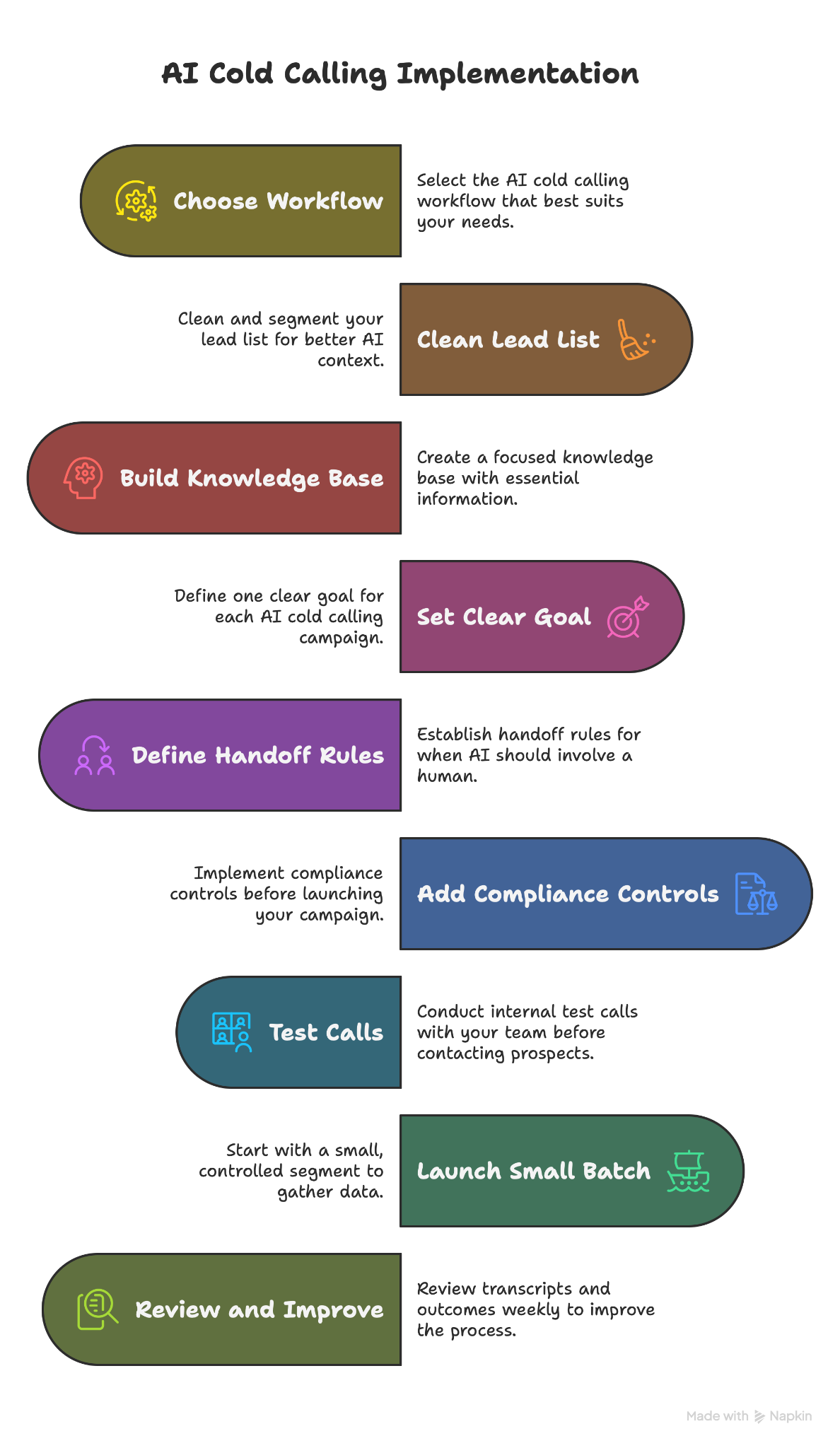
5. Define handoff rules
AI should know when to stop and bring in a human. Set handoff rules for moments like:
- The prospect asks about pricing details
- The prospect shows buying intent
- The prospect raises a complex objection
- The prospect asks for a custom use case
- The prospect sounds frustrated
- The AI cannot answer confidently
A good handoff should also include context. The rep should know who the prospect is, what they asked, what they care about, and why the AI routed the conversation.
6. Add compliance controls before launch
Compliance needs to sit inside the process from day one. Before you launch, confirm:
- Which contacts you can call
- What consent you have
- Which regions you’re calling
- Which call times you need to follow
- How the AI introduces itself
- How opt-outs get handled
- Whether you can record the call
- How your CRM stores call notes and transcripts
Also, make sure your AI cold calling tool can stop outreach when someone asks to opt out. It should happen immediately, not after someone manually reviews a spreadsheet.
{{templates}}
7. Test calls with your team
Run internal test calls before you contact prospects. Ask your team to play different types of prospects, like interested, busy, skeptical, confused, annoyed, and completely unqualified. It helps you spot weak points before they reach your market.
Pay attention to:
- Voice quality
- Latency
- Pronunciation
- Interruptions
- Objection handling
- Handoff timing
- Follow-up accuracy
- CRM updates
Test calls often reveal small issues that would hurt trust on a live campaign.
8. Launch with a small batch
Don’t start with your best leads. Pick a small, controlled segment first. Watch how the AI handles conversations, what prospects say, where calls drop off, and which follow-ups get replies.
A small launch gives you enough data to improve the process without risking your highest-value accounts.
9. Review transcripts and improve weekly
Look at transcripts, outcomes, objections, opt-outs, meeting rates, call length, and handoff frequency. Then update your scripts, knowledge base, qualification rules, and follow-up steps.
You’ll usually find patterns fast. Maybe the opener feels too long. Maybe prospects ask the same pricing question. Maybe the AI hands it off too late. Fix those issues before scaling the campaign.
Your goal should be to have AI handle repetitive work well enough that your best reps spend more time with the right prospects.
What to look for in an AI cold calling tool
A high-volume outbound team needs different features than a small founder-led sales team. Before you compare tools, get clear on what you need AI to handle.
Here are the main things to look for:
Compliance controls
Your tool should help you manage consent, do-not-call checks, opt-outs, caller identification, call recording rules, and regional restrictions. It should also give you a clear way to stop outreach when a prospect asks not to receive more calls.
For AI voice calls, it matters even more. You need to know who the AI can call, what it can say, and how it handles opt-outs during the conversation.
Call quality and latency
Voice quality can make or break the call. Look for clear audio, natural pacing, accurate pronunciation, and low latency. If the AI pauses too long or talks over the prospect, people will notice fast.
Test the tool with messy conversations before you commit. Ask unexpected questions, interrupt it, speak quickly, use industry terms, and see how well it recovers.
Human handoff
A good AI cold calling tool should know when to bring in a person. Look for handoff options like warm transfers, meeting booking, rep notifications, or CRM task creation. The handoff should include context, too. Your rep needs the call summary, qualification answers, objections, and reason for escalation.
Without that context, the prospect has to repeat everything, which defeats the point.
CRM and sales tool integrations
AI cold calling works better when it connects to the tools your team already uses. At minimum, look for CRM integrations with platforms like Salesforce, HubSpot, or Pipedrive. The tool should log calls, update lead fields, save notes, and trigger follow-ups without forcing reps to copy information between tabs.
Calendar, email, Slack, and SMS integrations also help because cold calling rarely ends with the call itself.
Follow-up support
The best AI cold calling tools can send follow-up emails, share meeting links, create tasks, alert reps, or move leads into the right sequence. Speed after the call often affects whether a lead moves forward.
Here’s a simple test: After a call ends, can the tool handle the next step without making your rep do extra admin work?
Customization
Your team should control how the AI speaks, what it asks, and when it stops. Look for tools that let you edit scripts, qualification criteria, objection responses, call goals, and handoff rules. You should also control what information the AI can use during calls.
Avoid tools that lock you into rigid scripts. Cold calls rarely follow a perfect path, so your tool needs enough flexibility to handle common detours.
Analytics and call insights
AI cold calling should give you better visibility into your outbound motion. Look for transcripts, call summaries, objection tracking, conversion rates, call outcomes, handoff rates, and meeting booking rates. These insights help you improve scripts, refine lead segments, and coach reps.
The tool should make patterns easy to spot. If every insight requires digging through dozens of recordings, your team won’t use it for long.
Pricing clarity
Some tools charge per seat. Others charge by minute, call volume, phone number, workflow, or usage tier. Before you choose one, calculate the expected cost per qualified lead, not only the monthly plan price.
Check for extra costs like phone numbers, premium voices, higher call volume, CRM integrations, support, or compliance features. A cheap plan can become expensive fast if the pricing model doesn’t match your call volume.
Top 5 AI cold calling tools
The right AI cold calling tool depends on whether you want AI to support reps, make calls, or handle the work around the call.
Some tools focus on AI voice calls, while others focus on conversation intelligence, coaching, and sales communication. A few can help with follow-ups, scheduling, and CRM updates after a call ends.
Here are five tools worth comparing:
| Tool | Best for | Key features | Starting pricing (billed monthly) |
|---|---|---|---|
| Lindy | AI assistant you can text to offload calls and follow-up tasks | AI phone numbers, templates, CRM, scheduling, integrations | $49.99/month |
| Dialpad | AI-assisted sales calls and coaching | Transcripts, summaries, sentiment, sales coaching | Talk to sales |
| Retell AI | Conversational inbound and outbound calls | Voice AI, routing, handoff, analytics | Pay-as-you-go, $0.07-$0.31/minute |
| Synthflow | No-code voice AI for teams | Voice assistants, scheduling, qualification, support | Contact sales |
| Vapi | Developer-built custom voice AI | Voice API, custom logic, provider control | Per-minute usage, from $0.05/minute |
Why I’d use Lindy for my AI cold calling workflows
Cold calling often creates more work after the call than during it. Reps need to update the CRM, send follow-ups, book meetings, add reminders, and keep the rest of the team in the loop.
Here’s where an AI assistant like Lindy can help.
Lindy works like a sales assistant you can text when you need help with phone calls or the follow-through after them. It also connects with hundreds of apps. So, instead of jumping between your CRM, inbox, calendar, and Slack, you can ask Lindy to handle the next step.
For example, you can text Lindy to:
- Make an outbound call to a lead
- Use an AI phone number for calling workflows
- Qualify a prospect and book a consultation
- Update the CRM with call notes and next steps
- Send a follow-up email based on what the prospect said
- Schedule a meeting with the right rep
- Remind you to follow up next week
- Summarize the call for your team
- Alert you when a lead replies or needs attention
Lindy also has ready-to-use skills for phone calling workflows, so you don’t have to start from a blank page. You can use a skill to call leads, collect key details, schedule meetings, and notify your team after the call.
On the data-security side, Lindy is SOC 2 Type II, HIPAA, GDPR, and PIPEDA compliant, with encryption in transit and at rest. These compliance standards cover the tool's side. The compliance discipline above (consent, do-not-call, opt-outs, regional rules) is your team's job.
For those new to AI or looking to expand their knowledge, Lindy Docs offers comprehensive guides and tutorials. It helps you learn how to use Lindy for your everyday tasks.
So, if you’re a sales team needing an AI cold calling tool to hand off initial calling and qualifying tasks, Lindy is worth considering.
Start your Lindy free trial today and offload repeat calling workflows with ease.
{{cta}}
Frequently asked questions
Can AI make cold calls for my sales team?
Yes, AI can make cold calls for your sales team when the goal is simple, like qualifying leads, confirming interest, or booking meetings. It works best for early-stage outreach with clear scripts and handoff rules. Human reps should still handle complex objections and serious buying conversations.
Does AI cold calling work for B2B sales?
Yes, AI cold calling can work for B2B sales when teams use it for the right tasks. It helps with lead qualification, follow-ups, call summaries, CRM updates, and outreach to lower-intent lists. It works less well when the call needs industry knowledge or relationship-building.
How does AI cold calling compare to human reps?
AI cold calling is fast and follows the instructions you set with consistency. It creates more top-of-funnel activity and helps reps avoid repetitive work. Human reps still own conversations, manage objections, and build long-term relationships. Using both gives you the best results.
Can AI replace SDRs?
No, AI cannot fully replace SDRs. However, it can take over repetitive work like dialing, research, qualification, summaries, and follow-ups. SDRs still matter for trust-building, objection handling, account strategy, and conversations with high-intent buyers.
How much does AI cold calling software cost?
AI cold calling software costs vary by tool, usage, and call volume. Tools like Vapi and Retell charge per minute, starting from $0.05-$0.07 per minute, while Lindy charges a flat monthly fee of $49.99/month. Before choosing a tool, calculate the cost per qualified lead instead of only comparing monthly plan prices.
How does AI personalize cold calls?
AI personalizes cold calls by using lead data and conversation context. It can mention the prospect’s company, industry, role, previous form submission, recent interaction, or the reason they entered your list. It can also adapt during the call based on what the prospect says.
For example, if a lead says they already use a competitor, the AI can ask what they like about that tool instead of forcing the original script. If the lead says they’re hiring SDRs next quarter, the AI can route them into a different follow-up path.
Can AI handle an entire sales call?
No, AI cannot handle an entire sales call because it cannot manage complex objections or negotiate deals. However, it can handle early conversations, qualification steps, and meeting scheduling. Human reps take over once the prospect shows buying intent.
What’s the difference between an AI dialer and an AI voice assistant?
An AI dialer helps reps place calls faster and may add features like call logging or voicemail drops. An AI voice assistant can speak with prospects, ask questions, understand responses, and take next steps like booking meetings or sending follow-ups.









