What Are AI Agents? Types, Benefits, and Use Cases
Marvin broke down what AI agents are, how the perception-action loop works, and their six types, benefits, and use cases across support, healthcare, and finance.


After testing many AI agents across workflows, I’ll share a clear breakdown of what AI agents are, how they benefit users, and why industries want them for tasks like CRM updates, email triage, meeting notes, and more.
What is an AI agent?
An AI agent is a software program that can perceive information, make decisions, and take action to achieve a goal. It can do that independently or in collaboration with other agents.
To put it simply, it’s like having a reliable digital coworker that understands your intent and takes care of routine or complex tasks without supervision.
AI agents, when configured right, can handle everything from answering questions and summarizing data to managing projects or scheduling meetings. That’s what makes them more intelligent, flexible, responsive, and useful than static rule-based systems. These advanced capabilities are central to how modern intelligent agents operate in complex environments.
Characteristics of AI agents
Most AI agents share several key traits that define how they think and act. Here’s what they are:
- Autonomy: They operate without constant human direction, deciding how to handle situations based on data and prior experience.
- Goal-driven behavior: They focus on specific objectives, such as optimizing routes, writing reports, or responding to customers.
- Perception and reasoning: They interpret data from multiple sources and determine the best course of action.
- Learning: They refine their performance over time by learning from feedback or new information.
- Adaptability: They adjust to changing environments or goals without needing to be reprogrammed.
These characteristics make them different from AI assistants or basic chatbots. Let’s see how.
AI agents vs AI assistants vs chatbots
Users sometimes are confused among AI agents, AI assistants, and chatbots. All of them work differently and serve different purposes. These three differ on a few important parameters. Here’s how they compare:
| Feature | AI Agent | AI Assistant | Chatbot |
|---|---|---|---|
| Autonomy | High | Medium | Low |
| Context awareness | Highly aware | Moderate | Limited |
| Learning ability | Continuous learning with feedback | Occasionally, when you update the logic | Follows fixed rules until you update the logic |
| Example | Lead enrichment agent, Lindy voice agent | Microsoft Copilot, Siri | Website support bot |
While assistants and chatbots help users interact with software, AI agents can make independent decisions, learn from feedback, and collaborate with other agents to complete multi-step tasks. To understand how these concepts differ from broader system design, read our breakdown on agentic ai vs ai agents.
How do AI agents work?
AI agents try to mimic how humans think. They observe a situation, make sense of it, and act. This pattern is called the perception-action loop, and it allows agents to function with a degree of independence.
Let’s look at how an AI agent in Lindy works. Before an AI agent can do anything, you need to define a few things:
- Goal: You tell the agent what outcome it should aim for. For example, calling a lead, summarizing an email thread, or answering support questions.
- Inputs it should pay attention to: This could be text, audio, files, CRM data, or user messages.
- Actions it is allowed to take: Such as sending a message, updating a record, calling an API, or making a phone call.
Once an agent has this foundation, it starts operating in a loop. Here’s the sequence of steps that most AI agents take:
1. Perceive the situation
The agent gathers information from the environment. In Lindy’s case, that might be an incoming phone call, a message from a user, or a new document in a workspace. The agent reads the content, analyzes intent, and picks up cues from previous interactions.
When I tested support agents, perception mattered more than anything else. If the agent missed a few details or nuances of the tone or phrasing, the next action never matched what the user needed. This accuracy is especially critical when deploying ai customer service agents to resolve user inquiries automatically.
2. Reason and decide
Once the agent understands what is happening, it evaluates what to do next. The reasoning can be simple or complex, depending on how you configure the agent. Lindy’s decision-making comes from the prompts and workflow steps. The agent considers its goal, the user’s request, and any available context before selecting the next step.
3. Act on the task
After choosing an action, the agent executes it. That could be replying to a user, updating a spreadsheet, calling someone, searching a knowledge base, or triggering a workflow step. You can also connect external services using custom gpt actions to extend what your agent can execute.
In one workflow I tested, a pair of Lindy agents handled email triage together. The first summarized the thread, and the second drafted replies using that summary. Their handoff worked smoothly because each agent had a defined role, goal, and set of allowed actions.
4. Learn from feedback
Agents improve when they get corrections or examples. In Lindy, you guide them through prompt edits, workflow adjustments, or explicit feedback on outputs. Over time, the agent becomes more accurate because it sees clearer instructions and refined examples.
When I used agents for repetitive research tasks, small snippets of feedback made a big difference. Every correction nudged the agent toward more consistent results.
5. Stay aligned through monitoring
Even with a good setup, agents still need oversight. When an output looks off, you correct it and tighten the instructions so future behavior matches your expectations.
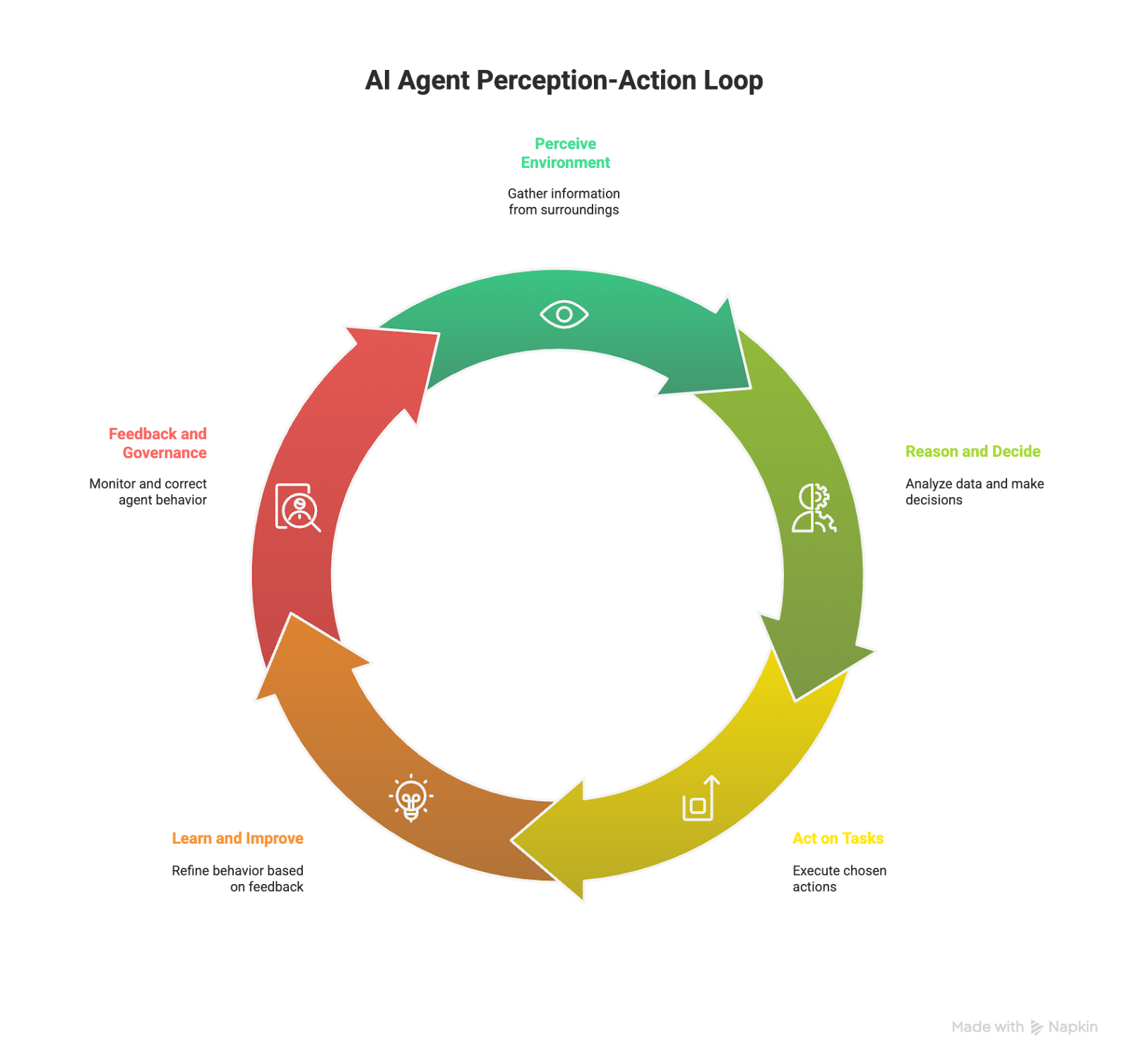
This perception-action loop is what separates AI agents from static automation. It helps agents understand, reason, and evolve with respect to the context.
Types of AI agents
Some AI agents follow strict rules, while others learn from continuous feedback. Understanding the types of AI agents helps you align them with use cases across industries, from robotics to everyday productivity tools. Many specialized industries rely on vertical ai agents designed specifically for domain-specific workflows.
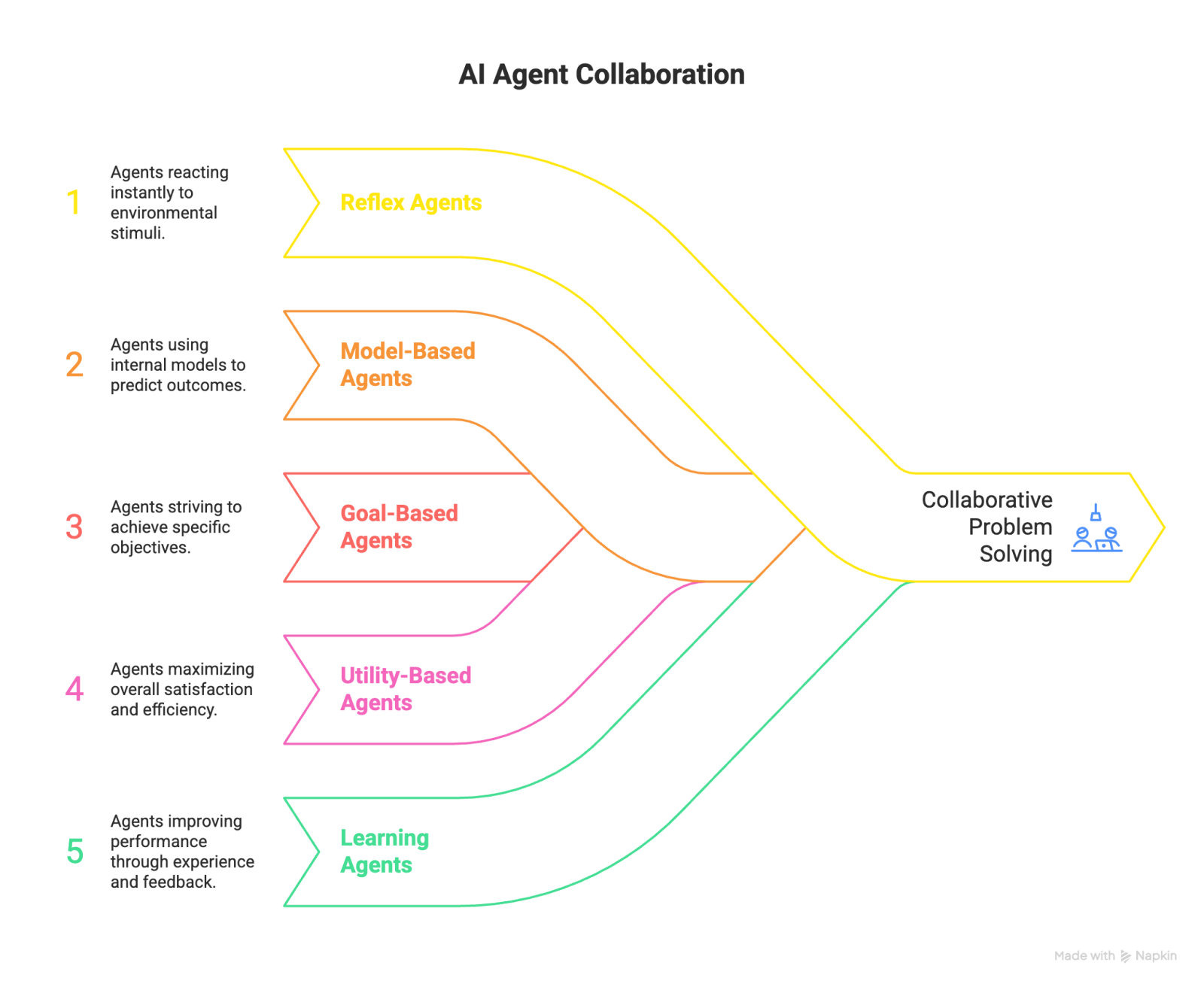
These are the 6 AI agents you should know about:
1. Simple reflex agents
These agents react directly to what they perceive. They follow “if-then” rules without remembering past experiences.
Simple reflex agents are fast but limited. When I tested one for customer responses, it worked well for straightforward questions but failed when users added extra context.
Here are some examples:
- Old-school chatbots: Respond to user queries with canned answers from a database without understanding or adapting to context.
- Basic security systems: Trigger alarms or lock doors when a motion sensor is activated, based on pre-set rules.
2. Model-based reflex agents
Model-based agents build an internal map of their environment and use it to make better decisions. They can predict outcomes instead of reacting blindly. These agents are better than reflex agents because once they understand the environment, they adapt faster.
Here are some examples:
- Robot vacuum cleaners: Use a map of the house to navigate around obstacles and clean efficiently.
- Self-parking cars: Build a model of the parking space and calculate the best route to park autonomously.
3. Goal-based agents
Goal-based agents focus on achieving a defined objective. They evaluate different actions and choose the one that best moves them closer to that goal. These agents are good at strategic decision-making.
Here are some examples:
- Game-playing AIs like Deep Blue: Aim to win a game by following the rules and calculating the best possible moves.
- Automated stock trading systems: Execute trades to maximize profit based on predefined financial strategies.
4. Utility-based agents
Utility-based agents evaluate all the options and select the one that maximizes their overall benefit. They act like decision-makers in business who always consider trade-offs before deciding on something.
Here are some examples:
- Self-driving cars: Choose the safest and fastest route based on real-time traffic data.
- Recommendation systems: Suggest products that align with a user's preferences and past behavior to maximize engagement or sales.
5. Learning agents
Learning agents improve through experience and feedback. They observe outcomes, adjust behavior based on the feedback you provide, and perform better over time.
These AI agents evolve after receiving corrections or new data. They’re ideal for dynamic environments where conditions change constantly.
Here are some examples:
- AlphaGo: Learns to play Go by playing thousands of games and adapting its strategy based on outcomes.
- Self-driving cars: Improve driving techniques by learning from real-world driving experiences, like adjusting turns or braking more smoothly.
6. Multi-agent systems
Multi-agent systems are teams of AI agents that collaborate to solve complex problems. Each agent handles part of the work and communicates with others to reach a shared goal.
Here are some examples:
- Supply chain management systems: AI agents optimize inventory levels, predict demand, and coordinate logistics for on-time product delivery.
- Disaster response networks: Multiple AI agents collaborate to assess damage, manage rescue efforts, and allocate resources during emergencies.
{{templates}}
Examples and use cases of AI agents
When I started exploring AI agents across different tools, what stood out was how easily they blended into existing workflows. They quietly handled the parts of work that usually eat up time, whether it's customer service or healthcare.
Here are a few examples of AI agents in action:
Customer support and service
AI agents can answer questions, resolve simple issues, and escalate only when needed. Customer-facing agents that combine natural language understanding with CRM data can handle the majority of the common inbound queries without human help.
That frees up human support reps to focus on complex requests.
Healthcare
AI agents can analyze data quickly and assist in reading medical scans, flag anomalies, and even schedule follow-ups. They can also summarize patient charts before doctor consultations. The time saved on admin work directly translates into more time for patient care.
Finance
Financial teams rely on AI agents for tasks like fraud detection, compliance tracking, and forecasting. I tested some financial modeling agents, and they caught data inconsistencies almost instantly.
Some trading firms now deploy multiple agents that monitor markets in real time, reducing risk through quicker reactions.
Sales and marketing
Sales and marketing teams use AI agents to qualify leads, personalize outreach, and analyze customer intent. I tried Lindy’s AI CMO to adjust a campaign copy based on engagement metrics from previous emails. That small tweak made a noticeable jump in response rates.
Operations and logistics
In operations, AI agents manage inventory levels, optimize routes, and predict supply shortages. You can create different agents and manage procurement, shipping, and delivery schedules.
Education
In education, adaptive teaching agents guide students through lessons at their own pace. Teachers use them to generate progress summaries and identify knowledge gaps. They can even adapt tone and difficulty to match each learner’s style.
These examples are enough proof that AI agents work and help you offload tedious tasks.
If you want to have an AI agent for your workflows and don’t have the technical resources, Lindy can help. Let’s see how.
How to create an AI agent with Lindy
Lindy helps you create AI agents without any coding knowledge or technical skills. That makes AI accessible and easy to implement for your business.
Here's how to create your AI assistant with Lindy:
- Sign up and create your first agent: After logging in, navigate to the "+" button near your list of AI agents in the left sidebar and click “Start from scratch” or choose a template.
- Set Triggers: Define events, like new emails, that will activate the agent. For example, you could set time-based, every Monday at 9 am, or event-based triggers, like after every Staff Meeting.
- Set Conditions: Filter the events the agent will handle.
- Add a Knowledge Base: Upload documents or provide data sources like your website.
- Add Actions: Instruct the agent to “Add step,” select “Perform an action,” and choose the tasks you want to complete, like sending emails.
- Add Integrations: Some actions require integrations with support third-party apps, such as with Google Drive or Salesforce.
Test: Save your new AI agent and try it out by clicking the back button. Then, run trials and make adjustments before deploying.
Benefits of using AI agents
Once set up properly, an AI agent becomes a dependable teammate that quietly handles the background work while you focus on what matters most. Here’s how they benefit teams:
24/7 automation and availability
AI agents never clock out. They manage emails, update dashboards, or respond to customers around the clock. During my testing, agents working overnight often caught issues or requests that humans would have missed until the next morning.
Higher productivity and reduced costs
By taking over repetitive tasks, agents help small teams act like large ones. In one workflow, I created an AI agent to update CRM entries and it significantly cut admin time. That can translate into cost savings and faster project turnaround.
Better decision-making through data
Agents analyze information continuously and surface insights that humans might overlook. For example, an AI agent can review support tickets and find patterns in complaint keywords. It can then help the support team to fix an issue before it escalates.
Personalization at scale
Agents learn user preferences over time. Whether drafting reports or following up with leads, they adjust tone and content automatically. It is like working with an assistant who already knows your style.
Collaboration and scalability
Multiple agents can coordinate to handle complex processes. This teamwork among agents can make it easy for organizations to scale operations without adding people.
For example, you can have the first agent to manage scheduling, the second one can oversee documentation, and the third one can update the CRM without conflict.
Challenges and limitations of AI agents
During my testing, I noticed that an AI agent’s strengths often depend on how well you’ve trained, managed, and monitored it. Here’s what to look out for while implementing them:
Data quality and bias
Agents are only as smart as the data they learn from. Poor or unbalanced data leads to biased or inaccurate outcomes.
I tried doing that to see the results. I fed one support agent incomplete information, and it started giving inconsistent answers. When I updated its dataset, it immediately improved accuracy.
Lack of transparency
Many AI agents use models that work like black boxes. You see the output, but not the reasoning behind it. During testing, I sometimes had to trace back through logs to understand why an agent made a decision.
Transparency tools and audit trails help, but they still require attention.
Dependence on infrastructure
AI agents rely on steady internet connections, cloud platforms, and API integrations. When one of these links breaks, so does the workflow.
While testing a workflow, an email integration failed and paused the entire process until I reconnected it. Reliability is as much about infrastructure as intelligence.
Ethical and governance concerns
AI agents handle sensitive information, from customer data to internal documents. Without proper governance, they risk privacy breaches or misuse. Always set clear rules, like data access limits and human approval checkpoints, to make AI agents safer and more compliant.
Try Lindy, the AI agent tool for non-technical users
Lindy is an automation platform that lets you create prebuilt and custom AI agents using its drag-and-drop workflow builder. You’ll also find 4,000+ integrations to help you launch quickly.
Lindy helps automate your workflows with features like:
- Drag-and-drop workflow builder for non-coders: You don’t need any technical skills to build workflows with Lindy. It offers a drag-and-drop visual workflow builder.
- Create AI agents for your use cases: You can give them instructions in everyday language and automate repetitive tasks. For instance, create an assistant to find leads from websites and sources like People Data Labs. Create another agent that sends emails to each lead and schedules meetings with members of your sales team.
- AI Meeting Note Taker: Lindy joins meetings from Google Calendar. It records the conversation, creates transcripts, and writes structured notes in Google Docs. After the meeting, Lindy can send Slack or email summaries with action items and can even trigger follow-up workflows across apps like HubSpot and Gmail.
- Update CRM fields without manual entry: Instead of just logging a transcript, you can set up Lindy to update CRM fields and fill in missing data in Salesforce and HubSpot without manual input.
- Send follow-up emails and keep everyone in sync: Lindy agents can send follow-up emails and keep everyone in the loop by sending updates in your Slack channel.
- Supports tasks across different domains: Lindy also handles website chat, lead generation, and content creation. You can create AI agents that help reduce manual work in training, sales outreach, and email writing.
- Cost-effective: Automate up to 40 monthly tasks with Lindy’s free version. The paid version lets you automate up to 1,500 tasks per month, which is a more affordable price per automation compared to many other platforms.
Try Lindy free and automate up to 40 tasks with your first workflow.
{{cta}}
Frequently asked questions
Is ChatGPT an AI agent?
No, ChatGPT is not an AI agent. However, it can perceive text input, reason through language models, and generate relevant responses. It learns from feedback and can complete tasks such as summarizing information or drafting content.
What is a GPT agent?
A GPT agent is an AI agent powered by the Generative Pre-trained Transformer (GPT) model. It uses deep learning to understand and generate human-like text. GPT agents can handle a wide range of tasks such as answering questions, writing emails, and analyzing information in natural language.
What are Gen AI agents?
Gen AI agents, short for generative AI agents, are advanced agents that can create text, images, or speech using large language models. These agents combine creativity with reasoning, allowing them to assist in content generation, research, and communication.
What does an AI agent do?
An AI agent performs tasks by understanding context, making decisions, and taking action. It can automate scheduling, customer support, data analysis, reporting, and more. The main goal of an AI agent is to reduce manual work and improve efficiency.
What are agentic AI systems?
Agentic AI systems are collections of agents that plan, reason, and act autonomously. They often collaborate with other agents or tools to solve complex problems, such as managing logistics or analyzing research data.
Can I create an AI agent without coding?
Yes, you can create an AI agent without coding with no-code platforms like Lindy. It lets users design agents visually by setting goals, triggers, and data sources. This approach makes building AI agents accessible to anyone, not just developers.
Are AI agents safe and reliable?
AI agents are safe when used with proper oversight and data controls. Regular monitoring, feedback loops, and clear access permissions ensure they act responsibly and deliver consistent results.
If you’re using an AI agent platform, check the security compliance. Lindy, for example, is SOC 2 and HIPAA compliant.










