AI Agent Architecture: 7 Components and 5 Core Patterns
Lindy broke down AI agent architecture, covering memory, planning, and execution layers, plus multi-agent frameworks like LangGraph and CrewAI for orchestration.


AI agent architecture is the structural design that sits between a model and a result. The model generates text. The architecture decides what the model pays attention to, what it remembers from past interactions, what sequence of steps it takes, and whether it checks its own work before moving on.
The first time I gave an AI system a task that mattered, it forgot everything the next day. It started from scratch. No memory of what I'd told it, no context from the conversation before, just a blank slate waiting for instructions it had already received. I assumed the model was the problem, but it wasn't.
Reliability comes from the architecture underneath. The more AI systems I tested, the more I noticed the same pattern. The ones that worked had memory, a planning step, real tool access, and a feedback loop underneath.
This guide walks through every layer of that structure.
What is AI agent architecture?
AI agent architecture is the blueprint for how an AI system takes in information, decides what to do with it, uses tools to act, and remembers what happened so the next task goes better. It's the structure underneath the model, the part that determines whether an agent actually gets things done or just sounds like it will.
A weak architecture produces an agent that reacts, forgets, and breaks the moment something shifts from the expected pattern. A solid one produces an agent that adapts, recalls context, and completes work end to end without being pushed at every step.
AI agent architecture diagram explained
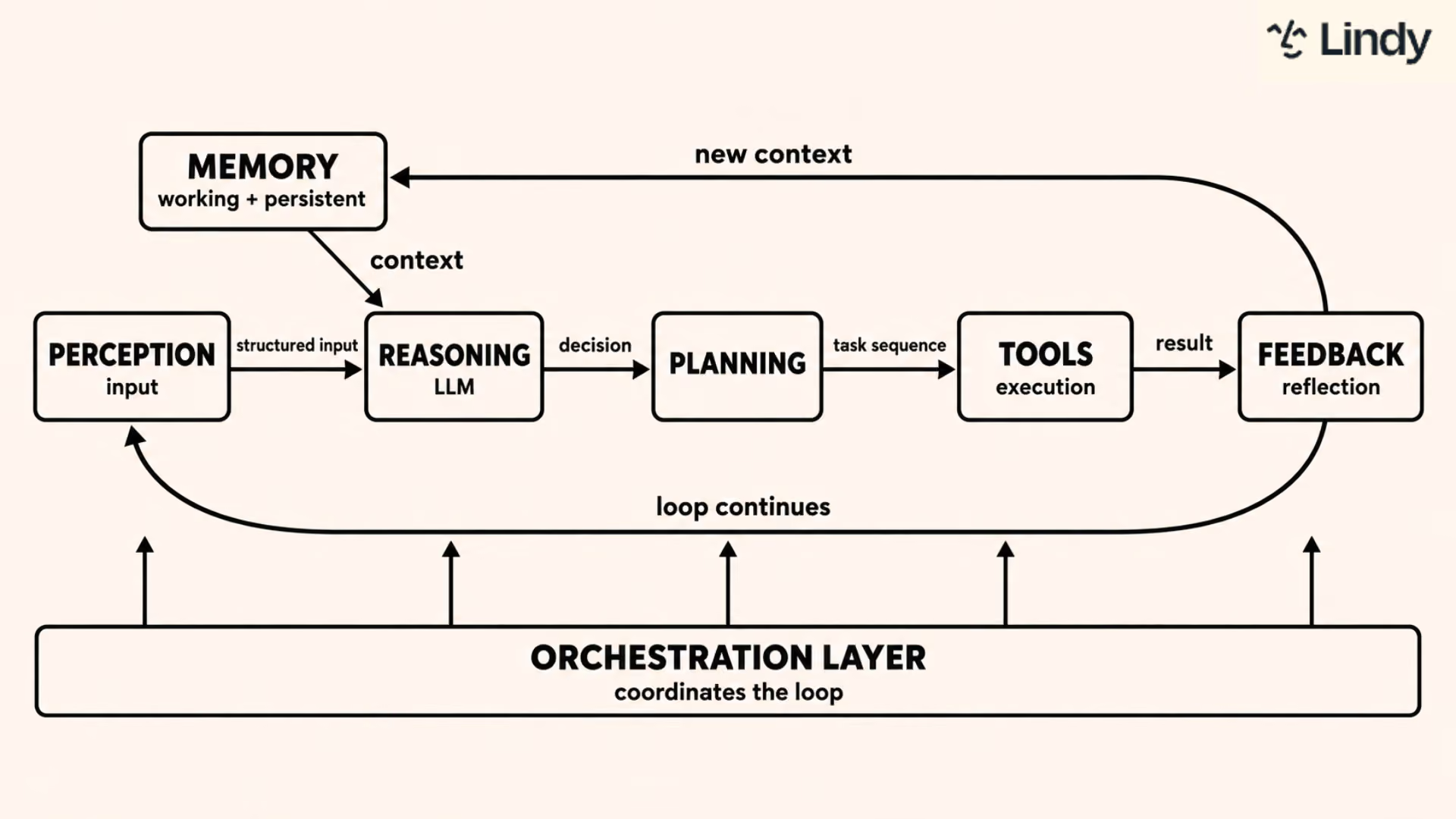
Here is what each connection in the diagram represents:
The perception and input layer sits at the entry point. It catches every incoming trigger and converts it into structured input the system can process. That structured input moves to the reasoning engine.
Before the reasoning engine decides anything, it pulls from memory. Memory sits as a side input, feeding context into the reasoning step. Working memory supplies what is active in the current session. Persistent memory supplies what the system has learned across past sessions. The reasoning engine reads both before forming a decision.
The decision moves to the planning module, which sequences the steps needed to carry it out. Simple tasks get a short sequence. Complex, multi-step goals get a longer one with dependencies mapped between each step.
The plan moves to the tool and execution layer, where the agent actually acts. It calls APIs, updates records, sends messages, and retrieves data. Every action produces a result.
That result passes to the feedback and reflection loop. The agent checks whether the action worked. If something failed, it decides whether to retry, escalate, or adjust the next step. If it succeeded, it moves forward.
Two things happen after the feedback check. The system writes new context back to memory, improving future tasks. And the loop returns to perception, ready for the next trigger.
The orchestration layer runs alongside all of this. It coordinates sequencing across components in a single-agent system and manages handoffs between agents in a multi-agent one. The architecture sets what reaches the model and what gets done with the answer it returns.
7 key components of an AI agent
Every AI agent, regardless of what it's built for, runs on the same underlying set of components. They work together in a loop. The agent receives input, recalls relevant context, reasons through what to do, calls the tools it needs, checks whether the result was correct, and then updates its memory. Here is what each layer does.
1. Perception and input layer
The perception layer tells the agent when something needs its attention. Every trigger gets caught here and passed into the system for processing. That includes new emails, form submissions, Slack messages, and scheduled tasks.
What the agent is allowed to notice is determined entirely by this layer. A narrow perception layer limits the agent before it starts thinking. The breadth of inputs it can handle directly shapes what it can do.
2. Memory
Memory lets an agent carry context forward instead of treating every interaction as a fresh start. It works in two layers. Working memory holds what's active in the current session and clears when the session ends. Persistent memory survives across sessions, storing past interactions and preferences in a vector database.
Vector databases retrieve information by meaning rather than exact wording. An earlier instruction phrased one way can still surface when later context calls for it. Without persistent memory, every conversation starts from zero.
3. Reasoning engine (the LLM)
The reasoning engine is the LLM at the center of the agent. It receives input from the perception layer, queries memory for context, and determines what the agent should do next. It sits above the loop, governing the order the other components fire in.
Keeping the model separate means it can be swapped, upgraded, or routed by task type without rebuilding everything around it.
4. Planning module
The planning module determines what the agent does next and in what order. Rule-based planning handles predictable, high-volume tasks with outcomes defined in advance. If a VIP email arrives, flag it immediately. If a payment fails, send a reminder.
Dynamic planning uses the LLM to reason through ambiguous or multi-step goals in real time. It breaks tasks into steps and adjusts when something changes mid-task. Most production systems use both. Rules handle the routine work. Dynamic reasoning handles judgment.
5. Tool and execution layer
The execution layer is where decisions become actions. It connects the agent to the external systems it needs. That includes CRMs, calendars, inboxes, databases, and APIs.
Without a strong tool layer, the agent finishes every task by handing it back to you. With one, it can update a record, schedule a meeting, send an email, and log the outcome. The quality of these integrations determines whether the agent is useful in practice or just good at describing what it would do.
6. Feedback and reflection loop
After taking an action, a well-architected agent checks whether it worked. Was the ticket marked resolved before the survey went out? Did the CRM actually update?
This separates an agent from standard automation. An automation follows a fixed sequence and stops. An agent evaluates the result, recognizes when something went wrong, and decides whether to retry or escalate.
Some agents run a self-critique pass before finalizing a response. They check their own output before it goes out.
7. Orchestration layer
The orchestration layer coordinates everything else. In a single-agent system, it sequences tasks and handles failures.
In a multi-agent system, it routes work to the right specialist and manages handoffs between agents. It ensures context flows correctly as tasks change hands.
Without orchestration, components don't know what order to run in or what to do when something breaks. This layer turns a collection of components into a coherent system that behaves predictably under real conditions.
Types of AI agent architectures
If you want to go deeper on how individual agents are classified by behavior and capability rather than by system structure, this breakdown of AI agent types covers 13 distinct categories with examples.
Single-agent architecture
A single-agent architecture puts one agent in charge of all reasoning, planning, and execution. Everything runs through a single decision loop. Input arrives, the agent processes it, picks a tool, acts, and checks the result.
This works well for narrow, predictable tasks. FAQ bots, scheduled summaries, and single-tool lookups are natural fits. The scope is defined, the steps are repeatable, and the agent doesn't need to coordinate with anyone else to complete the work.
The limitation shows up at scale. When task volume grows, or subtasks require different areas of expertise, one agent becomes a bottleneck. It can't specialize or delegate. Everything queues behind the same decision loop, and performance drops as complexity increases.
Multi-agent architecture
A multi-agent architecture distributes work across specialized agents, each responsible for a specific function. One agent handles research. Another handles drafting. A third logs outcomes to the CRM. An orchestrator sits above them, routing tasks and managing handoffs between each one.
This is the right structure when a task outgrows a single context window, or when different subtasks genuinely need different tools and expertise. A single agent forced to handle research, writing, and CRM updates in sequence will do each one worse than a specialist designed for that job alone.
Multi-agent systems are usually arranged as sequential pipelines, hierarchical delegation, or parallel processing. The last two each get their own section below, under hierarchical orchestration and parallel processing.
The coordination cost is real. More agents means more moving parts, more potential points of failure, and more complexity when something breaks mid-task. The payoff is worth it when the task genuinely exceeds what a single agent can handle reliably.
Cognitive and hybrid architecture
A cognitive or hybrid architecture combines reactive speed with deliberative reasoning. When the answer is obvious, the system responds immediately. When the task is complex or ambiguous, it reasons through the steps before acting.
This is the dominant pattern in modern LLM-powered systems. LLMs naturally blur the line between reactive and deliberative behavior. They can recall context and reason through a task in the same pass, without needing two completely separate modules to handle each mode.
Most production agents are hybrid by default. A purely reactive system moves fast but loses context. A purely deliberative system is thorough but slow. Hybrid architecture gives you both, applied where each one is actually needed.
5 common architecture patterns
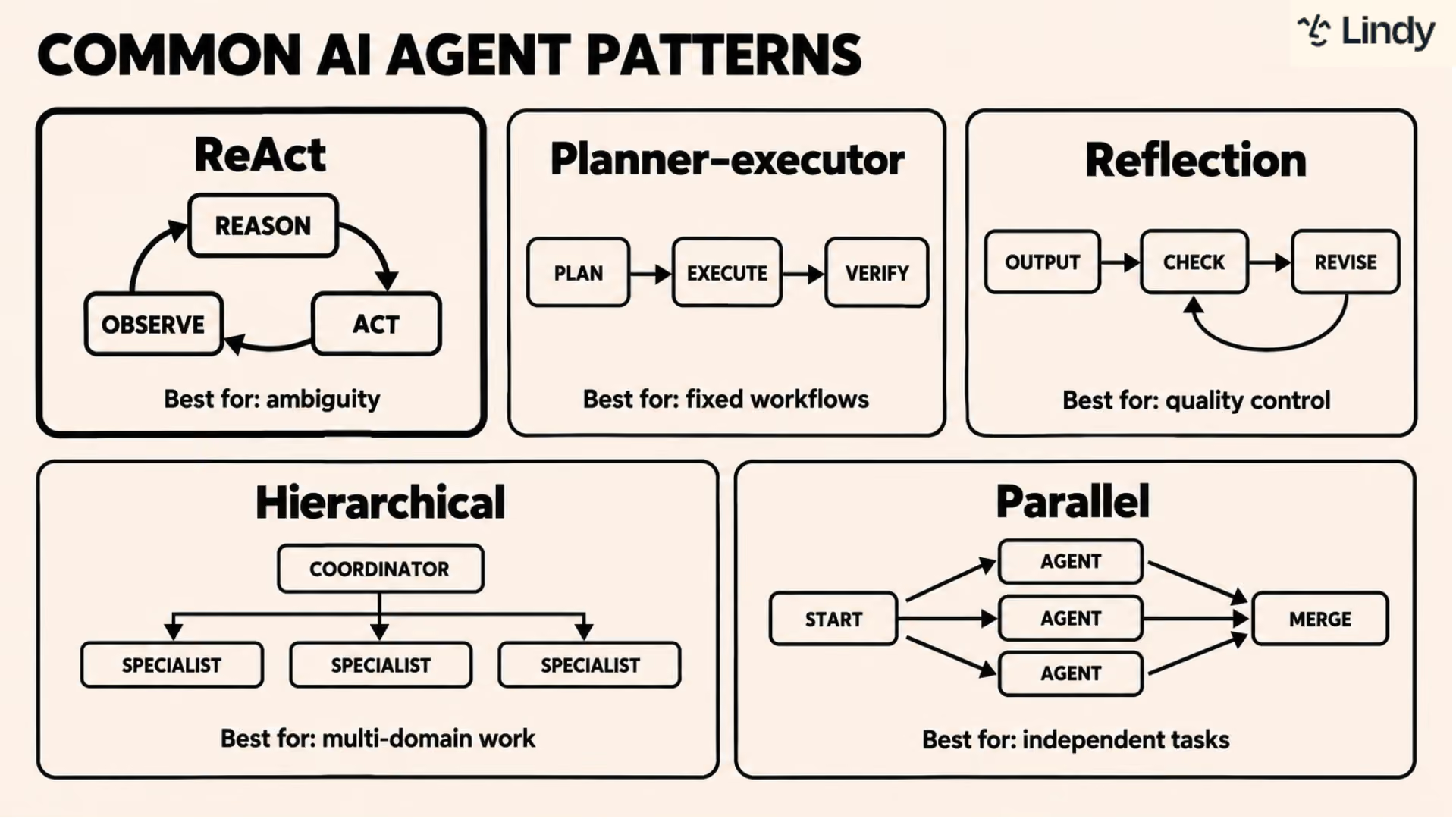
The most common AI agent architecture patterns are ReAct, planner-executor, reflection, hierarchical orchestration, and parallel processing. ReAct is the most widely used, running a loop of reasoning, acting, and observing before each next step.
The others handle specific needs: fixed multi-step plans, self-review before output, delegated specialist work, and parallel subtasks running at the same time.
ReAct (reasoning + acting)
ReAct is a loop where an agent reasons about what to do, acts on that reasoning, and then reasons again based on what it observed. Yao et al. introduced the pattern in 2022, and it has since become the most widely implemented approach in production systems.
LangGraph, LangChain, and most modern agent frameworks are built around some version of it. For a tested comparison of which frameworks hold up in practice, this guide covers the top options.
In practice, it works like this. The agent decides it needs to check a calendar. It calls the calendar API, sees the available slots, concludes Tuesday works, and sends the invite. Each observation feeds directly into the next decision.
ReAct handles ambiguity well. The agent reasons from what it actually finds rather than from what it assumed before it started.
Planner-executor
The planner-executor pattern separates deciding what to do from doing it. A planning module generates the full task sequence upfront. A separate executor works through each step, in order or in parallel, without revisiting the plan.
This works better than ReAct for tasks that are long and whose steps should stay fixed from start to finish. A research task might be planned as five search queries. The executor runs all five at once and consolidates what comes back.
The tradeoff is adaptability. If new information arrives mid-task, the executor can't adjust without returning to the planner. The pattern trades flexibility for predictability.
Reflection
A reflection pattern inserts a self-evaluation step before finalizing any output. After producing a response, the agent reviews its own work. Did this answer the question? Is the tone right? Does the data hold up?
This is most common in content generation and code review workflows. Errors in those contexts carry real cost, so the added latency is worth it. The agent acts as both writer and reviewer before anyone else sees the output. One pass to produce, one pass to check.
Hierarchical orchestration
Hierarchical orchestration places a coordinator agent at the top of the system. It receives the goal, breaks it into subtasks, and delegates each one to a specialist below. Specialists complete their work and report back. The coordinator assembles the final output from their returns.
This is the right structure for multi-domain work. A goal that spans research, drafting, sending, and CRM logging touches four separate domains. Four specialists doing one job each outperform one generalist doing all four in sequence.
The coordinator only needs two things from each specialist: what it's for, and what format it returns.
Parallel processing
Parallel processing runs multiple agents on separate subtasks at the same time and consolidates results once all are complete. It cuts total task time when the subtasks don't depend on each other.
One agent can query Salesforce. Another searches email. A third pulls from a knowledge base. All three results arrive together and feed the planning layer at once rather than arriving one at a time.
The pattern fails when subtasks are actually dependent on each other. If one agent needs another's output before it can start, running them in parallel creates a coordination problem. Use it only when the work can genuinely run in isolation.
If you're ready to move from understanding these patterns to building with them, this step-by-step guide to creating AI agents covers the practical process from start to finish.
How AI agent architecture works, step by step
AI agent architecture runs a continuous loop from input to action to memory. A trigger arrives and gets structured into something the system can process. The reasoning engine pulls relevant context from memory, the planning module sequences the steps, and the execution layer carries them out. After each action, a feedback loop checks whether it worked and writes what happened back to memory.
Here is how that loop breaks down in order:
- A trigger arrives, like a user message, a scheduled event, or an API webhook.
- The perception layer structures the raw input into something the system can process.
- The reasoning engine queries memory for relevant context from past interactions.
- The planning module determines the task sequence and the order of operations.
- The execution layer calls the tools and APIs needed to carry out each step.
- The feedback loop checks whether each step produced the expected result.
- The system returns results and writes new context to memory for future use.
What are some examples of AI agent architecture?
Some examples of AI agent architecture include support triage systems that route tickets without human intervention, meeting assistants that turn transcripts into follow-up emails, and lead qualification pipelines that score and enrich new contacts before anyone on the sales team sees them.
Each one runs the same underlying loop of perception, reasoning, planning, execution, and feedback applied to a specific domain.
Here is how each plays out in practice:
- Support triage: An incoming ticket triggers the agent. It retrieves the customer account from the CRM, searches the knowledge base for relevant guidance, classifies the issue type, routes the ticket to the correct team, and logs the full interaction. No human touches it until it lands in the right queue.
- Meeting follow-up: When a meeting ends, the agent retrieves the transcript, extracts action items, and drafts a follow-up email to all participants. It waits for approval before sending, then updates the calendar with any next steps or scheduled dates that came out of the meeting.
- Lead qualification: A new form submission triggers the agent. It scores the lead against ICP criteria, pulls enrichment data from external sources, and drafts an outreach message. If the estimated deal size exceeds a set threshold, it flags the record for human review before anything goes out.
Architecture guidance from Anthropic and Google
Two of the most widely referenced sources on agent architecture design come from Anthropic and Google Cloud. Both are aimed at developers and technical teams evaluating how to build or assess production systems. Both reach the same core conclusion: the simplest architecture that reliably completes the task is the right one.
Here is what each source covers:
- Anthropic's "Building effective agents" is based on Anthropic's work with dozens of teams building LLM agents across industries. The central finding is that the most successful systems didn't use complex frameworks. They were built with simple, composable patterns. Anthropic recommends starting simple and adding multi-step agentic systems only when simpler solutions fall short.
- Google Cloud's agent architecture component guide takes an infrastructure-first view. It breaks an agentic system into components, like frontend framework, agent development framework, agent tools, agent memory, agent design patterns, agent runtime, AI models, and model runtime. Most useful for teams on Google Cloud making decisions about orchestration, tool calling, and memory.
{{templates}}
How to choose the right architecture for your use case
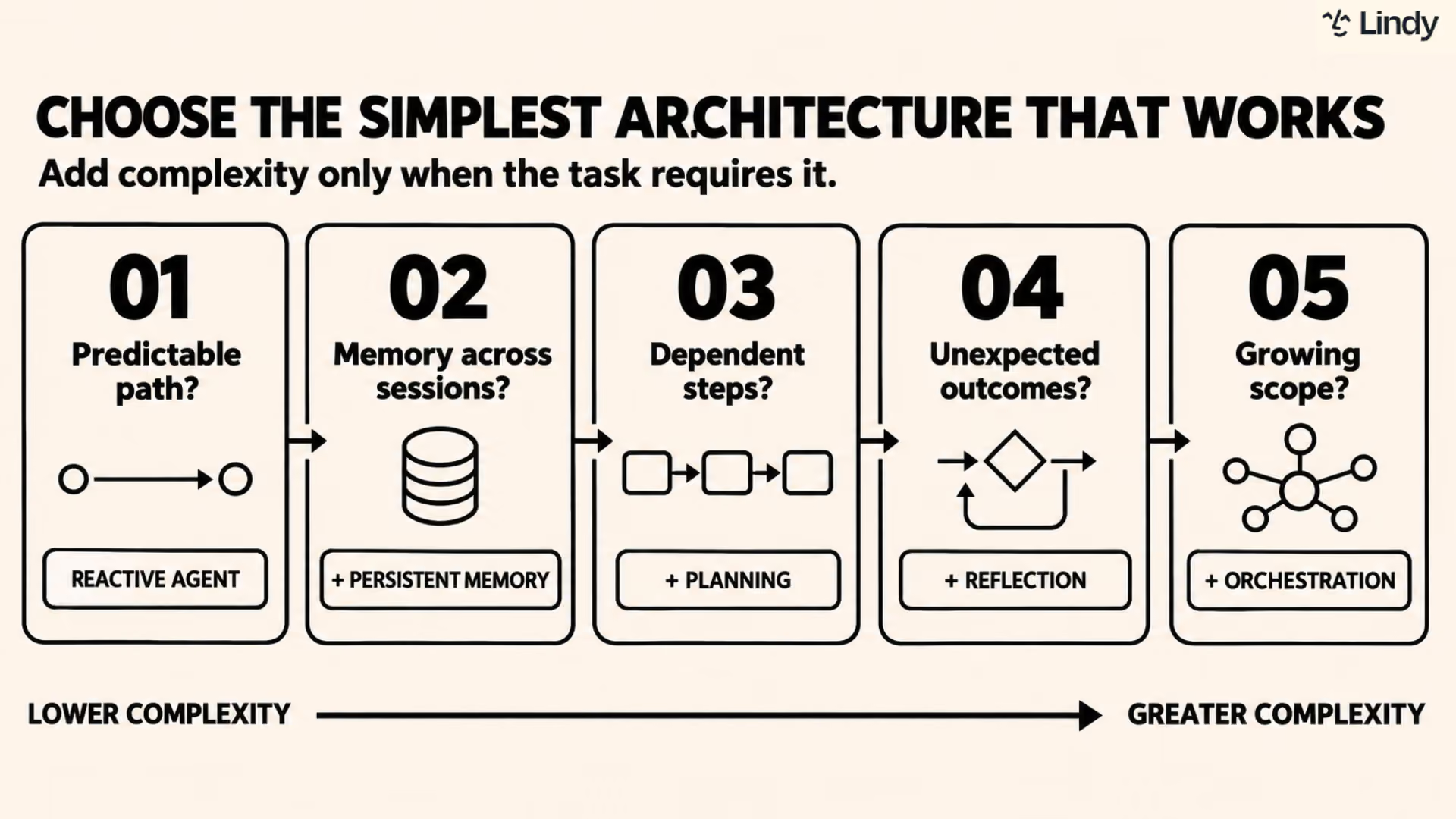
The right architecture is the simplest one that reliably completes the task. Start with a single-agent setup and only add complexity when the work genuinely demands it. Most architecture decisions come down to five questions about the task itself.
Here is what to ask before you build or evaluate:
- Does the task follow a predictable path every time? If yes, a single-agent reactive setup is enough. The moment inputs start varying, or context starts mattering across sessions, that breaks down. Predictability is the clearest signal that you don't need more architecture than the minimum.
- Does it need to remember things between sessions? Check whether the system has persistent memory or only session-level context. Session context clears when the conversation ends. Persistent memory survives across days and weeks, which is what you need if the system is supposed to know you over time.
- How many steps does the task involve? Single-step tasks can use simpler architectures. Anything with dependencies needs a planning module that sequences steps correctly. It also needs to know what to do when one step fails before the next one starts.
- What happens when something unexpected occurs? A well-architected system asks for clarification or flags the issue. A poorly architected one guesses and moves on. How a system handles edge cases tells you more about its architecture than how it handles easy tasks.
- Will the scope grow over time? Modular, orchestrated systems scale. Rigid single-agent setups usually do not. If the use case is likely to expand, the architecture needs to support that from the start rather than be rebuilt when it runs out of room.
Ready to skip the architecture decisions entirely? Try Lindy
If you are running a business rather than an engineering team, the architecture question has a shorter answer. Find a system where it has already been handled for you.
Lindy is an AI teammate that lives in your Slack, connects to your tools, and handles the work without you configuring pipelines or managing components. @mention Lindy in any channel, and it answers in a thread with sourced context from your meetings, files, and connected apps.
DM it, and it works as a personal assistant with access to your email, calendar, and memory across sessions. The architecture underneath is what makes it reliable. You just describe what you need.
{{cta}}
FAQs
What is the difference between AI agent architecture and an LLM?
AI agent architecture is the full structural system that governs how an AI operates, whereas an LLM is one component inside it, the reasoning layer that generates text and makes decisions. The architecture wraps the model with memory, planning, tools, and a feedback loop. Without it, the LLM can respond but cannot act, remember, or check its own work.
What is the most common AI agent architecture pattern?
The most common AI agent architecture pattern is ReAct, short for reasoning and acting. The agent thinks about what to do, picks a tool, observes the result, and reasons again before the next step. Most major frameworks, including LangGraph and LangChain, implement some version of this loop. For more complex, multi-domain tasks, hierarchical orchestration is the next most common pattern.
What is the difference between single-agent and multi-agent architecture?
A single-agent architecture uses one agent to handle all reasoning, planning, and execution, while a multi-agent architecture distributes work across specialized agents, each built for a specific function and coordinated by an orchestrator. Single-agent works well for narrow, predictable tasks. Multi-agent is better when the scope exceeds one context window or requires different tools and expertise across subtasks.
What does an AI agent architecture diagram show?
An AI agent architecture diagram shows how an agent's components connect and how information flows between them. It maps the path from the input layer through the reasoning engine, into planning and tool execution, and back through the feedback loop. The diagram makes the abstract structure concrete and shows what happens between a user's request and the agent's response.
Is agentic architecture the same as AI agent architecture?
Yes, in everyday use. Agentic architecture refers to the broader design of systems built for autonomous, goal-directed behavior, while AI agent architecture refers more specifically to the structural blueprint of an individual agent. IBM and Google Cloud use "agentic architecture" for the full system view, and most practitioners use both terms to mean the same thing.
If you want a hands-on starting point rather than a conceptual overview, this beginner tutorial walks through the process in five steps.









