Zapier Pricing: Plans, Costs, and What to Watch Out for in 2026
Marvin broke down Zapier's pricing across Free, Professional, and Team plans, weighing task limits, multi-step Zaps, and overage costs against Make and n8n.


I ran out of Zapier tasks on a Tuesday afternoon. The Zap I'd set up to pull new form submissions into a Google Sheet and ping my Slack had been running fine for three weeks. Then the overage charges started. I'd used through my 750 monthly tasks eleven days into the billing cycle.
Zapier bills on how many times your automations fire. The plan price is only the floor. One two-action Zap that fires 20 times a day burns 750 tasks in under three weeks. Add a second Zap and you're out in nine days.
I tested Zapier across its Free, Professional, and Team plans, ran the task math on different workflows, and dug into the separate Agents and Chatbots products Zapier now sells alongside the core tiers.
Here's what each plan actually costs, where the bill starts climbing, and when it makes more sense to look elsewhere.
Zapier pricing plans at a glance
Zapier has four core tiers for Zap automation and two separate product lines (Agents and Chatbots), each priced independently.
Annual billing saves 33% across Professional and Team. The task tiers above are the base entry points. You can buy more tasks within each plan: 1,500, 2,000, 5,000, 10,000, up to 2 million per month.
The per-task cost drops as you go higher. For a full breakdown of how Zapier's features and usability hold up in practice, see our Zapier review.
What is Zapier?
Zapier is a no-code automation platform that connects your apps and moves data between them without any coding required. You set up a "Zap," which is a trigger-action workflow, and Zapier runs it automatically in the background every time the trigger fires. A new form submission creates a CRM contact. A new Stripe payment sends a Slack notification.
You set the rule once and Zapier handles the rest, pulling from a library of 9,000+ app integrations.
Here's what you can use Zapier for:
- Moving data between apps: Zapier watches for a trigger in one app (a new row in a spreadsheet, a new email, a new lead) and copies or transforms that data into another app automatically. This cuts out manual exports and copy-pasting between tabs entirely.
- Multi-step workflow automation: Chain multiple actions from a single trigger. One form submission can create a CRM record, notify your team in Slack, add a row to a Google Sheet, and send a welcome email, all in one Zap.
- Conditional logic and branching: Build Zaps that behave differently based on the data using Paths and Filters. Route a high-value lead to one team and a low-value one to another, without anyone manually sorting the list.
- Connecting AI tools to your apps: Zapier MCP lets AI assistants like ChatGPT or Claude take action inside your connected apps directly from a conversation. Each MCP tool call draws two tasks from your plan's monthly quota.
- Scheduled and recurring tasks: Trigger Zaps on a schedule rather than on a live event. Run a daily data sync, send a weekly report, or clean up records on a set cadence without touching anything manually.
- Building forms and data tables: Zapier Forms captures inputs that kick off workflows automatically. Zapier Tables stores and updates the data your Zaps work with, keeping everything in one platform.
Does Zapier have a free plan?
Zapier’s free plan gives you 100 tasks per month and two-step Zaps only. One trigger leads to one action. If a form submission needs to create a CRM record and send a Slack notification, that's two actions (which means two steps), which means you need a paid plan.
What's included:
- 100 tasks per month
- 15-minute polling time
- Zapier Tables and Forms
- Unlimited Zap workflows (two-step only)
- Zapier Copilot (AI assistant for building Zaps)
Best for: Testing a single, simple automation before committing to a subscription. If your Zap fires fewer than 100 times a month and only needs one action, the Free tier is fine.
Where it breaks: Multi-step Zaps, Paths, Filters, and premium app connections all require a paid plan. The 15-minute polling interval also means your Zap checks for new data every 15 minutes rather than near-instantly. For anything time-sensitive (a new lead, a support ticket), that delay matters.
Professional plan: From $29.99/month ($19.99/month billed annually)
The Professional plan is where most solo users and small teams live. It gives you multi-step Zaps, all premium app connections, conditional logic (Paths, Filters), Formatter, and webhooks. The base tier gives you 750 tasks per month.
Higher task tiers up to 2M are available within the Professional plan. Zapier publishes the full task-tier table on its pricing page. A 14-day free trial is available for new accounts, no credit card required.
What's included:
- Webhooks
- Multi-step Zaps
- 2-minute polling time
- All 9,000+ app integrations, including premium apps
- Paths, Filters, and Formatter (these do not count as tasks)
- Email support; live chat available from the 2,000-task tier upward
Where it breaks: No shared workspaces, user roles, or collaborative features. If two people need to build and manage Zaps together, you need Team. Task overages also matter. Once you hit your monthly cap, Zapier switches you to pay-per-task billing at a higher per-task rate unless you turn that off. Turn it off and your Zaps pause instead.
Team plan: $103.50/month ($69/month billed annually)
The Team plan adds shared workspaces, user roles, shared app connections, and SAML SSO. It starts at 2,000 tasks per month, shared across up to 25 users.
What's included:
- Everything in Professional
- Up to 25 users in a shared workspace
- Shared Zap workflows and folders
- Shared app connections
- SAML SSO
- 1-minute polling time
- Priority support
Where it breaks: The task pool is shared across all 25 users. One person running a high-volume Zap pulls from everyone's allocation. At that point, 2,000 tasks run out fast. The 5,000-task tier costs $178.50/month ($119/month annually), and the 10,000-task tier runs $253.50/month ($169/month annually).
Enterprise plan: Custom pricing
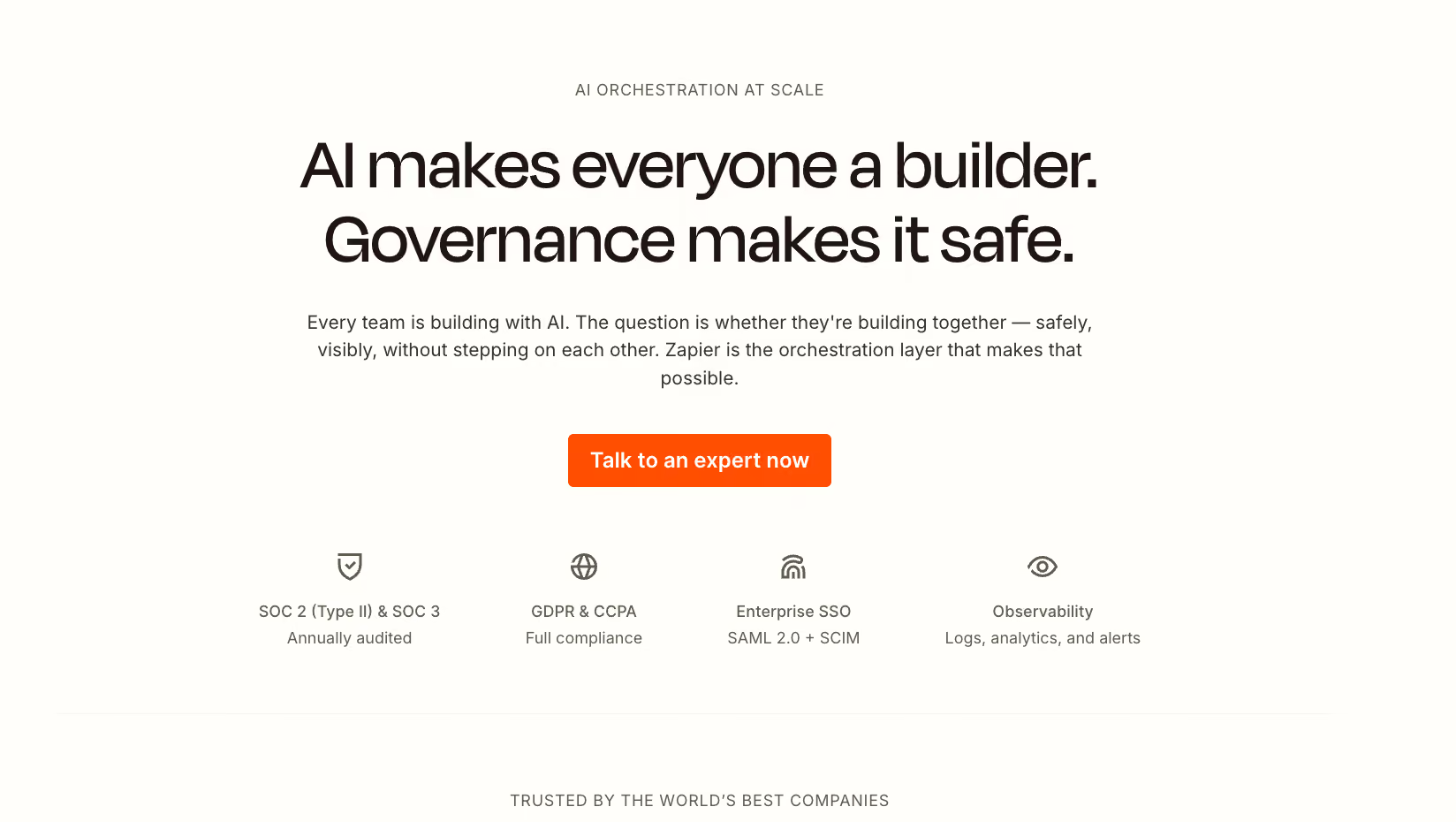
The Enterprise plan is built for organizations where multiple teams are running automations simultaneously and IT needs visibility over all of it. Pricing is custom. Contact Zapier's Sales team directly.
What's included:
- Log streaming to tools like Datadog or Splunk
- Workspaces for each team, with inherited admin-set guardrails
- AI guardrails that check outputs before they reach your systems
- 24/7 email support, plus weekday live chat with screen sharing on demand
- Advanced admin permissions and app access controls at the endpoint level
- Domain restrictions to block personal accounts from connecting to business systems
- Bring Your Own Model support, so AI runs through your own infrastructure (including Amazon Bedrock)
Where it breaks: Enterprise pricing is entirely opaque until you talk to sales. If your team is evaluating budget before committing to a conversation, there's no public figure to anchor to. The feature set is built around governance and compliance. If your organization doesn't need that level of control, the Team plan covers most of the same automation capability at a fraction of the cost.
How much does one Zap actually cost per month?
The cost of one Zap per month depends entirely on how many actions it contains and how often it fires. Zapier charges per successful action. So a Zap with two actions uses two tasks each time it runs. A Zap with five actions uses five.
Triggers never count, and neither do built-in tools like Filters, Paths, Formatter, or Delay. Only the actions that complete successfully draw from your monthly quota.
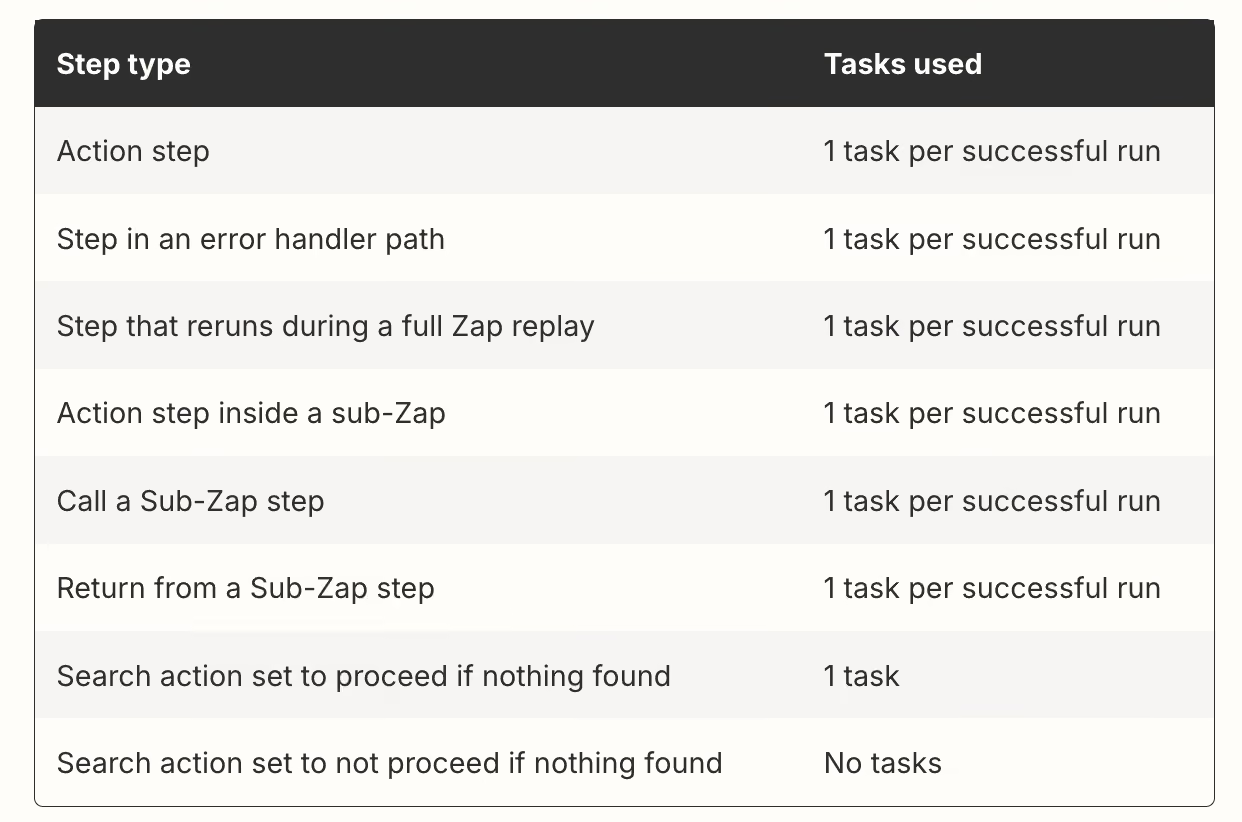
The math adds up faster than most people expect. Take a Zap that uploads a Gmail attachment to Dropbox and sends a Slack message with the link. That's two actions, so two tasks per run. Run it ten times and you've used 20 tasks. Run it 400 times in a month and you've used 800 tasks, which already exceeds the 750-task base tier on the Professional plan.
A single active Zap with moderate volume can exhaust a plan's allocation before the month is halfway through.
Why does Zapier get expensive for power users?
Zapier gets expensive for power users because the pricing scales with every action. A single busy Zap can burn through a month's task allocation in two weeks, and several features that feel standard cost more than they appear to upfront.
Here's where the bill climbs:
- Multi-step Zaps compound fast: Every action in a Zap counts as a separate task. A Zap with five actions uses five tasks per run. If it fires 50 times a day, that's 7,500 tasks a month from one workflow alone.
- MCP tool calls cost double: Each Zapier MCP call uses two tasks from your monthly quota. If you're connecting AI tools like Claude or ChatGPT to Zapier actions, your task consumption doubles on every call.
- Pay-per-task overages add up silently: When you hit your monthly cap, Zapier switches to pay-per-task billing at a higher rate unless you've turned it off. A high-volume week can push your bill well past the plan price without a clear warning until the invoice arrives.
- Premium apps require a paid plan: Salesforce, HubSpot, and similar apps don't work on the Free tier. If you build a workflow assuming premium access and realize you need to upgrade, you're paying before the automation runs.
What are Zapier Agents?
Zapier Agents is a distinct product from Zap workflows. You create AI-powered assistants that handle tasks in conversation or on a schedule, things like qualifying leads, responding to support tickets, or running recurring research tasks. They browse the web, query live data sources, and take actions in connected apps.
Agents pricing is completely separate from your core Zapier plan:
An "activity" counts each action your agent takes in chat or in a behavior, each web browsing step, each web search, each knowledge lookup, and each message you send from the Chrome extension.
Note: Zapier Agents does not currently support app and action restrictions set on Enterprise accounts.
{{templates}}
What is Zapier Chatbots?
Zapier Chatbots is an AI chatbot builder that lets you create custom chatbots, train them on your business knowledge, and embed them directly on your website.
You connect each chatbot to Zapier's 9,000+ app integrations through Zap workflows, so conversations can trigger real actions. The free tier gets you two chatbots. Paid tiers add knowledge sources, advanced AI models, and website embedding, and stretch conversation history from 7 days to 14 or 30.
How to choose the right Zapier plan
Choosing the right Zapier plan comes down to your task volume and how many people are building. If you're solo with light automations, the free or entry-level tier covers most needs. If your Zaps run often or your team shares workflows, the math changes fast.
Here's how to decide:
- Go with Free if you have one simple, two-step automation that fires fewer than 100 times a month. It works for light personal use and nothing more.
- Go with Professional if you need multi-step logic, Paths, premium app connections, or webhooks. Before picking a task tier, count your active Zaps, estimate how often each triggers, and multiply by the number of actions. The 750-task base tier runs out faster than most people expect.
- Go with Team if more than one person needs to build or manage Zaps in a shared workspace, or if you need shared app connections and user permissions across a team.
- Go with Enterprise if your organization needs SCIM user provisioning, audit logs, custom data retention, endpoint-level app controls, or a dedicated Technical Account Manager.
{{cta}}
Is there a cheaper alternative to Zapier?
Make, n8n, and Lindy are the most common alternatives to Zapier. Make and n8n both start below Zapier's Professional plan, and Lindy prices per person instead of per task. Each one takes a different approach to automation.
Here's how they compare:
- Make: Make starts at $16/month for 10,000 credits on the Core plan, billed monthly. That's a lower entry price than Zapier's Professional plan, and the credit limit is higher than Zapier's 750-task base tier. The trade-off is a steeper learning curve. Make's canvas-based editor takes longer to get comfortable with. For a direct cost comparison, see Make.com pricing.
- n8n: n8n is fair-code licensed and free to self-host. Cloud plans start at $24/month on the Starter plan. It suits technical users who want deep configuration and don't mind setup overhead. For a side-by-side, see n8n vs. Zapier vs. Lindy: which one automates better?
- Lindy: Lindy is an AI teammate that lives in your Slack. You @mention Lindy in a channel or DM it directly, and it handles the task without you configuring a single trigger or mapping a single field. It starts at $29.99/user/month on the Plus plan.
For a wider comparison across 19 tools, see Top 19 Zapier alternatives (an expert's honest review).
Zapier pricing FAQ
How much does Zapier cost per month?
Zapier's Professional plan starts at $19.99/month when billed annually, or $29.99/month on monthly billing. That's the base 750-task tier. The Team plan starts at $69/month billed annually, or $103.50/month on monthly billing, with 2,000 tasks shared across up to 25 users. Enterprise pricing is custom.
Does Zapier charge per user?
No, Zapier does not charge per user on Free or Professional plans. Those plans are single-workspace with one seat. The Team plan supports up to 25 users on a shared workspace, priced per workspace rather than per seat. Enterprise removes the user cap.
Can Zapier be self-hosted?
No, Zapier is cloud-only, and there is no self-hosted version. If you need an on-premises or self-hosted option, n8n is the most direct alternative.
Does Zapier offer a nonprofit discount?
Yes, Zapier gives nonprofits a 15% discount on any paid plan, excluding pay-per-task overage charges. Contact Zapier directly to apply.
Is Zapier free for personal use?
Yes. Zapier's Free plan is available forever, with no credit card required. You get 100 tasks per month and two-step Zaps. For a single personal automation that runs light, like posting a tweet when you publish a new blog post, or saving email attachments to Google Drive, the Free plan works.
What are the best free alternatives to Zapier?
Make and n8n both have free tiers. Make's free plan includes 1,000 credits per month. n8n is fair-code licensed and free to self-host, with cloud plans starting at $24/month. Lindy does not have a free plan. New users who join through a Slack workspace get a 7-day free trial, and direct signups are billed immediately.
How much does the Zapier Team plan cost per month?
The Team plan costs $103.50/month on monthly billing, or $69/month when billed annually. Both include 2,000 tasks per month shared across up to 25 users.
What is Zapier MCP pricing?
Zapier MCP is included on all plans at no extra cost. Each MCP tool call draws two tasks from your plan's monthly quota. There is no separate MCP subscription fee.










