What Is Grok AI? SpaceXSI’s Chatbot Explained for 2026


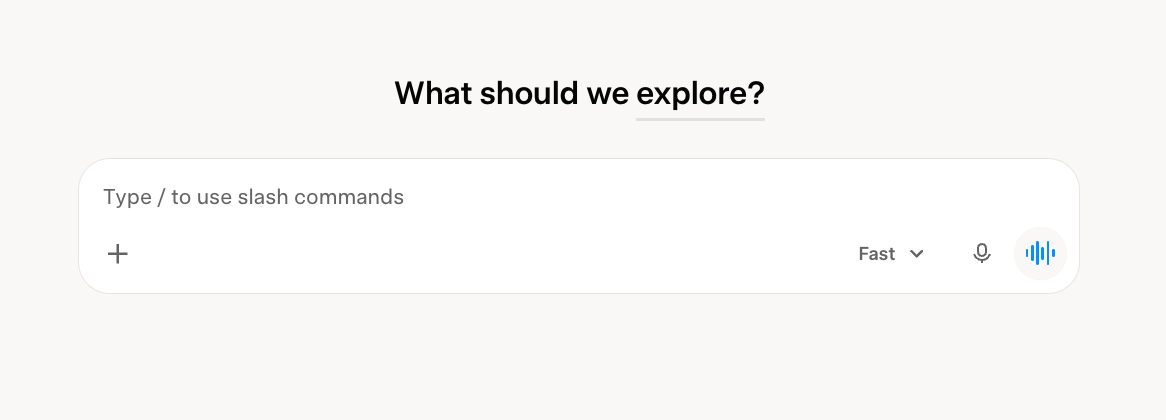
When you access Grok, a blank chat box asks, "What should we explore?" with a speed toggle sitting right next to it. You can send a first message with no account. However, in reply, Grok asks you to sign up. So what is Grok AI? It's SpaceXSI's chatbot, built around speed and live information rather than a polished first-time setup.
By the end of this guide, you'll know what Grok does and what its plans include. You'll also know how it compares to ChatGPT, and whether its safety history should change how you use it.
What is Grok AI: TL;DR
- Grok AI is SpaceXSI's conversational chatbot. Elon Musk originally built it under the xAI name and launched it in November 2023. It runs on grok.com, inside X, and on iOS and Android.
- It's free to use with limits. New customers now subscribe through the X Subscription, which runs from $8 to $200 a month across four tiers. Existing SuperGrok customers can keep their previous plans, which run from Lite at $10/month to Heavy. Every old plan above Lite includes Grok Bot (SpaceXSI’s background AI agent).
- Its biggest edge over ChatGPT is real-time X and web search, plus built-in image and video generation through Grok Imagine.
What is Grok AI? The 30-second answer
Grok is a large language model and chatbot built by SpaceXSI. It answers questions, searches the live web and X, and writes and debugs code. It also generates images and short videos, all from one chat window.
SpaceXSI built it to sound direct, a little cheeky, and current. It also pulls from live information as it answers.
Key features
Grok covers most of what you'd expect from a leading chatbot, plus a few things only it does:
- Voice mode: It holds a fast, natural back-and-forth conversation.
- Multi-agent mode: On paid plans, Grok runs several agents in parallel for harder questions, each working a different angle. It then merges the results into one answer you can check.
- Memory and Canvas: Grok remembers your preferences across chats. It also gives you a dedicated space for longer writing with inline suggestions.
How does Grok work?
Grok uses live web and X data by default when it answers. For recent events, it can pull current information and provide citations.
Like ChatGPT and Gemini, Grok answers questions through chat. On Premium and higher plans, Grok Bot can also work across connected apps and handle tasks in the background. Lindy works in that same space: an AI teammate you can text to get work done and receive updates.
What can Grok do?
Everything below comes from using Grok directly across chat, voice, and image generation. For anything I couldn't fully verify hands-on, like how Grok Build handles multiple tasks in parallel, I checked it against SpaceXSI's documentation instead.
Beyond basic chat, Grok handles live answers, image and video creation, coding, and file analysis:
- Live answers: Grok searches the web and X with citations before answering a question about a trending story, a stock, or a score.
- Image and video generation: Grok Imagine creates images up to 2K resolution from a text prompt on every tier, including the free plan, then lets you restyle them with a follow-up message or turn them into a short video. Video generation starts at Premium ($30): clips run 15 seconds at 720p by default, with 1080p on higher tiers.
- Coding: Grok Build runs as a free-to-try terminal agent that plans a task, searches your codebase, and edits multiple files. You can use plan mode, a preview step that shows Grok Build's plan before it starts editing files.
- Document and image analysis: Upload a contract, a screenshot, or a chart, and ask what it means.
- In-car assistance: Grok is built into Tesla vehicles. Tesla says a driver can ask it to add or edit a destination by voice.
- A distinct personality: Grok's style is humor-driven and direct, inspired by The Hitchhiker's Guide to the Galaxy. SpaceXSI has changed Grok's system prompt more than once in response to past moderation issues.
Some longtime users report Grok blocking requests that ChatGPT allows, even on topics where Grok is typically more permissive.
Grok vs. ChatGPT: What's the difference?
Both are capable, general-purpose chatbots with free tiers, but they differ in how each is built and priced.
How Grok and ChatGPT compare:
Grok's edge is pulling in live, current information, plus image generation from the entry price and video from Premium. ChatGPT's edge is a steadier personality. OpenAI backs that up with its own published rules for how the model should behave. ChatGPT's more predictable tone makes it a better fit for professional or sensitive use than for casual chat.
OpenAI confirms that ChatGPT Go, Plus, and Pro bill monthly, with annual billing available for Business and Enterprise. Grok’s newer X Subscription offers monthly and annual billing.
{{templates}}
Grok pros and cons
Pros (what works)
- Imagine includes real video generation: Grok Imagine bundles 15-second video generation into its Premium plan and up. ChatGPT dropped that same feature entirely when it discontinued Sora in 2026.
- Grok Build is free to try and capable: Grok Build can work on several parts of a task at once and offers an optional plan mode where you can review its proposed changes before it edits your code.
- A usable free tier: Chat, image generation, and Grok Build are all available before paying anything, with limits.
- Its API context window is large: SpaceXSI confirms a 500,000-token context window for grok-4.7 through its developer API. That's not the same as the context limit on every Grok chat subscription.
- SpaceXSI also offers a developer API: It lets developers build directly on Grok models with usage-based pricing. Every account also includes a free Playground to test models first.
Cons (where it falls short)
- Paid usage caps can feel tight: Some $30/month subscribers report hitting the image-generation cap, though SpaceXSI hasn't published an exact number and user-reported limits vary widely.
- Accuracy on precise, structured tasks is inconsistent: users often report Grok getting things wrong when pulling exact data out of documents.
- Trust is an ongoing concern: Grok has produced hateful and false content in the past. That forced xAI to publicly apologize and change how it configures the model.
- Grok Build had a confirmed privacy incident: In July 2026, it was caught uploading users' full codebases, including secrets, to cloud storage. The company shut the behavior off, and on July 15 it open-sourced the tool.
Should you use Grok? My take
Grok is a good fit for
- Anyone who wants fast, current-events answers without switching tools to search separately
- Casual or creative use, where a more direct, personality-driven tone is a feature
- Developers who want a free coding agent to try before committing to a paid plan
- X users who already want a chatbot built into the platform they use daily
Skip Grok if you
- Need consistently cautious, predictable answers for professional or sensitive work
- Want proven accuracy on structured data extraction out of the box
- Are uneasy about Grok's trust and safety record and would rather see SpaceXSI go longer without a repeat incident
If you want a wider view before deciding, a roundup of AI tools like ChatGPT is worth a look. It compares several tools beyond these two.
How to get started with Grok
- Open Grok: Go to grok.com, or download the iOS or Android app.
- Sign in: Create an account with X, email, Apple, Google, or GitHub.
- Pick a mode: Start on the free plan, and switch between search, reasoning, voice, or image generation depending on what you're trying to do.
A free account is enough to get a feel for the tool. New customers can compare usage limits across the X Subscription’s $8–$200 tiers. Existing subscribers can stay on their original SuperGrok plan.
Grok best practices
Keep these in mind:
- Switch modes on purpose: The default speed mode is built for quick replies. Move to a deeper reasoning mode when the question needs one.
- Use Grok Build's plan mode to review proposed changes: Read the plan before approving its edits. That approval step doesn't cover work running in the background. If you're deciding between coding agents, a direct comparison of Grok Build and Claude Code breaks down where each one wins.
- Point Grok Build at a throwaway repo first: That July 2026 data-upload incident is reason enough for caution. A side project with no secrets in its history is a safer first run than your main codebase.
- Check the default personality's edgier answers: Given Grok's history of pushing boundaries in its answers, read anything sensitive before you post it anywhere.
{{cta}}
My verdict on Grok
Grok's free tier lets you test its real-time answers, image generation, and surprisingly complete coding agent in Grok Build.
Grok falls short on consistency. Paid usage limits surprise some subscribers, and it's still weak at pulling exact numbers from documents. Its safety record also means sensitive topics need a second look.
If those limits sound fine for how you'd use it, start on the free plan. If you need predictable, carefully moderated answers more than speed and personality, ChatGPT is still the safer default for now.
The quickest way to judge Grok is to open it and run a few real tasks on the free plan. Try a live news question, one image prompt, and a quick Grok Build test if you write any code. That's enough to tell you whether the speed and real-time search are worth paying for.
If the free plan starts feeling tight, compare the paid tiers under the X Subscription based on which limit you hit first. Run one sensitive or high-stakes question through Grok, too, before you rely on it for real work, to gauge how much extra scrutiny its answers might need.
Frequently asked questions
Is Grok AI free to use?
Yes, Grok AI is free to use, with limits on chat, image generation, and Grok Build.
How is Grok different from ChatGPT?
Grok differs from ChatGPT mainly in how up-to-date its answers are and in tone. Grok pulls fresh results from X and the web on its own. It also leans toward a direct, Hitchhiker's Guide-inspired personality. ChatGPT sticks to a steadier, more rule-bound tone by design and offers an $8/month Go plan.
What is Grok AI best used for?
Grok AI works best for live, updated answers, quick image or video generation, and casual coding support via Grok Build. It's the wrong tool for sensitive professional work or any task that needs guaranteed accuracy on structured data.
Can I access Grok through X (Twitter)?
Yes, you can access Grok through X with a free account, though usage is limited. New customers can also choose the X Subscription, which combines Grok and X benefits. Existing X Premium and Premium+ subscriptions continue under their original terms.