8 Best Sintra AI Alternatives in 2026, Tested and Priced
Marvin reviewed 8 Sintra AI alternatives like LangGraph, CrewAI, and Zapier, comparing integrations, workflow flexibility, and pricing for developers and no-code teams.


Sintra includes 12 AI helpers, Brain AI, integrations, and automations. The best alternative depends on whether you want a Slack-first AI teammate, a smaller employee bundle, no-code automation, or a developer framework.
Those four options sort into two camps. Some stay close to Sintra's ready-made AI employee model. Others give you more control to build custom agents and workflows around your existing stack.
Sintra AI alternatives at a glance
- Marblism: Best for small teams that want seven named AI employees and a shared hours allowance.
- Lindy: Best for teams that want AI working across inbox, calendar, meetings, and other tools from Slack.
- LangGraph: Best for developers building stateful, branching multi-agent workflows.
- CrewAI: Best for role-based agent collaboration on research and content work.
- Microsoft Agent Framework: Best for enterprises already standardized on Azure.
- LangChain: Best for developers who want a large ecosystem for building custom agents.
- Taskade: Best for teams that want project management and AI automation in one workspace.
- Zapier: Best for companies that care more about integration breadth and workflow automation than pre-built AI employees.
I gave all eight the same setup, the same connected apps, and the same everyday jobs. Below, I compare each one on setup time, integration depth, customization, and pricing.
How I tested these Sintra AI alternatives
I kept coming back to the same question while comparing these tools: if Sintra feels too rigid, what actually gets better when you leave? I scored each alternative on four things:
- Setup time: How quickly I could get from signup to something useful.
- Integration depth: How well it connected with the tools teams already use, including Gmail, Outlook, CRMs, and social platforms.
- Customization: How much freedom I had to add conditions, branching, approvals, and multi-step workflows.
- Pricing: What you actually pay as usage grows, whether that’s a bundle, per-seat plan, or usage-based model.
I ran all eight hands-on and scored every one against Sintra on those same four points.
For the developer frameworks, that meant getting a basic agent or workflow running and seeing how much work it took to move beyond the defaults.
I also checked every price against the vendor's own pricing page. Sintra was my baseline throughout. Its bundle is fixed at 12 helpers, and it can't branch or add approval steps, so I looked at what each alternative does better.
What Sintra is and why people look elsewhere
Sintra AI gives you 12 specialized AI helpers with cute names, including Cassie for customer support, Penn for copywriting, and Seomi for SEO. Every current Sintra plan includes the full helper team, along with Brain AI, automations, and connected business tools.
The biggest constraint for someone comparing alternatives is the bundle itself. Sintra no longer sells individual helper plans, which means you subscribe to all 12 even if only a few roles fit your business.
Sintra has also expanded considerably since earlier reviews were published. It now advertises 1,000+ integrations and lets you give helpers recurring scheduled tasks.
What it still can't do is chain those steps together, with no conditions, branching, or approval gates. Sintra's own plan pages still advertise 15+ native integrations, so the 1,000+ figure is the wider Composio library rather than what you see at signup.
So the real question is whether you want a roster someone else defined for you, or the room to define the roles, the steps, and the approvals yourself.
Pre-built AI employees vs customizable automation
Before comparing individual tools, it helps to understand the two main ways these platforms approach the problem. Sintra alternatives fall into two broad groups:
- Pre-built AI employee platforms give you named roles with jobs already defined. Marblism is the closest match, bundling employees for inbox, social media, leads, SEO, and phone support into one subscription. Lindy is the other ready-to-use option: one shared AI teammate in Slack instead of a roster of roles.
- Developer and automation platforms give you more control over how work runs. LangGraph, CrewAI, Microsoft Agent Framework, LangChain, and Zapier let you define workflows, tools, routing, conditions, or multi-agent behavior yourself.
Lindy comes with routines, skills, editable workspace memory, approvals, and connected tools. You start with a plain-English request in Slack, with no workflow to build first.
Best 8 Sintra AI alternatives: Quick comparison
How to choose between them
The easiest way to narrow this list is to ask: what do you want Sintra to do differently?
If you liked the ready-made employee model and mainly wanted a better fit on price or integrations, start with Marblism. If the frustrating part was being boxed into preset behavior, look at the customizable platforms.
A good test is whether you can describe your workflow in one sentence. If it sounds like “research this and send me a summary,” a pre-built employee is probably enough. If it sounds like “check the CRM, branch based on deal stage, ask for approval, then update Slack,” you’ll want something with conditions, branching, and custom actions.
Company size matters less than technical appetite. A five-person startup with a developer may get more from LangGraph than a 100-person team with no one who wants to maintain it.
And before committing, check the exact apps you use every week. Integration count is less useful than knowing your CRM, inbox, calendar, and communication tools are supported properly.
1. Marblism
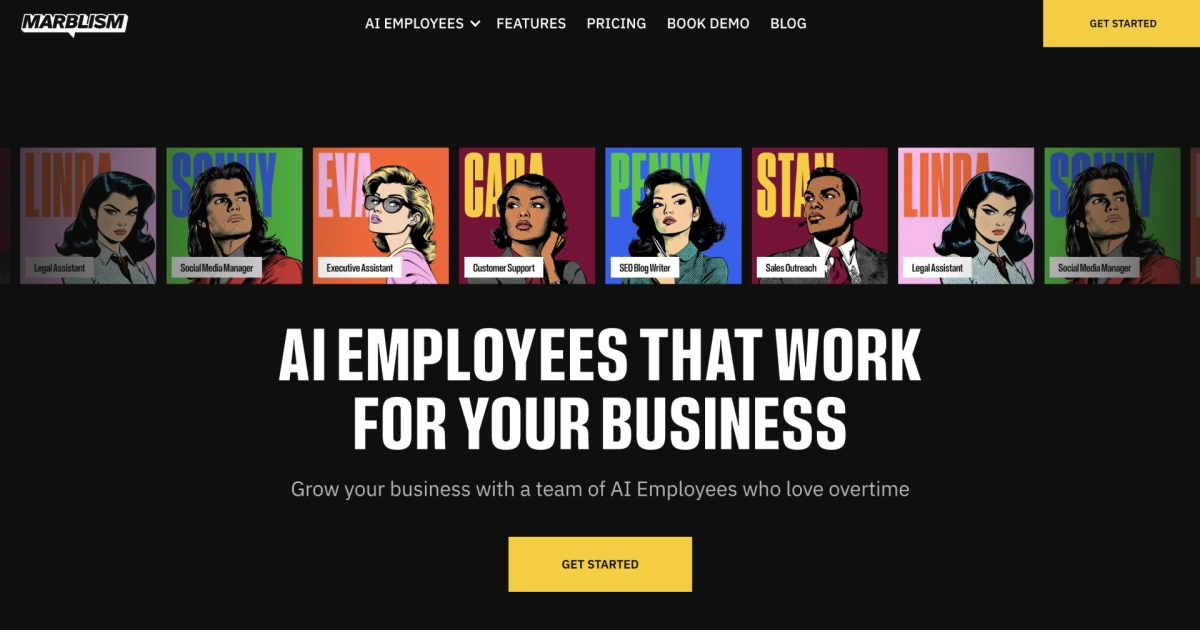
What it does: Marblism gives small businesses seven AI employees for inbox management, social media, lead generation, SEO content, phone calls, website building, and contract review. Each employee has a defined role and can handle work through your connected business tools.
Best for: Solo founders and small teams that liked Sintra’s ready-made employee concept and want another fixed-role AI team.
Pricing: Marblism costs $44/month on monthly billing. The base subscription includes 50 hours of AI work, unlimited team members, and unlimited businesses.
Key features
- Named employees for inbox, social, leads, SEO, calls, websites, and contracts
- 50 shared hours of AI work each month
- Unlimited team members and workspaces
- Gmail, Outlook, Google, and Outlook calendars
- Social connections including Facebook, Instagram, LinkedIn, Pinterest, Threads, and Google Business Profile
- 7-day money-back guarantee
What stood out for me
Marblism made sense almost immediately because each AI employee arrives with a clearly defined job. Eva handles inbox and calendar work, Stan focuses on lead generation, and Penny works on SEO content, with the rest covering roles like social media, calls, and contracts.
When I started assigning tasks, I rarely had to stop and figure out which employee should own what. For someone coming from Sintra’s named-helper model, that familiarity makes Marblism easy to pick up.
What could be improved
Marblism doesn’t offer a free trial. You pay first and get a 7-day money-back guarantee if it isn’t a fit.
The other thing I’d watch is usage. The subscription includes 50 hours of AI work shared across all of the employees, which can disappear faster once several roles are active at the same time. Hours reset every month and unused ones don't carry over.
You’re also working within Marblism’s existing roster. If your business needs a role or workflow outside those predefined jobs, you have less room to shape the system around it.
2. Lindy
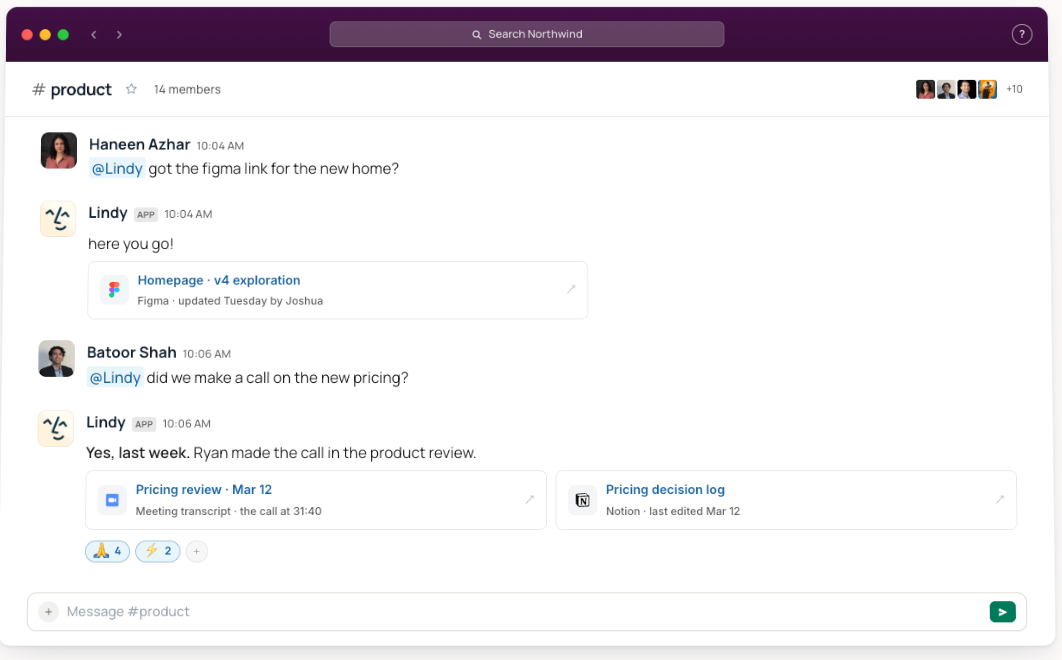
What it does: Lindy is a Slack-native AI teammate that works in threads, mentions, and DMs. It uses connected tools, meetings, files, and team context to complete work for the team.
Best for: Teams that want an AI teammate they can start using from Slack without designing the workflow first.
Pricing: Lindy Plus costs $29.99/user/month with 3,000 credits per user. Pro is $99.99/user/month, while Max is $199.99/user/month. New teammates who join through Slack get their first week free.
Key features
- Slack-native teammate for threads, mentions, and DMs
- 1,000+ app integrations plus support for any MCP server
- Scheduled routines for recurring work
- 40+ built-in skills, with the option to create your own
- Shared meeting library, meeting prep, notes, and follow-up
- Inbox management and replies drafted in your voice
- SOC 2 Type II and GDPR support
- Enterprise includes HIPAA support with a signed BAA
What stood out for me
I started by asking Lindy in Slack for a catch-up on a few things I’d normally open separate tabs for: recent emails, meeting context, and anything I needed to follow up on. It pulled the pieces together in the same thread, which made the “AI teammate in Slack” positioning click much faster than I expected.
The more useful moment came when I turned one of those requests into a recurring job. I didn’t have to think about which helper to open or rebuild the workflow somewhere else. The conversation itself became the starting point for the work.
What could be improved
Watch credit usage once you start handing Lindy recurring, cross-tool work. Plus includes 3,000 credits per user, while Pro includes 15,000.
A few one-off requests barely register. Scheduled briefs, inbox work, and repeat jobs eat through them much faster.
{{templates}}
3. LangGraph
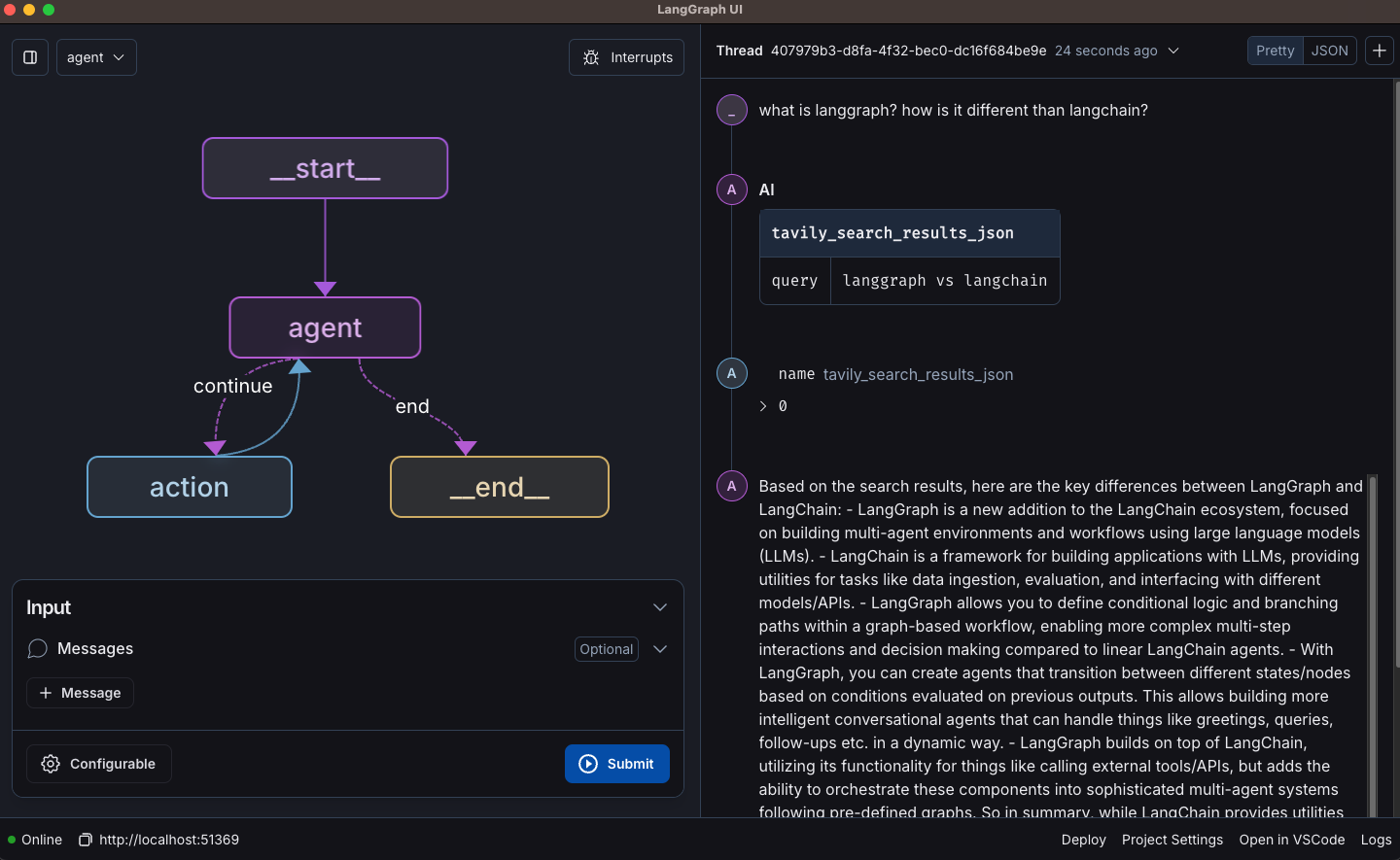
What it does: LangGraph is a free tool for developers who want to build AI agents that follow a path they design. You decide each step, what the agent remembers along the way, where it splits into different routes, when it pauses for a person to approve, and what happens if a step fails.
It's part of LangChain, a popular toolkit for building AI apps. LangChain recommends it when a basic agent, which picks its own next move every time, is too unpredictable and you want some steps to always run the same way.
Best for: Developers building long-running agents with complex state, approval steps, or multiple possible paths through a workflow.
Pricing: LangGraph is free and open source. If you want managed deployment and observability through LangSmith, the Developer plan is free and Plus costs $39/seat/month, plus usage.
Key features
- Durable execution for long-running agents
- Persistent state and memory across runs
- Human-in-the-loop approvals and interrupts
- Explicit graph-based branching and routing
- Checkpointing and resume support
- Single-agent, multi-agent, and hierarchical workflows
- Real-time progress and outputs while long-running agents work
- Managed deployment through LangSmith
What stood out for me
I built a small approval flow where one path continued automatically and another paused for review. That was the point where LangGraph clicked for me.
I could see the state move from step to step, choose exactly where the workflow branched, and stop execution before an action went through. It felt closer to designing application logic than configuring an AI employee.
That level of control is what separates LangGraph from more opinionated agent frameworks.
What could be improved
The control comes with more engineering work. You’re defining state, nodes, edges, routing, and interruption behavior yourself, which is a lot to own for simple jobs like researching a lead or drafting an email.
LangGraph includes pre-built components for common agent patterns, but its real value shows up when your workflow has enough branches, approvals, or state to need explicit orchestration.
4. CrewAI
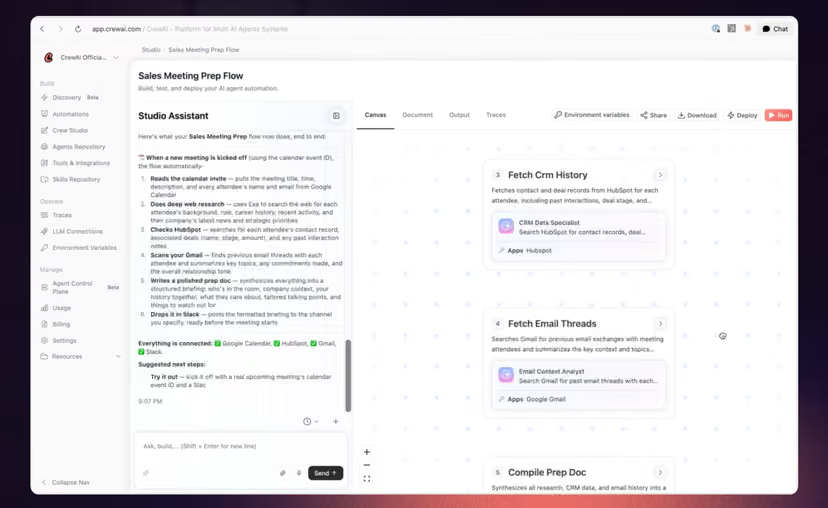
What it does: CrewAI lets you build groups of specialized agents called Crews, then coordinate their work through structured Flows. Agents can have their own roles, goals, tools, and tasks, while Flows add conditions, loops, state, and more predictable execution paths.
Best for: Teams that want multiple specialized agents collaborating on a job, with the option to add structured workflow logic around them.
Pricing: CrewAI’s open-source framework is free. Its hosted Basic plan is also free and includes 50 workflow executions per month. Enterprise uses custom pricing.
Key features
- Role-based Crews with separate goals, tools, and tasks
- Agent handoffs that pass context and completed work between roles
- Flows for controlling how agent tasks run together
- Conditional routing based on earlier results
- Loops and persistent state for longer workflows
- Human review checkpoints before important actions continue
- Visual editor and AI copilot for building workflows
- Python framework for deeper control over agent behavior
What stood out for me
For my test, I split one research job across three agents: one gathered information, another compared the findings, and a third turned them into a final summary.
The interesting part came after I wrapped those roles in a Flow. I added a checkpoint before the final output and could control which step ran next based on what came back from the earlier agent. That made CrewAI feel more like coordinating a small team than configuring one general-purpose assistant.
What could be improved
The hosted plan gets awkward once you move beyond experimenting. Basic gives you 50 workflow executions a month and caps you at two automations, then the next published option jumps to Enterprise with custom pricing. There isn’t an obvious self-serve middle tier for a small team that outgrows the free allowance.
The open-source version gives you more room, but setup got heavier fast once I moved past the basic Crew.
You’re responsible for the models, tools, deployment, and workflow logic, which makes CrewAI a much better fit for teams comfortable owning some infrastructure.
5. Microsoft Agent Framework
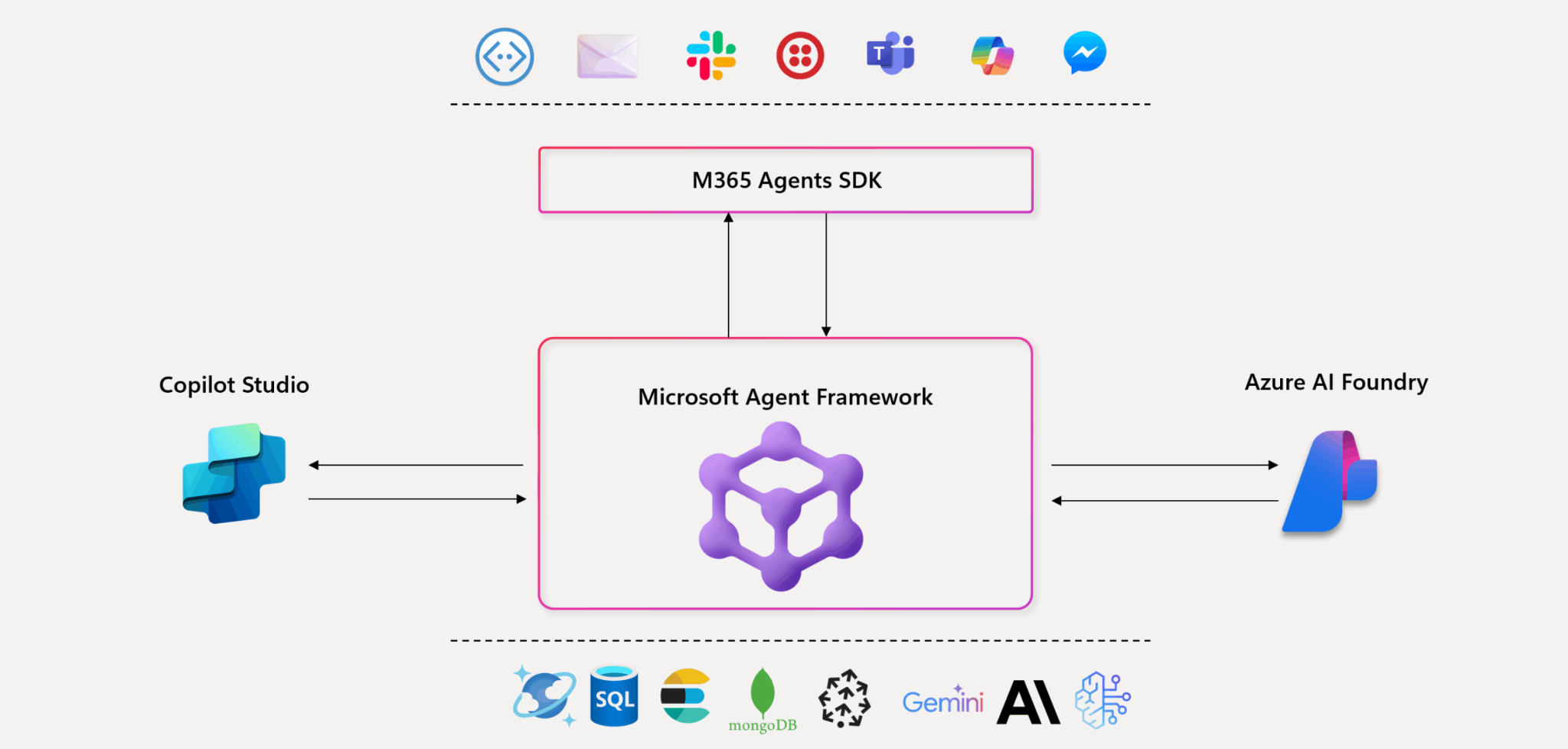
What it does: Microsoft Agent Framework is Microsoft's free, open-source toolkit for developers building AI agents that work together. You define the steps, give agents tools and memory, and add review points where a person approves before anything goes ahead. It replaces AutoGen and Semantic Kernel, Microsoft’s two earlier agent toolkits.
Best for: Development teams already using Azure or Microsoft tooling that want Microsoft’s current supported framework for production agents.
Pricing: Microsoft Agent Framework is free and open source. There is no fixed monthly framework fee. Hosting through Microsoft Foundry introduces separate charges for models, tools, storage, connections, and hosted compute depending on what you use.
Key features
- Graph-based workflows with branching, conditions, and routing
- Human approval steps inside longer agent workflows
- Checkpointing that lets interrupted workflows resume later
- Multi-agent orchestration across specialized roles
- MCP and A2A support for connecting agents and external tools
- Python and .NET support for production development
- Support for Microsoft and third-party model providers
- Migration paths for teams moving from AutoGen or Semantic Kernel
What stood out for me
A simple writer-and-reviewer workflow made the framework click for me. The agent pieces and the workflow pieces feel deliberately separate, which made it easier to see exactly where orchestration belonged.
Microsoft’s own tutorials use a similar writer/reviewer setup, and moving from a basic agent into a graph felt fairly logical.
What could be improved
The framework itself is free, but I found the real cost harder to predict once deployment entered the picture. Model usage, tools, knowledge connections, and hosted-agent compute can all add separate Azure charges, which makes budgeting less straightforward than a flat monthly plan.
A few parts also still feel early. Go support is in public preview, and the Python functional workflow API is still experimental, so I’d expect some movement if you’re building around those pieces today.
6. LangChain
What it does: LangChain is an open-source framework for building agents with pre-built agent patterns, model and tool abstractions, middleware, and 1,000+ integrations. LangChain agents run on LangGraph’s durable runtime underneath.
Best for: Developers who want to get a standard tool-using agent running quickly and still have room to customize it.
Pricing: LangChain is free and open source. LangSmith has a free Developer plan, while Plus costs $39/seat/month plus usage for teams that need managed deployment, tracing, evaluation, and other production tooling.
Key features
- Pre-built agent patterns for common tool-using workflows
- 1,000+ integrations across models, tools, databases, and APIs
- Middleware for guardrails, human review, and context handling
- Support for multiple model providers without rebuilding the agent
- LangGraph runtime for durable execution and state management
- LangSmith for tracing, evaluation, monitoring, and deployment
What stood out for me
I used LangChain to build a simple agent that could call a couple of tools and decide what to do next. Getting the first version running was quick, because the basic agent loop was already handled for me.
That made LangChain feel like the easier starting point for a standard agent. I could focus on the tools, prompts, and output without designing every step of the workflow myself.
What could be improved
The tradeoff shows up once the workflow gets more specific. Complex branching, long-running state, and tightly controlled execution need more work, especially when the default agent pattern stops fitting cleanly.
For those cases, you’ll often end up reaching for LangGraph underneath, which adds more control but also more engineering overhead.
7. Taskade
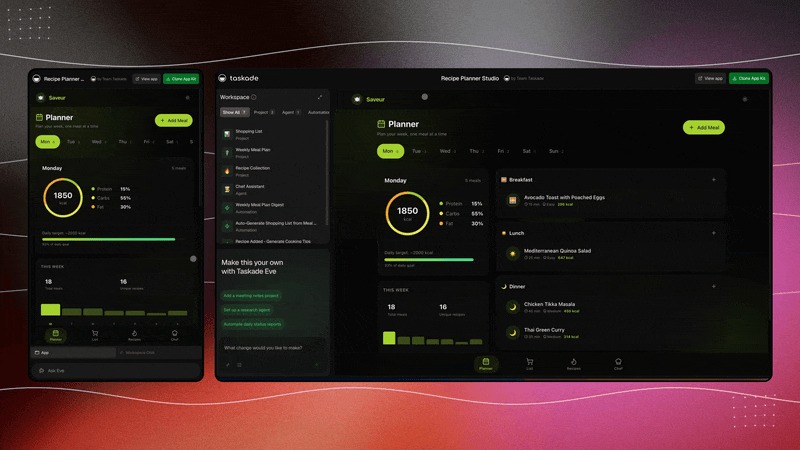
What it does: Taskade now goes well beyond project management. Taskade Genesis combines AI apps, agents, automations, projects, and shared workspace knowledge, letting teams build internal tools and workflows from plain-English prompts.
Best for: Teams that want AI agents and workflow automation living alongside the projects and data they already manage.
Pricing: Taskade has a free plan. On monthly billing, Pro costs $20/month for up to 10 users and Business costs $50/month with unlimited users.
Key features
- Unlimited AI agents on Pro
- Branching, loops, and filters for more complex automations
- Persistent memory across agent runs
- 100+ integrations on Pro and higher
- Support for GPT, Claude, Gemini, and other models
- AI knowledge base for grounding agents in workspace information
- Background agents and scheduled automations for recurring work
- Prompt-built apps, dashboards, portals, and internal tools
What stood out for me
Taskade felt different because I could put the agent, its source material, the project, and the automation in the same workspace. I tried a small project workflow and spent less time thinking about where the agent should store or retrieve context.
For a team already organizing work in Taskade, the AI layer feels attached to something useful from the start.
What could be improved
I started watching the credit counter once I moved beyond a couple of simple agents. Pro includes 50,000 AI credits per month, and heavier models or longer jobs use more of them, which makes monthly usage harder to estimate upfront.
Taskade also gives you a lot at once. Agents sit next to projects, automations, databases, and app building, and the workspace can feel busy if all you came for was an AI employee.
8. Zapier
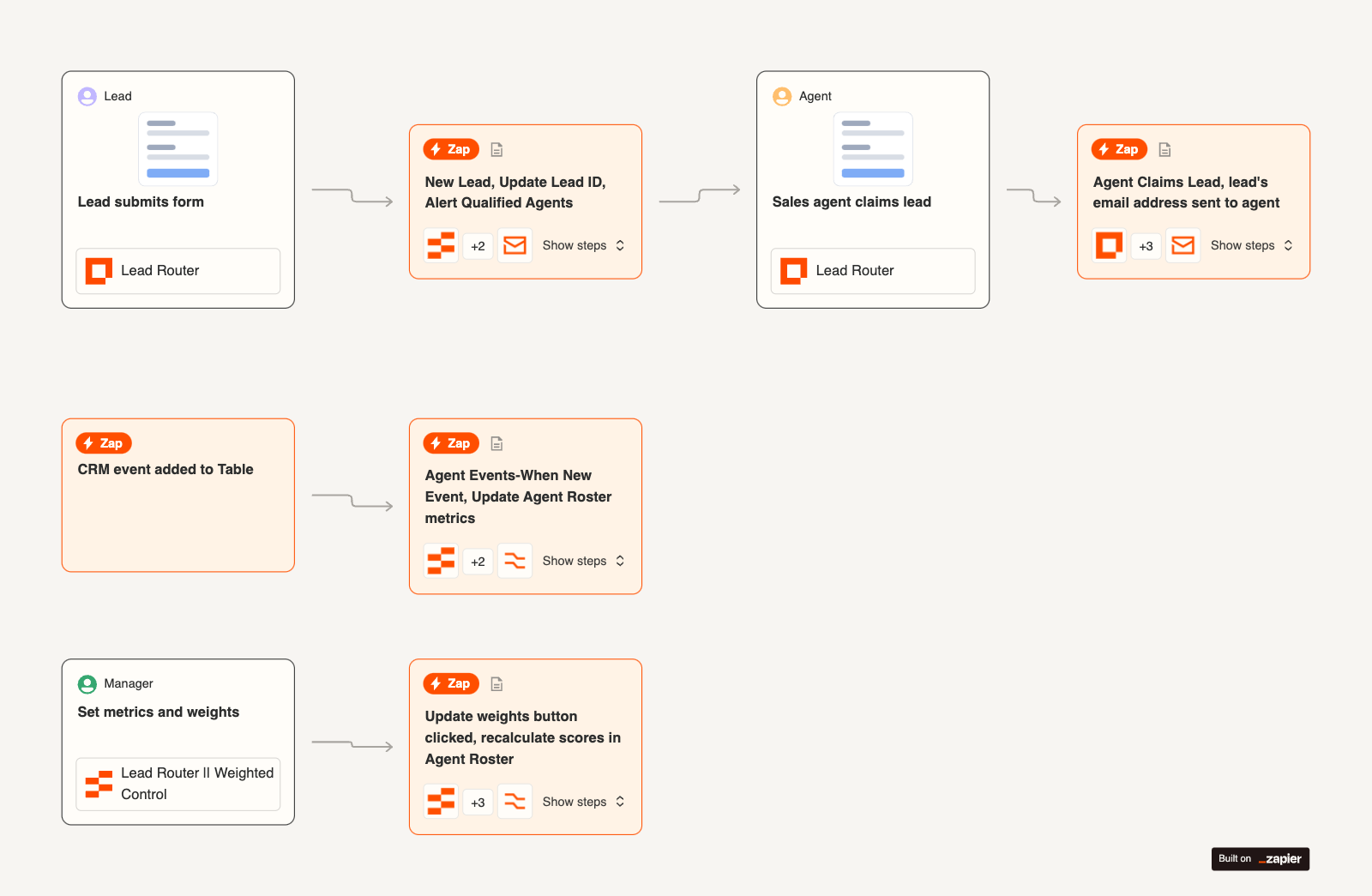
What it does: Zapier connects business apps through automated workflows and now layers AI across the same platform. Zaps can include multiple steps, conditional Paths, AI processing, code, webhooks, MCP, and other tools.
Best for: Companies that care most about connecting a large existing software stack and automating work across it.
Pricing: Zapier has a free plan with 100 tasks per month. Its current pricing page lists Professional from $29.99/month, or $19.99/month billed annually, with Team from $103.50/month, or $69/month billed annually.
Key features
- 9,000+ integrations across business apps
- Multi-step workflows with several actions
- Conditional Paths that route work based on rules
- Webhooks for custom app connections
- AI-powered steps inside regular Zaps
- MCP and SDK support for deeper integrations
- Tables and Forms for lightweight data collection
- Zapier Agents for agent-style workflows
What stood out for me
I used Zapier to route a lead down two different paths based on one field. Seeing the branch laid out visually made the workflow easy to debug, especially when I changed the condition and reran it.
The bigger win was app coverage. I could move from the CRM to Slack to email without leaving the same workflow, which is where Zapier’s integration breadth starts to matter.
What could be improved
Task usage can climb quickly once a Zap has several actions running at volume. AI steps can also use different task multipliers, which adds another variable when estimating cost.
The product has expanded far beyond classic Zaps too. Between AI steps, MCP, Agents, Tables, and Forms, the platform can feel crowded until you know which pieces you actually need.
Two more no-code options worth a look
If Sintra's missing branching and approval steps are what pushed you out, two automation platforms are worth adding to the shortlist. Neither is a pre-built AI employee bundle, so they suit people who want to design the workflow themselves.
1. n8n
n8n is a fair-code workflow platform with a visual editor, code steps, and a free self-hosted Community Edition. It supports branching, error workflows, automatic retries, and human approval steps.
Cloud Starter costs $24/month for 2,500 workflow executions, and steps inside a run are unlimited. If you self-host, you own the upkeep, including updates and backups.
2. Make
Make builds multi-step automations on a visual canvas, with routers, filters, and 3,000+ verified and community apps.
It has a free plan with 1,000 credits a month, and paid plans start at $16/month for 10,000 credits. Costs rise with credit use, and large scenarios get hard to manage once the canvas fills up.
Sintra AI vs Marblism
Sintra and Marblism both package AI workers into predefined roles, which makes this the closest head-to-head comparison on the list.
The pricing difference is smaller than it first looks. Sintra currently costs $48.50/month on its one-month plan, down from the regular $97 price shown on its site, while Marblism costs $44/month on monthly billing.
Commit longer and Sintra drops to $23.60 on three months and $15.60 on twelve, against Marblism's $24 on twelve.
Sintra gives you 12 helpers and 250 monthly credits. Marblism gives you seven employees and 50 shared hours of AI work each month. The two usage systems are different enough that I wouldn’t compare the limits directly.
The bigger difference is the roster. Sintra gives you 12 predefined roles to Marblism’s seven, while Marblism keeps the team smaller and uses an hours-based allowance that’s easier to understand at a glance.
For a closer look at Sintra itself, our Sintra AI pricing guide covers its plans and credit model, while our Sintra AI review goes through all 12 helpers.
Final verdict: Which is the best Sintra AI alternative?
The best Sintra alternative depends on what you wanted to change about Sintra in the first place.
Marblism is the closest match if you still want named AI employees with predefined jobs. Zapier makes more sense when app coverage and no-code workflow automation matter most, while Taskade fits teams that want agents living alongside projects, data, and day-to-day work.
For developers, the choice gets more specific. LangChain is the easiest starting point for a standard tool-using agent, LangGraph gives you tighter control over branching and state, and CrewAI works well when several specialized agents need to collaborate. Microsoft Agent Framework is especially relevant for teams already building around Azure, Python, or .NET.
Lindy fits teams that want an AI teammate working from Slack across email, meetings, calendars, CRM, and other company tools, with recurring routines and reusable skills available as the work gets more specific.
I’d choose based on how much setup you want to own, how specific your workflows are, and where your team already works every day.
FAQs
1. Is Sintra AI worth it?
Yes, Sintra AI can be worth it if you expect to use several of its 12 helpers. Every current plan includes the full roster, so teams that only need one or two roles may get better value from a smaller bundle or a more customizable platform.
2. Is Sintra AI better than ChatGPT?
No, Sintra AI is not better than ChatGPT for general work. Sintra is built around 12 predefined business helpers, while ChatGPT is a broader assistant that can handle a wider mix of tasks and use connected apps and memory where available.
Sintra fits better when its predefined roles match your work. ChatGPT fits better when you want more flexibility across different tasks.
3. Sintra or Marblism, which should I choose?
Choose Sintra if you'll use most of its 12 helpers, and Marblism if you only need a handful of roles. Sintra includes 12 helpers and 250 monthly credits, while Marblism gives you seven employees and 50 shared hours of AI work each month.
Marblism's hours-based allowance is easier to read at a glance, but the two usage systems are different enough that I wouldn't compare the limits directly. Check which roles you'd actually use before you pay.
4. What are the top Sintra AI competitors?
The main Sintra AI alternatives in this roundup are Lindy, Marblism, LangGraph, CrewAI, Microsoft Agent Framework, LangChain, Taskade, and Zapier. They range from pre-built AI employee platforms to no-code automation tools and developer frameworks.
5. Can I use Sintra AI for free?
No, Sintra AI does not currently offer a permanent free plan. Its current plans are paid subscriptions with a 14-day money-back guarantee, and limited-time discounts may reduce the price.










