Kimi K3 Pricing: API Rates, App Plans, and Cost per Task


Kimi K3 costs $3 per million input tokens and $15 per million output tokens on Moonshot's API. If you'd rather pay a flat monthly fee, the Kimi app has plans from free up to $199 a month.
Your real bill is harder to guess, because K3 thinks before every answer, caching can knock up to 90% off your input costs, and different hosts charge different prices for the same model.
I went through Moonshot's docs, Kimi's plan page, every host I could find that runs K3, and two cost-per-task benchmarks. Below is what K3 costs you per token, per plan, and per finished task.
Kimi K3 pricing at a glance
Kimi K3 costs $0.30 per million cached input tokens, $3.00 per million uncached input tokens, and $15.00 per million output tokens on the official Kimi API. That works out to $0.0003, $0.003, and $0.015 per 1,000 tokens. Here's the full API rate card:
If you'd rather pay a flat monthly fee, the Kimi app sells memberships. These are the prices on kimi.ai's pricing page as of October 5, 2026:
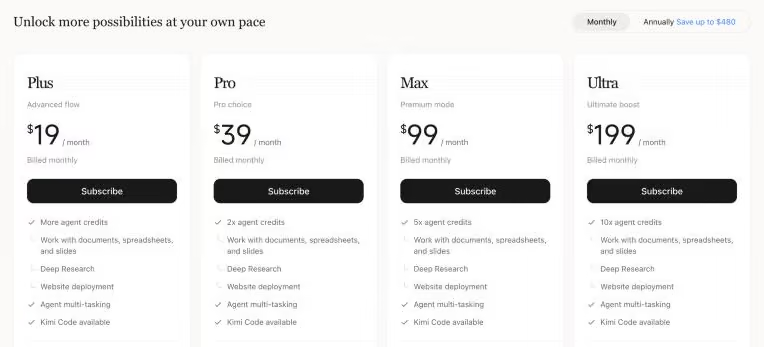
The API and the app are billed separately. A Plus membership doesn't give you API credit, and API credit doesn't unlock app features.
Kimi K3 API pricing, line by line
Three line items do almost all the work on a K3 invoice: cached input, uncached input, and output. Two smaller ones (cache writes and tool calls) show up depending on how you build.
Cached input: the $0.30 that decides your bill
When you send the same opening text again (a system prompt, tool definitions, a codebase), Moonshot's API reuses it from cache. Cache hits cost one-tenth of the normal input price, so every million tokens served from cache saves you $2.70, according to Moonshot's context caching guide.
Moonshot says its API hits the cache more than 90% of the time on coding workloads. That's Moonshot's own figure, and your rate depends on how you build your prompts.
Caching matches prefixes, which means everything after the first changed character misses. Put a timestamp at the top of your system prompt (the classic mistake) and a $0.30 request turns into a $3.00 one.
Cache writes: the newer line item
Moonshot recently started listing cache writes as their own line item, a change its caching guide calls a "platform upgrade." When a new prefix goes into the cache, you pay $3.00 per million tokens for the default 5-minute cache or $6.00 for a 1-hour cache.
The 5-minute write costs exactly the same as uncached input, so most requests cost what they did before. Moonshot's guide says as much: the write cost "was already included in the input price."
The 1-hour cache doubles the write price, so it only pays off when at least two follow-up requests arrive more than five minutes apart (a document someone asks about over an afternoon, say). Each hit resets the timer, and you can't clear a cache by hand.
Thinking tokens you can't switch off
K3 always reasons before it answers. You can set the reasoning_effort field to low, high, or max, and max is the default, per Moonshot's reasoning effort docs. There's no setting that turns thinking off.
Those thinking tokens cost money. Moonshot's thinking-model guide says reasoning content "counts towards your input/output token quota."
On multi-turn chats and tool calls, K3 also needs the full previous message passed back, reasoning included, so earlier thinking keeps riding along as input.
The smaller charges
A few extras round out the API bill:
- Web search: Moonshot's search tools bill per successful call: $0.002 for Web Search Basic, $0.003 for Web Search Pro, and $0.002 for URL Fetch, per its web search pricing page. The older built-in $web_search tool costs $0.005 a call and is expected to be deprecated on October 20, 2026.
- No batch discount for K3: Moonshot's Batch API charges 60% of standard rates, but it only supports Kimi K2.7 Code and K2.6.
- Top-ups and rate limits: you need to add at least $1 before K3 unlocks, and you get a $5 voucher once your total top-ups reach $5. Your cumulative top-up also sets your rate limits, from 3 requests per minute at the $1 tier to 300 at $3,000, per the recharge and rate limits page.
- Cheaper Moonshot models: Kimi K2.6 costs $0.95 per million input tokens and $4.00 per million output tokens, and K2.7 Code lists the same input and output rates. Both have 262K context windows.
- Yuan pricing: the China-facing API lists K3 at ¥20 per million input tokens and ¥100 per million output tokens.
Kimi K3 subscription plans (the Kimi app)
The Kimi app puts K3 inside chat, agents, and Kimi Code, and its plans are priced by how much agent work you want to do each month. Here's the lineup on kimi.ai as of October 5, 2026:
Annual billing saves up to $480 a year, on Ultra.
Adagio (free)
What's included: chat in the Kimi app, one agent task at a time, two scheduled tasks, two projects, and 500MB of storage.
Best for: finding out whether K3 suits you before paying for anything.
Watch out for: Kimi Code isn't on the free plan's feature list, and free users can't buy extra usage when credits run out.
Plus: $19 a month
What's included: more agent credits, document, spreadsheet, and slide work, Deep Research, website deployment, Kimi Code, 10 scheduled tasks, 20 projects, and 20GB of storage.
Best for: people who use Kimi most days and want it as one of their main chat apps.
Watch out for: heavy coders burn through it fast. One Hacker News commenter hit the $19 plan's weekly cap in a day and a half.
Pro: $39 a month
What's included: what Kimi labels "2x agent credits," Goal mode (agents keep working until a task is done), one-click Kimi Claw deployment, and 15 scheduled tasks.
Best for: people who hand Kimi long, multi-step jobs a few times a week.
Watch out for: you still don't get 1M-token chats, which start on Max.
Max: $99 a month
What's included: "5x agent credits," chats with up to 1M tokens of context, 100 projects, and 50GB of storage.
Best for: anyone who works with huge documents in chat, or runs agents most of the day.
Watch out for: you get two parallel agent tasks, same as Plus and Pro.
Ultra: $199 a month
What's included: "10x agent credits," four parallel agent tasks, and 25 scheduled tasks.
Best for: people who'd otherwise keep topping up Max.
Watch out for: at this price, compare your monthly usage against what the same work would cost on the API first.
Kimi for business
Kimi's Business plan costs $600 per seat per year with a two-seat minimum, billed annually with no monthly option. It adds no model training on your business data by default, 1M-token context, and dedicated support. Teams of 150 or more seats get custom quotes.
How credits and extra usage work
Every membership feature (chat, Deep Research, slides, Kimi Code, and agents) draws from one shared credit pool, metered by tokens. Credits refresh each billing cycle, and Kimi Code has its own separate rate limits, a 5-hour cap and a weekly cap, per Kimi's pricing details page.
Subscribers who run dry can turn on Extra Usage, a pay-as-you-go balance with a $10 minimum top-up that never expires.
Kimi says Extra Usage pricing is "close to the official API pricing," and its own examples put a song recommendation at about $0.005 and a week-long road trip plan at about $0.24.
Plan names are confusing right now. Kimi's help center still lists the same four prices under older names (Moderato, Allegretto, Allegro, and Vivace), and kimi.com's China plans charge ¥49 to ¥699 a month. The kimi.ai pricing page is the one to trust for US prices.
Which way to pay for Kimi K3?
Most people land in one of five camps.
Stay on Adagio if you:
- Want to test K3's writing, research, or chat quality before spending anything
- Use it a few times a week at most
Choose Plus or Pro if you:
- Use Kimi as your daily chat and research app
- Want Kimi Code in your terminal without tracking per-token costs (within its 5-hour and weekly limits)
Choose Max or Ultra if you:
- Need 1M-token chats over long reports or codebases
- Run agent tasks most of the day and keep hitting Pro's limits
Choose the API if you:
- Are building K3 into your own product, agent, or pipeline
- Need predictable rate limits and an invoice you can trace to tokens
Choose a third-party host if you:
- Already have billing with Amazon Bedrock, Together AI, Fireworks, or similar
- Want batch discounts, US-only routing, or one bill across many models
Kimi K3 pricing on OpenRouter and other providers
K3's weights are public, so a long list of companies serve it, and most charge exactly what Moonshot does on their own pricing pages. Here's what each host lists as of October 5, 2026:
All prices are per 1M tokens.
How much does Kimi K3 cost on OpenRouter?
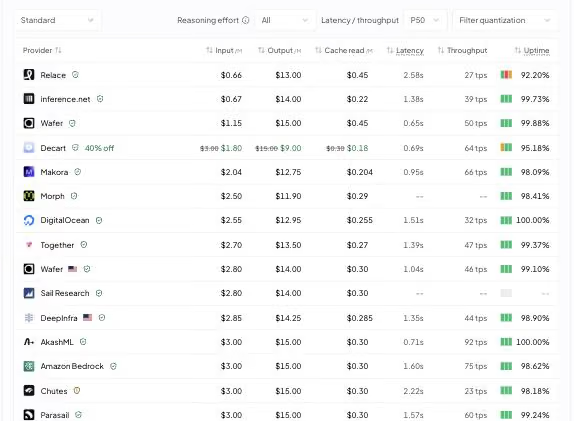
OpenRouter's Kimi K3 page shows a headline price of $0.66 per million input tokens and $13.00 per million output tokens as of October 5, 2026.
That headline belongs to the cheapest route, Relace, which runs a 4-bit (fp4) version. Two small providers price uncached input under $1, but Relace charges $0.45 per million for cached input, more than the $0.30 the big hosts charge, so its edge shrinks once most of your input comes from cache.
The 24 provider routes behind the listing top out at $4.50 per million input tokens, and the big names (Moonshot, Fireworks, Bedrock, Baseten) sit at $3.00 and $15.00.
OpenRouter's weighted average of what people paid was about $0.48 per million input tokens and $14.41 per million output tokens, since routing and caching pull input costs way down.
Two things to know before you pick a route on OpenRouter:
- Listed prices can differ from the host's own page: OpenRouter shows Together at $2.70 / $13.50, for example, while Together's own pricing page says $3.00 / $15.00.
- Batch has its own model ID: moonshotai/kimi-k3:batch runs on DeepInfra at $2.28 input and $11.40 output.
Check quality before you chase the lowest price
Quantization and serving setups vary by host, and quality can vary with them. When we moved models at Lindy this year, the same nominal model scored differently depending on who served it. A host that's 10% cheaper per token but needs one extra retry per task ends up costing you more.
{{templates}}
Why real Kimi K3 bills run higher than the rate card
At $3 and $15 per million tokens, K3 lists in the same bracket as mid-tier closed models, but it burns through a lot of tokens (enough that Hacker News ran a whole thread titled "Kimi K3 is not cheap" 10 days after launch).
The best independent numbers come from Artificial Analysis, which runs every model through the same 10-test Intelligence Index and publishes what it costs:
- Cost per task: about $2.00 per Intelligence Index task with K3 at max effort.
- Token use: 160 million output tokens across the index, against a median of 140 million for comparable models.
- Verdict: Artificial Analysis calls K3 "particularly expensive when comparing to other open weight models of similar size."
Input is the bigger line on long tasks
Artificial Analysis's cost breakdown shows where K3's per-task money goes, and input takes the bigger share.
Of K3's $2.00 per task, about $1.27 goes to input (roughly $0.80 in cache reads, $0.41 in cache writes, and $0.07 in uncached input) and $0.73 goes to output, of which about $0.49 is thinking.
That's what long agent tasks look like. Each step resends the whole conversation, tool results and all, so input piles up even at cached prices. If your cache hit rate drops, input costs climb fast.
Lower effort helps, up to a point
Dropping effort to low cuts K3's cost to about $1.15 per task on Artificial Analysis, according to its K3 (low) page. Output tokens fall from 160 million to 22 million.
You give up a lot of capability for that saving, though. K3's index score drops from 44 at max effort to 30 at low.
What coding tasks cost
Coding agents run longer than most jobs. On Datacurve's DeepSWE leaderboard (updated September 22, 2026), K3 at max effort solved 69% of tasks at an average cost of $4.65 per task, using about 81,000 output tokens over 98 steps.
What Kimi K3 costs for 3 common jobs
A per-token rate only becomes useful once you turn it into the cost of a real job. Here are three rough estimates on Moonshot's API rates, with the assumptions spelled out so you can swap in your own numbers.
1. A coding agent session
Picture a coding agent fixing one feature-sized bug across about 100 steps. Long sessions like this can send around 6 million input tokens in total, since every step resends the growing conversation.
That lands right next to DeepSWE's measured $4.65 average. If your prompt layout drops the hit rate to 70%, the same session costs about $7.86, so caching is the main thing to tune in AI coding agents built on K3.
2. Long-document analysis
Say you load a 200,000-token report (about 300 pages) and ask 10 questions over an afternoon, with more than five minutes between each one.
Here, the cache length decides the bill. If the default 5-minute cache expires before each question, every question pays full price on the document, and the total jumps to about $6.60.
3. A daily chat assistant
Now a personal assistant that handles 50 messages a day. Each message sends about 6,000 tokens (system prompt plus history, 80% cached) and gets back about 1,500 tokens at low effort.
That's about $1.38 a day, or roughly $41 a month. Chat flips the agent pattern, since short prompts make output the biggest cost. For personal chat, the $19 Plus plan is the better deal as long as its credits cover you.
{{cta}}
Kimi K3 vs Claude, GPT, DeepSeek, and Gemini pricing
K3 sits near the top of this group on list price, behind only Claude Opus 5.5. Here's how it compares with the models people most often weigh it against, using each vendor's own pricing page as of October 5, 2026:
Prices are per 1M tokens, from Anthropic, OpenAI, DeepSeek, and Google. A few footnotes:
- GPT-6.1 Sol and GPT-6 Luna: OpenAI charges double for input and 1.5x for output once a prompt passes 272K tokens. K3, Claude, and Gemini 3.8 Flash bill their full context at one rate.
- DeepSeek V4.1 Flash: these are peak-hour prices, and off-peak runs at half.
- Gemini 3.8 Flash: Google's rates double on January 1, 2027.
Is Kimi K3 cheaper than Claude?
On input and output rates, K3 costs 25% less than Claude Opus 5.5 and 50% more than Claude Sonnet 5.5, though its $0.30 cached input runs higher than Claude's $0.20.
Per finished task, the difference with Opus grows. On Artificial Analysis's Intelligence Index, K3 costs about $2.00 per task against $5.98 for Opus 5.5 and $0.72 for GPT-6.1 Sol.
Coding shows the same shape. On DeepSWE, K3's $4.65 per task compares with $11.84 for Claude Opus 5 and $2.36 for Gemini 3.8 Flash, which both solved 74% of tasks to K3's 69%.
So K3 is a cheaper option than Opus for heavy coding, and an expensive one next to DeepSeek or OpenAI's newest Sol. If price is your main reason for leaving Anthropic, weigh K3 against other Claude alternatives on your own tasks.
For a sense of how much model choice moves a bill, our team at Lindy cut inference costs on the migrated traffic by about 90% after moving it to DeepSeek V4 Flash.
Is Kimi K3 worth the price?
K3 is worth paying for when you need what makes it different: frontier-level long-horizon coding, a 1M-token context window, and open weights you can take elsewhere later. It's harder to justify for simple, high-volume work.
Kimi K3 is worth it if you:
- Run long coding sessions: K3 costs well under half of what Claude Opus 5 does per DeepSWE task.
- Want an exit plan: the weights are public, so you can move from Moonshot's API to another host or your own servers without rewriting prompts for a new model.
- Use Kimi's apps a lot: a $19 or $39 membership with Kimi Code included costs far less than the same usage on the API.
Skip Kimi K3 if you:
- Process lots of short, simple requests: Kimi K2.6 costs about a third as much per token, and DeepSeek V4.1 Flash costs a fraction of that.
- Need the cheapest frontier model per task: GPT-6.1 Sol came in at roughly a third of K3's cost on Artificial Analysis.
- Plan to self-host to save money: Moonshot recommends 64 or more accelerators for serving K3, so the "free" weights come with a very large hardware bill.
Price is only half of that decision. For benchmarks, the license, and how K3 performs, see our Kimi K3 explainer.
How to cut your Kimi K3 bill
Moonshot's rate card is fixed, so the savings come from how many tokens you send and where you send them. These five changes make the biggest difference.
1. Set effort to match the job
Max effort is the default, and it's often more thinking than a task needs. Try high for everyday work and low for simple classification or formatting, then check whether the answers hold up.
2. Keep your prompt prefix stable
Put the system prompt, tool definitions, and reference files at the top, and anything that changes (the user's question, tool results, timestamps) at the end. Every edit near the top of a prompt throws away the cache for everything below it.
3. Pick the cache length on purpose
Stick with the default 5-minute cache for agent loops and chats where requests come quickly. Pay the $6.00 write for a 1-hour cache only when people come back to the same document or codebase after longer breaks.
4. Compare hosts on cache hits and batch
OpenRouter publishes cache hit rates by provider, and they vary a lot. On October 5, it showed 92.2% for Moonshot and 83.8% for DeepInfra. For overnight jobs, DeepInfra's 20% batch discount or Fireworks's 50% batch discount beats paying real-time rates.
5. Send light work to a cheaper model
Route quick lookups, summaries, and formatting to Kimi K2.6 or another budget model, and save K3 for the long, hard jobs where it earns its price. For personal chat, a Kimi membership is usually cheaper than paying per token.
The number to budget for
Kimi K3 pricing looks simple: $3.00 in, $15.00 out, and $19 to $199 a month for the app. The figure to plan around is what a finished task costs, which runs from a few cents for a chat reply to about $5 for a long coding run.
Your cache hit rate and effort setting move that number more than any rate card does. Get those two right and K3 is fairly priced for what it does. Leave them on autopilot and you'll pay frontier prices for an open-weight model.
Frequently asked questions
Is Kimi K3 free?
Kimi K3's weights are free to download, and the Kimi app has a free Adagio plan. NVIDIA also gives free prototyping access. The Kimi API is paid per token at $3.00 input and $15.00 output per million, and Moonshot recommends a cluster of 64 or more accelerators for serving it yourself.
How much does Kimi K3 cost on OpenRouter?
Kimi K3 on OpenRouter shows a headline price of $0.66 per million input tokens and $13.00 per million output tokens, set by its cheapest 4-bit provider. Major hosts there, like Moonshot and Fireworks, charge $3.00 input and $15.00 output, and a batch version costs $2.28 and $11.40.
How much does Kimi K3 cost per task?
Kimi K3 costs about $2.00 per task on Artificial Analysis's Intelligence Index at max effort, and about $1.15 at low effort. Coding runs cost more: about $4.65 per task on the DeepSWE coding benchmark.
Is Kimi K3 cheaper than Claude?
Kimi K3 is cheaper than Claude Opus 5.5 on input and output ($3/$15 vs $4/$20) and costs about a third as much per task on Artificial Analysis. It costs more than Claude Sonnet 5.5, which lists at $2.00 input and $10.00 output per million tokens.
Why is Kimi K3 so expensive?
Kimi K3 is expensive because long agent tasks resend large amounts of input on every step, and it always thinks, at max reasoning effort by default. Its list price is also high for an open-weight model.
Is Kimi K3 worth the price?
Kimi K3 is worth the price for long coding sessions, huge-context work, and teams that want open weights they can move later. For short, high-volume requests, cheaper models like Kimi K2.6 or DeepSeek V4.1 Flash cost far less per token.









