How to Use AI in Business (Without Any Coding!)
Marvin walked through seven no-code ways to automate business tasks with AI agents, from CRM updates after calls to lead enrichment and automated weekly reports.
.avif)

Your competitors are already using AI to automate repetitive tasks so they can focus on core business and steal your customers.
But you can’t figure out how to start?
In this post, I’ll explain how you can use AI in business, whether you're in sales, support, marketing, or HR.
Why Use AI in Business?
AI helps you run faster, leaner, and smarter. It takes over the repetitive tasks that slow your team down and lets them focus on what actually drives results.
Using AI in business:
- Automates tasks like CRM updates, follow-ups, and reporting
- Saves 10-20 hours per week per employee
- Improves speed and accuracy across sales, support, and marketing
- Personalizes outreach at scale without extra effort
- Delivers real-time insights for faster decision-making
- Cuts costs without cutting performance
- Keeps your team focused on growth, not grunt work
How to Use AI to Automate Your Business Tasks in 7 Steps
Step 1: Auto-Update Your CRM After Sales Calls
Sales pros spend too much time on notes and CRM updates after calls. This eats into selling time and leaves your CRM outdated.
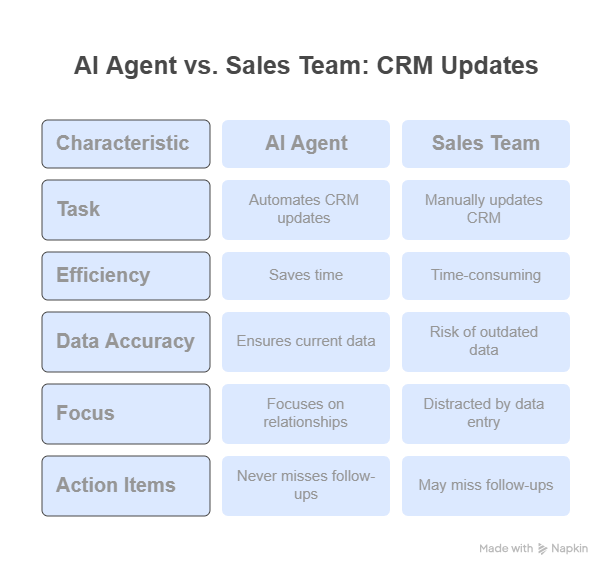
An AI agent can handle this. It listens to calls, summarizes key points, and updates your CRM automatically. Your sales team can then focus on building relationships and closing deals.
- Create a new AI agent for meeting automation. With a platform like Lindy, you can set this up quickly.
- Connect your video platform (Zoom, Google Meet) or calendar (Google Calendar, Outlook Calendar). The agent will then automatically join your sales meetings.
- Let the AI transcribe the conversation.
- Give the agent clear instructions:
- Summarize main discussion points and decisions.
- Pull out all action items and who's responsible.
- Identify next steps and timelines.
- Extract new contact info (like new stakeholders or updated job titles).
- Update your CRM (HubSpot, Salesforce, Pipedrive) under the right deal with notes, action items, and contact details.
- Integrate with your CRM using direct connections or webhooks.
- Enable auto-sync so summaries and updates go to your CRM right after the meeting.
Quick Tips:
- Be very specific in your instructions; define what "key points" mean for your business.
- Tell the AI to flag anything unclear for you to review.
- Make sure your sales team knows how the agent works and what info it needs to capture.
This way, your sales reps get hours back from manual data entry, your CRM data always be current and reliable, and you never miss important action items or follow-ups.
Step 2: Auto-Qualify and Enrich Leads
Manually researching new leads wastes time, delays follow-up, and means your team might chase unqualified prospects.
An AI agent for lead enrichment can instantly research and qualify new leads. This gives your sales team valuable insights before they even make contact.
- Set up a new AI agent specifically for lead enrichment.
- Trigger it when a new lead comes in from your website form, landing page, or lead source (usually via webhook).
- Tell the agent what info to gather:
- Look up the lead’s LinkedIn profile to confirm their role and company.
- Pull company size, industry, location, and recent funding from public databases or APIs.
- Add verified email addresses and phone numbers by integrating with lead data providers (like Apollo, Clearbit, ZoomInfo).
- Assess the lead’s potential based on your criteria (company size, industry fit, job title) and give it a score (A, B, C, or 1-10).
- Format the data neatly and send it to your CRM, making sure fields match up.
- Connect the necessary APIs for your lead enrichment tools.
Quick Tips:
- Clearly define what makes a lead "qualified" for your business.
- Specify which data sources the agent should use if there's conflicting info.
- Make sure your lead enrichment follows data privacy rules (GDPR, CCPA).
This helps your sales teams get pre-qualified leads, for faster, more targeted outreach. Conversion rates will also go up because you're focusing on high-potential leads. And your CRM will automatically fill with complete lead profiles, improving segmentation.
Step 3: Send Personalized Follow-Ups Automatically
Sales opportunities often fall through the cracks because follow-ups are inconsistent or forgotten. Manually tracking and personalizing follow-up sequences takes too much time and can lead to errors.
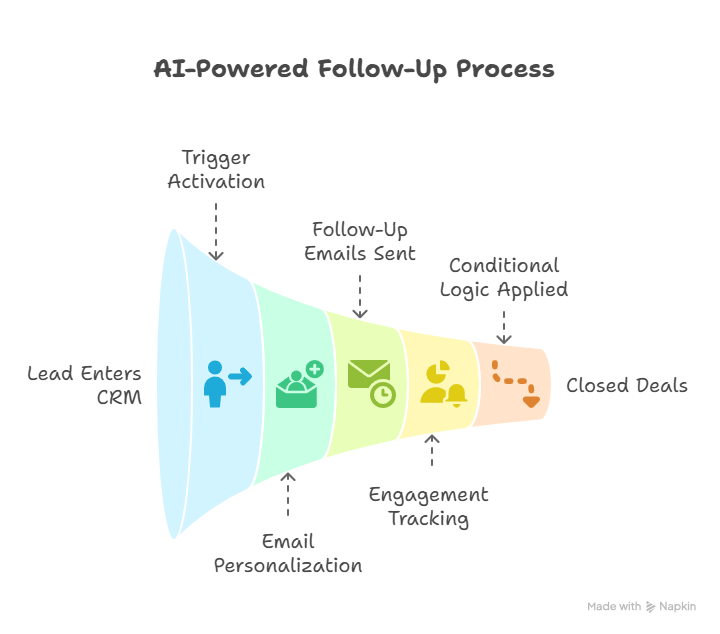
An AI-powered follow-up agent ensures timely, relevant, and personalized communication, helping you close more deals.
- Set the trigger to "Lead enters 'Contacted' stage" or "Meeting held" in your CRM, or based on a specific tag.
- Give detailed instructions for email content and timing:
- Access previous meeting notes (perhaps from another AI agent, a feature often found in tools like Lindy) to personalize the follow-up.
- Write a personalized follow-up email #1 for Day 1, referencing specific discussion points and next steps.
- If no reply, send follow-up email #2 on Day 4, offering more value or addressing concerns.
- If still no reply, send a final email #3 on Day 7, with a clear call to action.
- Keep the tone professional, helpful, and on-brand.
- Connect your email platform (Gmail, Outlook, or your preferred marketing platform).
- Use conditional logic to create different follow-up paths based on how the lead engages (e.g., if they opened but didn't reply).
Quick Tips:
- A/B test different subject lines to get more opens.
- Offer helpful resources or insights in every follow-up email.
- The more personalized the email, the better it will perform.
- Clearly define what "no reply" means (no open, no click, no response).
As a result, you get consistent, personalized follow-ups that lead to more closed deals. Your prospects will also feel valued and attended to, making their experience better.
{{templates}}
Step 4: Answer Customer Questions 24/7
Customer support teams often get swamped with repetitive questions. This means slow responses, higher costs, and unhappy customers. An AI support agent can instantly handle common questions. This frees up your human agents for complex issues, making customers happier overall.
- Create a new AI agent for customer support.
- Upload all relevant info to train the AI: your help center articles, FAQs, product manuals, past chat transcripts, and internal knowledge bases.
- Define how the agent should interact:
- Answer clearly, concisely, and accurately, pulling info directly from the sources you uploaded.
- If it can't find a clear answer, tell it to hand off the query to a human agent with all the context.
- Maintain a helpful and friendly tone.
- Provide links to relevant articles for more details.
- Embed the agent as a chatbot on your website, integrate it with your existing support platform (Intercom, Zendesk), or connect it to your Slack channel.
- Set up smart routing rules for urgent or complex cases (billing, technical issues, cancellations) so they go straight to the right human team member.
Quick Tips:
- Regularly update the agent's knowledge base with new product info and FAQs.
- Ensure a smooth handoff process to human agents when needed.
- Set up a way for customers to give feedback on the AI's answers, helping it improve.
- Clearly define what questions the AI agent can handle to manage customer expectations.
This helps your customers get immediate answers 24/7. It also significantly cuts down on routine questions for human agents. And while this allows for faster resolution times and higher customer satisfaction, your human agents can focus on complex, high-value customer interactions.
Step 5: Filter Job Applicants and Schedule Interviews
HR teams spend endless hours manually reviewing resumes and scheduling interviews, especially for high-volume roles. This slows down hiring and can introduce bias.
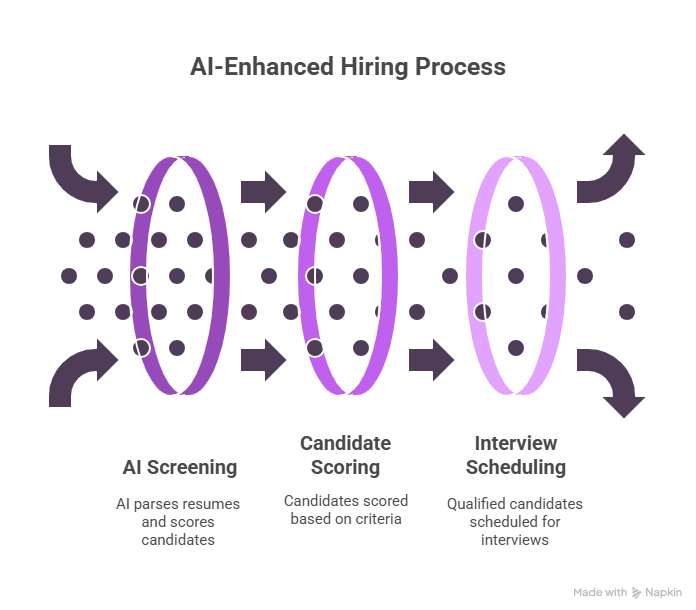
An AI hiring assistant can automate the initial candidate screening and even schedule interviews. This means you only talk to the most qualified candidates.
- Set up the AI agent to receive job applications via email or form entries (from your ATS or a dedicated email inbox).
- Instruct the AI on how to screen applications:
- Parse the resume to pull out key info: experience, education, skills, keywords.
- Compare this info against your job criteria (years of experience, software skills, required qualifications) and give the candidate a score from 1–10.
- If the score is above your set threshold (e.g., 8/10 for a senior role), have the agent send a personalized email to the candidate.
- The email should include a link to book a 30-minute initial screening interview on the hiring manager's calendar.
- Connect your calendar (Google Calendar, Outlook Calendar) and a booking tool (Calendly, TidyCal) to automate scheduling.
- Define specific keywords, experience levels, and qualifications that are crucial for each role.
Quick Tips:
- Let applicants know that AI is part of the initial screening.
- Regularly review the AI's screening criteria to find and reduce potential biases.
- Keep human oversight for all final hiring decisions; the AI is a screening tool, not the decider.
- Make sure automated communications are professional and keep the candidate experience positive.
This not only makes hiring faster, but also makes high-volume hiring possible even with a small team. You also don’t have to waste your time and get to focus only on the most qualified candidates. Your HR team can focus on strategic initiatives and engage with candidates with AI taking over the grunt work.
Step 6: Nurture Leads with Ongoing Email Campaigns
Leads not ready to buy right away often get lost. Manually nurturing these "cold" leads with relevant content is time-consuming and often inconsistent. An AI lead nurturing agent can automatically engage and educate prospects with personalized content. This keeps them warm and ready to convert when the time is right.
- Set the trigger for when a lead is marked as "Not ready," "Nurture," or similar in your CRM.
- Tell the agent to segment leads based on persona, interest, industry, or pipeline stage for highly targeted content.
- Give instructions for content and schedule:
- For specific lead segments, send 3–5 personalized emails over 2–3 weeks.
- Example: Day 1 = ROI case study, Day 4 = comparison guide, Day 10 = feature walkthrough.
- Tailor the content to the lead's interests from initial interactions or CRM data.
- Connect your email marketing platform (Mailchimp, HubSpot Marketing Hub, Constant Contact).
- Tell the agent to monitor opens, clicks, replies, and overall engagement to improve future nurturing efforts.
Quick Tips:
- Have a well-organized library of content (case studies, whitepapers, blog posts, videos) for the AI to use.
- Every nurturing email should have a clear, easy-to-do call to action (e.g., "Download the guide," "Watch the demo," "Reply with questions").
- Establish clear criteria for when a nurtured lead becomes "warm" enough for a sales rep to re-engage.
- Make sure all automated emails include clear unsubscribe options.
This increases the chances of your leads converting, giving you a better return on investment for your marketing spend.
Step 7: Turn Data Into Weekly Reports – Get Actionable Insights, Not Just Numbers
Business leaders often get overwhelmed by data from various dashboards, struggling to find real insights and trends. Manually putting reports together takes too much time and often happens reactively.
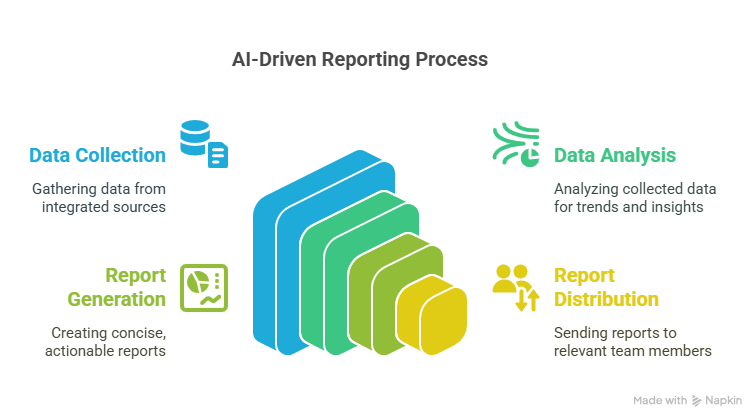
An AI reporting agent can automatically pull data from different sources, summarize key trends, and send concise, actionable reports straight to your inbox. This helps you make proactive decisions.
- Create an AI agent specifically for reporting.
- Connect all your data sources:
- Sales Data: Google Sheets, CRM (HubSpot, Salesforce), Stripe (for revenue).
- Marketing Data: Google Analytics 4 (GA4) for website traffic, Meta Ads Manager, Google Ads.
- Support Data: Your customer support platform.
- Any other relevant databases or spreadsheets.
- Set the reporting schedule (e.g., "Every Monday at 9:00 AM IST").
- Instruct the AI for analysis:
- Pull the latest sales figures (revenue, closed deals, average deal size) from your CRM and Stripe.
- Analyze website traffic (sessions, bounce rate, top pages) from GA4.
- Summarize key trends in customer support tickets (volume, resolution time, common issues).
- Highlight big changes from the previous period (e.g., 'Revenue up 15% WoW', 'Bounce rate increased 5%').
- Identify potential problems or opportunities based on set thresholds (e.g., 'If conversion rate drops below X%, flag as critical').
- Generate a short, executive summary with bullet points, focusing on insights you can act on, not just raw data.
- Tell the AI to email the report to you and your relevant team members (sales manager, marketing director).
Quick Tips:
- Clearly define your most important Key Performance Indicators (KPIs).
- Tell the AI to explain the numbers (e.g., comparing to previous periods, targets).
- Think about how the AI's text can guide you to create simple charts if you export data to a dashboard tool.
- Start with a basic report and refine the instructions over time to get more valuable insights.
These timely, actionable insights help you react quickly to market changes and performance. Your team doesn’t have to spend hours on collecting data and creating reports manually. As a result, you get a clear, consolidated view of your business performance across all key areas.
{{cta}}
Automate Your Business Tasks with Lindy
Lindy gives you one platform to automate your entire workflow, no devs, no setup headaches.
Why Teams Choose Lindy:
- Build custom AI agents with plain English, not code
- Replace 4–5 tools with one AI assistant
- Connect to Google Sheets, CRMs, Slack, email, and more
- Run complete workflows across sales, support, HR, and ops
- Setup takes minutes
- Adjust logic and instructions anytime
- Saves time, reduces errors, and helps you scale faster
Frequently Asked Questions
1. Do I need to be technical to use Lindy for automation?
No technical skills are required. You build agents by describing what you want in plain English. Lindy handles the logic and execution. If you know your process, you can automate it. You don’t need developers, just clear instructions.
2. How do I know which business task to automate first?
Start with one task that’s repetitive, time-consuming, and easy to define, like CRM updates, lead follow-ups, or weekly reporting. Pick what slows your team down the most, build an agent for that workflow, and expand once you see results.
3. Can I use Lindy with my existing tools like HubSpot or Google Sheets?
Yes. Lindy connects with popular tools like HubSpot, Salesforce, Google Sheets, Slack, Gmail, and more. You can also connect other apps using webhooks or APIs. Just plug Lindy into your stack and it’ll work where you already do.
4. How secure is it to use AI agents for business data?
Lindy follows enterprise-grade security practices. You control what data is accessed and how it’s handled. For sensitive workflows, you can limit access, log activity, and review output. Always avoid feeding personal or sensitive data unless necessary.
5. What happens if the AI agent gets something wrong?
You can build fallback logic into each agent (e.g., flagging unclear info for manual review). Lindy also lets you revise agent behavior anytime, so you can iterate as you go. Human oversight is still important for critical decisions.
6. Can I use Lindy across multiple departments at once?
Yes. You can create separate agents for sales, support, marketing, HR, and operations — all in one workspace. Each agent is independent and customizable, so teams can automate their own workflows without overlap or confusion.
7. What’s the best next step if I want to try this today?
Pick one use case from this article, like CRM updates, lead enrichment, or weekly reports. Sign up for Lindy, create your first agent, and test it with real data. Start small, then scale once it works. You’ll see results fast.










