Gemini Pricing: Every Plan, API Rate, and Workspace Cost


Gemini has a free plan, paid personal plans cost $4.99 to $199.99/month, and paid API pricing starts at $0.25 per million input tokens.
Google Workspace and Gemini Enterprise use separate business pricing.
Gemini pricing is confusing because Google sells Gemini three different ways. To see what that means in practice, I gave Gemini three ordinary jobs: summarize a report for me, help a coworker inside Google Docs, and process documents through an API script. Each job landed on a different bill.
In plain terms, you pay for Gemini with a personal plan for yourself, a Workspace seat for your team, or API usage for anything you build.
I compared all three pricing systems, then worked out what common API tasks would cost at today’s rates. Here’s how Gemini pricing works in 2026 and which option gives you the best value for your workload.
Gemini pricing at a glance
Gemini starts at $0 for personal use, while paid personal plans range from $4.99 to $199.99 per month. You can compare them on Google’s Gemini plans page. Developers can use a limited free API tier or pay from $0.25 per million input tokens with Gemini 3.1 Flash-Lite.
Here are the personal plans:
Plus and Pro are measured against Free (2x and 4x), while Ultra is measured against Pro (5x and 20x). Developers pay separately for the Gemini API.
These are the main paid text-model rates per million tokens:
Gemini 3.8 Flash keeps its introductory rates through December 31, 2026. The price rises to $1.50 input and $7.50 output per million tokens on January 1, 2027.
The three ways Google bills for Gemini
Google bills for Gemini in three different ways, depending on how you use it. Find the row that matches you before comparing prices:
A Google AI Pro subscription does not include API tokens, and API spend does not raise the limits in the Gemini app. Workspace access also follows its own plan and admin rules.
Recent Gemini pricing changes
Google has changed both its personal plans and API lineup, which leaves many older comparisons out of date. Here are the updates most likely to affect what you pay:
- Free Gemini accounts moved to Flash-Lite on October 9, 2026: People without a Google AI plan lost Gemini Flash and Gemini Pro in the app. AI Plus keeps Flash but loses Pro, and Google emails each Plus account its own date.
- Google AI Plus dropped to $4.99/month in June 2026: It sits between Free and Pro with twice the Free plan’s usage, 400 GB of storage, and 200 monthly Flow credits.
- Google AI Ultra split into two usage levels in May 2026: The 5x plan costs $99.99/month, while 20x costs $199.99/month.
- Gemini 3.8 Flash launched in September 2026 with temporary introductory pricing: Current rates double on January 1, 2027.
- Gemini 3.5 Flash was retired on October 8, 2026: Requests now route to Gemini 3.6 Flash, while Gemini 3.5 Flash-Lite remains available.
- Gemini 4 Argon reached paid API customers on October 13, 2026: Its introductory API price is $2 input and $10 output per million tokens through November 30, then $4 and $20.
Google also retires preview and older models over time. Check the Gemini model deprecation schedule before building a long-lived production workflow around a preview model.
Gemini personal plans: Free, Plus, Pro, and Ultra
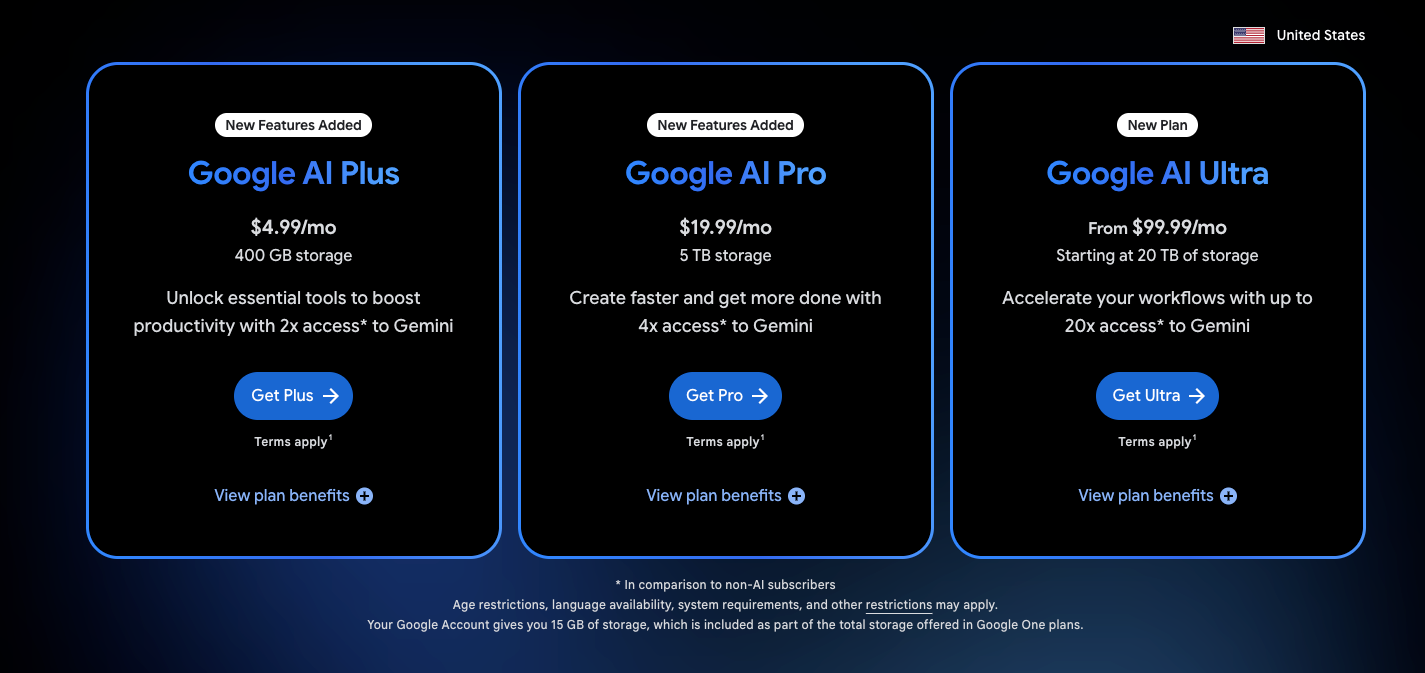
Gemini’s personal plans come in four levels, and each one fits a different amount of use. Free works for occasional questions, Plus gives light users more room, Pro supports a regular workday, and Ultra is built for people who repeatedly hit Pro’s limit.
Below are the prices, limits, and extras included with each plan:
Gemini Free
What you get: The free plan gives you the Gemini app, file uploads, image generation, limited Deep Research, and 15 GB of Google storage. Since October 9, free accounts use Gemini Flash-Lite only, and Flash and Pro need a paid plan.
Who it fits: Free covered the basics when I used Gemini for a few summaries, follow-up questions, and document checks during the week. It gives you enough room to learn how Gemini responds before choosing a paid plan.
What to consider: Longer conversations use the allowance faster because Gemini keeps sending the earlier context with each message. Large files, Deep Research, and image generation can also bring the limit forward. Once you reach it, you wait for the allowance to refresh or upgrade to a paid plan.
Students and yearly billing: Eligible US students can get Google AI Pro free for one year if they redeem by December 31, 2026. Everyone else can pay for Pro yearly at $199.99 instead of $19.99 a month.
Google AI Plus
What you get: AI Plus doubles the Free plan’s usage and adds 400 GB of storage and 200 monthly Flow credits.
Who it fits: Plus makes sense when you occasionally hit Free’s limit, but Gemini has not become central to your workday. The extra storage also matters if your Google account is already nearing its limit.
What to consider: The plan can become a short stop on the way to Pro. If you expect to work in Gemini most days or use its features across Google apps, paying $4.99 first may only delay the $19.99 upgrade.
Google AI Pro
What you get: AI Pro includes four times the Free plan’s usage, 5 TB of storage, 1,000 monthly Flow credits, and broader Gemini access across eligible Google products.
Who it fits: Pro is where Gemini began feeling useful as a daily work tool. I could move between research, document analysis, and work in Gmail or Docs without treating every request like a limited trial.
What to consider: The subscription still has five-hour and weekly limits, which can surface during long research or coding sessions. Pro also leaves API usage on a separate bill, even when your script uses the same Gemini model you see in the app.
Google AI Ultra
What you get: AI Ultra raises the personal usage limits and provides 10,000 or 25,000 monthly Flow credits. The 5x plan includes 20 TB of storage, while the 20x plan includes 30 TB.
Who it fits: Ultra is for people who regularly reach Pro limits or generate enough video and media to use thousands of Flow credits. A single busy afternoon on Pro would not be enough to convince me.
What to consider: Ultra 5x costs $80 more than Pro every month, while Ultra 20x adds another $100. Before upgrading, track how often you hit Pro’s limit during paid work and how long you wait each time. If the lost time does not approach the price difference, staying on Pro will cost less.
Gemini usage limits and AI credits
Every Gemini personal plan comes with a usage limit, which is how much you can use Gemini before it pauses. Higher plans raise that limit. AI credits are a separate allowance for creative tools such as video. This section explains how each one works.
Google does not promise a fixed number of prompts on most personal plans. Usage depends on the model, prompt length, uploaded files, generated media, tool use, and the amount of conversation history sent with each request.
Plans can apply both five-hour limits and weekly limits. Reaching one can pause access to a model until the allowance resets. Paid plans can keep chatting with Flash-Lite, while free accounts wait or upgrade.
AI credits sit in a separate bucket. They pay for eligible creative features such as Flow and cannot be exchanged for Gemini messages or API tokens. Pro and Ultra subscribers can purchase more credits in supported regions and products, while Plus users currently lack the same top-up option.
If video or media generation drives your usage, include extra credit packs in your budget. The subscription price may cover your Gemini chats, while the creative work creates a second monthly cost.
Gemini pricing for businesses
Business Standard is the first Google Workspace plan with Gemini across Gmail, Docs, Sheets, Slides, Drive, Meet, and Chat. It costs $14/user/month on a one-year commitment.
The cheaper Business Starter plan can look appealing until you check where Gemini works. Its AI access focuses on Gmail and Vids, which leaves out the apps many teams expect to use every day.
Here’s how the Workspace plans compare:
Google offers flexible monthly billing at a higher price and a 14-day trial for eligible organizations. Business plans support up to 300 users. You can check current rates on Google's Workspace pricing page.
Here's when each upgrade is worth considering:
- Business Starter to Standard: Costs an extra $70/month for a 10-person team on a one-year commitment. It's worth upgrading if employees regularly use Gemini in Docs, Sheets, Drive, Meet, or Chat. Starter may be enough for basic email assistance.
- Business Standard to Plus: Adds $8 per user per month for stronger security controls, administration, and more storage. The main reason to upgrade is better protection and governance, since everyday Gemini capabilities are similar.
- Workspace to Gemini Enterprise: Designed for organizations building AI agents connected to company data. The Business edition starts at $21 per seat/month for up to 300 seats, while Standard and Plus start at $30 per seat/month for larger teams with stricter IT requirements.
Before committing, check which features your team will use regularly and test them during the trial. A few real workflows will tell you whether the extra cost is justified.
Choosing the right way to pay for Gemini
The easiest mistake is paying for more Gemini in the wrong place. Personal plans, Workspace seats, and API usage solve different problems, even when they use the same models.
Here’s where I’d start based on the work you need Gemini to handle:
I’d begin at the lowest tier that covers the job and watch where the friction appears. Paying more only helps when the higher plan removes a limit you can name.
For example, Pro can beat Free when it saves hours of copying content between Gemini and Google apps. A small API workflow may cost only a few dollars each month, making a seat subscription irrelevant to the calculation.
Gemini API pricing
Your final Gemini API bill depends on the model, the inference tier, prompt length, cached context, tools, and whether you use the free or paid tier.
The sections below follow those cost layers in the order you’re likely to encounter them, beginning with the base token rates.
Base token rates for each Gemini model
The Gemini API charges separately for input and output. Prompts, system instructions, files, tool definitions, and conversation history count as input. Replies and reasoning tokens count as output.
A short classification request may cost a fraction of a cent. An agent that repeatedly resends a long conversation history can cost several times more, even when the final answer stays short.
Gemini 3.1 Pro Preview becomes more expensive above 200,000 input tokens. The entire request then costs $4 per million input tokens and $18 per million output tokens. A large codebase or collection of reports can cross the threshold before the model produces its first word.
The Gemini API pricing page also lists rates for image, video, audio, live, and specialist models. Media workloads use different billing units, so text-token estimates won’t capture their full cost.
If you’re comparing Gemini with OpenAI’s developer models, our GPT-6 guide breaks down the pricing and use cases for Astra, Sol, and Luna.
Inference tiers change the price and delivery time
After choosing a model, you decide how quickly the request needs to run. Google offers four inference tiers, each balancing cost, capacity, and response time differently. Here’s what each tier is built for:
- Standard handles normal synchronous requests at the listed model rate.
- Batch cuts many model rates by 50% for jobs that can finish later.
- Flex cuts rates by 50% for live requests that can tolerate slower, less predictable responses. It’s still in preview.
- Priority charges a premium to move your requests ahead of Standard traffic for lower latency. It’s still in preview.
I’d use Standard for interactive tools where someone is waiting for the answer. Batch is the easier saving for overnight classification, evaluations, and bulk document processing, since you keep the same model while paying a lower token rate.
Priority becomes relevant when uneven latency affects customers or production systems. For an internal job that runs overnight, paying extra for faster delivery adds little value.
Context length and caching affect repeated requests
You pay for input tokens every time Gemini receives them. If an agent sends the same manual, codebase, or transcript across 20 requests, you can pay for the same material 20 times.
Context caching stores the repeated portion for reuse at a lower rate. Keep stable content, such as the system prompt, tool definitions, and reference files, at the beginning. Put the changing question near the end. Editing an earlier section can break the cache and return the next request to full input pricing.
Long prompts can also trigger higher rates. Gemini 3.1 Pro Preview charges more once a request exceeds 200,000 input tokens. If an agent needs one contract clause, send the contract and relevant policies. Loading the company’s full legal library costs more and may push the request over the pricing threshold.
The free API tier changes how Google handles your data
The Gemini API free tier works well for prompt testing, model comparisons, and early prototypes, though it comes with lower rate limits.
Use public, synthetic, or non-sensitive information during those tests. Google may use free-tier prompts and responses to improve its products. Paid-tier content is not used for product improvement under Google’s standard API terms.
Move customer records, credentials, internal files, and other confidential data to the paid tier with the appropriate security controls.
Before launching, test the workflow again with realistic traffic. A prototype that handles five requests can still fail when several users arrive at once, and the free tier’s lower limits may hide how much paid capacity you’ll need.
Tools and storage can add charges beyond tokens
Search grounding, media generation, cached context, and faster inference can each create a separate charge on top of token rates.
One agent task may involve several model calls, two searches, a file retrieval, and a final summary. Looking only at the first API request would miss most of the cost.
Track the price of the finished task. If a research report uses $0.03 in tokens, $0.02 in grounding, and $0.04 across follow-up calls, budget $0.09 per completed report. Multiply that figure by your expected monthly volume for a more useful forecast.
Argon and preview models add planning risk
Google built Gemini 4 Argon for high-stakes scientific and security work, announced it on September 30, 2026, and rolled it out in stages.
Its introductory API rates are $2 per million input tokens and $10 per million output tokens through November 30, 2026, with standard rates of $4 and $20 after that. Cached input receives a larger discount.
Early access began with trusted specialists. Since October 13, Argon is available to paid API customers and in the Gemini app for Google AI Pro and Ultra subscribers, while AI Studio and Antigravity require Ultra. Test it against your own workload before it goes into a forecast, and budget for the $4 and $20 rates from December 1.
Preview models carry a different kind of cost. Google can retire them sooner than stable releases, which may force your team to retest prompts, update model IDs, and migrate with limited notice.
Pin model versions when Google allows it, monitor the Gemini deprecation schedule, and keep one tested fallback ready.
5 ways to lower Gemini API costs
The biggest savings come from reducing repeated input and matching each request to the cheapest option that can handle it. Start with these five changes:
- Lower the reasoning effort: Test low, medium, and high settings on the same tasks, then keep the least expensive level that still meets your quality target.
- Cache repeated material: Place stable instructions, tools, and reference files at the beginning of the prompt, with changing requests near the end.
- Send flexible jobs to Batch or Flex: Use lower-cost processing for nightly classification, document extraction, evaluations, and other work without an immediate deadline.
- Keep free-tier tests non-sensitive: Use public or synthetic data during prototyping, then move to paid access before adding customer or company information.
- Route simple requests to Flash-Lite: Use the lower-cost model for formatting, tagging, extraction, and basic classification, escalating only uncertain cases to Flash or Pro.
Three Gemini API cost examples
Token prices become useful once you apply them to a complete job. I worked through three common workloads below, using the current rates and showing the assumptions behind each estimate.
The totals exclude search grounding, media generation, retries, and external tools. Your bill will change with prompt length, cache performance, output size, and the number of model calls.
1. Coding agent fixing a feature
Picture a coding agent working through a feature-sized change over 100 steps. Across the full session, it sends six million input tokens, reuses 90% of them from the cache, and generates 80,000 output tokens.
These estimates use Google’s cached-input rates of $0.075 per million tokens on Gemini 3.8 Flash and $0.20 on Gemini 3.1 Pro Preview.
The cache does much of the work here. If the hit rate falls from 90% to 70%, the same session rises to about $1.97 on Gemini 3.8 Flash and $5.40 on Gemini 3.1 Pro Preview.
A small change in prompt structure can therefore affect the bill more than switching between two similarly priced models.
2. Reviewing a long report
Now consider a 150,000-token report with a request for 40,000 output tokens. The model receives the report once, analyzes it, and returns a detailed review.
The price changes once the input crosses 200,000 tokens. At 250,000 input tokens, Gemini 3.1 Pro Preview moves to its higher long-context rate, bringing the same job to about $1.72. Gemini 3.8 Flash costs about $0.34.
For a one-time report, both totals remain low. Repeating the analysis across thousands of documents makes model choice and prompt length much more important.
3. Running a daily chat assistant
For the final example, picture an assistant handling 50 messages each day. Every message sends 6,000 input tokens, including its instructions and conversation history, then returns 1,500 output tokens.
Across 30 days, the assistant processes 1,500 messages.
Gemini 3.8 Flash’s scheduled price increase doubles this example’s monthly cost. If you plan to keep the assistant running into 2027, use the higher figure in your forecast now.
These examples also show why Gemini subscriptions and API pricing solve different needs. A personal plan pays for the Gemini interface and bundled Google features. The API pays for usage inside an app or workflow you build and operate.
{{templates}}
Gemini pricing compared with ChatGPT and Claude
The three personal plans sit within a few cents of one another, but $20 buys a different package from each company.
Google AI Pro offers the strongest storage bundle. It becomes easier to justify when you already work in Gmail, Docs, Drive, and Gemini Notebook or would otherwise pay for additional Google storage.
ChatGPT Plus may offer more value if you care about its tools, apps, or model selection. Claude Pro has a stronger case for developers who want Claude Code included with their subscription.
Our ChatGPT pricing guide compares every tier from Free through the $500 Pro plan. The Claude pricing breakdown covers its plans, usage limits, Claude Code access, and API rates.
API costs create a different comparison:
Gemini 3.8 Flash is the cheapest model in this table, though its introductory rates double in January 2027. Gemini 3.1 Pro Preview matches Claude Sonnet 5.5 on input and costs $2 more per million output tokens.
I wouldn’t choose from the rate card alone. Run the same representative tasks through each model, then compare accuracy, retries, editing time, latency, and cost per accepted result. A cheaper model loses its advantage when every difficult request needs a second attempt.
{{cta}}
My verdict on Gemini pricing
Gemini is worth paying for when the Google bundle removes work you already do by hand. Google AI Pro offers the clearest value for someone using Gemini most days across Gmail, Docs, Drive, and Gemini Notebook, especially when the included 5 TB of storage replaces another expense.
Free remains the right starting point for occasional use. AI Plus gives light users more room for $4.99/month, while Ultra deserves consideration only after you repeatedly hit Pro limits during paid work. One busy session is a poor reason to add $80 to every monthly bill.
For developers, budget around a finished task rather than a million-token rate. Use Flash-Lite for simple extraction and formatting, cache repeated context, and move delayed work to Batch. If Gemini 3.8 Flash will remain in production next year, build its January 2027 price increase into the forecast now.
FAQs
1. Is Gemini free?
Yes. The Gemini app has a $0 plan, and the Gemini API offers a limited free tier for supported models. The app and API have separate limits, and Google may use free-tier API content to improve its products.
2. How much does Google AI Pro cost?
Google AI Pro costs $19.99/month. It includes higher Gemini app limits, 5 TB of storage, 1,000 monthly Flow credits, and broader access across eligible Google products.
3. What is the difference between Gemini Pro and Ultra?
Google AI Pro costs $19.99/month and fits regular daily use. Google AI Ultra costs $99.99 or $199.99/month and provides much higher limits, more storage, more Flow credits, and earlier access to selected premium features.
4. What’s the difference between the two Ultra tiers?
Usage and storage. Ultra 5x costs $99.99/month for five times Pro’s usage, 20 TB, and 10,000 monthly Flow credits. Ultra 20x costs $199.99/month for 20 times Pro’s usage, 30 T,B and 25,000 credits.
5. Can students get Google AI Pro free?
Yes, for now. Eligible US students can get Google AI Pro free for one year if they redeem by December 31, 2026.
6. What is the cheapest Gemini API model?
Gemini 3.1 Flash-Lite is the cheapest current paid text model at $0.25 per million input tokens and $1.50 per million output tokens. The best low-cost choice still depends on whether it meets your accuracy requirements.









