CrewAI Pricing 2026: Plans, Limits, and the Token Bill
Jack broke down CrewAI's pricing plans, explaining how costs work, its flexible payment options, and tips to maximize value across different team tiers.


CrewAI pricing used to mean choosing between paid tiers that started at $99 a month. Open the page today, and there are 2 left: a free plan capped at 50 workflow executions a month and an Enterprise tier priced by quote.
I read that page line by line and pulled its full feature table. The overage rate isn't on it, and after going through CrewAI's documentation index, I don't think that's an oversight. Basic is a free tier with a hard wall, and everything past that wall is a phone call.
CrewAI pricing at a glance
CrewAI pricing splits into 2 plans on CrewAI.com. Sales quotes Enterprise, and its executions are "sized to workflow." Basic costs $0 and stops at 50 workflow executions a month.
| Plan | Price | Best for |
|---|---|---|
| Enterprise | Custom | Teams running agents in production behind SSO, RBAC, and their own VPC |
| Basic | $0 | Testing 1 or 2 agentic workflows |
Nothing sits between those 2 on CrewAI.com. There's no annual toggle and no self-serve upgrade once you hit 50 executions, which means the pricing page has no path from evaluating to paying that doesn't route through a person.
CrewAI does publish a fixed paid price, and it's on a different site entirely. Its AWS Marketplace listing sells a Basic contract at $99.00 a month, or $1,188.00 on a 12-month term.
The listing is titled CrewAI Enterprise Platform and sold by CrewAI, and the only plan inside it is Basic.
Is CrewAI free?
Yes, CrewAI is free in 2 separate ways, and one of them has a limit.
The framework is open source under the MIT license, with 58.4k stars on GitHub as of September 2026. It's standalone Python with its own primitives. Run it on your own machine, and CrewAI charges you nothing.
The hosted platform has its own free tier. Basic covers Studio, the AI Copilot, GitHub integration, tracing, guardrails, and 50 workflow executions a month.
The feature table spells out what that 50 means. CrewAI lists included executions at 50, maximum executions at 50, and additional executions as a dash.
You can't buy more capacity on Basic. I'd read that as a funnel toward sales, and what happens when you reach the cap is the part CrewAI doesn't say.
A verified user in the professional training industry ran into it and called the plan restrictive on G2 on July 31, 2026:
"With only 50 runs per month, you'll likely hit the quota quickly."
So CrewAI is free twice over, and the hosted version of free comes with a number on it.
Every CrewAI pricing plan, broken down
I've started with the one that ends in a quote and worked down to the one that costs nothing. The middle entry isn't on CrewAI's pricing page at all, which is the reason it needs a section of its own.
Enterprise: custom pricing
What's included: everything Basic gets, plus the access controls, data handling, and deployment options a security review covers. Under governance, CrewAI names "SSO, RBAC, workload identity, PII redaction, and policies," and the sign-on itself runs through Microsoft Entra ID or Okta.
Where the plan earns its quote is deployment. You can "Deploy on CrewAI cloud, your own VPC, or your own infrastructure," and enterprise connectors come with it. On the compliance row, CrewAI lists SAM and FedRAMP High.
Support turns into a dedicated contact you can reach in Slack or Teams, with on-site time and training on top. Every one of those controls sits behind a quote, so there's no way to price any of it before a call.
The execution numbers stop being numbers on this plan. Included reads "sized to workflow" and maximum reads "Custom." Additional executions get 2 words of explanation: "Flexible overage."
Best for: teams with agents already running, who now need them to pass a procurement review.
Pros:
- CrewAI's pricing page puts FedRAMP High and SAM registration on the Enterprise row, a lane neither rival names. LangSmith and n8n both carry SOC 2 Type II, which clears a commercial security review, but neither one gets you into a federal procurement.
- Onboarding is contractually scoped at 45 days. CrewAI commits to a "45-day onboarding that lays the foundation for agent production at scale across the business."
Cons:
- You learn your rate on a call, and nothing in the contract terms is published first.
- Forward-deployed engineering and training are "available a la carte," so the quote you sign is a floor.
The $99 AWS Marketplace contract (also called Basic)
What's included: a 1-month contract on AWS Marketplace covering 100 workflow executions a month, 2 live crews, 5 seats, and self-service setup. This contract is where the old $99 Basic tier went when it came off crewai.com.
Best for: buying exactly 100 executions and 5 seats through AWS spend you've already committed.
Pros:
- It doubles the Basic allowance, covers 5 seats, and the price is printed on the listing where you can read it before you commit.
- Billing lands on your AWS invoice, so it rides on an approval your company has already granted.
Cons:
- At 100 executions, a job scheduled every hour exhausts the allowance in about 4 days, and the vendor refund policy is no refunds.
- It doesn't appear on crewai.com at all, so anyone comparing plans on the pricing page never sees it.
{{templates}}
Basic: 50 workflow executions a month at no cost
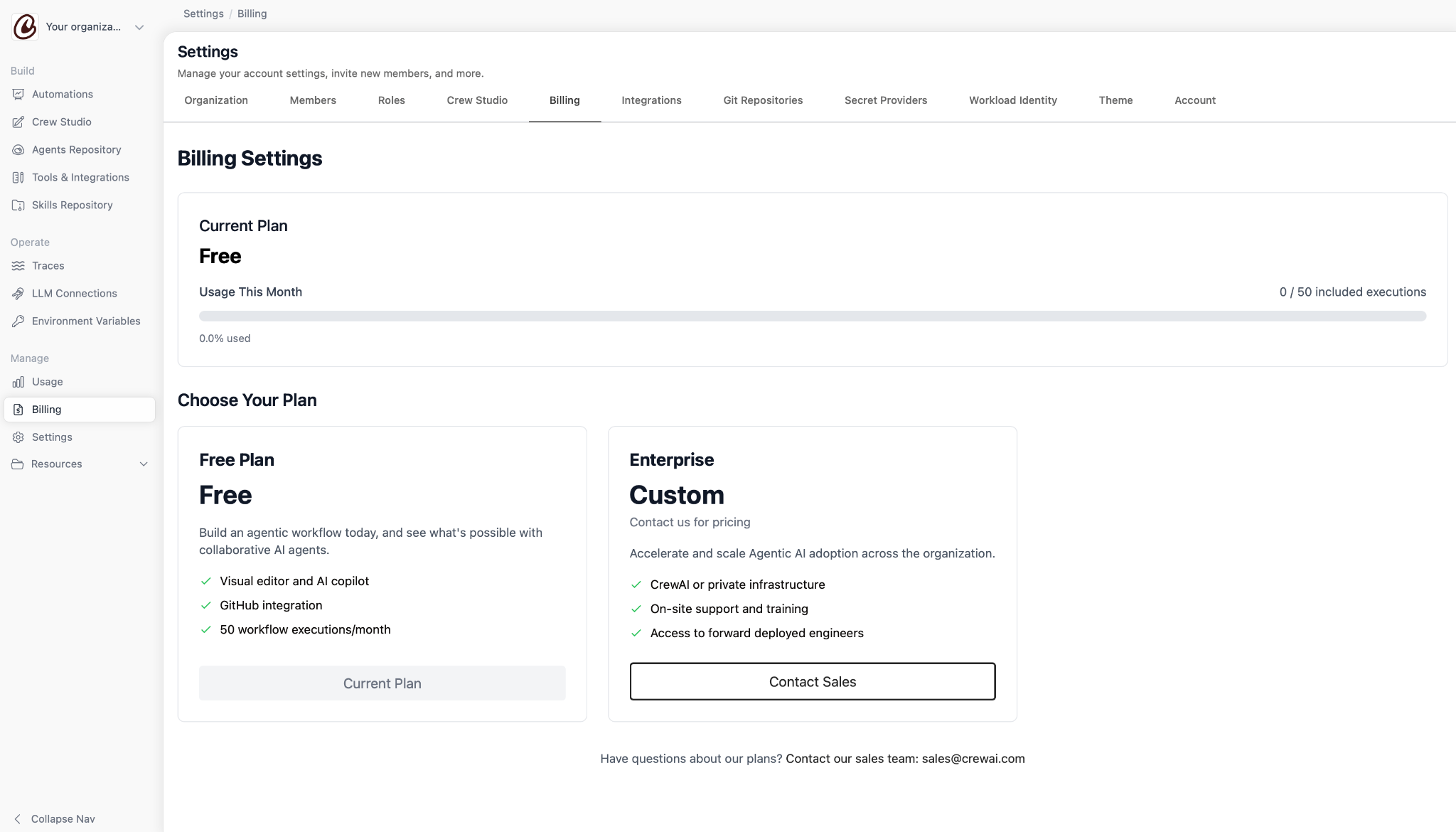
What's included: everything except enterprise governance, enterprise connectors, and paid support. You work in Studio, CrewAI's visual editor, with standard tools and triggers, workflow templates, and private repositories for your agents and tools.
The connection points are there as well. GitHub integration comes standard, and you can export a workflow as an MCP server or as a UI component, so a Basic workflow can already feed something else you run.
Observability is the layer many vendors hold for paying customers, and CrewAI doesn't. You get tracing, OpenTelemetry, the usage dashboard, token counts, hallucination scores, and deployment history, all on the plan that costs nothing.
The control layer ships too, with agent training, LLM testing, guardrails, human-in-the-loop input, and workflow chat in the UI and in Slack or Teams. Scheduling comes with it, and compute is auto-provisioned, so a cron job runs without you sizing anything.
One line is missing from all of that. On Basic, support is community only.
Best for: a first workflow you want to trace properly before anyone approves a budget for it.
Pros:
- Traces, token counts, and hallucination scores are all there on day 1.
- A cron job on Basic runs on real compute, so a recurring workflow is testable before you pay.
Cons:
- Cron scheduling and a 50-run cap work against each other. On Basic, that same hourly job is done for the month in just over 2 days.
- No enterprise connectors, so anything sitting behind SSO in your stack stays unavailable.
What extra workflow executions cost
On Basic, extra workflow executions cost nothing, because you can't buy any. On Enterprise, CrewAI doesn't publish what they cost. Before that number matters, though, CrewAI leaves open what a workflow execution even is.
What counts as a workflow execution
CrewAI's platform documentation index has no page on executions, usage, limits, quotas, or billing. I looked at every entry in it.
CrewAI bills you by the workflow execution and doesn't define that unit anywhere in its own docs. So whether a 12-step crew with 3 agents counts as 1 execution or 12 is a question for sales.
CrewAI bills by the execution; you think in runs, and nowhere does CrewAI say those are the same number.
What CrewAI charges for extra executions
On Basic, the feature table answers it with a dash. On Enterprise, "flexible" is the word that matters, because your rate is written into the contract and nowhere else.
Say your crew runs 1 nightly report and a lead-enrichment flow that fires on each new lead; call it 10 runs a day between them. On the simplest reading of the unit, that's 300 executions a month. Basic cuts you off at 50, the AWS contract at 100, and past that, CrewAI publishes no price.
Search for that number, and you'll land on third-party sites that do quote a rate. Checkthat.ai, which appears high in search results for this term, lists $0.50 per execution, which works out to $475 a month for 1,000 runs: a $25 base plus $450 of overage.
Those aren't CrewAI's numbers, and I couldn't trace them back to anything CrewAI publishes, so I'd treat them as estimates until CrewAI confirms a rate.
The cost the pricing page doesn't show
Agent turns and retries both consume tokens with whichever model you pointed it at. On daily workloads, those token charges outgrow the platform bill, and CrewAI lets you pick any model, so the model bill is yours to manage.
Prasad K. worked through the arithmetic on G2 on August 25, 2026, and landed on the same place. His review puts the software at $0 and then names the part that costs money:
"The true cost lies in the LLM API tokens consumed during multi-agent interactions."
Token count and the usage dashboard both ship with Basic, so you can watch the spend accumulate before your model provider bills you for it.
Which CrewAI plan should you choose?
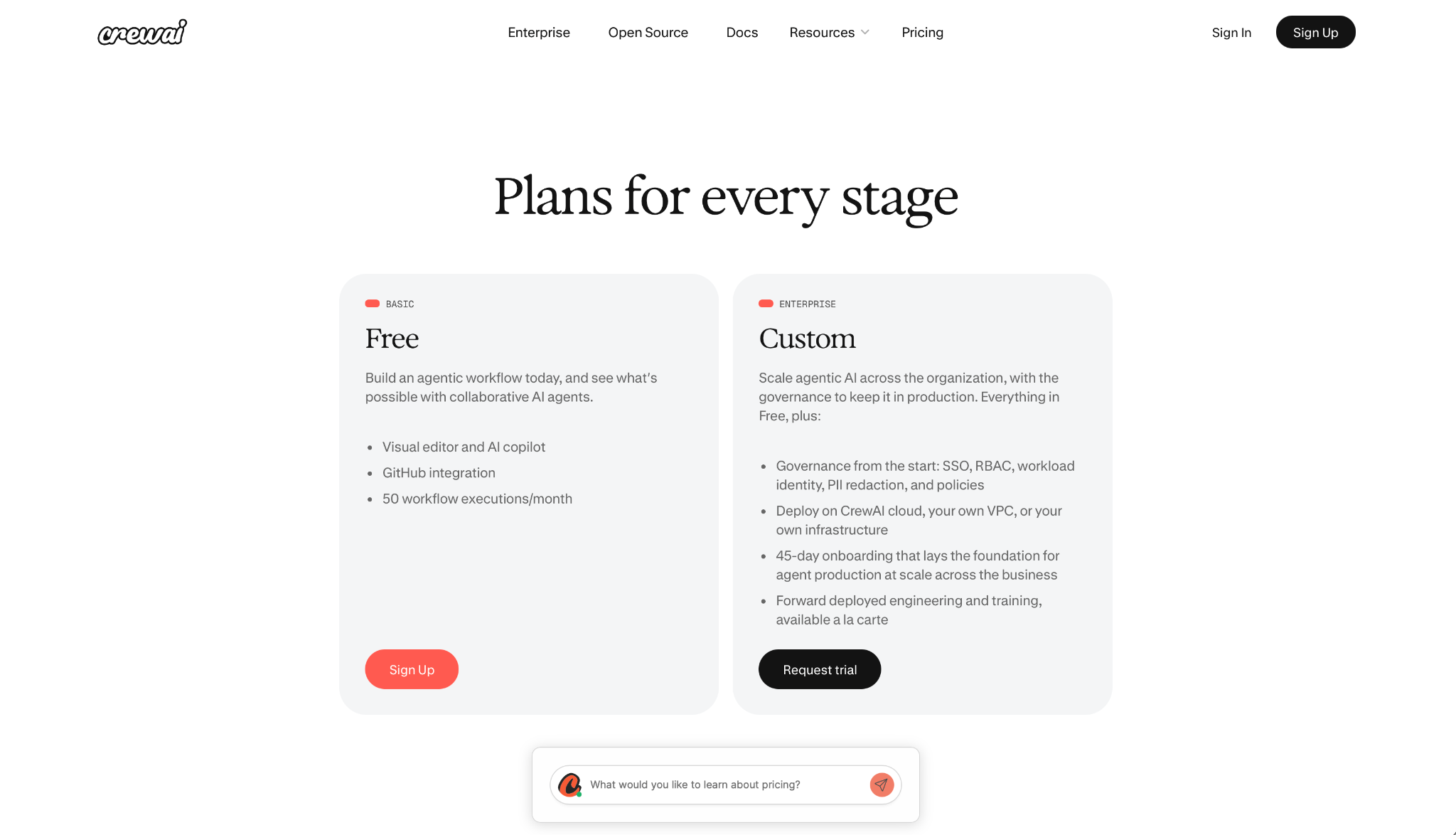
The decision comes down to whether 50 executions a month covers you, because there's nothing between Basic and a sales call except a contract on AWS Marketplace that crewai.com never mentions.
Choose Basic if you:
- Want to build a workflow and read its full trace without paying for it.
- Run manual or weekly jobs.
Choose the $99 AWS contract if you:
- Need 5 people in one workspace and can live within 100 executions.
- Already buy software through AWS Marketplace.
Choose Enterprise if you:
- Need SSO, RBAC, PII redaction, or a deployment inside your own VPC.
- Have public-sector or regulated work that needs a FedRAMP High or SAM path.
- Expect execution volume you can't predict, and want the overage terms in writing.
{{cta}}
Is CrewAI worth the cost?
CrewAI holds a 4.2 out of 5 across 21 reviews on G2 as of September 2026, and reading them, the complaints sort themselves into the 2 halves of the pricing model. The praise goes to the orchestration, and the complaints go to what running it costs. Lindy's CrewAI review covers how the product itself holds up beyond the price.
CrewAI's own case studies argue the other side, and each one names a company and a number you can check.
CrewAI's case studies credit General Assembly with a 90% reduction in development time. DocuSign gets 75% faster first contact with leads, and Konecta gets a 96% reduction in QA time, from 74 hours to 3.
Those are outcomes from teams that already cleared the 50-execution ceiling, which is the part the pricing page doesn't help you plan for. CrewAI also claims 65% of the Fortune 500, a figure I'd take as a count of pilots.
Two variables set your number, and neither one is the plan you're on. How often the workflow runs decides how fast you hit the ceiling, and which model you assign decides what each of those runs costs you in tokens.
CrewAI is worth it if you:
- Have Python engineers who can design agent handoffs and debug them when a handoff misfires.
- Need multi-agent orchestration with governance attached, and can treat a sales quote as normal procurement.
Skip CrewAI if you:
- Want a price you can forecast from a public page.
- Run work that retries often, and would rather know what a failed run costs before you sign.
- Have no Python capacity in-house. Studio covers the first workflow, and my read is that tuning agent handoffs and debugging a misfire both land you in Python, because that's where the primitives live.
What reviewers say about the price
Of the 21 G2 reviews, 9 mention cost, and all 9 reach for adjectives rather than a rate. Those adjectives sort into 2 complaints: Basic's ceiling, and a token bill nobody sees coming.
The free tier runs out before the pilot does
The 50-execution cap is the one complaint with a number attached to it, and the verified user quoted earlier is the one who spells it out: "With only 50 runs per month, you'll likely hit the quota quickly."
It matches the feature table, with 50 included, 50 maximum, and nothing purchasable past it, so that's not an edge case. It's the plan working as designed.
The token invoice outgrows the subscription
Prerna T. names a second cost on G2, the one that arrives as the work gets harder.
"Sometimes this multi-agent system gets very complicated as well as expensive once you are past the simple ones."
Prasad K.'s review, quoted above, is the one that does it most precisely, with $0 against the framework and a token bill against the handoffs.
In her August 27, 2026 review, Himika J. was blunter about the total. "The cost involved is much higher." Alishetti S. said the same thing more neutrally: the framework costs nothing, and the hosted platform is what he'd pay for on top.
That's the pattern worth taking away. Those 9 reviewers describe the cost in adjectives because CrewAI doesn't give them a number to use, which is exactly what the pricing page does to you before you buy.
Frequency of running drives the bill, and that's the axis the rest of the field competes on.
CrewAI alternatives and pricing comparison
The tools in this field charge in 5 different ways, and the billing unit is where the money moves. CrewAI pricing is the only one on this list that doesn't name its unit rate.
Every number below comes from the vendor's own pricing page, or its repo where the tool has no paid plan, checked in September 2026.
| Tool | Entry paid price (see note) | Billing unit | Best for |
|---|---|---|---|
| Lindy | $29.99/month per user | Per user, plus credits | An AI assistant that runs in Slack, with per-seat control |
| LangSmith (LangChain) | $39/seat/month | Per seat, plus metered compute | LangGraph engineers who want published unit rates |
| AutoGen | $0 (MIT) | Per LLM token only | Prototyping multi-agent systems on your own hardware |
| n8n | $24/month | Per workflow execution, unlimited users | Scheduled work where the per-run cost has to be predictable |
| LlamaParse (LlamaIndex) | $50/month | Per credit and per page | Document-heavy pipelines that need parsing before retrieval |
These entry prices aren't like-for-like. Lindy and LangSmith bill per person, so a team of 5 multiplies them. n8n and LlamaParse bill flat regardless of headcount. Read the billing unit before you compare the left column.
Lindy's CrewAI alternatives roundup covers a wider list with notes on each one, and AI agent frameworks sorts the same field by architecture instead of price.
Lindy
Plus is $29.99/month per user for 3k credits, Pro is $99.99 per user for 15k, and Max is $199.99 per user for 35k.
The credit side is the one you can plan around, because Lindy publishes what tasks cost. Everyday asks run 2 to 250 credits. Deep work climbs to 1,000, and a big build can reach 2,500, so you can size a month before you commit to it.
Every seat feeds a shared pool, and admins can set credit allocations per seat. The pool is capped, so a month can't run past what you budgeted without you seeing it.
Where this gets expensive is headcount. The credit pool is shared, but the seat isn't, so putting 10 people on Plus multiplies that headline figure by 10 before anyone spends a single credit.
LangSmith (LangChain)
LangChain prices its platform through LangSmith, and it publishes every number it charges. Developer is $0 per seat on 1 seat with up to 5k base traces a month, and Plus is $39 per seat with 10k.
Above those base traces, both plans meter what you use, at $1.50 per LangChain Compute Unit and $1.00 per LangChain Storage Unit. Those are rates you can put in a model before you sign, which is what CrewAI won't give you.
LangChain's unit rates are published, so you can forecast a LangSmith month in a spreadsheet before you buy. CrewAI gives you a dash and a 2-word phrase, so your rate arrives after a call with sales.
Published rates don't mean a simple invoice. Compute Units and Storage Units move independently of each other and of your headcount, so forecasting a LangSmith month means forecasting 3 variables at once.
AutoGen
AutoGen's code is MIT-licensed, and the repo carries 60.9k stars as of September 2026, so your only cost is the model API behind it. On price alone, it undercuts everything else on this list.
Read the repo before you commit to it, though. Microsoft has AutoGen in maintenance mode, says it "will not receive new features or enhancements," and points new projects at the Microsoft Agent Framework instead.
n8n
n8n prices by workflow execution and says so on the pricing page itself: "Pricing based on monthly workflow executions, regardless of complexity." Steps inside the workflow don't count against you. That sentence, printed on a public pricing page, is what CrewAI's docs leave you to guess.
Starter is $24/month for 2,500 executions, Pro is $60 for 10,000, and Business is $800 for 40,000. All 3 bill monthly, and none of them cap users. Annual billing takes 17% off.
n8n's cheapest paid tier covers 2,500 executions, and CrewAI's free tier covers 50. n8n defines an execution as one whole workflow run, whatever its complexity, and CrewAI defines nothing, so the 50-fold gap is the best read available rather than a like-for-like. n8n also ships a free Community Edition you host yourself, and a trial that covers 1,000 executions. For anything on a schedule, that's the difference that decides which tool you can run.
That same line cuts the other way once you look at your own jobs. A job that runs once and does 40 things costs what one that does 2 costs, so the cheap work in your account is paying for the expensive work.
LlamaParse (LlamaIndex)
The LlamaIndex framework is free and open source. LlamaParse is the paid piece, and it runs on credits with a conversion LlamaIndex publishes outright. 1,000 credits equals $1.25.
From there, the tiers are straightforward. Free covers 10,000 credits, Starter is $50 for 40,000, and Pro is $500 for 400,000. Basic parsing starts at 1 credit per page, so a 200-page document is the unit to price against.
LlamaParse does 1 job on this list, converting documents into text a model can retrieve. Treat it as a component inside a stack. The LangChain alternatives breakdown covers where each of these sits.
Lindy vs CrewAI: which should you choose?
CrewAI gives Python engineers the primitives to compose agent crews. Lindy gives a team an AI assistant that already runs in Slack.
CrewAI is better for: engineering teams building custom multi-agent systems, where the orchestration logic is the product, and you've got Python people to maintain it.
CrewAI names a federal path LangSmith and n8n don't, though its page marks that row "CrewAI or customer," so part of the work lands on you. Self-hosting is documented as a supported deployment path.
Lindy is better for: companies that need everyday work handled without writing agent handoff code. Pricing is per seat and published in full, and credit ranges are listed.
On compliance, Lindy is SOC 2 Type II certified, GDPR compliant, and PIPEDA compliant, with HIPAA and a signed BAA on Enterprise. CrewAI's list goes further into federal territory, and Lindy's goes further into what a healthcare or Canadian buyer asks for.
Lindy's limit is the other side of the same design. It won't compose a custom agent topology for you, so if the orchestration logic is your product, you'll outgrow it and land back in Python.
Use both if: your engineers are building custom crews while the rest of the company needs everyday work handled now. CrewAI covers the custom pipeline, and Lindy covers the recurring work around it in Slack and email.
Lindy's trial runs for 7 days for teammates who join through Slack, and CrewAI's Basic plan runs 50 executions. Both are enough to test a workflow before you spend anything on either.
My bottom line on CrewAI pricing
CrewAI pricing is now 2 published numbers, 1 figure CrewAI won't print, and 1 contract sold on someone else's site. Basic covers everything but enterprise governance, connectors, and paid support, and it stops at a 50-execution ceiling you can't pay to lift.
Enterprise covers governance and ends in a quote, which is where that unprinted figure lives. And where the old paid tiers used to sit, there's an AWS Marketplace contract that Amazon sells, and crewai.com doesn't list.
Your model bill decides your spend more than the plan does. Point 3 agents at a large commercial model and the subscription becomes a minor line item.
Run the framework locally under MIT and watch the token dashboard for a week. You'll have your own number before CrewAI quotes you one.
Frequently asked questions
How much does CrewAI cost?
Basic costs $0 and covers 50 workflow executions a month. Enterprise is priced by custom quote. A fixed $99/month contract exists on AWS Marketplace, covering 100 executions and 5 seats.
Is CrewAI free?
Yes, in 2 separate ways: the MIT-licensed framework you host yourself, and the hosted Basic plan. Basic caps you at 50 workflow executions a month with no way to buy more.
What do CrewAI extra workflow executions cost?
CrewAI doesn't publish a rate for extra workflow executions. Basic lists them as unavailable, and Enterprise lists "Flexible overage," so the price comes from your contract.
Does CrewAI have Enterprise pricing?
Yes, CrewAI prices Enterprise by quote. The plan adds SSO, RBAC, PII redaction, dedicated VPC deployment, FedRAMP High, and a 45-day onboarding.
How does CrewAI work?
CrewAI coordinates multiple AI agents, each with its own role and tools, inside a shared workflow called a crew. You build them in Python or in Studio, the visual editor.
Is CrewAI cheaper than LangGraph?
Neither one is cheaper on the framework alone, because LangGraph and CrewAI are both free and open source. The split shows up in the paid layer, where LangSmith's Developer tier covers 5k base traces on 1 seat.
CrewAI's free tier runs to 50 workflow executions a month. From there, LangChain publishes its unit rates, and CrewAI publishes a dash in the overage cell.









