ChatGPT vs Grok: I Tested The Latest Models on 5 Tasks


ChatGPT and Grok both changed in October 2026. OpenAI brought GPT-6 to regular ChatGPT chats on October 7, while Grok rolled out new subscription plans on October 12. Yet plenty of comparisons still reference GPT-5 and older Grok pricing.
If you’re choosing between ChatGPT and Grok, the models, prices, and features you read about last month may already be out of date. I checked the latest plans and model availability against official sources, then ran the same five tasks in both apps.
ChatGPT came out ahead in my coding, writing, and agent tests, while Grok offers a cheaper always-on agent, video generation, and access to live X posts. I’ll break down where each wins and which subscription gives you the most value.
Is Grok better than ChatGPT? The quick answer
Choose based on the work you do most. ChatGPT is the safer default for writing, coding, and long sourced reports, and Grok earns its place when live X data, video, or a cheaper agent matters to you. Here’s how I’d split it:
- General work? I’d pick ChatGPT Plus ($20/month). Its chat now runs on GPT-6, it includes Codex and ChatGPT Work, and it won my coding, writing, and agent tests.
- Always-on agent on a budget? I’d pick Grok Premium ($30/month). Grok Bot starts at that price, and the plan bundles Cursor and X Premium. ChatGPT’s always-on agent, dots, starts at the $100 Pro tier.
- Work that splits cleanly? I’d pay for both. A writer or analyst could keep ChatGPT Plus for drafting and research, then add the $8 Grok Plus plan or the free Grok app for live X searches.
ChatGPT vs Grok: Side-by-side comparison
The biggest difference shows up in what each plan includes beyond chat. ChatGPT opens up full Codex and ChatGPT Work at $20, with limited desktop access on Free and Go. Grok adds Grok Bot and video generation at $30, and its $8 Plus plan already includes images and Cursor. Here’s what each one offers:
What is ChatGPT?
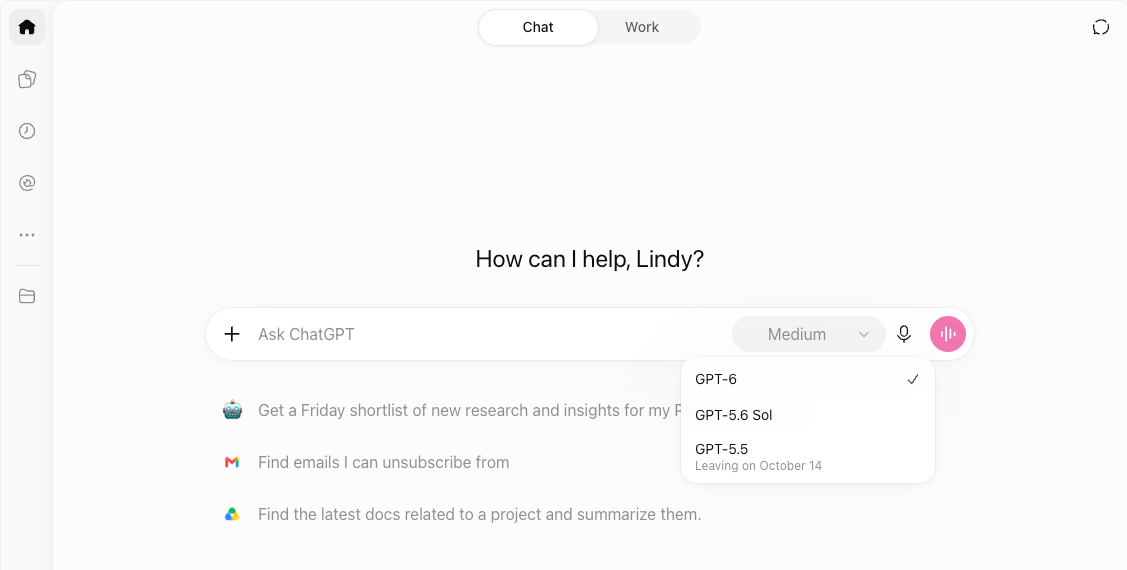
ChatGPT is OpenAI's AI assistant, available on the web, desktop, iOS, and Android. It handles everyday conversations, while ChatGPT Work takes on longer projects involving documents, presentations, spreadsheets, and connected apps. Codex focuses on coding tasks.
ChatGPT offers a free plan, with paid tiers providing access to more capable models and higher usage limits. Here’s what each plan includes:
- Free ($0): Unlimited text chats with usage limits on advanced features.
- Go ($8/month): Higher usage limits at a lower price, though ads may appear.
- Plus ($20/month): GPT-6 access, scheduled tasks, custom GPTs, and expanded deep research.
- Pro (from $100/month): Higher limits, advanced reasoning, and dots, ChatGPT's always-on AI agent.
Our ChatGPT pricing guide covers each plan’s features, limits, and costs in more detail.
What is Grok?
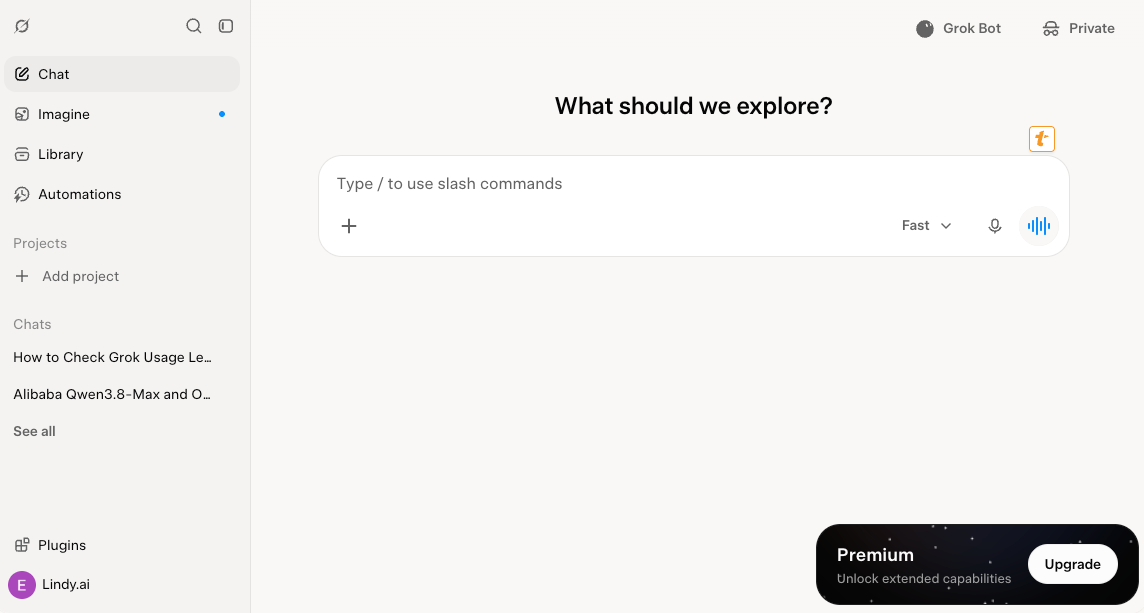
Grok is the assistant from SpaceXSI, available on grok.com, the iOS and Android apps, and inside X. Since October 12, Grok comes through "The X Subscription," which bundles Grok chat, voice, image and video generation, Grok Bot, Cursor, and X Premium features into five tiers.
Grok offers a free plan with limited chat and agent requests. Paid plans share a weekly usage pool across Grok and Cursor, with higher tiers offering more usage. Here’s what each tier includes:
- Free ($0): Limited chat and AI features
- Plus ($8/month): Base weekly usage allowance
- Premium ($30/month): 4x the Plus allowance, with Grok Bot access
- Super ($100/month): 15x the Plus allowance for heavier AI use
- Ultra ($200/month): 50x the Plus allowance for power users
Existing SuperGrok and Cursor subscribers can keep their current plans. For exact monthly costs, usage limits, and API rates, check our Grok pricing guide.
How I tested ChatGPT and Grok
I ran the same five tasks on ChatGPT Plus ($20 a month) and Grok’s $30 tier. That tier was called SuperGrok until October 12 and has been Premium for new subscribers since. Here’s what I tested and how each tool scored:
My scores mostly follow the pricing and feature differences, with one exception: ChatGPT Work beat Grok Bot in my agent test, even though Grok Bot is the cheaper way to get an always-on agent.
For every run, I logged the plan, the model shown in the picker, the effort level, the date, and the usage it cost, such as “Plus, GPT-6, High, October 9.”
Both apps are mid-rollout, so the model your account shows may differ from mine. Grok’s plans also changed on October 12, partway through my testing, which is why I logged the plan for every run. I scored each result from 1 to 5, and five coworkers picked between unlabeled drafts for the writing test.
Alongside the tests, I checked every price, model name, and plan limit against OpenAI’s and SpaceXSI’s own pages.
Grok vs ChatGPT: Which model answers in each app?
A plan name doesn't tell you which model answers your chat. OpenAI and SpaceXSI both keep their strongest models in agents, coding tools, and the API, and both are mid-rollout in their chat apps.
Before running anything, I checked the model menus. ChatGPT Plus listed GPT-6 as the default, with no "Sol" label, just as OpenAI's help page describes. Grok's picker showed Grok 4.7 on the $30 plan.
ChatGPT: Models by plan
ChatGPT's model options depend on your subscription. GPT-6 is the name you'll see in the model menu, while Luna, Sol, and Astra refer to different models powering ChatGPT and its other tools.
The biggest difference is where you can use Astra, OpenAI's most capable model. Plus subscribers can access it through Work and Codex, while Pro subscribers also get it in regular chat under the name GPT-6 Pro, subject to weekly limits. Business and Enterprise users can access GPT-6 Pro in chat too.
OpenAI's help page still references GPT-5.6 Luna for Free and Go, so availability may vary during the rollout. Our GPT-6 guide explains how Luna, Sol, and Astra compare.
Grok: Models by platform
Grok 4.7 is available across several tools, but model access depends on where you use it and your subscription.
- Grok app: Grok 4.7 is rolling out to the app. Premium or higher is required for the latest models.
- API: Grok 4.7 with a 500K context window and a May 2026 knowledge cutoff.
- Grok Build and Cursor: Grok 4.7 is available, including on Plus, plus a Fast variant.
- Grok Bot: Included with Premium and higher plans. Cursor manages which model it uses.
If you're using Grok for everyday chat, check your model picker to confirm whether Grok 4.7 is available. Developers can access it through the API, Grok Build, and Cursor. Our Grok 4.7 guide covers the model's capabilities and performance in more detail.
ChatGPT vs Grok for coding
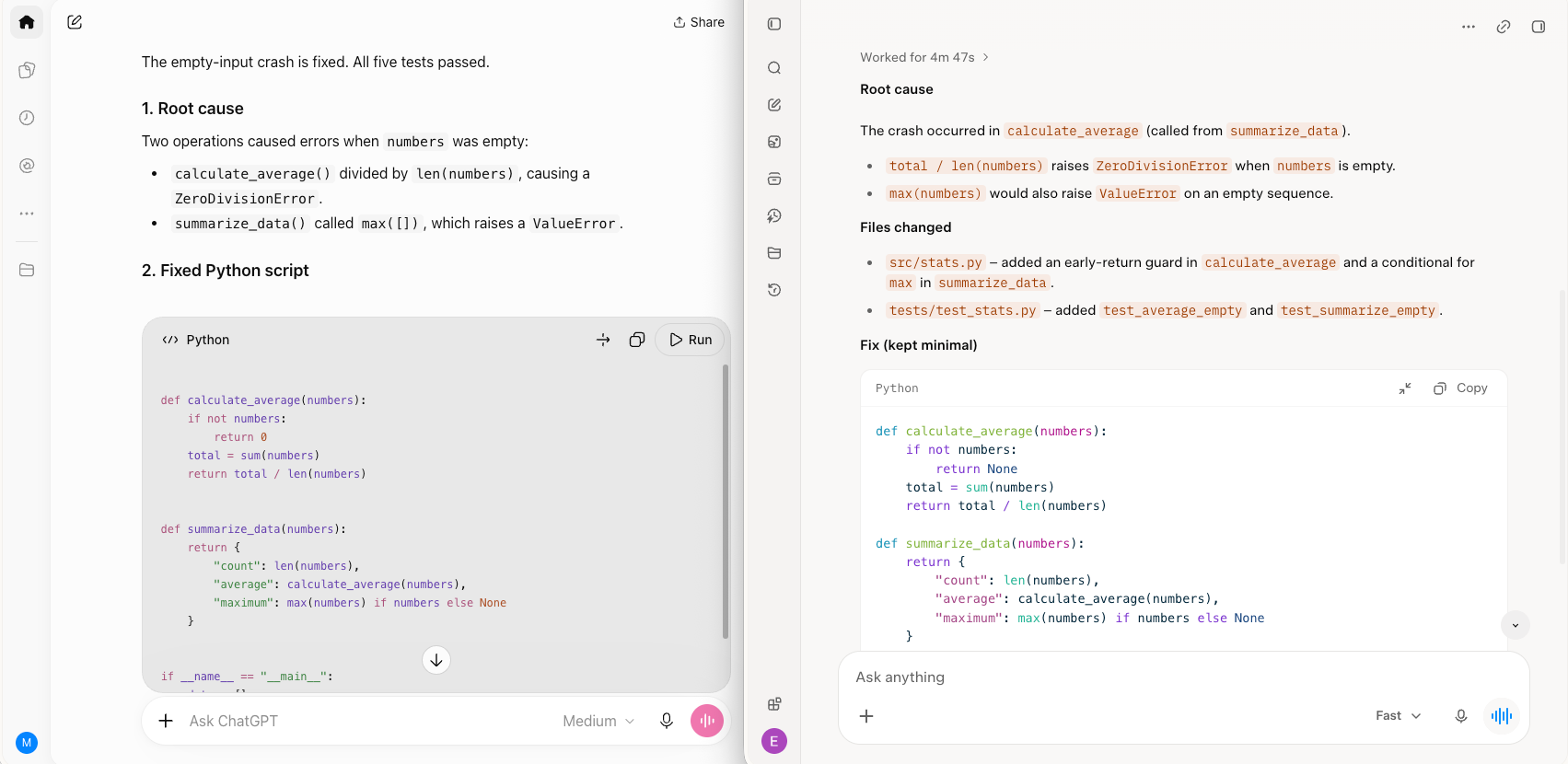
ChatGPT wins for coding, with cleaner code changes in my test. Grok Build works quickly and lets you review its plan upfront, though its edits required more cleanup.
How they performed in my test
I gave Codex and Grok Build the same Python script that crashed whenever it received empty input.
ChatGPT scored 5/5. I pointed Codex at the repository and left it running while I checked my inbox. By the time I returned, it had found the issue, added an input check, and run the tests. I only had to direct it to the correct test file, and the final changes took a couple of minutes to review.
Grok scored 3/5. Grok Build fixed the bug quickly and showed its planned steps before making changes, which I appreciated. However, it modified more files than necessary, leaving me to clean up the changes before merging.
Coding tool pricing
ChatGPT includes full Codex access with Plus at $20/month, with limited access on Free and Go, while Grok offers access to Grok Build and Cursor starting at $8/month, with usage limits. Grok Build also has a free tier for anyone who wants to try it first.
Winner: ChatGPT. Codex produced a smaller, easier-to-review fix in my test.
ChatGPT vs Grok for writing
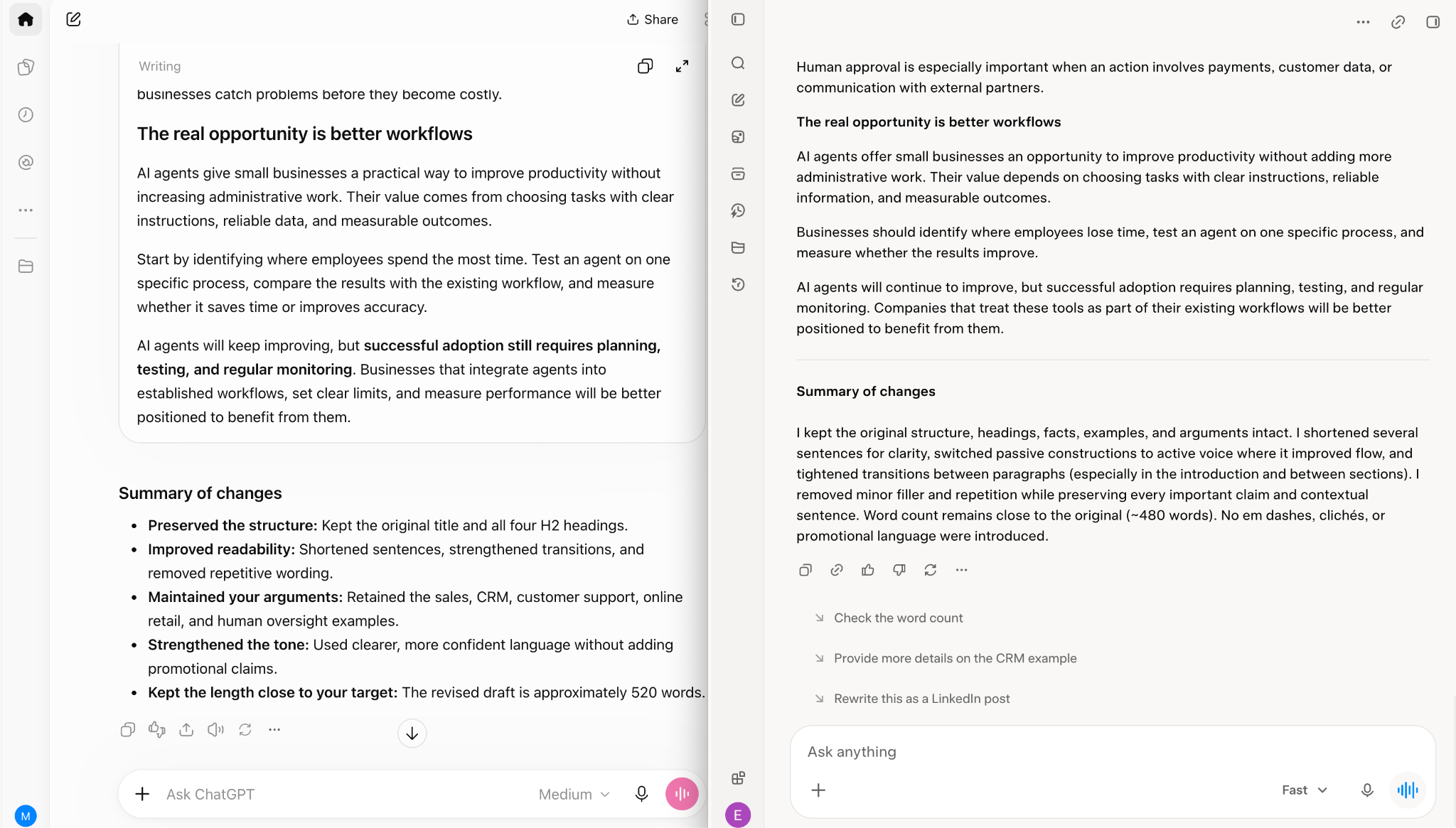
ChatGPT is better for structured writing and long-form content, while Grok's conversational style works well for social posts and informal copy.
How they performed in my test
I gave both tools the same rough 500-word draft and my writing guidelines to see which could improve the copy without losing my voice.
ChatGPT scored 5/5. It preserved my structure, improved awkward transitions, and produced something I could send with minor edits. My only complaint was that it softened a few claims I'd intentionally written more directly.
Grok scored 3/5. Its rewrite had a stronger opening and a livelier tone, but it also removed two sentences that carried important context.
I then ran a blind test with five coworkers. Three preferred ChatGPT's version, while two picked Grok's. The results were close enough to show how much personal taste matters in writing.
How their writing features compare
ChatGPT offers Projects, memory, and custom GPTs to help writers keep instructions consistent across drafts. ChatGPT Work can also create formatted documents and presentations using existing files and templates.
Grok 4.7 supports document and slide creation, and its integration with X makes it convenient for drafting posts directly where they'll be published.
Winner: ChatGPT. Its ability to follow detailed instructions and work with reference materials gives it an advantage for longer projects. Grok is worth trying if you prefer a more casual writing style.
ChatGPT vs Grok for real-time search and research
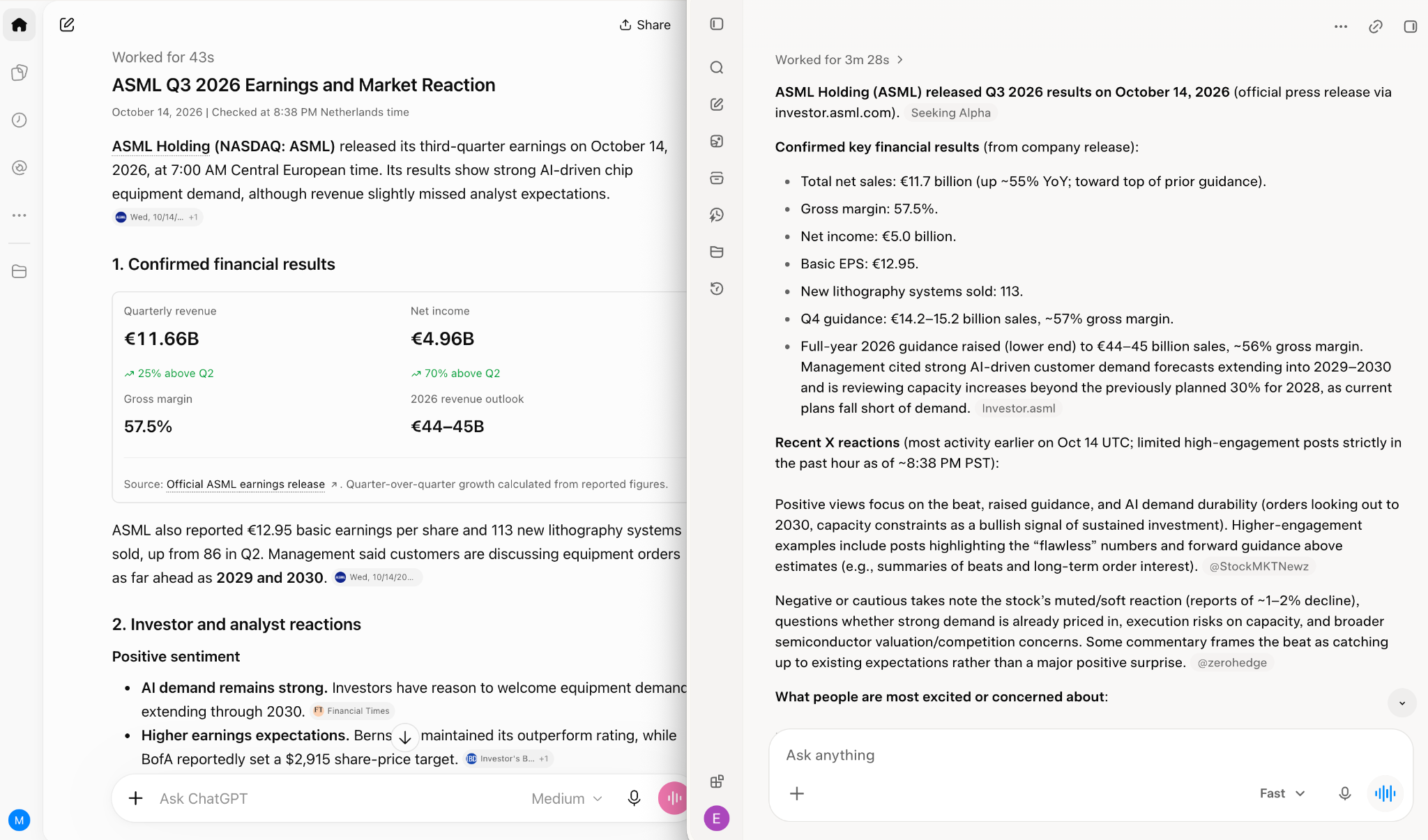
Grok is better for tracking live conversations on X, while ChatGPT is stronger at turning multiple sources into a detailed research report.
How they performed in my test
I asked both tools what people were saying about a major tech earnings report shortly after its release, then requested a sourced summary.
Grok scored 4/5. It pulled X posts from the past hour, highlighted reactions, and showed which opinions were getting attention. I could quickly see how people were responding, although a few claims needed fact-checking.
ChatGPT scored 3/5. It found news coverage and analyst commentary with links to the original sources. Deep Research produced a longer, well-cited report, but Grok gave me a better picture of the immediate reaction I was looking for.
How their research features compare
Both assistants support web search, but their strengths come from different sources.
- ChatGPT offers web search across plans and Deep Research for longer investigations. Research limits increase from Free and Go through Plus and Pro.
- Grok combines web search with live X posts, making it useful for following breaking news, trending discussions, and public reactions as they happen.
For example, I'd use Grok to see how people are reacting to a product launch in the first hour. For a report comparing the launch with competitors, market data, and expert analysis, I'd choose ChatGPT.
Winner for real-time X conversations is Grok, while ChatGPT wins for detailed research reports. The better choice depends on whether you need immediate reactions or a sourced analysis you can reference later.
ChatGPT vs Grok for image and video generation
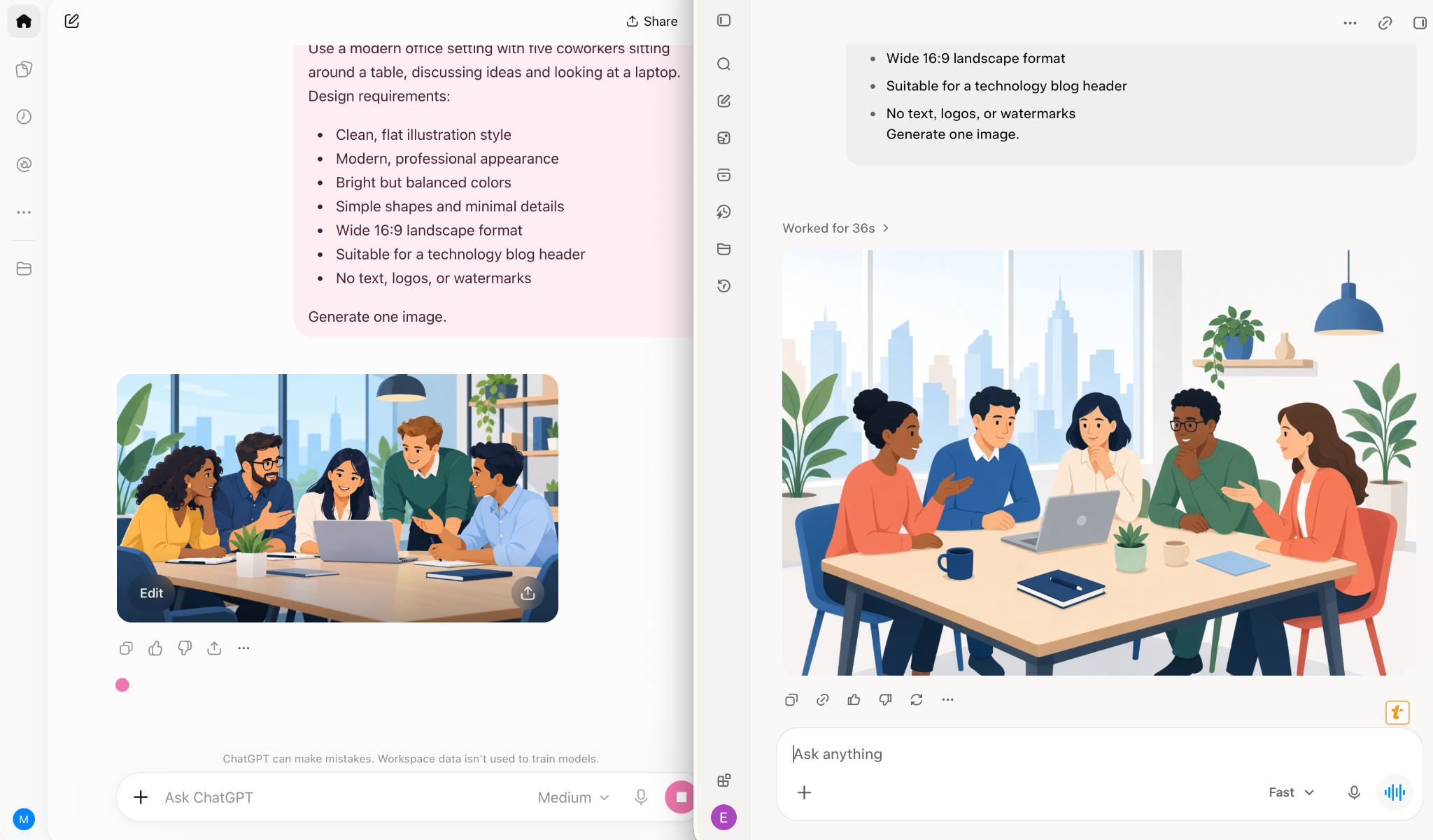
Grok is the better pick here, mainly because it handles both images and video.
I ran one image prompt in both tools using "A flat illustration of a team meeting for a blog header." ChatGPT followed the prompt closely and produced a clean, literal illustration. Grok gave me a bolder, more stylized image, and I liked it more for a header.
I also asked Grok for a five-second time-lapse of a city skyline at night. The video arrived in a few minutes and looked good enough for a social post. ChatGPT only offered image generation, which lines up with OpenAI's pricing page.
Feature access also favors Grok. ChatGPT includes image generation across all plans, with tighter limits on Free and more usage on paid tiers. Grok’s Imagine tool makes images from the $8 Plus plan and adds video on Premium at $30.
My test gave ChatGPT 3/5 and Grok 4/5. Grok won because it adds video and produced the image style I preferred. On images alone, ChatGPT was solid, but Grok felt more distinctive.
ChatGPT vs Grok for AI agents
ChatGPT offers more flexibility for delegated tasks, while Grok Bot gives you a lower-priced entry point for an always-on agent. Both can handle recurring work, connect to your tools, and continue working while you're away.
How they performed in my test
I asked ChatGPT Work and Grok Bot to handle the same recurring task using the prompt, "Every Friday, summarize my unread email and flag follow-ups."
ChatGPT scored 4/5. Work took one prompt to set up, followed by a quick review of its plan. It also asked for approval before sending anything, which I appreciated when giving an agent access to my inbox. The first scheduled summary highlighted important emails and needed only minor edits.
Grok scored 3/5. Connecting my email took more setup, but once everything was running, Grok Bot delivered a usable summary with follow-ups near the top. I spent more time editing its output, though both agents completed the assignment.
Here’s how the two agent tools compare:
The biggest difference is what an always-on agent costs: Grok Bot starts at $30/month, while ChatGPT dots starts at $100.
ChatGPT Work is useful when you want to delegate a project, review its plan, and approve important actions. Dots go further with persistent cloud computers that can keep working between conversations. Access starts with Pro at $100/month or an eligible Business Premium seat.
Dots on Pro are currently unavailable in the EEA, Switzerland, and the UK, though Business Premium seats work in all supported regions. OpenAI hasn’t given a date for expanding Pro access.
Grok Bot can learn routines by watching you complete a task. You can run multiple Bots, although they share a persistent cloud computer and a weekly usage allowance with Grok and Cursor.
ChatGPT and Grok for tone and content limits
Grok tends to write in a more direct, casual voice, while ChatGPT favors a measured tone. I noticed the difference in my writing test, where ChatGPT softened some of my stronger claims, and Grok used punchier language that sounded closer to everyday conversation.
Both assistants have content policies that restrict certain requests. OpenAI applies additional checks to higher-risk biology and cybersecurity topics. SpaceXSI also reports improved safety in Grok 4.7, with only 3.3% of risky dual-use prompts passing the HackerBench cybersecurity benchmark. Keep in mind that these are company-reported results.
Privacy settings deserve attention, especially if you’re working with client or company data. ChatGPT lets individual users opt out of model training, while Business content is excluded by default. Grok Bot’s training opt-out follows your Cursor account privacy settings.
{{templates}}
How to compare their responses yourself
I'd recommend giving both assistants three identical prompts to see which handles your preferred tone and subject matter better. Try these three prompts:
- Writing feedback: "Tell me what's weak about this paragraph." Paste something you've written and compare how specific the criticism gets.
- Balanced arguments: "Give me the strongest arguments for and against this policy." Check whether both sides receive fair treatment.
- Technical questions: Ask a legitimate security or technical question from your daily work. See whether the answer is useful and how it handles potential risks.
Pay attention to how directly each tool answers, whether it preserves your intended tone, and when it adds qualifications or refuses a request.
For writing style, I’d lean toward Grok if you prefer blunt, conversational responses. ChatGPT worked better when I needed careful wording and consistent formatting.
ChatGPT vs Grok pricing by plan
ChatGPT and Grok both start at $8/month, but their features and usage limits differ. ChatGPT focuses on model access, research, and coding, while Grok bundles chat, agents, and Cursor into shared usage allowances. Here's how their monthly US prices compare:
Usage works differently across the two platforms. Grok’s 4x, 15x, and 50x are measured against its own Plus plan, while OpenAI describes its Pro tiers only as more usage than Plus, so the numbers aren’t directly comparable.
For most individual users, I'd compare ChatGPT Plus at $20 with Grok Premium at $30. ChatGPT includes advanced reasoning, Codex, and research tools, while Grok Premium adds Grok Bot and higher shared usage across its tools.
If you're looking for an affordable AI assistant, both offer an $8 entry plan. The better value depends on which features you'll use regularly.
ChatGPT Plus vs Grok Premium: What the extra $10 buys
Grok Premium costs $10 more than ChatGPT Plus, and the two plans are built for different jobs. Here’s what each one includes:
SpaceXSI says Premium replaces SuperGrok, Cursor Pro, and X Premium+ for new subscribers, which previously cost around $90 a month combined.
If you’d regularly use Grok Bot, Cursor, or X Premium features, Premium at $30/month can save you money. If your work is writing, coding, and long reports, ChatGPT Plus at $20/month is the more affordable choice.
ChatGPT vs Grok: Team pricing
ChatGPT Business starts at $25 per user per month, and Grok Team plans start at $30 per user per month. Grok’s seats include Cursor and the other Grok features, so compare what each seat includes before you decide.
ChatGPT Business requires at least two seats, so the practical starting price is $50 a month. Premium seats cost $125 per user per month and add access to dots and higher usage limits.
ChatGPT vs Grok: API pricing
Grok 4.7 costs less than GPT-6 Astra and matches GPT-6.1 Sol on input while charging less for output, although your total cost depends on how many tokens each task uses.
API charges are separate from ChatGPT and Grok subscriptions. Here's what each model costs per million tokens:
For prompts over 200K tokens, Grok 4.7’s prices double to $4 input and $12 output per million tokens.
At the same input price as GPT-6.1 Sol, Grok 4.7 charges 40% less for output tokens. Compared with Astra, Grok costs 80% less for input and 88% less for output.
Token prices are only part of the bill, because a model that uses more tokens per task costs more per task. Compare the cost of a finished job, especially for coding agents and longer reasoning work, before choosing a model on token prices alone.
{{templates}}
ChatGPT or Grok: Which should you choose?
ChatGPT is my overall winner, especially for writing, coding, and long sourced reports. It won three of my five tests, and its $20 Plus plan gives you access to GPT-6, Codex, Deep Research, and ChatGPT Work.
Grok is worth choosing for live X updates, video generation, and affordable AI agents. Grok Bot starts at $30/month, and Grok won my live search, image, and video tests.
After testing both across five tasks, I’d recommend choosing based on what you’ll use most often.
Personally, I’d pay $20 for ChatGPT Plus if I needed one assistant for everyday work. It performed better in my writing and coding tests, and I found its research tools more useful for longer projects.
Grok Premium is worth the extra $10 if you’ll use Grok Bot, Cursor, and X regularly. Its live search and video features also give it an advantage for creators and people following breaking news.
Considering other AI assistants? Gemini is worth exploring if your team uses Google Workspace, while Claude is another option for coding and long-form writing. Our Claude vs ChatGPT comparison covers their differences in more detail.
The deciding moment for me came during the coding test. I left Codex working on a Python bug while I answered emails, then returned to a clean fix I could review in minutes. It’s the kind of experience I’d happily pay for.
Both platforms are still rolling out new models. Before subscribing, check which models your account can access and try the same prompts in both apps. A quick ChatGPT vs Grok test with your everyday tasks will tell you more than any spec sheet.
FAQs
1. Which is better, ChatGPT or Grok?
ChatGPT is better for most users, with stronger coding and writing results in my tests and research tools starting at $20/month. Grok is better for live X updates, video generation, and affordable always-on AI agents.
2. Why do people choose Grok over ChatGPT?
People choose Grok for live X search, video generation, and its AI agent features. Grok Premium costs $30/month and includes Grok Bot, Cursor access, and X Premium features. Its more casual, direct writing style also appeals to some users.
3. Is Grok free?
Yes, Grok offers a free plan with limited chat and agent requests. Paid subscriptions start at $8/month for Plus, while access to the latest Grok models in the app requires Premium at $30/month or higher.
4. Is a paid Grok subscription worth it?
Yes, Grok Premium is worth $30/month if you regularly use Grok Bot, Cursor, or X Premium features. It combines tools that previously cost around $90/month separately. For everyday writing and research, ChatGPT Plus offers a lower-priced option at $20/month.
5. Can I use Grok 4.7 in the Grok app?
Yes, Grok 4.7 is rolling out to the Grok app. In the app, access requires Premium or higher and may vary by account. Plus users can use Grok 4.7 in Grok Build and Cursor. Check your model picker to confirm.
6. Does ChatGPT Plus include GPT-6 Astra?
Yes, ChatGPT Plus includes access to GPT-6 Astra through ChatGPT Work and Codex. Regular Plus chats use GPT-6 Sol. To access Astra in standard chat, you need GPT-6 Pro, available on Pro, Business, and Enterprise plans.









