9 Botpress Alternatives by Skill Level (2026)
Marvin reviewed 14 Botpress alternatives including Chatfuel, Dialogflow, and Voiceflow, comparing no-code ease of use, integrations, and pricing for chatbot-building teams.


The first time I opened Botpress's Studio to wire up a simple FAQ bot, I had 11 blocks on the canvas before I'd written a single sentence of copy. It works, and it's powerful once you're past that initial complexity. But "powerful" and "what I needed for a three-page FAQ bot" turned out to be two different things.
So, I looked at 18 tools that get named as Botpress alternatives and ruled out the ones that were a scope mismatch before running a single test. Then I ran the same brief, a boutique fitness studio's website and WhatsApp assistant, against the nine that were left.
Some are built for someone who never wants to see a line of code. Others assume you're comfortable in a terminal.
By the end, you'll know which of these nine fits how much setup you want to do. You'll also know which one fits the job you need done, from a website FAQ bot to a WhatsApp lead funnel or something that keeps working after the conversation ends.
Botpress alternatives: TL;DR
- Lindy: An AI assistant that answers the FAQ, then keeps working after the conversation ends, updating records and routing leads.
- Voiceflow: Botpress's closest visual-builder cousin, with a basic flow built entirely from drag-and-drop blocks.
- Tidio: Live chat and an AI layer (Lyro) built for small teams that want a widget up fast.
- Manychat: The tool built around Instagram and WhatsApp comment-to-DM automation.
- Chatbase: The fastest visual-builder way to turn your own docs into an answering bot.
- n8n: Self-hostable workflow automation with about as much control as Botpress itself, if you're willing to wire every clause by hand.
- Rasa: Code-first and self-hostable, with a free Developer Edition, for a team that wants to own every layer.
- Typebot: A free, Fair Source visual form and chat builder with a real (if young) AI block.
- Intercom (Fin): An AI agent built into a full helpdesk, for a team that already runs support through one.
What Botpress is (and who it's for)
Botpress is a platform for building AI chatbots and agents, now pitched as an AI-native customer support platform. It ships a visual builder called Agent Studio, a reasoning layer called the Autonomous Engine, a structured data store called Tables, and an integration marketplace called the Hub.
You can build a basic reply flow by dragging blocks around, and Botpress's Expression card will even turn a plain-language condition into the JavaScript behind it for you. Hub integrations like HubSpot add ready-made cards to create or update a contact, so a code step mostly shows up for custom logic the cards don’t cover.
Botpress is built for teams that want a chatbot with real logic behind it and don't mind the engineering lift. With a developer on the team, it can do things a pure visual-builder tool can't touch.
The friction shows up for everyone else, and it's one reason non-developers start looking for an alternative.
Why people look for Botpress alternatives
The Studio gets difficult fast for a non-developer: Building even a simple flow means learning where every block, condition, and panel lives before you can be productive in it. That learning curve is steep if nobody on the team has touched a tool like this before.
Cost adds up during development, before the bot ever goes live: Botpress's free plan caps out at 100 conversations a month, three seats, and three AI agents. This closer breakdown of Botpress's pricing tiers walks through what changes at each paid plan. Paid plans start at $189/month ($150/month, billed annually).
Every conversation counts the same, whether a real visitor or your own testing triggered it, so testing a flow burns your quota as fast as a live customer would.
The code step still shows up where the brief gets real: The visual builder handles a simple FAQ reply fine, and conditions and HubSpot contact updates can be built without writing code. Custom logic the ready-made cards don’t cover is where a JavaScript code step takes over.
Channel setup outside web chat takes real configuration: WhatsApp and other channels connect through the Hub, and each one takes its own configuration.
Botpress can still work well for a low-volume team with that skill in-house. For everyone else, one of the nine below is probably a better match for the actual job.
How I tested Botpress alternatives
Of the 18 tools, nine were a scope mismatch or overlapped a tool already on the list, and never got the brief at all. The other nine, the ones above, ran the following brief:
"Build me a website assistant for a small boutique fitness studio. This is a throwaway test build to see how you handle a realistic support and lead-capture case, never a real business. Load my three-page FAQ (class schedule, membership pricing, cancellation policy) as your knowledge base and answer visitor questions from it directly, in under 60 words per reply.
Only ask for a visitor’s name, email, and phone number when they specifically ask about pricing or booking a class. That’s the one trigger for capturing a lead, so never ask on every message. If the same email comes through twice in separate conversations, merge it into one lead record instead of creating a duplicate.
When a question falls outside the FAQ, like a refund dispute or an injury question, hand the conversation to a human inbox with the full conversation history attached, not just the last message.
I need this assistant reachable in two places with the same answers, the studio's website widget and WhatsApp, so a visitor can start on one and finish on the other without repeating themselves.
At the end of the week, I need to export every captured lead and its full transcript as a CSV I can hand to a front-desk manager. Tell me plainly if any of this needs a developer, a paid plan, or isn’t possible on your platform at all. I’d rather know that now than after I’ve built half of it."
Six things had to hold up for a tool to earn its spot. I checked the 60-word reply cap, conditional lead capture, duplicate-email merging, full-history handoff, matching answers across the website widget and WhatsApp, and a clean CSV export. Where a tool couldn't clear one of those natively, its section says so plainly.
Nine of the 18 didn't make the final list, each for its own reason:
Gumloop is a general-purpose workflow builder. n8n already covers that same workflow-automation ground here.
StackAI is an enterprise AI platform with governance, on-premise hosting, and compliance features, a scope mismatch for a small business shopping for a website assistant.
Claude Code is a coding agent for building software from scratch, outside the chatbot-builder category this search is after.
Relay.app shut down in September 2026; while it operated, it was marketing and sales workflow automation with human-approval steps built in, the same ground n8n already covers here.
SketricGen ties lead qualification to its own multi-agent builder, covering ground n8n and Manychat already handle here.
UChat is an omnichannel chatbot builder that overlaps with Manychat's channel coverage and Tidio's live-chat layer.
Wati is built WhatsApp-first, extending to channels like Instagram, Facebook, and SMS from that same core, the same channel ground Manychat already covers here.
Freshchat is Freshworks' conversational support platform, with live chat, a shared inbox, and the Freddy AI Agent, overlapping with Intercom Fin's helpdesk coverage.
YourGPT is a support and lead-gen agent platform, but Chatbase and Tidio already cover the same ground here.
The whole test, all nine builds plus the scope research behind the nine cuts above, ran across nine days. Every build but n8n's and Rasa's ran start to finish in one sitting; those two, the longest builds in the set, spanned two sessions each, as their own sections below describe.
How to choose: By skill level and use case
The nine tools below split into four categories, based on who's building the thing and what job it needs to do.
You have zero building experience and want to just describe what you need: Lindy fits a reader who wants one assistant handling the FAQ bot alongside real follow-up work, more than a website widget alone.
You want a no-code, drag-and-drop canvas: Voiceflow, Tidio, Manychat, and Chatbase all suit a reader who wants Botpress’s drag-and-drop idea without learning Botpress’s Studio.
You're comfortable writing code and want to own every layer: A reader who has or wants Botpress-level technical control and is fine building it themselves lands on n8n, Rasa, or Typebot.
You need the AI agent built into existing support software: Intercom Fin is the pick for a reader who already runs a helpdesk platform and wants the AI agent built directly into it.
Staying on Botpress can still be the right call at low, steady volume: Its free tier covers 100 conversations a month with three seats. If your bot rarely sees more traffic than that, the free tier may be all you need.
Three things typically push a team past Botpress's free tier: more volume than it covers, a team without the skill to run Studio, or a channel it doesn't support well.
Free-forever is a different bar than cheap-to-start. Typebot's self-hosted core clears it with unlimited chats, and n8n's Community Edition clears it too, also unlimited. Rasa's Free Developer Edition gets there a different way by being a real, self-serve production license, capped at 1,000 conversations a month.
Those three are the most generous free Botpress alternatives here. Tidio, Manychat, and Chatbase have free plans too, but a live bot outgrows them fast.
How the 9 Botpress alternatives stack up at a glance
Category, best use case, and starting price for each:
1. Lindy: Best AI assistant and chatbot for follow-up work
What it does: Lindy is an AI assistant you set up by describing what you want in plain language. It answers questions from a knowledge base, then acts on what it learns and keeps working past the reply.
Best for: A reader who wants the FAQ bot and the follow-up work handled by the same assistant.
I loaded the same three-page FAQ into Lindy and started with the clause most tools fumble, asking for contact details only when someone mentions pricing or booking. It took one step to set up.
The knowledge base answered questions about the class schedule and cancellation policy inside the 60-word cap on the first pass.
The WhatsApp side took the most setup time. WhatsApp isn't a native Lindy channel, so getting it to work meant connecting a third-party tool, Whatsable, first.
Two clauses didn't clear natively: merging a repeat email and exporting leads as a CSV, and I built a Skill to handle human handoff instead.
Across the whole build, testing burned around 640 credits, well inside the Team plan's 3,000 credits a month per user, and took about 90 minutes end to end.
If all you need is the FAQ answered, Lindy is the assistant you need. For anything past that, check what the current product actually supports before you build around it.
Key features
- Text-based configuration: Type out what you want in plain language, and Lindy turns the description directly into a working Skill or Routine.
- Acts after the conversation ends: Updates records, flags leads, and sends summaries with no separate automation layer. Anything with outside impact, like sending an email, waits for your approval.
- Skills library: 40+ prebuilt Skills for common jobs, each one a customizable starting point.
- Knowledge base: Point Lindy at your docs, site, or files, and it answers from that source directly, no separate FAQ rebuild required.
Pros and cons
Pros
- ✅ Lead capture set up without writing a line of code
- ✅ Human handoff can be set up through a custom Skill, without touching code
- ✅ Fast to get running, even with a six-clause brief
Cons
- ❌ WhatsApp isn't a native channel, so getting it running means connecting a third-party tool first
- ❌ Credit cost varies by task, from a couple of credits for a simple answer to hundreds for a heavier build, harder to predict than a flat per-conversation price
Pricing
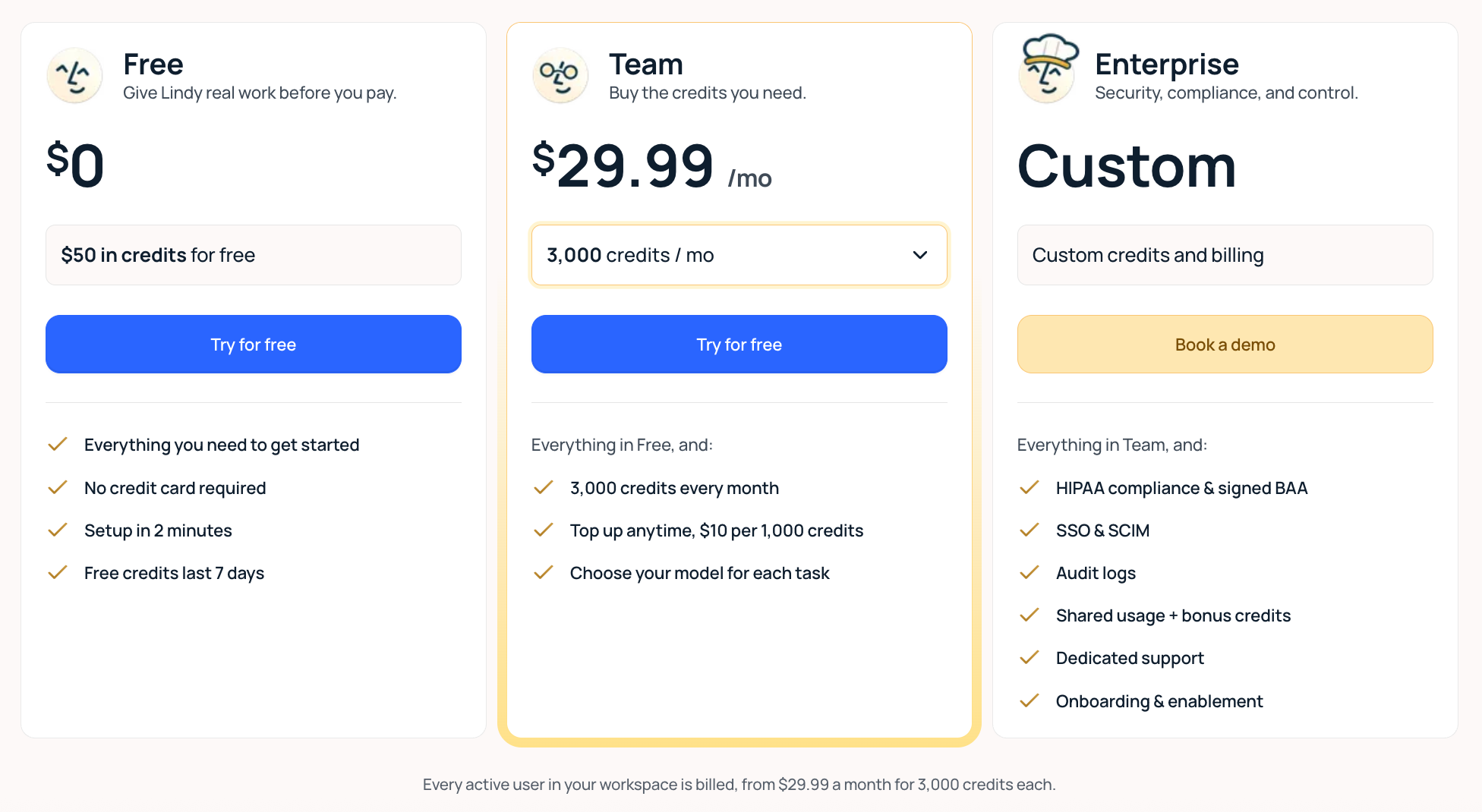
Lindy's free plan gives new users $50 in credits with no card required, expiring after seven days. The first paid plan, Team, starts at $29.99/user/month with 3,000 credits included each month. Credit usage scales with the workload. A quick FAQ answer uses two to 250 credits. A heavier build, like the one in this test, runs into the hundreds of credits.
Team can top up its credit pool anytime at $10 per 1,000 credits. Enterprise adds HIPAA compliance with a signed BAA, SSO and SCIM, shared usage plus bonus credits, dedicated support, audit logs, and onboarding, priced by talking to sales.
There’s no annual-billing discount currently published on any tier. If the shared credit pool runs low, Lindy pauses credit-using actions and tells you until credits reset or an admin tops up, and admins can set how much of the pool each seat is allowed to draw from.
Bottom line
Lindy answers the FAQ cleanly, and a custom Skill handled human handoff too. WhatsApp needed an extra tool, Whatsable, to connect. Contact merging and CSV export weren't available to build with.
If your brief is answering questions and escalating what it can't handle, Lindy covers it well. Contact merging and CSV export are the two pieces you'd handle outside it.
{{templates}}
2. Voiceflow: Best drag-and-drop builder for Botpress's visual design, minus the code
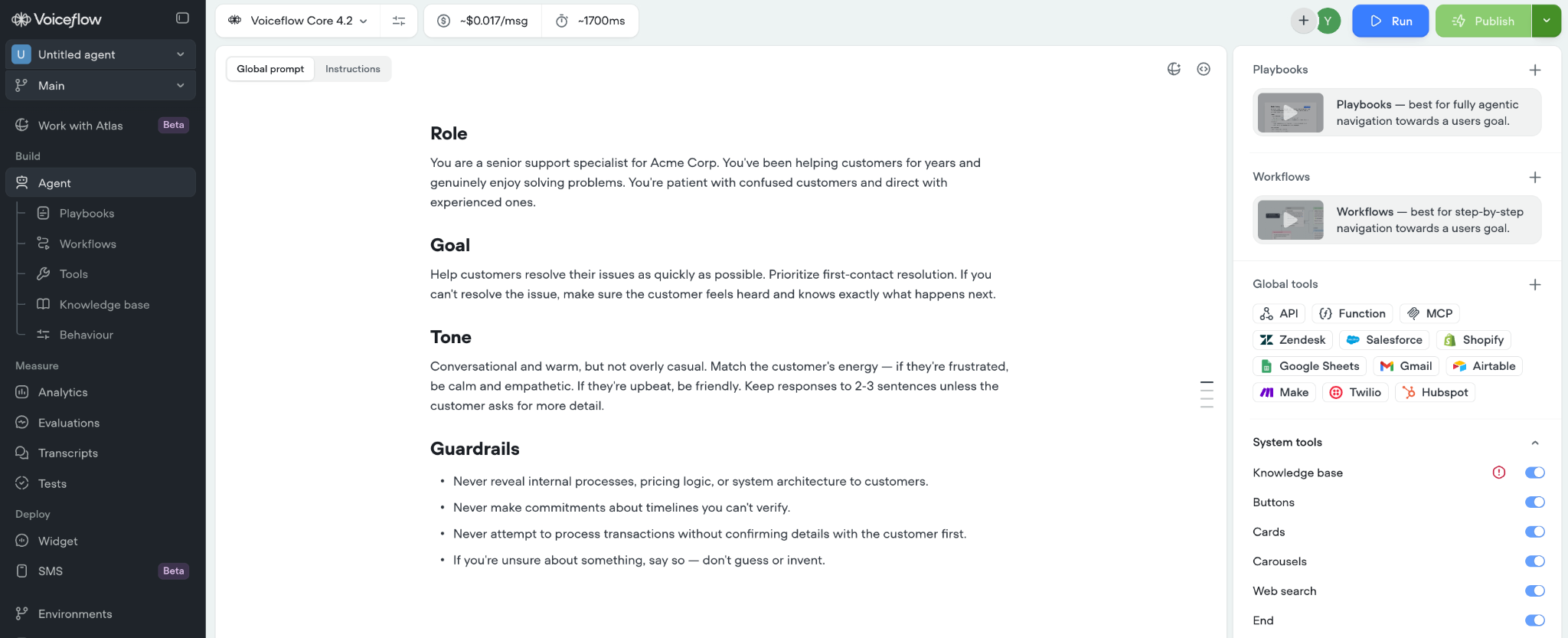
What it does: Voiceflow is a visual builder for chat and voice agents, the closest thing here to Botpress's own flow-based approach, minus the code requirement for a basic build.
Best for: A reader who wants Botpress's drag-and-drop design without needing a developer for the first version.
I loaded the FAQ in, pointed replies at it, and answers stayed under the brief's 60-word limit from the first few messages.
The pricing-and-booking trigger worked too; no code needed.
Handoff didn't clear. Voiceflow can call out to a live-chat tool, but has no built-in inbox for a human to pick up the conversation. WhatsApp hit the same wall, routed through a third-party connector instead of a native channel.
Duplicate-email merging doesn't exist natively either. A repeat visitor gets a second transcript unless someone merges it by hand.
In about 45 minutes, FAQ replies, the conditional trigger, and CSV export were working. Handoff, WhatsApp, and email merging weren't, so three of the six brief clauses needed a workaround.
For a closer side-by-side of Botpress and Voiceflow specifically, this Botpress vs Voiceflow breakdown goes deeper on how the two compare. If voice channels matter more to your build than they did to mine, this roundup of other Voiceflow alternatives is worth a look too.
For a pure website FAQ bot with no cross-channel need, Voiceflow is a cleaner version of what Botpress's Studio is going for.
Key features
- Visual flow builder: Branch, condition, and knowledge-base blocks on one canvas, close to Botpress's own building metaphor.
- Multi-LLM support: Pick a default model for the whole agent, override it per playbook, and set a backup provider if your main one goes down.
- Self-serve signup: A working account with no card required.
- Early-build speed: A working flow from a blank canvas faster than n8n or Rasa's developer-first builds.
Pros and cons
Pros
- ✅ Cleanest visual builder of the tools tested that need no coding
- ✅ Strong for structured, multi-step conversation design
Cons
- ❌ No built-in inbox for a human to take over, and no direct WhatsApp connection. Human handoff goes to an outside helpdesk like Zendesk, and WhatsApp needs a third-party connector.
- ❌ No native duplicate-email merge. A repeat visitor's second conversation stays a separate transcript.
- ❌ Pricing isn't shown on the public page; you have to create a free account to see it.
Pricing
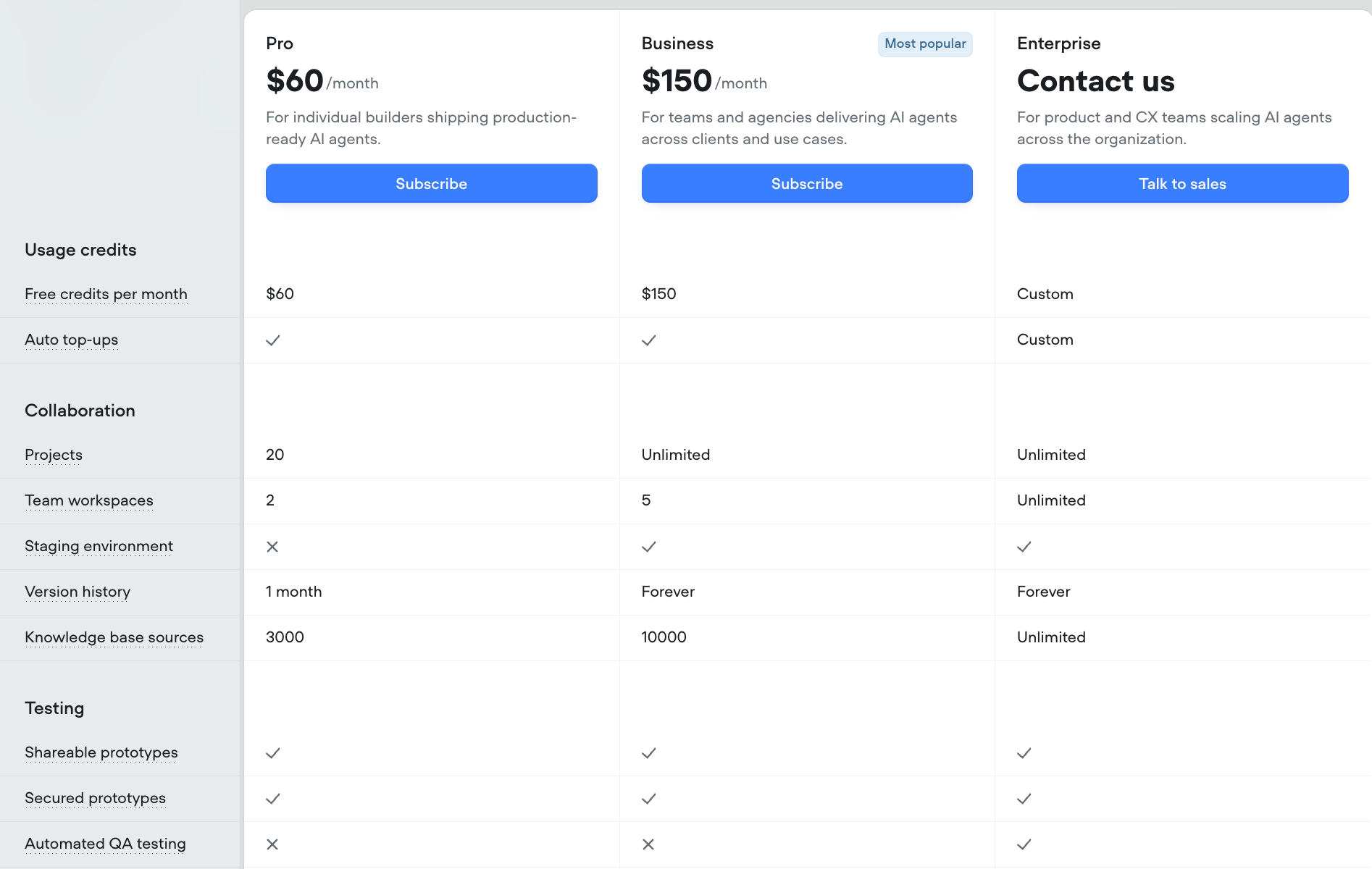
Voiceflow doesn't show its prices until you sign up for a free account. Once inside, Pro runs $60/month ($54/month, billed annually) with $60 in credits included each month, and Business runs $150/month ($135/month, billed annually) with $150 in monthly credits. Enterprise is custom-priced, with its own credit allowance set by sales.
Credits are still issued at the full monthly rate even on annual billing, so Pro keeps $720 a year in credits despite the lower $54/month price, and Business keeps $1,800. Both paid plans support auto top-ups if a workspace runs over its allowance.
Bottom line
Voiceflow swaps total workflow ownership for conversation-design speed, a deal that holds up fine inside "design a chat flow." Once the brief needs a live handoff, de-dup, or a second channel, you're reaching for a connector or a manual step Voiceflow doesn't build itself.
3. Tidio: Best live chat and AI chatbot combo for small teams
What it does: Tidio pairs a live-chat widget with an AI layer called Lyro, built for small teams running human and AI conversations through one inbox.
Best for: A small team that wants live chat and an AI customer service chatbot in the same tool.
Tidio's setup started differently from every other tool here. It treats human conversations and AI conversations as two things you configure somewhat separately, which took a minute to get used to. Once I'd loaded the FAQ into Lyro, the 60-word cap held cleanly on class-schedule and pricing questions.
The duplicate-email clause ran without extra setup, and repeat sessions using the same email stayed under one contact profile.
Tidio fell short here. Lyro, its AI layer, answers questions well, but it won’t ask for contact details only on pricing or booking questions out of the box. I set up Tidio’s Flows product to do it. Lyro’s own Procedures can collect those details too.
The cross-channel piece worked cleanly. The same Lyro knowledge base powers both the website widget and a connected WhatsApp channel, so a visitor gets identical answers in both places.
The full build took me about 40 minutes. The human-handoff clause worked exactly as specified, since Tidio’s own live-chat inbox carries the full thread by default. A CSV export of every contact, for the front-desk manager at the end of the week, came built in. Conversation transcripts download one at a time.
Tidio held up with little extra setup for a small support team.
Key features
- Lyro AI Agent: Trained directly on your content. Tidio claims a 75% average resolution rate for routine questions.
- Unified inbox: Human and AI conversations live in the same place.
- Flows automation: Code-free conditional logic and proactive triggers, layered on top of Lyro.
- Built-in de-dup: Repeat sessions with the same email stayed under one contact profile in my test.
Pros and cons
Pros
- ✅ Duplicate-email merging worked with zero setup
- ✅ CSV export of every contact came built in; transcripts download one at a time
- ✅ Lyro answers multiple questions in one conversation at no extra cost
Cons
- ❌ Conditional lead capture takes extra setup, through Flows or a Lyro Procedure
- ❌ Pricing takes a minute to understand, since conversations, Lyro conversations, and Flows visitors are tracked somewhat separately
Pricing
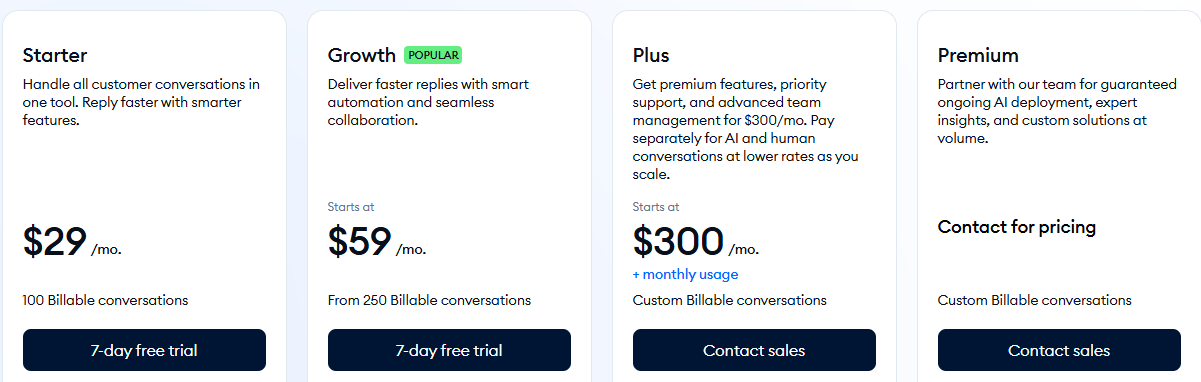
Tidio's Customer Service plans begin with Starter at $29/month ($24.17/month, billed annually), covering 100 billable conversations and 50 one-off Lyro AI conversations. Growth starts at $59/month ($49.17/month, billed annually) with 250 billable conversations. Plus starts at $300/month plus usage. Premium is custom-priced.
A free plan covers 50 billable conversations and 50 one-time Lyro conversations at no cost. Tidio doesn’t charge an overage fee past Starter’s 100 conversations. Instead, you can’t reply to new chats until you upgrade or the quota resets, and monthly plans auto-upgrade once you hit 95% of the quota.
Its pricing runs on a sliding usage scale, so covering more billable conversations means moving that scale up to the next price point.
Bottom line
Tidio ran clean almost everywhere. FAQ accuracy, de-dup, cross-channel answers, human handoff, and the contact export all worked with no workaround. Transcripts still download one at a time. The one gap, asking for contact details only on pricing or booking questions, has a fix sitting one product over inside the same account.
4. Manychat: Best tool for Instagram and WhatsApp comment-to-DM leads
What it does: Manychat automates comment-to-DM and message flows across seven channels, built for social-channel growth.
Best for: A business whose leads come from Instagram comments and DMs.
Manychat is the only tool where the brief itself was a bad fit before I'd built anything. There's no website chat widget channel on Manychat at all, even though it covers seven other channels well. A visitor lands on our website and chat isn't a scenario it's built for.
So I ran the parts of the brief that apply, treating it as a WhatsApp-only build. The FAQ answered cleanly inside the 60-word cap once I'd upgraded to Pro, since AI-powered replies specifically require Pro tier or higher. The Free and Essential tiers only handle rule-based flows.
Once AI was active, I set it to only ask for contact details when a message mentioned pricing or booking, using a keyword and tag condition, and that worked as intended. My repeated test messages all stayed under one contact rather than creating duplicates.
What I couldn't test here: the brief also called for the same assistant to live on both a website chat widget and WhatsApp, answering identically on either one. Manychat has no website widget at all, so that comparison was never possible to run.
Handoff and export both worked cleanly once AI was active. An out-of-scope question routed into Manychat’s shared team inbox with the thread attached, and contact data exported to a spreadsheet through Manychat’s Google Sheets integration.
The whole build took about 35 minutes once I accepted the channel scope.
The Active Contacts metric that decides billing turned out simpler than I expected going in. Manychat counts each person once per billing month for billing, no matter how many messages you exchange with them, so my own repeated test messages during the build never inflated the count the way a per-message meter would have.
Manychat also spells out what happens once you use up the contacts included in your plan: automations keep running, with an automated per-contact overage fee and account warnings before you reach it. That's a gentler failure mode than a tool that stops answering once a quota's gone.
Manychat and Botpress solve two different problems: social comment-to-DM funnels versus a general-purpose chatbot builder, even though they end up grouped together in searches like this one.
Key features
- Comment-to-DM automation: Turns a public Instagram comment or story reply into a private conversation automatically.
- Multi-channel reach: Instagram, WhatsApp, Messenger, TikTok, Telegram, SMS, and email from one builder.
- AI-powered replies: Available on Pro tier and above.
- Broadcast campaigns: Scheduled drops and segmented sends across connected channels.
Pros and cons
Pros
- ✅ Built specifically for businesses that want an AI sales chatbot across Instagram and WhatsApp
- ✅ Contact de-dup and conditional logic both held up cleanly with AI turned on
Cons
- ❌ AI-powered conversational replies require upgrading past the entry paid tier
- ❌ Free and Essential connect only two channels and leave out WhatsApp, SMS, and email
Pricing
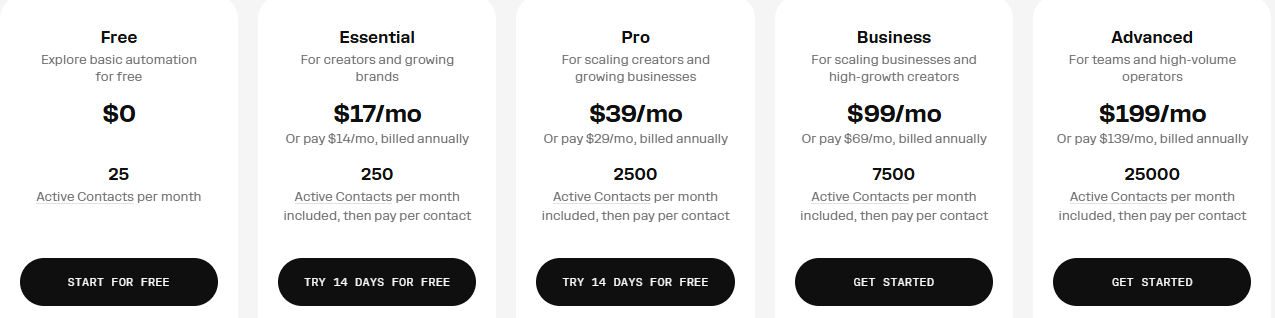
Manychat's Free plan covers 25 Active Contacts a month at no cost. Essential starts at $17/month ($14/month, billed annually) for 250 Active Contacts. Pro is $39/month ($29/month, billed annually) for 2,500 contacts and adds AI-powered replies.
Business runs $99/month ($69/month, billed annually) for 7,500 contacts, and Advanced is $199/month ($139/month, billed annually) for 25,000 contacts.
When you cross your plan's included Active Contacts, your automations keep running and Manychat charges a small per-contact overage fee, about $0.10 per extra contact on Essential and less on the higher tiers, with account warnings before you get there.
Bottom line
Manychat wins the moment your channel is Instagram or WhatsApp, and loses it the moment you need a website widget, since that channel doesn't exist here.
5. Chatbase: Best visual builder for turning docs into a live bot fast
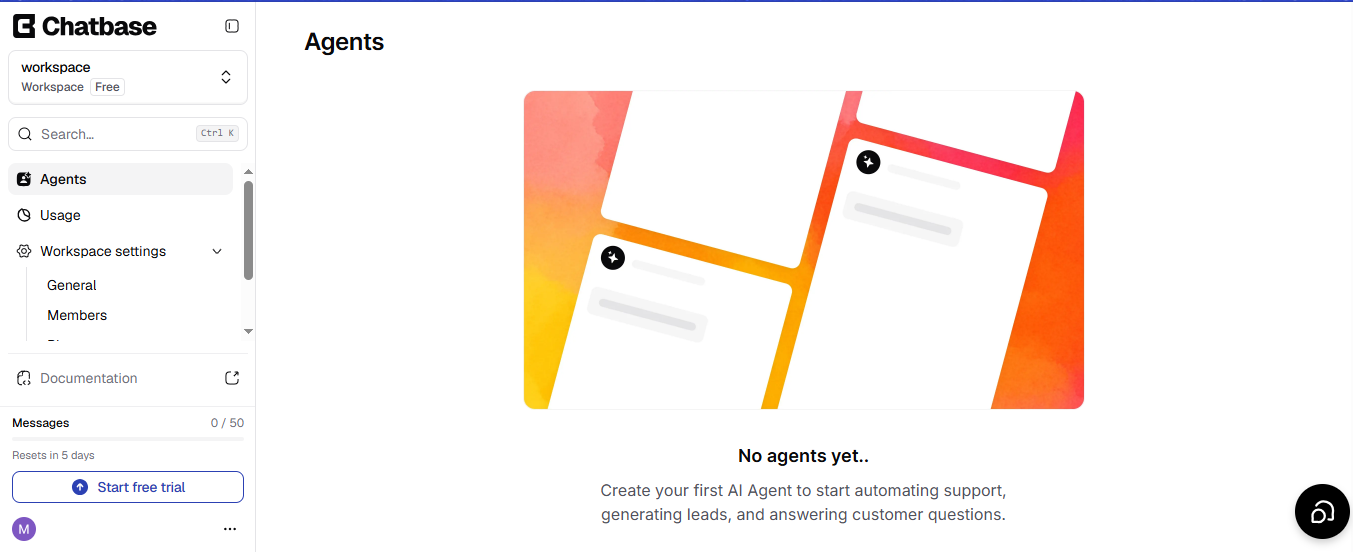
What it does: Chatbase turns your own documents into an AI-trained chatbot, deployable on a website widget or as a standalone agent, priced by message credit.
Best for: A team that wants the fastest visual-builder path from "here's our FAQ" to a live answering bot.
Chatbase was the fastest of the code-free builders I tested to a working first answer, behind only Intercom Fin's helpdesk-native setup.
Uploading the three FAQ pages and pointing a new agent at them took about 2 minutes, and the 60-word reply cap held on the first real question, no extra prompt engineering needed.
Model choice affects credit cost: the cheapest tier runs one credit per message, the most expensive recommended model costs five, and a couple of older models on the full list cost six, worth weighing before picking one for a simple FAQ bot (Chatbase's own model-comparison docs break down the options).
The lead-capture clause was the hardest part. Chatbase's Collect Leads action has a "When to use" field, so I used an AI Action to trigger it only on pricing and booking questions. Duplicate-email merging isn't native. Two sessions from the same visitor create two separate records unless merged by hand in Contacts.
Everything else cleared without drama: human handoff with the full conversation attached, identical answers across the website widget and WhatsApp, and CSV export on request.
The full build used about 55 credits, comfortably inside the Hobby plan's 700-credit allowance, and took under 30 minutes.
Key features
- Document-based training: Upload PDFs, docs, or a sitemap and get a trained bot in minutes.
- Model comparison tooling: Test the same message against several models side by side before picking one.
- Helpdesk integrations: Native connections to tools like Stripe and Zendesk on higher tiers.
- Voice and telephony: Available starting on the Standard plan.
Pros and cons
Pros
- ✅ The build used about 55 message credits, well inside even the Hobby plan’s 700 monthly credits, though human handoff needs the Helpdesk that starts on Standard
- ✅ The same agent answered identically on the website widget and a connected WhatsApp channel
Cons
- ❌ No native duplicate-email merge. Repeat visitors create separate lead records unless merged manually.
- ❌ Conditional lead capture needs extra setup through the Collect Leads action
For more visual-builder options beyond what's covered here, this Chatbase alternatives roundup goes deeper.
Pricing
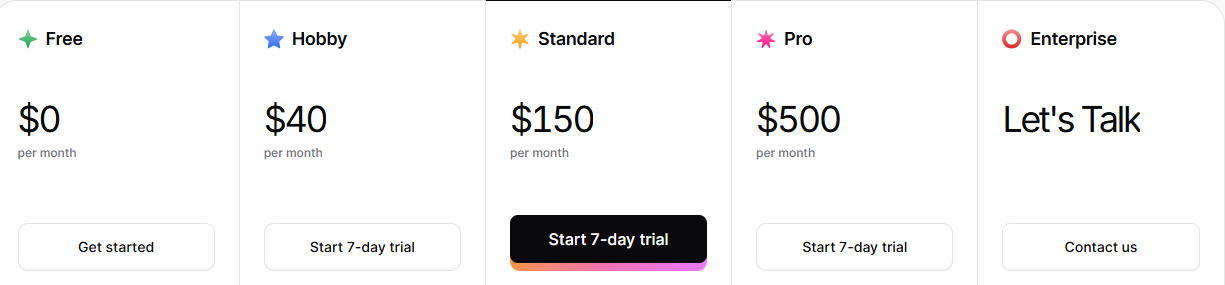
Chatbase's Free plan includes 50 message credits a month at no cost. Hobby starts at $40/month ($32/month, billed annually) for 700 credits. Standard is $150/month ($120/month, billed annually) for 4,000 credits. Pro runs $500/month ($400/month, billed annually) for 15,000 credits. Enterprise is custom-priced.
Chatbase doesn't charge automatically if you go over that credit allowance. Chatbase's overage coverage is an opt-in add-on, Auto Recharge Credits, that tops up your balance at $40 per 1,000 credits once it falls below a threshold you set yourself.
Bottom line
Chatbase is the fastest code-free path from docs to a working bot. The credit math is predictable too, with the cheapest models running one credit per message. The one gap is de-duplication, which still needs a manual workaround.
6. n8n: Best developer-first option for Botpress-level control without per-conversation
What it does: n8n is visual workflow automation software you can self-host or run in the cloud. It's built for wiring together apps and logic, one node at a time.
Best for: A technical reader who wants Botpress's level of control over logic and infrastructure, without Botpress's per-conversation pricing.
n8n is workflow-first. Its Chat Trigger node offers a hosted chat page and an embeddable widget. I wired every one of the six brief clauses by hand as a node chain.
The pricing-and-booking trigger, duplicate-email merging, and human handoff all came from standard n8n nodes (if/else, Merge, and a post-to-inbox step) wired together by hand. The 60-word cap lived in an AI node's system prompt.
Cross-channel consistency between the website and WhatsApp worked, but only because I manually pointed both channel nodes at the same FAQ data. CSV export was one more node, writing every lead and transcript to a Google Sheet on demand.
The whole build took a little over three hours across two sessions, longer than every tool here except Rasa's. n8n's pricing meters cloud usage by workflow execution rather than a flat monthly fee.
Key features
- Visual workflow canvas: Drag nodes, wire logic, and drop into code only where you need it.
- Self-hosting option: A free, unlimited Community Edition if you're willing to run your own infrastructure.
- Execution-based pricing: A 20-step workflow still counts as one execution, so complex logic doesn't multiply the bill.
- 2,300+ integrations: Including dedicated AI nodes for major model providers.
Pros and cons
Pros
- ✅ Every brief clause was achievable
- ✅ The 60-word cap lived in one AI node’s system prompt, easy to set and easy to verify
Cons
- ❌ Every clause in the brief needed manual node-wiring, start to finish
- ❌ Cloud plan's execution cap is a real ceiling for active use
Pricing
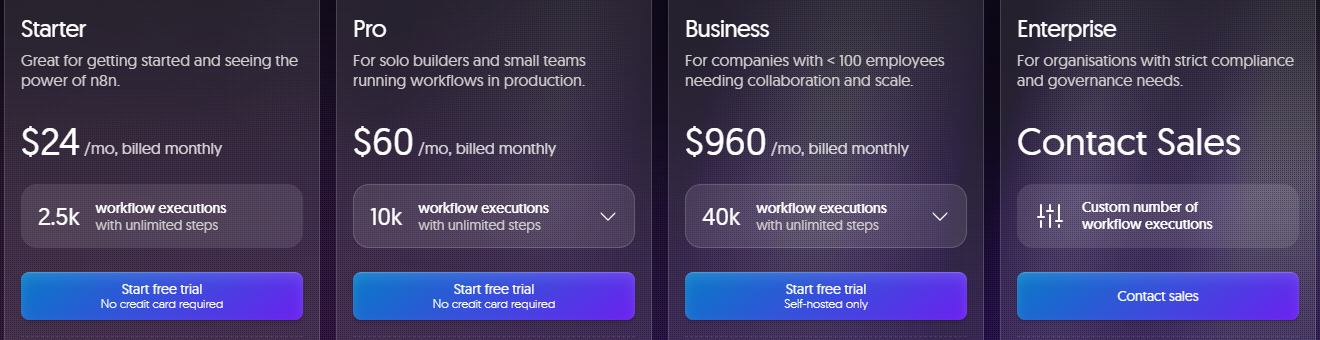
n8n’s Community Edition is free and self-hosted, with no execution cap. Starter cloud plans begin at $24/month ($20/month, billed annually) for 2,500 workflow executions. Pro is $60/month ($50/month, billed annually) for 10,000 executions. Business runs $960/month ($800/month, billed annually) for 40,000 executions and is self-hosted.
On n8n's Business and Enterprise plans, your execution quota doesn't cut a workflow off mid-run if you go past it. n8n's own FAQ for those tiers says workflows keep running past the cap, with overage charges applying only if you skip upgrading to the next tier, and its sales team reaches out about usage before any overage bill lands.
Bottom line
n8n can do everything my brief asked for, but you're the one building it, node by node, with no setup wizard walking you through it. If that's a fair trade for skipping Botpress's per-conversation pricing, n8n delivers. If not, the hours of wiring will wear on you.
7. Rasa: Best code-first option for teams that want to own every layer
What it does: Rasa is a code-first AI agent framework for conversational AI, built around its own dialogue-management engine (CALM).
Best for: A team with real developer resources that wants to own every layer of the stack, code included.
Rasa comes closest to Botpress's developer-first identity, minus the visual builder. There's no canvas in the free Developer Edition; you write flows in YAML and use collect steps to gather the information you need.
Getting replies to reliably stay under the 60-word cap took real iteration. The pricing-or-booking trigger became a flow with a collect step, straightforward if you've done this before.
The de-dup clause was the biggest gap. Rasa doesn't have a CRM, so I had to hand-build an integration to an external system just to merge duplicate emails. Human handoff worked once I customized Rasa’s built-in human-handoff pattern, passing full session state.
WhatsApp was the real limit: true integration needs Rasa's Twilio connector, a paid third-party service, on top of the free tier. CSV export worked too, through raw conversation logs from Rasa’s Inspector, reshaped into a CSV, more manual than the export button every visual-builder tool here ships with.
The whole build took about six hours across two days, almost entirely spent getting the flows right.
Rasa’s Free Developer Edition is a standing production license, usable for up to 1,000 external conversations a month, and the license key lands in your inbox after a quick signup form.
Key features
- CALM dialogue management: Language-model-native conversation handling that reasons past simple intent matching.
- Custom actions server: Full code-level control over what happens after the bot understands a message.
- Free production license: The Developer Edition is usable in production with real, capped conversation limits.
- Full data ownership: Self-hosted by design, on your own infrastructure unless you choose the managed Enterprise option.
Pros and cons
Pros
- ✅ Deepest customization and data control of any tool tested
- ✅ Free Developer Edition is a standing production license, not a trial, usable for 1,000 conversations a month from signup
- ✅ Human handoff passes full session state to a human inbox once configured
- ✅ Self-hosted by design, so your data and conversations never leave your own infrastructure
Cons
- ❌ No visual builder in the free Developer Edition, so every flow is written by hand
- ❌ WhatsApp parity needs a paid connector beyond the free tier
- ❌ The steepest learning curve, most of a weekend versus under an hour for the visual-builder tools
Pricing
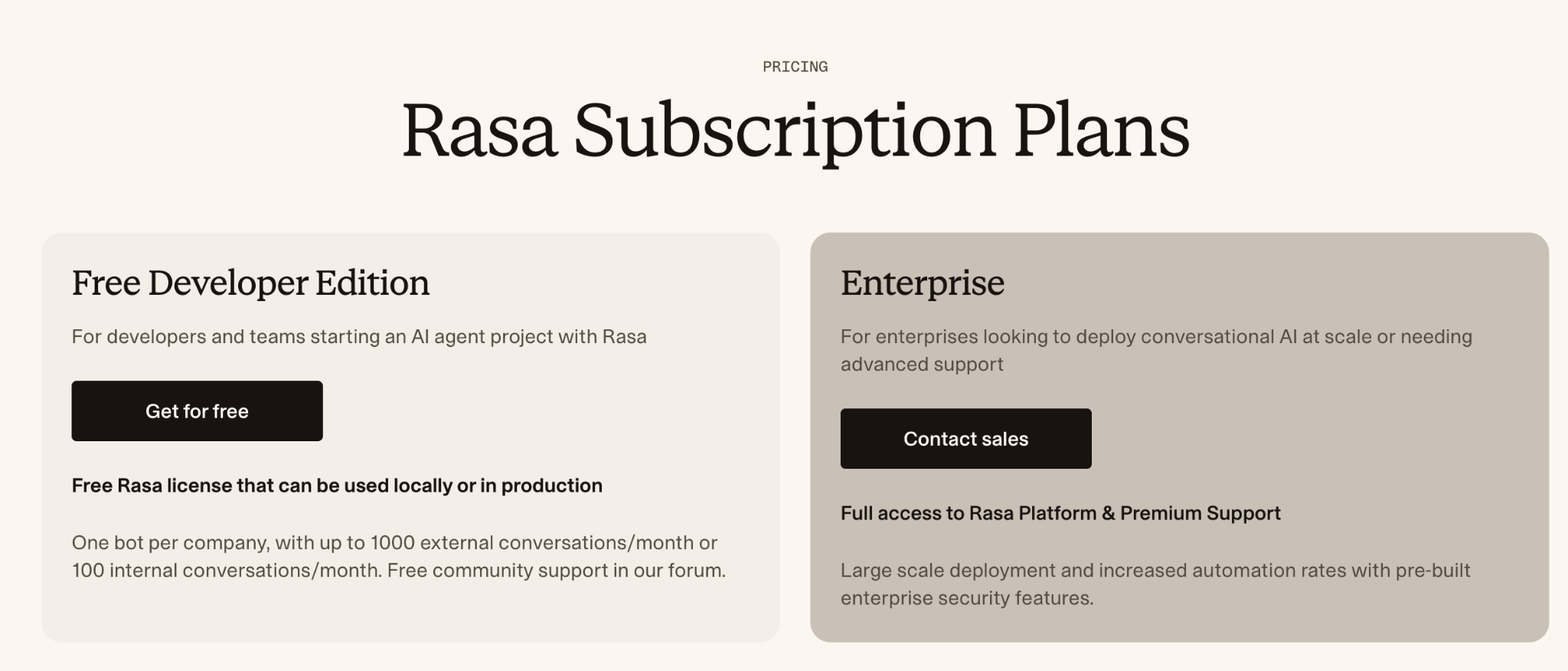
Rasa's Free Developer Edition is a free license, usable locally or in production. It covers one bot per company, up to 1,000 external conversations a month or 100 internal conversations a month, with community forum support.
The full Rasa Platform (Rasa Pro plus the optional Rasa Studio visual layer) is Enterprise-only and custom-priced. Contact sales for a quote.
Bottom line
If your team already writes Python, Rasa is the closest thing to owning Botpress's own control without Botpress's bill. If it doesn't, budget most of a weekend before you have a working bot.
8. Typebot: Best free, self-hostable option for hand-wired conditional logic
What it does: Typebot is a free, self-hostable Fair Source visual builder for conversational forms and chatbots, with native AI blocks for OpenAI’s GPT models, Anthropic’s Claude, and Mistral.
Best for: A reader who wants a free, self-hostable option and doesn't mind wiring conditional logic by hand.
Typebot surprised me. Going in, I expected a purely rule-based form builder with no real AI reasoning, based on how it's usually described. That's out of date.
Typebot now ships a native OpenAI block you drag into a flow. I connected it to the three-page FAQ and got real, non-scripted answers inside the 60-word cap, once I set a length instruction in the block's system prompt.
Checking a message for pricing-or-booking intent before asking for contact details took real work, but all of it was visual, dragging a block into place and setting a rule rather than writing code.
It took me noticeably longer than Voiceflow's equivalent step, since the AI block and the Condition block have to be wired together explicitly.
The CSV export was the standout part of this build. Typebot's Results table exports natively to CSV, cleanly, with every field from the conversation, exactly the end-state the brief asked for.
I got human handoff working by having the flow export the full transcript into the handoff step directly. Two clauses didn't clear natively, though.
De-dup doesn't exist, so every chat session I ran landed as its own row in the Results table. Cross-channel parity hit a hard stop too. WhatsApp needs the Pro tier, and even there it's wired up as a separate channel, with its own button and file-type restrictions and a shorter default session window than the website widget.
The full build took about 50 minutes, most of it spent hand-wiring the OpenAI block into the flow and testing the Condition logic against sample messages. Everything except the WhatsApp piece runs on Typebot's free Personal plan up to 200 chats a month, or you can self-host the Fair Source core for unlimited use.
Typebot earned a second look here, even though it's not as polished as Voiceflow for pure conversation design.
Key features
- Native AI blocks: Connect OpenAI, Claude, or Mistral models directly inside a flow through separate OpenAI, Anthropic, and Mistral AI blocks.
- Fair Source core: Self-host for free with no chat cap for your own bots, as long as you don’t resell access or host Typebot for others.
- Native CSV export: The Results table exports cleanly with every conversation field.
- Condition blocks: Drag-and-drop branching logic for anything beyond a straight-line flow.
Pros and cons
Pros
- ✅ Conditional logic stays visual: drag a Condition block and set a rule
- ✅ Cleanest CSV export of any tool tested
- ✅ Full custom JavaScript and CSS access, even on the free plan
Cons
- ❌ Conditional AI-plus-logic wiring takes longer to set up than a tool with native intent detection
- ❌ WhatsApp needs the Pro tier and runs as a separate channel wired up on its own, with session-timeout and formatting limits the website widget doesn't share
Pricing
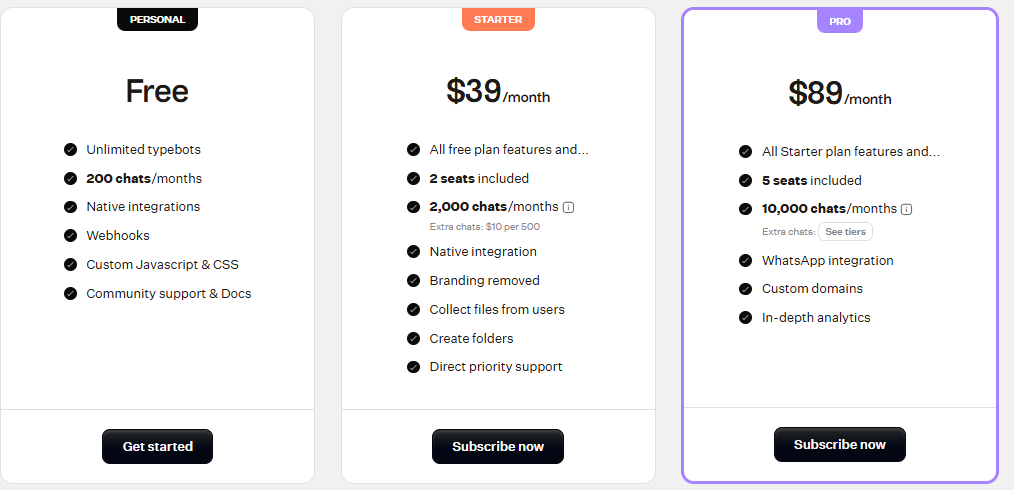
Typebot's Personal plan is free, covering unlimited typebots and 200 chats a month. Starter is $39/month for 2,000 chats and two seats, with extra chats billed at $10 per 500. Pro runs $89/month for 10,000 chats, five seats, and adds WhatsApp integration and custom domains. Enterprise is custom-priced.
No annual-billing discount is currently published; Typebot says plans stay monthly-only because the pricing is based on chat usage.
Bottom line
Typebot handles the AI-answering half of this brief well on a free plan. WhatsApp and de-dup are where it stops.
9. Intercom (Fin): Best AI agent for teams already running a full helpdesk
What it does: Intercom’s Fin AI Agent is the AI layer built directly into Intercom's helpdesk. It answers from your content and hands off to a human agent inside the same inbox when it can't.
Best for: A team that already runs, or is ready to run, a full helpdesk platform and wants the AI agent native to it.
Intercom Fin was the cleanest build of the whole test, and it should be. This is a support tool with the AI agent built in as a native feature. I connected the three-page FAQ in minutes, and the 60-word cap held right from the first reply.
The pricing-and-booking trigger ran as a Fin Task with its own conditional setting, a native path from the start. My returning test visitor resolved to the same contact profile with no configuration. Intercom can still create separate profiles with the same email when user IDs differ.
Handoff is where Intercom’s helpdesk roots show. Fin hands off into the same Intercom Inbox the rest of the support team already works from, with full context attached by default.
Cross-channel consistency between the website Messenger widget and a WhatsApp channel worked the same way, with one Fin AI Agent and one knowledge base serving both channels.
The lead-and-transcript export for the front-desk manager was the last box to check. Intercom's CSV export covers conversation metadata only, so full transcripts need a text or PDF export or the Conversations API.
The whole build took about 25 minutes, the fastest of any tool tested, and cost about $3.96 in testing (four billable Fin outcomes at Intercom's base $0.99 resolution rate, before any pricier Qualification-type outcome applies). Five of the six brief clauses ran natively.
Fin comes wrapped in Intercom's full helpdesk, seats included, so it's a heavier swap for a solo builder who wants a website bot. If your team already needs that helpdesk, or is about to, Fin is the strongest match here.
Key features
- Native to a full helpdesk: Messenger, shared inbox, and ticketing all in the same platform as the AI agent.
- Usage-based Fin pricing: The AI layer itself is priced per resolved conversation, layered on top of the regular seat price.
- Works with your current helpdesk too: Fin can run on Salesforce or another existing helpdesk if you don't want to switch platforms.
- Set up in under an hour: Intercom's own stated setup time for Fin on an existing helpdesk, which matched this build's own pace.
Pros and cons
Pros
- ✅ Returning visitors merged into their existing contact record with zero setup in my test, a real gap for several of the other eight tools tested here, which need a manual workaround for the same job
- ✅ One Fin agent and one knowledge base served both the website Messenger and WhatsApp
Cons
- ❌ Comes bundled with a full helpdesk platform and its seat pricing
- ❌ Per-outcome pricing means cost scales directly with how many conversations Fin resolves
Pricing
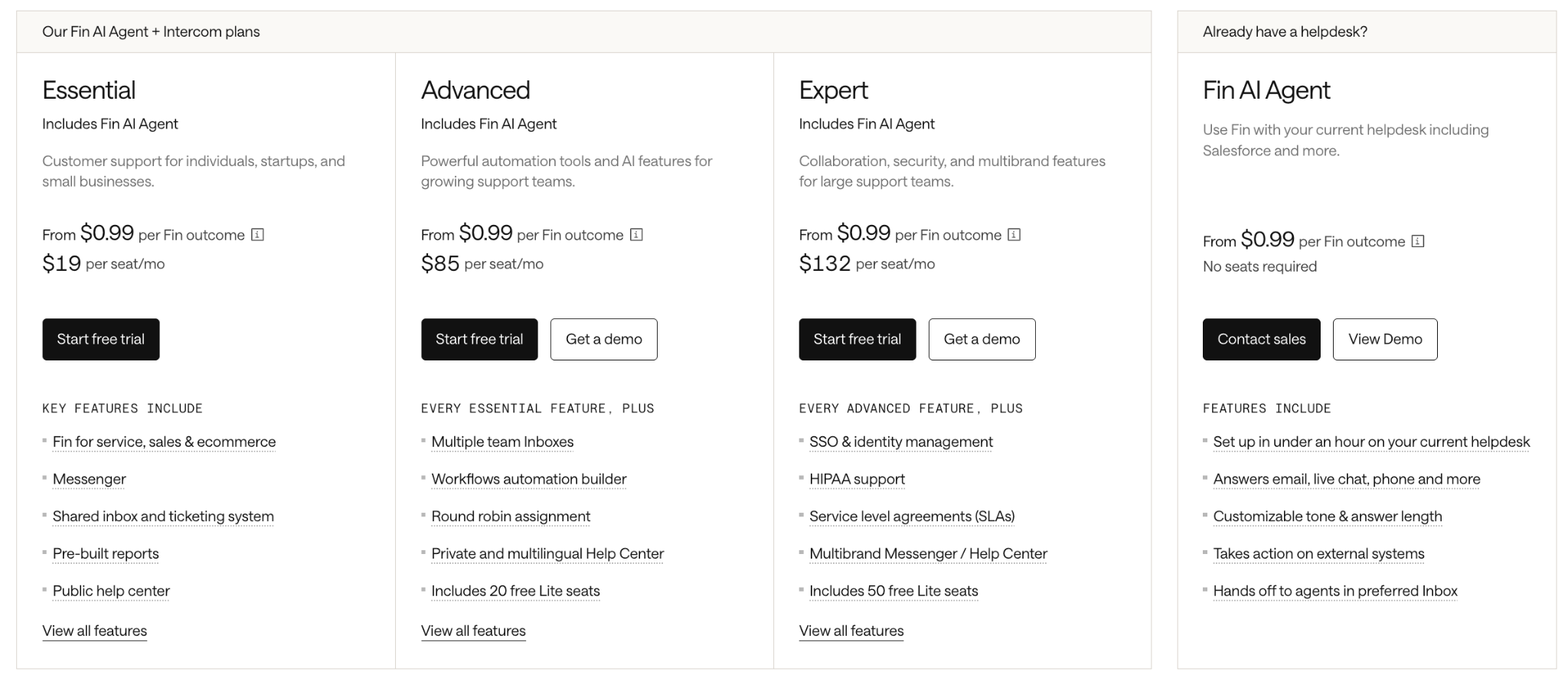
Intercom's Essential plan starts at $29/seat/month, billed monthly, plus from $0.99 per resolved conversation. It includes Fin AI Agent, Messenger, and a shared inbox and ticketing system.
Advanced runs $99/seat/month ($85/seat/month, billed annually), Expert $139/seat/month ($132/seat/month, billed annually), both starting from that same $0.99 rate and adding more automation and admin features.
Intercom’s pricing page lists a higher $9.99 rate for each Qualification outcome, where Fin qualifies a sales lead. Standard outcomes like a Resolution cost $0.99.
A standalone Fin AI Agent, for teams keeping their current helpdesk, starts from $0.99 per outcome with no seats required, with a 50-outcome monthly minimum.
Bottom line
Fin is fast to set up because it’s already built into a real helpdesk, seats, inbox, and ticketing all included. That’s the whole pitch if your team already runs one. If you’re after a lightweight bot instead, look elsewhere on this list.
How to evaluate Botpress alternatives
Match the tool to your actual skill level: Some of the nine above hand you a visual canvas and stop there, no more code-dependent than Botpress’s own Studio for a basic flow. Others (n8n and Rasa specifically) still expect you to wire logic by hand, without Botpress’s per-conversation pricing attached to it.
Match the tool to whoever keeps the bot running after launch, since that's a different skill set than building the first version.
Check what actually counts as channel coverage: A pricing page listing seven channels says nothing about whether a tool runs the identical knowledge base across two of them without extra wiring
Check whether a channel is a first-class citizen (native, with the same answers and the same handoff) or a connector bolted on afterward, the way Voiceflow treats WhatsApp and Meta channels.
Know which pricing model you’re actually buying into: Per-conversation, per-message-credit, per-Active-Contact, per-workflow-execution, or a flat seat price. Each one rewards a different usage pattern.
A conversation-metered tool like Botpress punishes a chatty support flow the same as a real sale. A hybrid tool like Intercom Fin ties part of the bill to headcount and lets the rest scale with how many conversations Fin resolves.
Find out what happens once you hit your plan’s limit: Tools handle a busted limit in three ways. Some stop answering. Some charge an automatic overage. Some ask you to upgrade next cycle. The headline price rarely tells you which. Read the fine print before you build against a specific tier.
Judge how mature the human handoff really is: Some tools attach the full conversation history to a human handoff automatically. Others need a manual workaround wired in, the way Typebot needed the flow set up to pass the full transcript into the handoff step. That gap only shows up once a real visitor needs it.
Decide who should own and host your data: Cloud-only, self-hostable, or fully open-source changes who controls the underlying data and what a later migration costs. A tool you can self-host, like n8n's Community Edition or Typebot's Fair Source core, gives you more control over access to your data if the hosted service shuts down.
Choose your Botpress alternative
If you're leaving Botpress, it's often because it's a developer tool wearing a friendly, drag-and-drop interface. The fix comes down to matching the tool to your skill level and the channel job you have.
Skip all nine and stay on Botpress if you’re already comfortable in its Studio, your volume sits under its free tier’s 100 conversations a month, and nobody on the team minds the occasional code step.
Final verdict
My pick is Lindy, if you want more than an FAQ bot: something that also acts on what it learns, updating records and routing leads once the conversation ends.
If all you need is a bot that answers questions from your docs, Voiceflow or Chatbase get you there without the extra assistant layer. If you need Botpress-level control over logic and infrastructure, n8n or Rasa give you that, code included. If support already runs through a full helpdesk, Intercom Fin is built to sit inside it.
{{cta}}
How Lindy helps teams automate more than a chatbot can
After a chat ends, someone still has to update the record, flag the lead, and write up what happened.
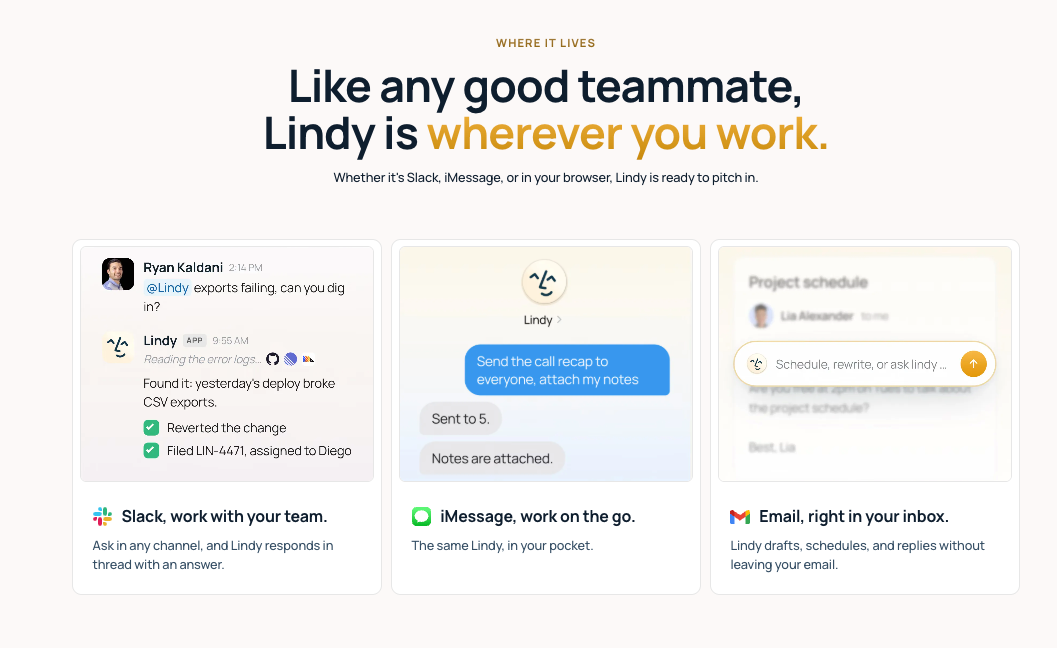
Lindy is built to act on what it learns, not just reply. Tell it what you want in your own words. It answers from a knowledge base the same way the tools above do. Then it acts on what it learns, updating a CRM, sending a follow-up, or routing a lead, all from inside the same assistant.
It works where your team already works, in Slack, email, and iMessage, handles the question, and keeps working once the conversation itself ends.
Lindy’s docs cover the basics of setting up Lindy, Skills, routines, and security, useful once you’re building something more than a simple FAQ bot, or check this AI agent builder roundup if you’re comparing options beyond chatbots specifically.
Frequently asked questions
What are the 3 best AI chatbots?
Chatbase, Tidio, and Lindy are the best three, each for a different job. Chatbase sets up the quickest for a document-trained FAQ bot. Tidio fits a small team that wants live chat and an AI FAQ bot in one tool. The third pick suits a reader who wants an assistant that also acts on what it learns.
Is Botpress completely free?
No, Botpress has a free plan at $0/month, with 100 conversations, three seats, and three AI agents included, with no top-ups or overages. Paid plans start at $189/month ($150/month, billed annually) once you need more volume. Team permissions require the Team plan at $939/month ($750/month, billed annually).
Which AI is best for chatting?
Chatbase and Fin AI Agent are the best for pure conversational quality, both answering cleanly and accurately in testing. Chatbase needs nothing else in place, only your docs. Fin is layered on a full helpdesk, so it only makes sense if your team already runs one.
Which AI chatbot builder is the best?
Voiceflow is the best no-code chatbot builder for most teams, since its visual canvas works the way Botpress’s Studio does, minus the code step. Tidio is a close second if you also want live chat support, and n8n or Rasa fit a technical team that wants full control instead, code included.
For a broader comparison beyond chatbot-specific tools, see this AI agent builder roundup.
Can I move my Botpress chatbot to another platform?
No, not as a direct import. Every tool here needs the FAQ content, flows, and any custom logic rebuilt in its own system. An FAQ-style knowledge base like the three-page one in this test transfers over quickly, since it's plain content you can drop straight into a new knowledge base.
Do I need a developer to use Botpress?
No, not for a basic reply flow, a conditional rule, or a HubSpot contact update, since those have ready-made cards. Custom logic beyond the cards is where a JavaScript code step and a developer come in.










