AI Lead Generation Chatbot: 8 Best Picks After Testing 13
Jack tested five AI lead generation chatbots, including Landbot, Botsonic, and Botpress, comparing qualification flows, CRM integrations, and monthly pricing for sales teams.


I started with 13 AI lead generation chatbots and gave each one the same messy job. Capture a visitor, ask enough to understand what they need, decide where the lead belongs, and leave the sales rep with useful context.
A few tools looked polished until the visitor gave a vague answer or changed direction midway through the chat. Eight made the cut by handling those moments well, keeping drop-offs low, and giving me flows I could edit without rebuilding the whole conversation.
8 best AI lead generation chatbots
- Landbot: Best for visual, no-code lead flows on your website and WhatsApp
- Botsonic: Best for a simple website assistant trained on your own content
- Botpress: Best for developer teams that need custom logic and memory
- Tidio: Best for ecommerce stores that want AI chat with a live chat fallback
- ChatBot: Best for launching a template-based lead bot in minutes
- Chatling: Best for low-cost website bots with a free plan to test first
- Manychat: Best for turning Instagram and WhatsApp comments and DMs into leads
- Lindy: Best AI teammate for lead follow-up and CRM updates
How I tested these AI lead generation chatbots
I tested each chatbot across dummy websites, landing pages, and demo funnels to see how it performs in everyday scenarios. I ran the same qualification flow on every website tool to compare speed, accuracy, and setup effort. Manychat and Lindy don't have a website chat, so I compared Manychat on a comment-to-DM flow and Lindy on follow-up for a lead another tool had already captured.
Each path had three to four questions, and I checked how quickly each bot responded, how it handled edge cases, and whether it kept the user on track.
The other five missed the cut for practical reasons: Drift has been replaced by Salesloft's 1mind, HubSpot's free chatbot builder is rule-based, Zoho SalesIQ's free plan covers live chat only, Freshchat bills its AI agent per session on top of the plan, and Crisp's free plan includes no AI credits.
Here is what I looked for:
- How well the bot understands intent and answers natural questions without forcing users down rigid paths
- How quickly it captures lead information and moves users into the right qualification or booking step
- How reliably it syncs details to a CRM so sales teams receive clean, structured data
- How easy it feels to build or edit flows when you want to change questions or logic
- How well it handles follow-up steps like emails, meeting links, or internal notifications
I also tested each website tool on mobile, since many visitors start conversations there. Tools that responded quickly, scored leads clearly, and sent structured data to my CRM ranked higher.
Best AI lead generation chatbots compared
What is an AI lead generation chatbot?
An AI lead generation chatbot talks with potential buyers, collects their details, and qualifies them for sales. Visitors can describe what they need in their own words, and the chatbot can ask follow-up questions based on each answer.
The experience feels more natural than filling out a fixed form. A visitor might ask about pricing, explain their use case, and share their team size in the same conversation.
From there, the chatbot can book a meeting, send the lead to the right rep, or add the details to your CRM. It can also answer common product questions along the way, keeping interested visitors moving toward the next step.
How an AI lead qualification chatbot works
An AI lead qualification chatbot asks a short series of questions, compares the answers with your criteria, and sends promising leads to sales. Most conversations follow four steps:
- Start with the visitor’s intent: The opening question reflects the page they’re viewing, such as pricing, a product feature, or a demo.
- Collect the details sales needs: Three or four questions can cover company size, role, use case, budget, and buying timeline.
- Decide what happens next: A strong match moves to sales, while an early-stage visitor receives useful content or enters a nurture sequence.
- Pass along the context: The chatbot can book a meeting, alert the right rep, and create a CRM record with the conversation attached.
Keep the exchange focused. Each extra question gives the visitor another reason to leave, so ask only for details that change the next step.
Lead generation chatbot vs AI agent
A lead generation chatbot handles the conversation with a potential buyer. It greets the visitor, asks qualifying questions, collects contact details, and passes the lead to sales.
An AI agent can pick up the work that follows. It might research the company, draft a personalized email, update the CRM, and remind the rep if nobody responds.
ChatGPT sits somewhere between the two. It’s useful for answering questions, writing messages, and running multi-step tasks in agent mode. However, it doesn’t come with a website lead-capture widget or built-in CRM routing.
A common setup pairs a chatbot for the first conversation with an agent for the follow-up. Our AI sales automation platform guide covers tools built for that wider sales process.
1. Best AI Lead Generation Chatbot for No-Code Custom Flows
Landbot: What is it?
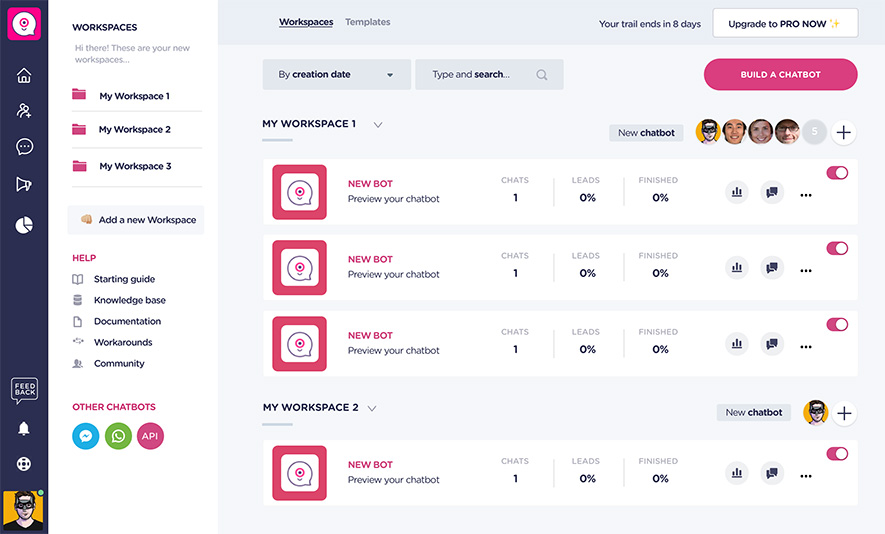
Landbot builds chatbots from visual blocks for websites and WhatsApp. I tested it across several landing pages and found it easy to build custom lead flows without touching code.
It works well for teams that want full control over the conversation layout and prefer a drag-and-drop builder.
Who it's for
- Marketing teams that want a fast setup without technical help
- Agencies building custom flows for multiple clients
- Small businesses that want a simple website or WhatsApp bot
Key features
- Visual flow builder with easy branching and conditional steps
- UI elements like buttons, sliders, and carousels that guide users through the flow
- WhatsApp support for lead capture outside the website
- Real-time handoff to live chat when a visitor needs a human
- Integrations with HubSpot, Salesforce, Mailchimp, Google Sheets, and custom APIs
Pros
- Easy to design and test conversation flows
- Strong website and WhatsApp support
- Good for branded or highly structured lead forms
Cons
- Limited AI flexibility for complex qualification
- Starter includes only 100 AI chats a month
- WhatsApp runs on separate plans, which raises the entry cost
Pricing
Landbot plans start at $45/month for Starter, with Professional at $110/month and custom Business pricing. Starter includes 500 chats and 100 AI chats per month. A free plan and free trials for paid plans are available.
Bottom line
Landbot suits teams with a clear qualification path and predictable next steps. Its visual builder makes website and WhatsApp funnels easy to map, including booking and CRM handoffs. Choose it for repeatable sales conversations, while open-ended requests and high chat volume may expose its limits.
{{templates}}
2. Best AI Lead Generation Chatbot for Content-Trained Website Answers
Botsonic: What is it?
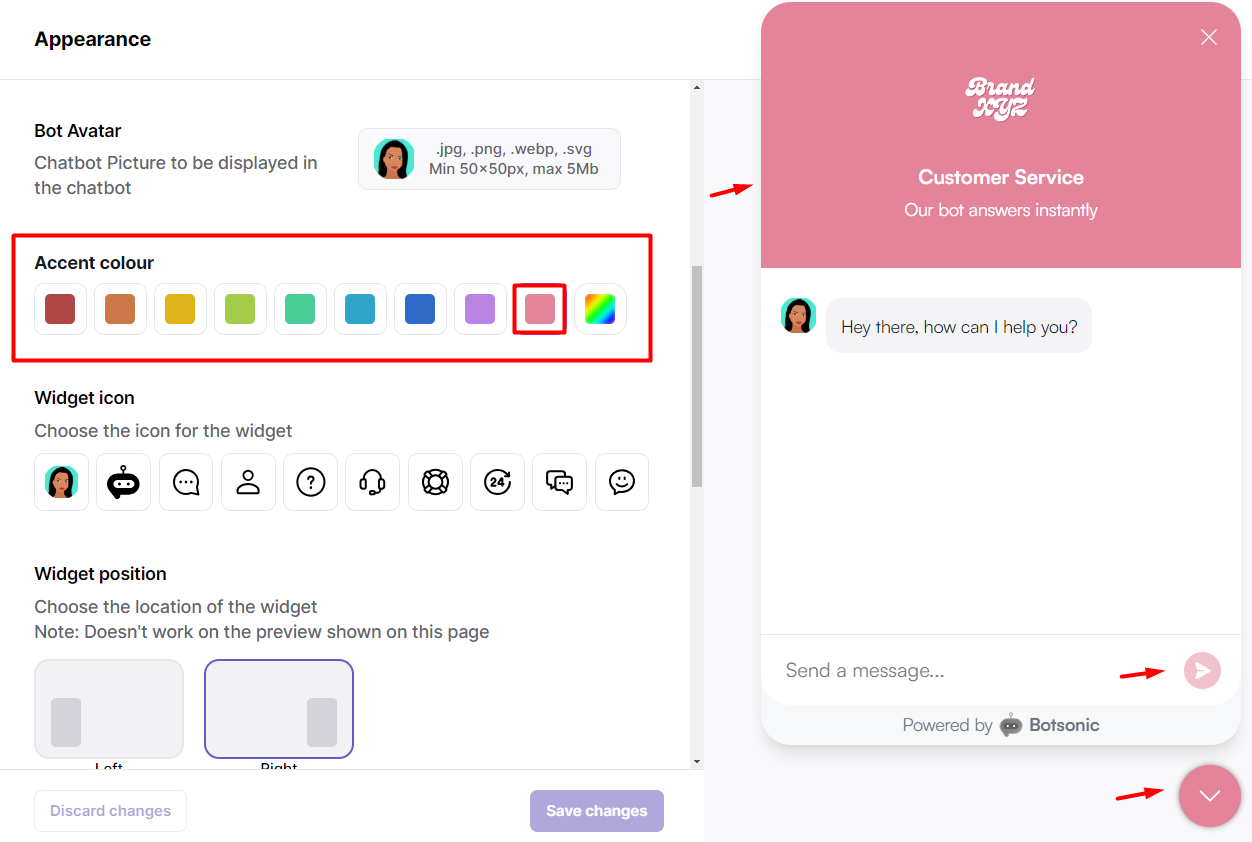
Botsonic builds AI chatbots that sit on your website and answer from your own content. I tested it on a few documentation-heavy sites and found it useful for simple qualification, quick answers, and basic lead capture. It works best as a lightweight assistant trained on your pages or uploaded files.
Who it's for
- Small businesses that want an AI assistant on their website
- Marketers who need a simple chatbot trained on existing content
- Founders who want basic lead capture without complex workflows
Key features
- AI chat trained on your website or uploaded documents
- Fast embed widget for landing pages
- Multilingual support for global audiences
- Integrations with Zapier, plus training from Google Sheets and Notion pages
- Basic lead capture for collecting emails and key details
Pros
- Easy to embed on a site
- Good for content-driven replies
- Works well for simple qualification and FAQs
Cons
- Not ideal for multi-step lead qualification
- Limited workflow depth next to more advanced platforms
- The message allowance stretches less on plans that use more advanced AI models
Pricing
Botsonic plans start at $19/month for Starter, with Professional at $49/month, Advanced at $299/month, and custom Enterprise pricing. All paid plans include a 7-day free trial.
Bottom line
Botsonic works best when prospects repeat the same product, pricing, or support questions. Train it on your website content to answer them and route visitors. It suits focused funnels, though complex routing and high message volumes may require higher tiers.
3. Best AI Lead Generation Chatbot for Developer Teams
Botpress: What is it?
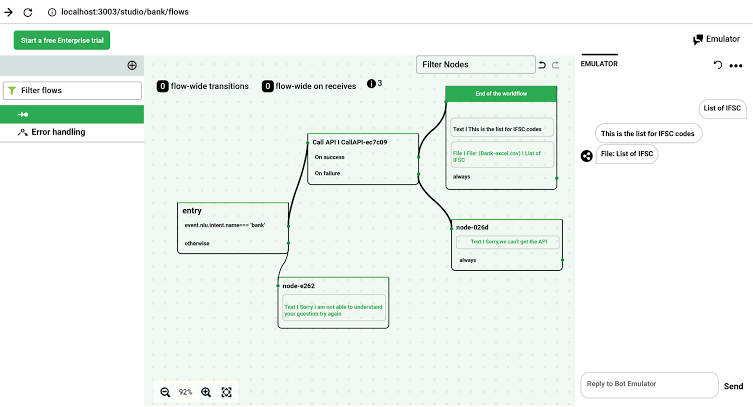
Botpress gives developers full control over chatbot logic, memory, and deployment. I tested it with a few complex qualification flows and found it powerful when you need custom behavior or control over how the bot handles each branch.
Who it's for
- Engineering teams that want full customization
- Mid-size and enterprise companies with technical resources
- Teams that need custom NLP, memory, or code-level control
Key features
- Built-in NLP engine with strong entity and intent handling
- Memory layer that lets the bot store and recall information
- Visual flow builder paired with a code editor for deeper tuning
- Real-time debugging tools for testing logic and conversation paths
- Integrations with 30+ tools, including Zapier, Asana, Shopify, and Salesforce
Pros
- Powerful for complex use cases
- Gives you control over how the bot handles each branch
- Ideal for technical teams that want precision
Cons
- Setup takes time if you don't know the platform
- Best suited for teams with engineering support
- Heavy AI use can add charges once the included AI budget runs out
Pricing
Botpress plans start at $189/month (Plus, billed monthly), with Team at $939/month and custom Enterprise pricing. A free plan is also available.
Bottom line
Botpress fits technical teams that need detailed control over chatbot logic, integrations, and deployment. Developers can shape complex qualification flows and connect internal systems, but that flexibility takes more setup and upkeep than a template-driven builder.
4. Best AI Lead Generation Chatbot for Ecommerce Stores
Tidio: What is it?
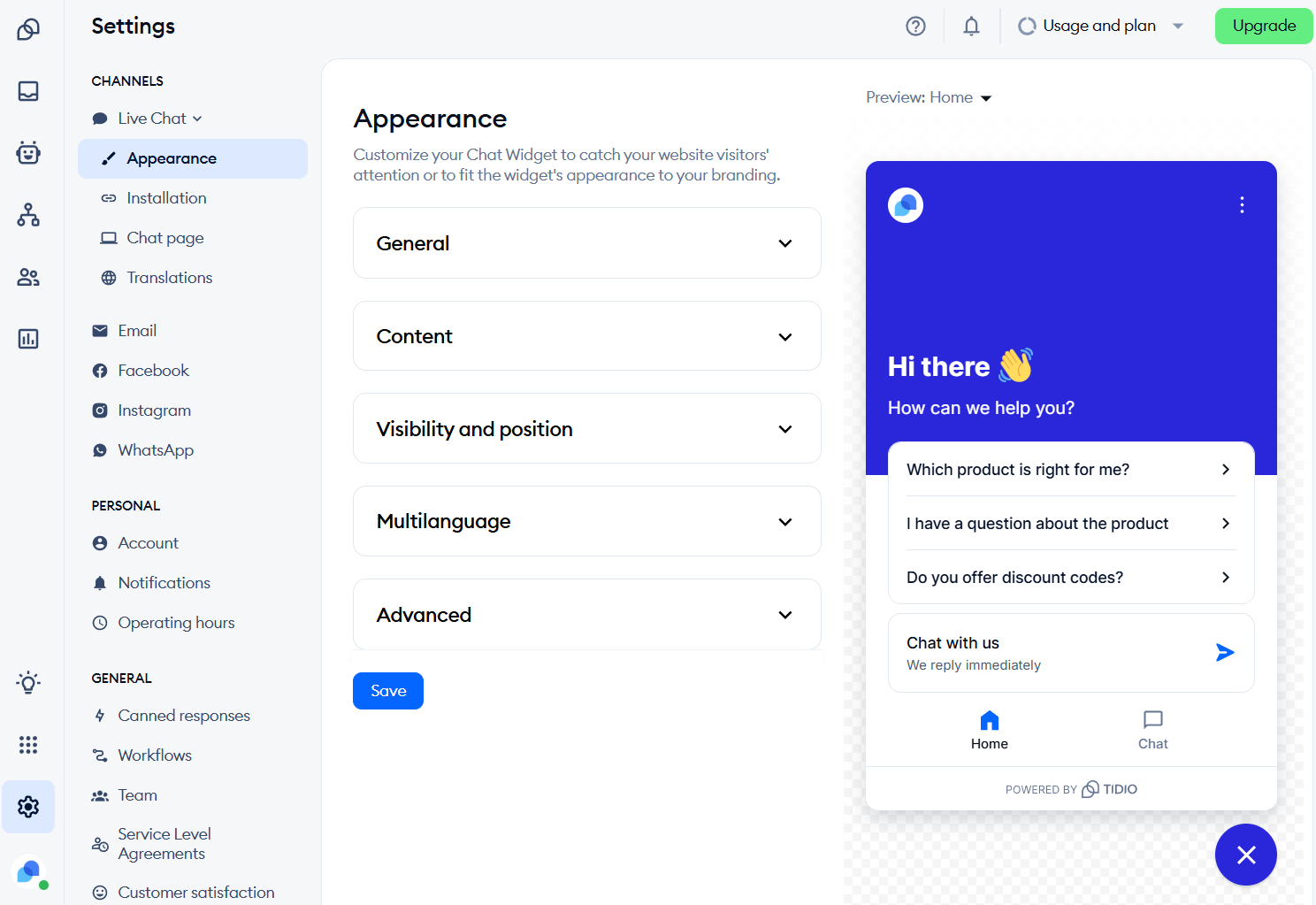
Tidio combines live chat, AI responses, and helpdesk features in one place. I tested it on a few Shopify stores and saw how well it handles product questions, cart recovery, and quick lead capture. It suits ecommerce teams that want AI support with a smooth handoff to a human.
Who it's for
- Ecommerce brands that want chat plus AI support
- Shopify and DTC teams that need quick responses during peak traffic
- Stores that want automated cart recovery and product guidance
Key features
- An AI responder (Lyro) that answers product and support questions
- On-page lead capture forms with trigger logic
- Live chat fallback when a shopper needs help
- Prebuilt flows for FAQs, cart recovery, and product guidance
- Integrations with Shopify, Instagram, Messenger, Wix, and 30+ other tools
Pros
- Great for stores with frequent product questions
- Smooth handoff from AI to live chat
- Strong Shopify integrations
Cons
- Limited use outside ecommerce
- The Lyro AI add-on is metered and billed separately
- Free, Starter, and Growth plans cap at 10 seats
Pricing
Tidio plans start at $29/month (Starter, billed monthly), with Growth from $59/month and Plus from $300/month plus usage charges. Premium has custom pricing. A 7-day free trial is available for Starter and Growth.
Bottom line
When shoppers keep asking “Where’s my order?” or “Will this work for me?”, Tidio can answer before the chat becomes a ticket or abandoned cart. Agents can step in through the shared inbox. Estimate billable conversations and Lyro usage first, since growing traffic can raise the monthly cost quickly.
5. Best AI Lead Generation Chatbot for Template-Based Launches
ChatBot: What is it?
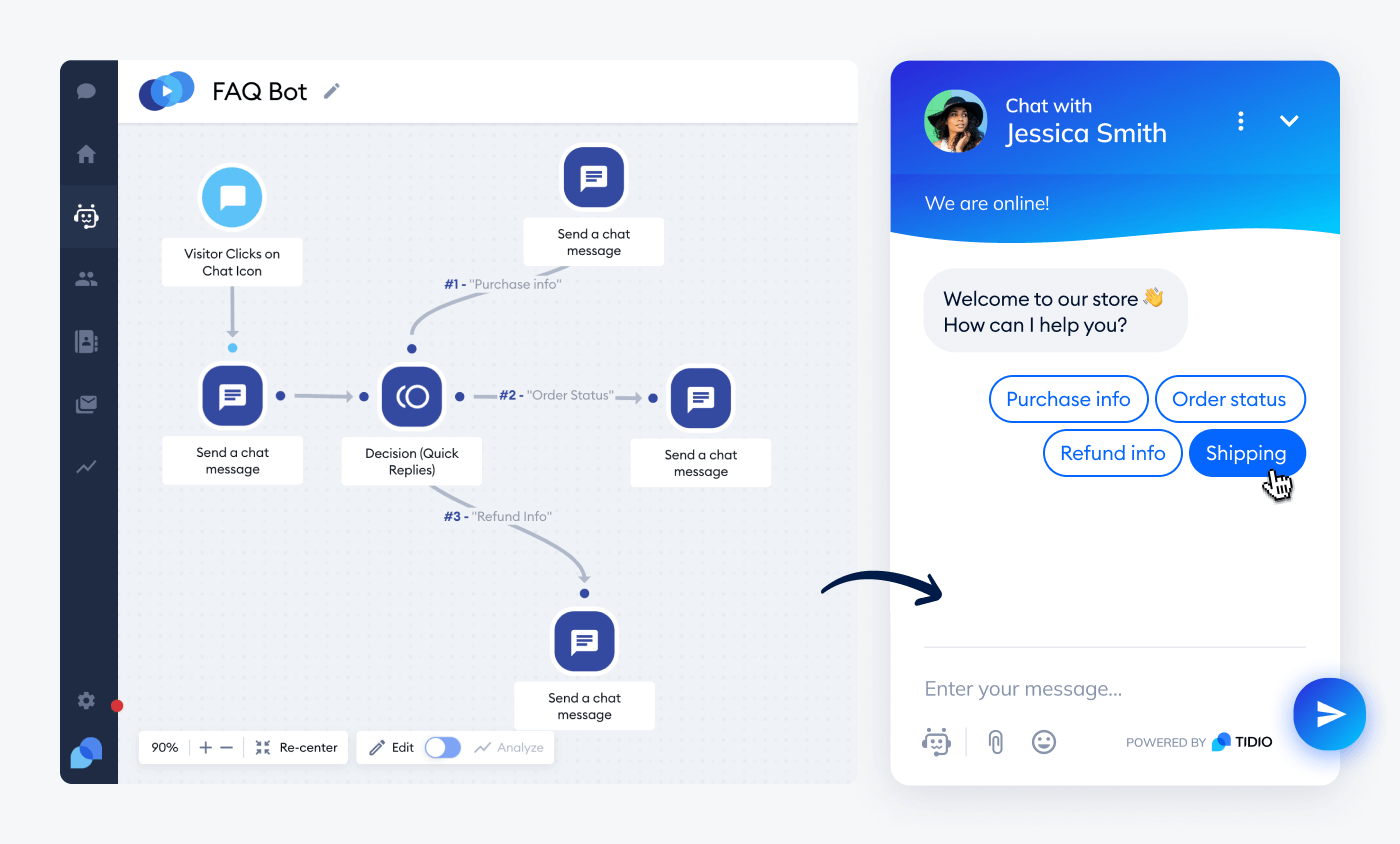
ChatBot is a no-code platform for building website chatbots that answer questions, qualify leads, and route conversations. I adapted one of its templates for a service business and had a working lead flow ready within minutes, making it a good fit for teams that value speed and simple setup.
Who it's for
- Startups and service businesses that want fast deployment
- Non-technical teams that prefer templates over custom logic
- Users already working with LiveChat who want a smooth handoff
Key features
- Library of lead-gen templates that cover common scenarios
- Drag-and-drop builder for simple flows
- LiveChat integration for human handovers
- Integrations with Messenger, Slack, Zapier, and Mailchimp
Pros
- Easy to launch a bot with minimal setup
- Helpful templates for common lead flows
- Good fit for small teams
Cons
- Limited customization for advanced qualification
- No free plan
- Entry plans include few AI resolutions, so volume raises the bill
Pricing
Plans start at $25/user/month (Essential, billed monthly), with Growth at $99/user/month, plus custom Enterprise pricing billed annually. A free trial is also available.
Bottom line
ChatBot fits small teams with a clear qualification path and little time for setup. Its templates help launch lead capture quickly, while the visual builder keeps edits manageable. Choose it for straightforward website conversations and clean human handoffs, but expect limits with complex branching or workflows.
6. Best AI Lead Generation Chatbot for Small Budgets
Chatling: What is it?
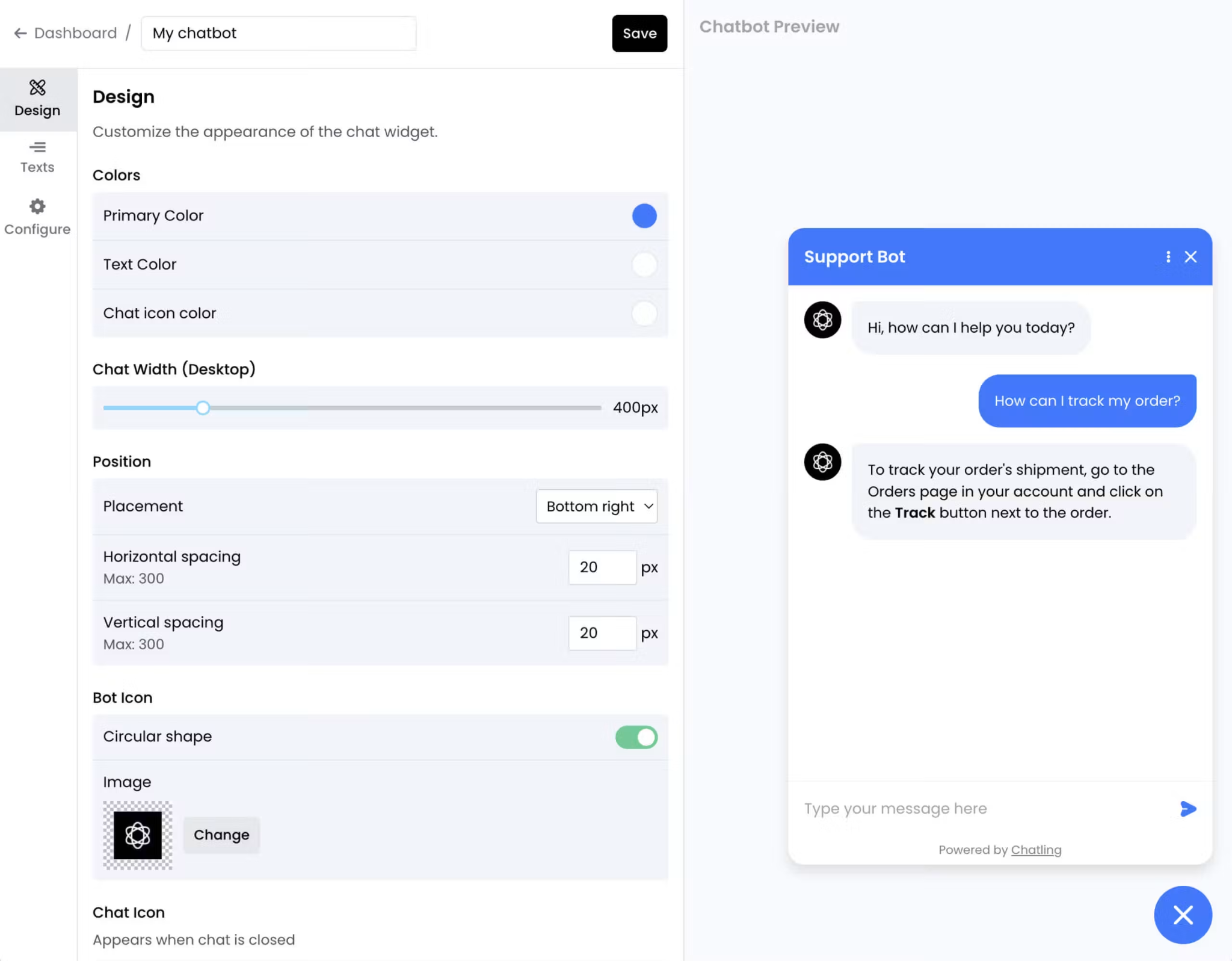
Chatling lets you build website chatbots trained on your content. You can choose an autonomous AI agent for open-ended conversations or a flow-based chatbot for structured qualification, giving small teams an affordable path to lead capture.
In my test, the flow-based mode asked the same questions in the same order every time, which made it the more dependable choice for lead capture.
Who it's for
- Small teams and startups that want to start on a free plan
- Marketers who need a bot trained on existing pages and files
- Sites that plan to add WhatsApp or Instagram later
Key features
- Drag-and-drop visual builder for custom chatbot flows
- Training on your website content and uploaded files
- Contact capture from chatbot conversations
- WhatsApp, Instagram, Messenger, Telegram, and API access on paid plans
- A choice of AI models, including GPT, Gemini, and Claude
Pros
- Free plan to test with real visitors
- Flow-based and agent-based build modes in one tool
- Low entry price for paid plans
Cons
- Costs are harder to predict because Chatling meters AI credits, email credits, voice minutes, and resync credits
- The free plan is web-only
- Removing the "Powered by Chatling" badge costs $35/month on lower plans
Pricing
Chatling plans start at $25/month (Starter, billed monthly), with Growth at $75/month and Scale at $295/month. A free plan is also available.
Bottom line
Chatling fits small teams that want a content-trained website bot without a big monthly bill. The free plan lets you test it on real visitors, and paid plans add WhatsApp, Instagram, and API access. Watch the metered credits, since costs climb as usage grows.
7. Best AI Lead Generation Chatbot for Instagram and WhatsApp
Manychat: What is it?
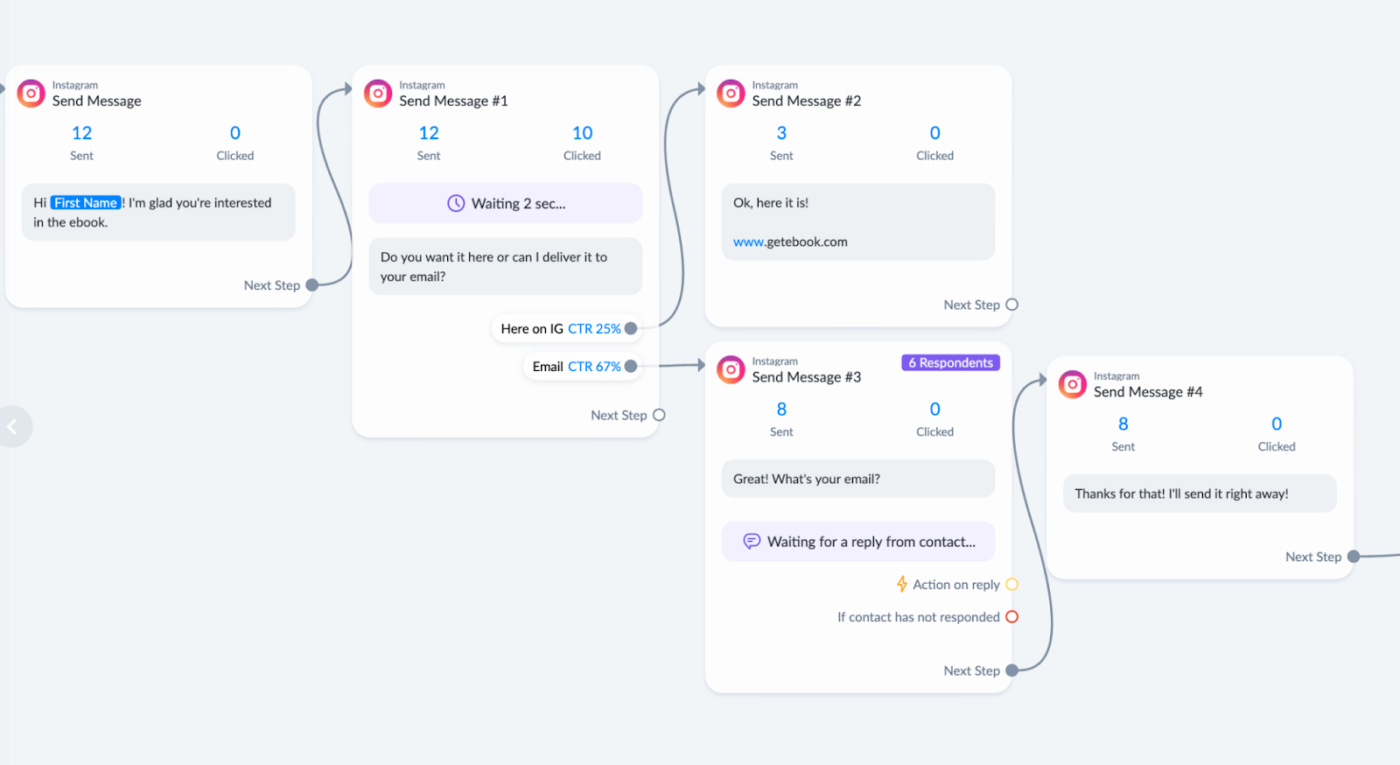
Manychat automates replies to comments and direct messages on Instagram, TikTok, Facebook Messenger, WhatsApp, and Telegram. A comment or keyword can trigger a DM flow that collects an email and tags the lead, which suits businesses whose leads start in social conversations.
I got my first comment-to-DM flow live quickly by starting from one of its 60-plus ready-made templates.
Who it's for
- Creators and social-first brands that win customers in DMs
- Ecommerce stores that run Instagram campaigns
- Teams that want to capture leads without staffing an inbox all day
Key features
- More than 60 ready-made templates that reply to comments, greet new followers, and share links in DMs
- An automation builder that collects emails and contact details, then tags and segments contacts
- Manychat AI on the Pro plan, which learns your business and tone and answers FAQs
- Broadcasts on WhatsApp, Telegram, and Messenger on Pro
- Inbox AI that sorts conversations with custom labels and rules
Pros
- Strong fit for Instagram and TikTok funnels
- Free plan for testing a comment-to-DM flow
- Templates make the first flow quick to launch
Cons
- Built for social messaging, so it has no website-first chat or ticketing
- Pricing follows active contacts, so the bill grows with your audience
- The free plan covers only 25 active contacts
Pricing
Manychat plans start at $17/month (Essential, billed monthly), with Pro at $39/month, Business at $99/month, and Advanced at $199/month. A free plan and 14-day trials are also available.
Bottom line
Manychat earns its place when comments and DMs already drive customer interest. It can respond while that interest is fresh, collect contact details, and guide the person toward an offer, though contact-based pricing deserves a close look as your audience grows.
8. Best for Follow-Up After an AI Lead Generation Chatbot Captures the Lead
Lindy: What is it?
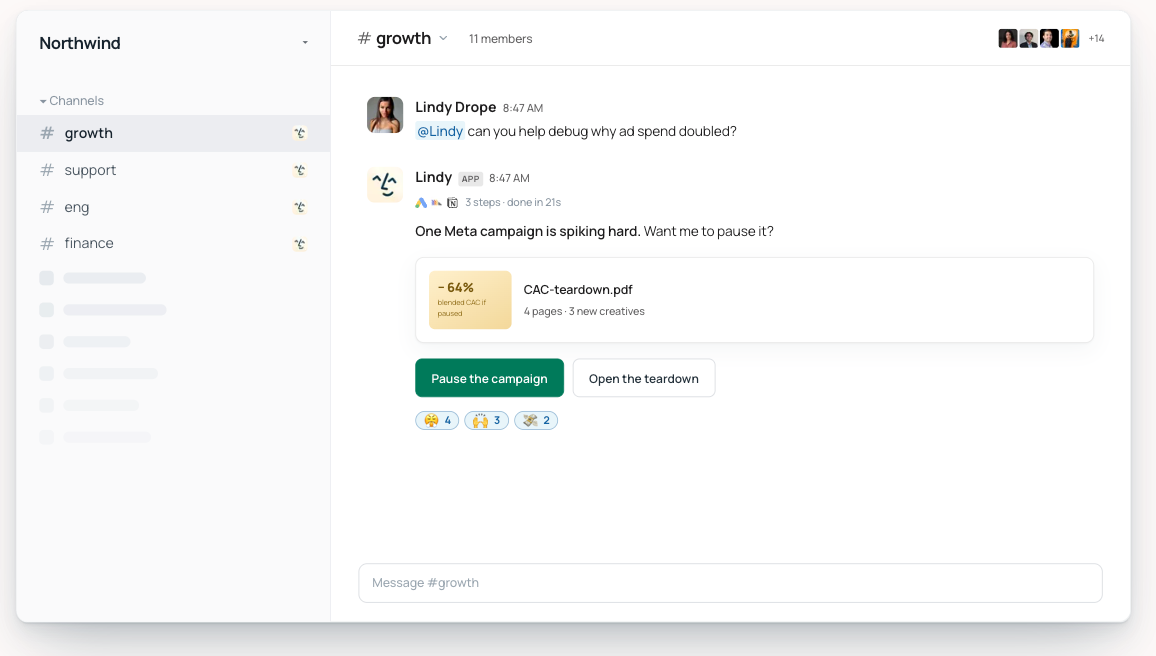
Lindy is an AI teammate that works inside Slack and connects with your CRM, inbox, calendar, and other team tools. Once a capture tool hands over a lead, you ask for the follow-up in a Slack thread, and Lindy drafts the reply, schedules the call, updates the record, and keeps follow-up moving.
In my test, the drafted reply came back in the same thread, ready for me to review, which makes it a strong partner for the capture tools on this list.
Who it's for
- Sales teams that capture leads with one tool and need follow-through
- Small teams without a dedicated SDR
- Ops and RevOps people who update CRM records by hand
Key features
- Drafts follow-up replies in your voice, with every draft saved for review before it goes out
- Scheduling that proposes times and books the meeting on your calendar
- Lead enrichment on request, such as researching a prospect and updating the CRM record
- CRM updates in Salesforce and HubSpot
- Slack answers about leads, such as what a prospect said on past calls, with links to the exact moment in each call
Pros
- Saves a follow-up routine as a skill once, so the whole team can reuse it
- Each connected tool can be set to always allow, require approval, or "Don't offer"
- One tool for follow-up, scheduling, and meeting notes
Cons
- It focuses on what happens after capture, so teams that only need a form-style capture bot will find simpler tools above
- It runs on credits, and bigger jobs use more of them
- Free credits run out after seven days, so a longer test needs a paid seat
Pricing
Team starts at $29.99/user/month for 3,000 credits, and Enterprise pricing is custom. The free plan includes $50 in credits that last seven days, with no credit card required.
Bottom line
Lindy is strongest after a lead enters the pipeline. It can draft the reply, schedule the call, update the CRM, and keep following up when a promising conversation would otherwise disappear into someone’s inbox.
{{cta}}
Already on Salesforce? Consider Agentforce
Agentforce is the natural shortlist pick for teams already running sales through Salesforce. Its SDR agent can qualify inbound leads, answer common questions, book meetings, and write the conversation back to the CRM.
Pricing starts at $500 per 100,000 Flex Credits, billed per action. Agentforce add-ons cost $125/user/month, Industries add-ons cost $150/user/month, and Agentforce Max Editions start at $550/user/month. Salesforce Foundations is free, and Conversations cost $2 each.
Free AI lead generation chatbots
Free plans are useful for testing one real lead flow with live visitors. Watch the limits closely because each tool measures usage differently, from chats and active contacts to AI actions. Here's what each tool gives you to test with:
- Landbot: The Free plan includes 100 chats per month, one seat, and the full builder with templates, but no AI chats.
- Tidio: The free plan includes 50 billable conversations per month. Lyro AI has its own conversation allowance and pricing.
- Chatling: The free plan supports a website chatbot. Messaging channels and API access require a paid tier.
- Botpress: The Free plan costs $0 and includes 100 conversations and three seats, with no overage charges.
- Manychat: The free plan covers 25 active contacts per month, which is enough to test a small comment-to-DM campaign.
- Botsonic: A 7-day trial covers the paid features.
- Lindy: The free plan includes $50 in credits that last seven days.
- ChatBot: A trial is available, though there is no permanent free plan.
I'd test a complete path from first message to handoff, since a chatbot that answers well can still fail when it tries to create a contact or notify sales. Our AI chatbots for businesses guide compares more tools by budget and team size.
CRM integration and human handoff
The handoff reveals whether a lead chatbot is helping sales or creating cleanup work. A useful integration creates or updates the CRM record, maps the qualification answers correctly, and attaches enough context for the rep to continue.
Landbot, Botpress, and Tidio connect with CRMs such as HubSpot or Salesforce, while Zapier can cover many additional combinations. Before launch, submit a test lead and inspect every synced field from the rep’s view.
I paid close attention to what appeared when a person joined the conversation. If the visitor had already shared their budget, timeline, and use case, those answers needed to follow them. Repeating the same questions made the handoff feel broken.
Our AI sales chatbots roundup compares tools that qualify prospects and route them to the right sales workflow.
AI lead generation chatbot use cases by industry
The best qualification flow changes with the buying decision. A property buyer, patient, SaaS prospect, and online shopper each arrive with different questions and require a different next step.
Real estate
Real estate chatbots can ask about location, budget, property type, and moving timeline, then book a viewing or share relevant listings.
The strongest flow I tested felt closer to a short conversation with an agent than a long inquiry form. It captured enough detail for the team to prioritize serious buyers without making casual browsers commit too early.
Healthcare
Clinics can use chatbots to book appointments, collect basic intake details, and route patients to the right department. The bot can also answer approved questions about hours, locations, and accepted insurance providers.
Keep clinical decisions and sensitive cases with trained staff. The chatbot’s role is to reduce scheduling work and prepare the handoff, with privacy and consent built into the flow.
SaaS and B2B
SaaS chatbots often qualify leads by company size, role, current tools, use case, and buying timeline. High-fit visitors can book a discovery call, while earlier-stage prospects receive a relevant guide or product page.
This setup gives sales consistent context before the first conversation. It also reveals recurring objections, which can help the team improve its messaging and qualification rules.
Ecommerce
Ecommerce chatbots can answer product questions, suggest items, capture contact details, and follow up on abandoned carts. The strongest flows help shoppers make a decision without turning the conversation into a survey.
A visitor asking about fit, delivery, or compatibility often needs one clear answer. Removing that small point of doubt can keep the purchase moving.
Professional services
Agencies, consultants, and law firms can use chatbots to screen inquiries before offering an introductory call. A short flow might ask about the service needed, urgency, budget, and project background.
The payoff appears in the calendar. Each booked call arrives with enough context for the team to prepare, while lower-fit inquiries can receive helpful information or a more suitable next step.
How to build a lead generation chatbot
Building a lead generation chatbot starts with one outcome and a short path to reach it. No-code builders, AI tools, and developer platforms differ in setup, but the core process stays similar. Here’s how I’d build the first version:
- Choose one goal. Decide if the chatbot should qualify prospects, collect contact details, book meetings, or route inquiries.
- Map the shortest useful conversation. Ask only for information that changes the next step. A demo flow may need role, company size, use case, and preferred time.
- Connect the destination. Map the required CRM fields, add calendar availability, and choose which team receives each lead.
- Test messy answers. Try vague replies, skipped questions, typos, and requests for a person. Check what the CRM and sales rep receive.
- Review real conversations. Remove questions that cause exits, clarify confusing replies, and adjust qualification rules as patterns emerge.
My best flows stayed short and gave the visitor a clear next action. Teams wanting a longer setup guide can follow these eight steps for building an AI chatbot without coding.
Benefits of AI chatbots for lead generation
AI lead generation chatbots create the most value between a visitor’s first question and the sales handoff. They respond while interest is fresh, gather consistent information, and move qualified leads forward. Here’s where they help most:
- Faster first responses: A chatbot can answer common questions immediately and keep the conversation active while the visitor is still considering the offer.
- More consistent qualification: Every prospect receives the same core questions about need, budget, timing, or company size.
- Less sorting for sales: Reps receive clearer context and spend less time chasing missing details or reviewing low-fit inquiries.
- Quicker next steps: Qualified leads can book a meeting, enter a CRM sequence, or trigger an alert during the same conversation.
- Useful follow-up context: Email and messaging follow-ups can reflect what the visitor asked, giving the next message a clear reason to exist.
- Coverage across channels: Website chat, WhatsApp, and Instagram can feed leads into the same process when the chosen platform supports them.
Chatbots handle people who have already started a conversation. Teams also looking for prospects can compare AI lead generation tools built for outbound research and outreach.
My verdict
Landbot is my top pick for most teams. Its visual builder lets you design and test a structured lead flow without code, on your website and on WhatsApp, and the Free plan lets you try it with real visitors first.
The other picks fit narrower situations. Tidio suits ecommerce stores that want AI chat with a live chat fallback, and Botpress suits developer teams that need custom logic and memory. Manychat turns Instagram and WhatsApp conversations into leads.
Botsonic suits a simple website assistant trained on your own content, Chatling suits teams that want a low-cost bot with a free plan to test first, and ChatBot suits a template-based launch in minutes. Lindy works as the AI teammate behind a capture bot, drafting follow-ups, booking calls, and updating your CRM.
Start with one AI lead generation chatbot, run your qualification flow on a handful of real visitors, and read the first 50 conversations before you commit to a paid plan.
FAQs
1. Which AI tool is best for lead generation?
The best tool depends on where your leads start. Landbot fits website and WhatsApp flows, Tidio fits online stores, Manychat fits Instagram DMs, and Botpress fits developer teams. Lindy handles follow-up and CRM updates after capture.
2. Is ChatGPT a chatbot or an AI agent?
ChatGPT is a chatbot with some agent features. It answers questions, and its agent mode can run multi-step tasks. It has no built-in lead capture widget or CRM routing, so you'll need to pair it with a tool from this list.
3. Can I build my own lead generation chatbot?
Yes. Landbot and Chatling let you build a lead bot in a visual builder without code, and ChatBot gives you templates to start from. Start with one goal, a short flow of three or four questions, and a CRM connection, then test it before launch.
4. What is an AI lead generation chatbot?
An AI lead generation chatbot is software that talks to visitors, collects contact details, and qualifies leads in real time. It reads intent, asks a few targeted questions, and sends the answers to your CRM or booking tool.
5. Is there a free AI lead generation chatbot?
Yes. Landbot gives you 100 chats a month, Tidio 50 conversations, and Manychat 25 active contacts on their free plans. Chatling, Botpress, and Lindy also have free plans, and Botsonic offers a 7-day free trial. Expect to upgrade once real traffic arrives.









