AI in CRM Guide: How It Works, Benefits & Where to Start


Customer relationship management (CRM) used to be about storing contact info, tracking sales, and logging emails.
Now, it’s about prediction, personalization, automation, and real-time insights.
AI has completely changed how CRMs operate, and in this guide, I’ll show you how AI in CRM works and how you can make the most of it.
What Is AI in CRM?
AI in CRM refers to the use of artificial intelligence technologies, like machine learning, natural language processing, and predictive analytics, within your CRM system.
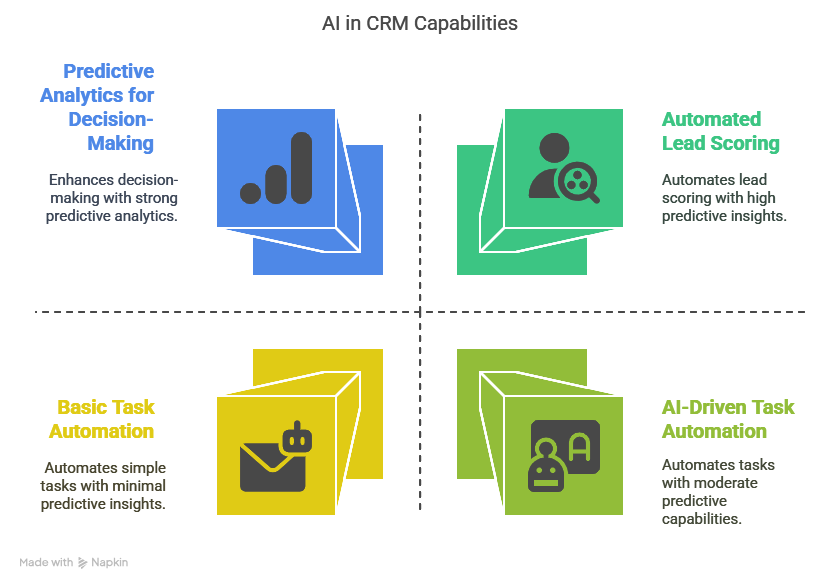
Instead of just tracking past activities, AI analyzes patterns in your data to recommend actions, score leads, automate tasks, and improve decision-making across your entire customer lifecycle.
What Can AI Do Inside a CRM?
AI is no longer just a nice-to-have feature in your CRM. It actively helps you work smarter, save time, and close more deals by turning your customer data into real-time actions.
Let’s break down how AI actually helps inside your CRM system:
1. Lead Scoring and Prioritization
AI looks at each lead’s behavior, past interactions, and firmographic data like job title or industry. It assigns scores to show which leads are most likely to convert. That way, your team focuses on high-quality leads instead of wasting time chasing unqualified ones. The more you use it, the better it gets at predicting success.
2. Predictive Sales Forecasting
Instead of relying on manual updates or gut feeling, AI reviews patterns in your sales history, pipeline velocity, and even market signals to generate accurate forecasts. It helps you see which deals are likely to close and flags any risk areas early so you can take action before it’s too late.
3. Automated Data Entry and Enrichment
No more wasting hours typing in notes or filling contact fields. AI automatically logs emails, calls, meeting summaries, and updates records without manual effort. It can also enrich your contact data by pulling in useful details from sources like LinkedIn or company websites. This keeps your CRM clean and complete with minimal effort.
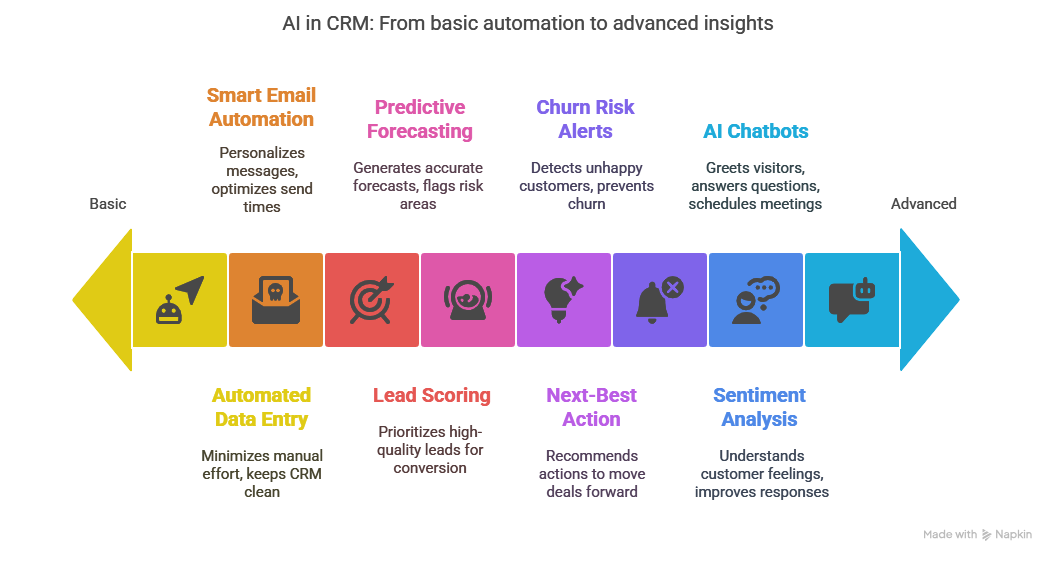
4. Smart Email and Message Automation
AI can draft emails based on the lead’s profile, recent activity, and where they are in the sales funnel. Some tools even analyze the best times to send for maximum engagement. It ensures your messages feel personal and timely without requiring you to write every word yourself.
5. Next-Best Action Suggestions
AI tracks all your interactions and deal progress to recommend what to do next. Whether it’s sending a proposal, booking a follow-up call, or sharing a specific resource, these suggestions help you move deals forward without missing key steps.
6. Churn Risk Alerts
AI reviews usage data, support tickets, survey responses, and communication frequency to detect signs that a customer might be unhappy or likely to leave. It then alerts your team so you can step in before churn happens. This turns your CRM into a retention engine, not just a sales tool.
7. Sentiment and Intent Analysis
AI reads the tone of emails, chats, or support calls to understand how customers feel. It can detect urgency, frustration, or satisfaction. These insights help your team respond better and faster, improving customer relationships without needing to listen to every single call.
8. AI-Powered Chatbots and Assistants
AI chatbots can greet website visitors, qualify them based on predefined logic, and collect key information. Some can even schedule meetings or answer basic product questions. All interactions are synced to your CRM automatically, so reps get a full picture when they step in.
What Are the Real Benefits of Using AI in CRM?
AI is not just about making your CRM “smarter.” It’s about making your entire sales, marketing, and support process more efficient, more accurate, and easier to scale.
Here’s what that actually looks like in practice:
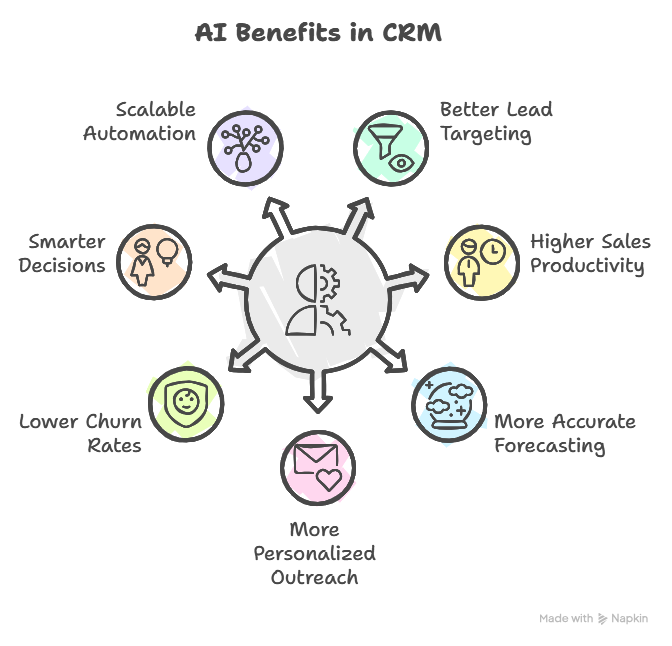
1. Better Lead Targeting
AI helps you stop guessing who to talk to. It identifies leads that are more likely to convert based on behavior, engagement, and historical data. Your team can focus time and energy on the right people instead of chasing cold leads.
2. Higher Sales Productivity
Reps waste less time on admin tasks like logging calls, updating records, or writing emails. AI automates these repetitive jobs so your team can spend more time closing deals and building real relationships.
3. More Accurate Forecasting
AI reviews past sales performance, deal stages, and current activity to give you reliable forecasts. This helps your team plan better, avoid overpromising, and stay ahead of potential risks in the pipeline.
4. More Personalized Outreach
Instead of sending one-size-fits-all emails, AI helps tailor messages to each lead based on their actions, interests, and timeline. Personalized communication leads to higher open rates, more replies, and stronger relationships.
5. Lower Churn Rates
AI detects when a customer is going quiet, submitting more support tickets, or showing signs of dissatisfaction. This gives your team a chance to step in early, fix the issue, and keep the account.
6. Smarter, Faster Decisions
AI connects the dots between sales, marketing, and support data. It shows you what’s working and what’s not. This helps your team make confident decisions backed by real-time insights, not just gut feeling.
7. Scalable Automation
As your business grows, so do the tasks. AI lets you handle more leads, customers, and touchpoints without increasing headcount. It works behind the scenes to manage volume while keeping quality high.
How Companies are Using AI in CRM: Real-World Use Cases
Let’s look at how companies across sales, marketing, and customer support are using AI inside their CRM systems to save time, reduce churn, and drive revenue.
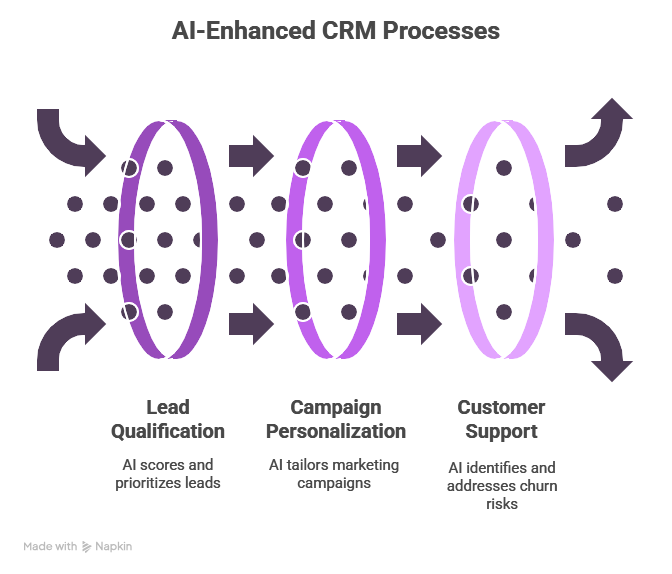
1. Sales Teams Qualify Leads Faster and Close More Deals
Imagine a SaaS company is handling over 10,000 inbound leads every month. Sales reps can’t manually go through each one, so high-potential leads get lost in the mix.
They use AI to:
- Score leads based on behavior, industry, company size, and past patterns
- Automatically create new lead records from web forms and live chat
- Recommend the best email sequence for each lead based on segment and intent
As a result, the sales cycle shortens from 30 days to just 18. Reps are more productive, and qualified leads get follow-ups instantly.
Lindy’s Lead Management Agent ranks every inbound lead using real-time signals. It creates enriched contact records from chats or forms and recommends next steps inside your CRM. Sales teams can instantly know who to focus on and what to send without any guesswork.
2. Marketing Teams Personalize Campaigns and Predict ROI
Picture a B2B marketing team with thousands of contacts in their CRM. The challenge? Everyone gets the same message, regardless of behavior or readiness to buy.
They apply AI to:
- Segment contacts based on actions, engagement levels, and firmographic data
- Build custom LinkedIn and email campaigns tailored to those segments
- Predict which campaigns are likely to generate the most pipeline before launch
This boosts MQL to SQL conversion by 32%, since messages now reach the right people at the right time with the right content.
Lindy segments customer contacts based on behavior, not just job titles. It integrates with your email and CRM tools to track engagement and push segmented lists into your campaigns. You can also use Lindy to write tailored copy based on segment data.
3. Customer Support Teams Reduce Churn and Respond Faster
Imagine an eCommerce brand with growing ticket volume. Their support team struggles to keep up, and some frustrated customers stop responding altogether.
They turn to AI to:
- Auto-tag and prioritize tickets based on keywords, sentiment, and urgency
- Spot churn risk from repeated complaints, silence, or negative tone
- Alert account managers when high-risk customers need attention
The result is a 22% drop in churn and a 35% improvement in ticket resolution time.
Lindy’s Support Agent reads ticket content in real time, tags it with urgency and tone, and updates your CRM automatically. It notifies team members when an account shows churn signals, so they can follow up early and personally.
How to Use AI in CRM (Step-by-Step)
Adding AI to your CRM doesn’t mean ripping everything out or starting from scratch. It’s about integrating smarter workflows that make your existing tools faster, more accurate, and more useful. Follow these steps to do it right:
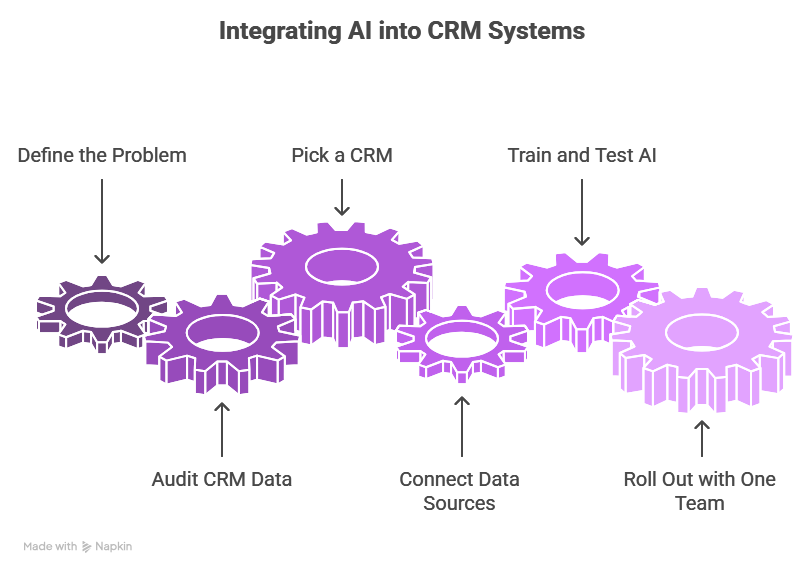
1. Define the Problem You Want to Solve
Don’t try to “AI everything” at once. Start by identifying a single, high-impact use case.
- Are your sales reps wasting time on unqualified leads?
- Are too many deals getting stuck in the pipeline?
- Are customers leaving without warning?
Once you define the goal, it becomes easier to pick the right AI tools and workflows.
Lindy lets you create AI agents like Lead Scoring Agent, Follow-up Assistant, and Churn Tracker in literal minutes. Start by picking one use case, like prioritizing leads. You can activate that agent and connect it to your CRM.
2. Audit Your CRM Data
AI only works well with clean, complete, and structured data. If your CRM is full of empty fields, duplicates, or outdated info, the predictions will be unreliable.
- Check for missing contact details, deal stages, or activity logs.
- Standardize naming conventions and field formats.
- Remove inactive or low-quality records.
Lindy can scan your CRM and highlight missing or inconsistent fields. Create a Data Quality Agent to clean, enrich, and standardize records by pulling in up-to-date contact info from sources like LinkedIn, email threads, or your calendar.
3. Pick a CRM That Supports AI or Can Be Enhanced with It
Some CRMs like Salesforce or HubSpot have AI features built in. But many smaller tools don’t. In that case, you can add external AI layers that work alongside your CRM.
- Make sure the tool integrates natively or through APIs
- Check if it supports your data volume and team size
- Look for agents or features specific to your use case
Lindy is CRM-agnostic. It connects with tools like Salesforce, HubSpot, or even Airtable. You don’t need to switch systems. Just connect your CRM, and Lindy starts working on top of your data using its own AI logic.
4. Connect All Relevant Data Sources
The more context your AI has, the better decisions it can make. Your CRM may not capture everything, so make sure to integrate other sources too.
- Email and calendar tools (Gmail, Outlook)
- Meeting notes and call logs (Zoom, Slack, Gong)
- Website analytics (Hotjar, Google Analytics)
- Customer support platforms (Zendesk, Intercom)
Lindy connects to all these tools out of the box. Just click to authorize Gmail, Slack, your CRM, and more. It automatically syncs contact interactions, meeting history, deal notes, and support messages into one AI-ready stream.
5. Start Training and Testing the AI Models
Many tools come with pre-trained models, but you’ll still need to tweak and validate them.
- Review AI-generated insights weekly
- Compare predictions with real outcomes
- Add manual overrides or exceptions where needed
- Provide feedback when AI makes a wrong call
Lindy gives you an activity feed for every agent. You can review what it recommends, why it made that choice, and either accept or override it. Over time, Lindy learns from your behavior and fine-tunes its accuracy for your business.
6. Roll It Out with One Team First
Don’t launch across the entire company on Day 1. Pick one sales pod, marketing team, or support group.
- Test the AI features in a real workflow
- Track time savings, response quality, or lead conversion rate
- Hold weekly reviews to gather team feedback
Once it proves value, expand to the rest of the org.
You can assign Lindy to a single team first. Let your SDRs use it to prioritize leads or your account managers can use it for churn tracking. Lindy’s dashboard gives you usage metrics, results, and learning suggestions so you can measure success before scaling.
{{templates}}
Common Challenges When Using AI in CRM (And How to Handle Them)
AI in CRM is powerful, but it’s not magic. If you don’t set it up right or use it wisely, it can create confusion instead of clarity.
Here are some common challenges teams run into, and what you can do to avoid them:
1. Your CRM Data Is Messy or Incomplete
Imagine AI trying to score leads or predict churn using outdated job titles or missing deal stages. It won’t work well. You need clean and structured data for reliable AI-driven results.
Make it a habit to review and clean CRM records. Standardize fields, remove duplicates, and make sure every contact or deal has the basics filled in.
Use Lindy to scan your CRM and flag missing fields, empty records, or inconsistencies. It can even fill gaps by pulling in info from email signatures, LinkedIn, or previous conversations automatically.
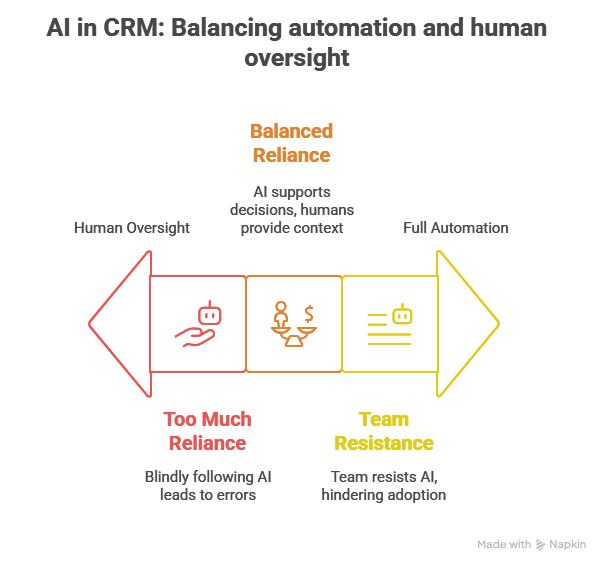
2. Your Team Resists the Change
Some people feel threatened by AI or think it’ll replace their role. Others just don’t trust it. That resistance can stall adoption, even if the AI works great.
Start small. Show how AI saves time by eliminating repetitive tasks like manual follow-ups or data entry. Let people test it in their daily flow before rolling it out company-wide.
Lindy works in the background and blends into existing workflows. You can start with a single assistant, like one that logs meetings or writes email drafts, and let the reps see the value before scaling it across teams.
3. You Rely Too Much on AI Predictions
AI makes smart suggestions, but it doesn’t always get it right. Blindly following its predictions can lead to missed context or missteps.
Use AI as a decision-support tool, not an autopilot. Always review insights before acting. Combine AI outputs with team knowledge and customer feedback.
Lindy can show the reasoning behind every suggestion, why it scored a lead high, or why it flagged an account as risky. You can review the logic, accept or override it, and give feedback so Lindy keeps learning from your team’s input.
4. Privacy or Compliance Risks Pop Up
When AI handles customer data, privacy matters. Some tools might store sensitive info in ways that don’t meet GDPR, CCPA, or your company’s internal rules.
Choose AI tools that are transparent about data handling. Make sure they follow regional regulations, offer data control, and allow you to set access permissions.
Lindy is designed for enterprise-grade compliance. It doesn’t store sensitive data without your control, and you can restrict what agents can access. Lindy also offers audit logs and supports data retention policies aligned with GDPR and CCPA.
5. You Try to Do Too Much Too Soon
Trying to automate everything on day one usually leads to broken workflows and overwhelmed teams.
Start with one high-impact AI use case, like lead scoring or ticket triage. Once that works smoothly, layer in more automation over time.
Lindy is modular. You can turn on one AI agent at a time and expand as your team gets comfortable. There’s no pressure to build everything up front. You can build a smart CRM system one step at a time.
Ready to Make Your CRM Smarter with AI?
Lindy lets you build AI agents that actually work across your tools, make decisions in real time, and help your team focus on what moves the needle.
With Lindy, you can:
- Score and route leads automatically so reps always know who to follow up with
- Write tailored emails and suggest next-best actions based on real data
- Enrich and clean CRM records without manual effort
- Flag churn risks before accounts go silent
- Connect data across sales, marketing, and support without switching platforms
You don’t need a new CRM. You just need a smarter one.
{{cta}}
Frequently Asked Questions
1. How does AI impact CRM?
AI transforms CRM from a static data tool into an active decision-making system. It scores leads, predicts churn, automates tasks, and personalizes communication. This helps teams close deals faster, retain more customers, and eliminate time wasted on manual work.
2. What are some key benefits of AI in improving customer experiences in CRM?
AI personalizes every touchpoint using behavior data, predicts what each customer needs, and automates responses in real time. It shortens wait times, improves accuracy, and ensures customers get timely, relevant help, boosting satisfaction and loyalty across every stage of the journey.
3. What are the three commonly used examples of AI in CRM?
Lead scoring, email personalization, and churn prediction are the most common. AI ranks prospects based on data, writes tailored outreach messages, and alerts teams before a customer leaves. These three functions directly improve conversion, engagement, and retention rates.
4. Can AI help my team collaborate on CRM updates?
Yes. AI tools like Lindy sync notes from meetings, update contact records, and track deal changes automatically. Teams no longer need to chase updates or duplicate data. Everyone works from the same, accurate, real-time CRM view without manual coordination.
5. Can AI receptionists integrate with existing CRM systems?
Yes. Most AI receptionists can log calls, capture contact details, and book meetings directly into your CRM. They integrate via APIs or native connectors, ensuring all lead data is tracked and accessible for sales and support teams immediately.
6. Can AI scheduling software integrate with existing CRM and DMS platforms?
AI scheduling tools can sync calendars, meeting links, and follow-ups directly into CRMs and DMS platforms. This allows sales reps and service teams to see the full meeting history and status in one place, without toggling between tools.
7. Can AI scheduling tools integrate with existing CRM systems?
Yes. AI schedulers like Calendly, Clara, and Lindy can connect with CRMs to create or update contact records, log activities, and send reminders. This streamlines coordination and ensures CRM timelines stay complete and up to date.
8. How do AI chatbots integrate with existing CRM systems?
AI chatbots connect with CRMs via direct integrations or APIs. They capture visitor info, log questions, qualify leads, and trigger workflows. All chat interactions and outcomes get recorded in the CRM, so reps have full visibility when they follow up.
9. How do AI customer service solutions integrate with CRMs?
AI support tools analyze conversations, auto-tag issues, and sync resolution notes directly into CRMs. They also update customer sentiment and ticket status. This ensures your team has real-time insights across all customer interactions, without manual data entry.
10. How does AI enhance e-commerce data analysis?
AI spots patterns in customer behavior, purchase trends, and abandoned carts. It segments users, predicts buying intent, and recommends products or offers. This data flows into your CRM, giving marketing and support teams clear signals to act on quickly.
11. How does CRM use AI to manage customer relationships?
AI tracks every interaction across sales, support, and marketing to build a real-time profile of each customer. It flags risks, suggests next steps, and automates outreach. Teams can stay proactive and personalized, even as customer volume increases.
12. How to implement AI-driven sales forecasting in existing CRM systems?
Start by syncing historical deal data, activity logs, and win rates. Use AI tools like Lindy or Salesforce Einstein to model trends, identify key predictors, and generate rolling forecasts. Regularly compare predictions to outcomes to keep models accurate.
13. How to integrate generative AI into existing enterprise CRM systems?
Use APIs to connect generative AI tools with your CRM. Set up access to notes, emails, and activity logs. The AI can then write follow-ups, generate summaries, or suggest next actions. Make sure to review outputs before full rollout.
14. How to leverage AI in business?
Focus on automating repetitive tasks, improving decision-making, and personalizing customer interactions. Start with clear use cases, like AI for lead scoring, forecasting, or support. Choose tools that integrate easily with your stack and give your team real-time insights.
15. How to monetize artificial intelligence?
You can sell AI-powered products, build AI services for other businesses, or use AI internally to cut costs and scale output. Many companies start by using AI to reduce headcount growth, automate manual work, and convert more leads into revenue.
16. How to use AI in client management?
AI can track communication history, suggest the best times to follow up, and recommend talking points. It logs every interaction and alerts you to changes in tone or engagement. This helps you maintain strong, consistent relationships with less manual effort.
17. How to use AI to automate data entry in a CRM?
AI tools capture data from emails, forms, and meeting transcripts. They automatically fill contact fields, update deal stages, and log notes. You can also use integrations to pull data from calendars, calls, or chats directly into the CRM in real time.
18. What are the best practices for integrating AI into existing CRM systems?
Start small with one use case. Clean your CRM data, connect relevant tools, and pick an AI system that integrates well. Monitor results, gather team feedback, and gradually expand adoption. Make sure you review predictions before fully automating decisions.
19. What are the main benefits of using Lindy.ai for customer support?
Lindy flags urgent tickets, summarizes conversations, and routes issues to the right teammate. It syncs with your CRM, updates records automatically, and alerts managers when churn risk increases. This helps your support team work faster and stay proactive.
20. What should enterprises look for in an AI-in-CRM platform?
Look for strong integrations, transparency in decision logic, real-time data sync, and modular AI agents. Prioritize tools that offer explainable outputs, flexible customization, and full data privacy controls. Scalability, ease of use, and measurable ROI should also guide your choice.









